

Vidushi Saxena
Developer
Category: Engineering
Vidushi Saxena
Developer
Animation does not make a component a Client Component.
In the Next.js App Router, layouts and pages are Server Components by default. Keep page composition, server-side data work and markup on the server where appropriate. Use a Client Component when an interaction needs React state, event handlers, Effects or browser APIs. CSS-only animation does not require client-side React, and "use client" does not automatically disable server prerendering. Next.js documents the Server and Client Component model here.
That distinction becomes important as soon as a site moves beyond counters and form fields. A hover transition, scroll reveal, custom cursor and WebGL hero may all move on screen, but they ask very different things from React and the browser. Treating them all as “animation” and putting "use client" at the top of the page widens the client boundary before you have established a reason to do it.
The useful question is “What has to execute in the browser?”
An animation does not automatically need a Client Component
A Server Component can render markup that the browser later animates with CSS. There is no contradiction there.
Consider a CTA whose arrow shifts on hover. React does not need to track the hover state, calculate a timeline or subscribe to an input source. The server renders the anchor. CSS handles the visual response in the browser.
// components/cta.tsx// No "use client" import styles from "./cta.module.css"; export function CTA() { return ( <a className={styles.cta} href="/work"> View the work <span aria-hidden="true">→</span> </a> );}/* components/cta.module.css */ .cta span { display: inline-block; transition: transform 180ms ease;} .cta:hover span,.cta:focus-visible span { transform: translateX(0.25rem);} @media (prefers-reduced-motion: reduce) { .cta span { transition: none; }}The browser animates server-rendered markup. No client-side React runtime is needed for that transition.
The boundary changes when the implementation actually needs browser-side JavaScript. A cursor effect needs pointer input. A scroll reveal may need IntersectionObserver. A draggable object needs state and events. A timeline may need to initialize an animation engine after mount. A canvas or WebGL scene has browser rendering resources to create and dispose of.
Next.js describes Client Components in those terms: state, event handlers, lifecycle logic, browser-only APIs and custom hooks. Visual movement itself is not the criterion. See the official Server and Client Components guide.
| Effect pattern | Usually needs a Client Component? | Usually needs ssr: false? | Architectural note |
|---|---|---|---|
| CSS hover, focus or keyframe effect | No | No | Server-render the markup; let CSS handle motion |
| Stateful React animation | Yes | Usually no | Client behavior does not automatically mean browser-only rendering |
| Scroll-triggered JavaScript effect | Yes | Usually no | Observation and measurement happen in the browser |
| Pointer or cursor effect | Yes | Usually no | Requires input APIs; adapt for coarse pointers |
| Layout-measured interaction | Yes | Usually no | Browser geometry belongs in client-side logic |
| Canvas effect | Usually | Depends | Rendering context and dependency behavior decide the loading model |
| WebGL/Three.js scene | Usually | Sometimes | Heavy or browser-dependent runtimes may justify deferred/browser-only loading |
| Dependency touching window during evaluation | Yes | Often | Import/evaluation itself may have to stay out of server rendering |
| Static SVG or CSS decoration | Not necessarily | No | Do not add client JavaScript without a runtime need |
The word usually matters. A text reveal, GSAP timeline and WebGL scene should not inherit the same architecture simply because all three animate. Inspect what the implementation actually imports, measures, subscribes to and renders.
For the separate question of which rendering layer an effect should use, see DOM vs Canvas vs WebGL. This article has a narrower job: once you know what you are building, where should its runtime live in Next.js?
What "use client" actually changes
Think boundary, not “make this page client-rendered.”
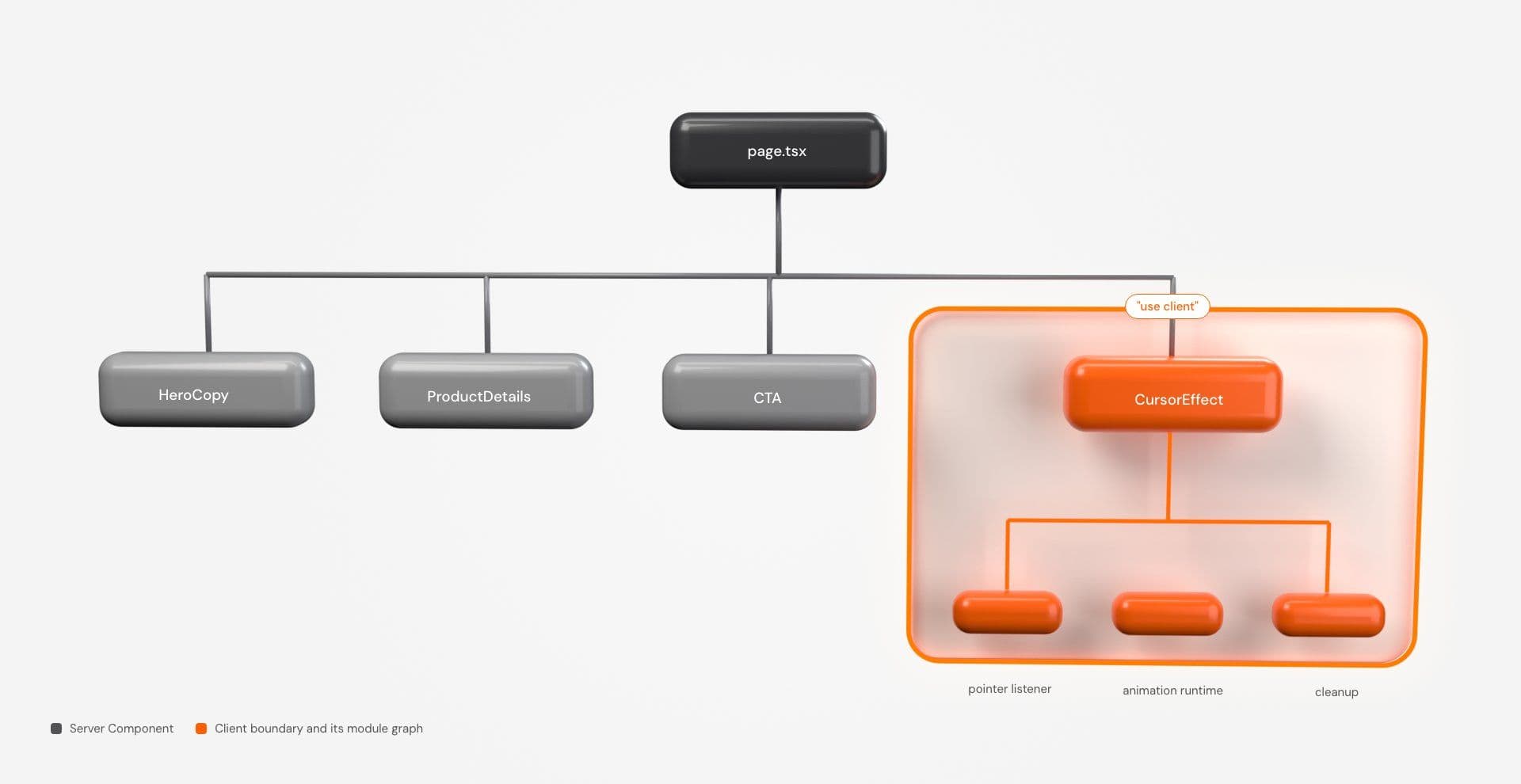
The "use client" directive establishes an entry point into the client module graph. Modules imported beneath that entry point become part of the client-side graph, which is why placing the directive high in the tree can bring unrelated code along for the ride. Next.js recommends applying it to specific interactive components rather than broad portions of the UI. The framework documentation covers that boundary explicitly.
page.tsx Server├─ HeroCopy Server├─ ProductDetails Server├─ CTA Server└─ CursorEffect Client ├─ pointer listener ├─ animation runtime └─ cleanupIf only CursorEffect needs pointer coordinates, making page.tsx a Client Component unnecessarily widens the client boundary.
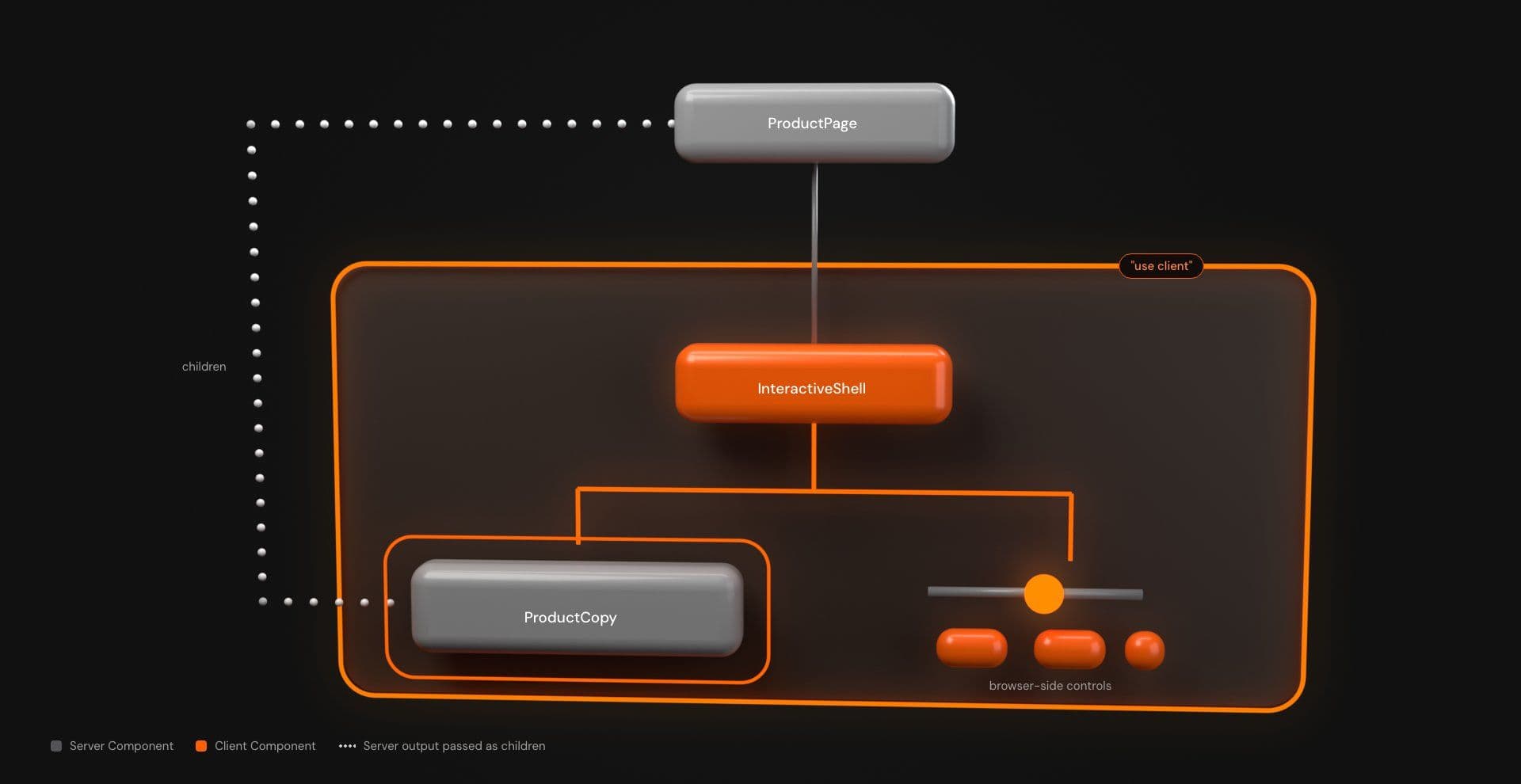
There is an important composition nuance here. A Client Component can import other client-side modules, but that does not mean every piece of UI visually nested inside it must originate in the client graph. Next.js supports rendering Server Components and passing their rendered result into a Client Component through children or another prop. Props crossing the Server-to-Client boundary must be serializable.
That gives you useful structures such as:
ProductPage Server└─ InteractiveShell Client ├─ ProductCopy Server output passed as children └─ browser-side controlsThe distinction matters on creative pages because decorative behavior and meaningful content do not need to share an execution model. Your canvas may need the browser. Your product heading does not suddenly need requestAnimationFrame.
Client Component does not mean client-only rendering
Adding "use client" does not normally mean “skip the server and render this exclusively in the browser.”
On an initial load, Next.js can prerender HTML for both Server and Client Components. The browser receives the initial interface, then React uses the RSC payload and client JavaScript to reconcile and hydrate the Client Components. On subsequent client-side navigations, the framework can use prefetched and cached RSC payloads rather than repeating the exact initial-load sequence. Next.js documents both rendering paths.
Conceptually, for the initial load:
Server render ↓HTML + RSC payload ↓Browser displays initial UI ↓Client JavaScript loads ↓Hydration ↓Listeners / observers / animation runtime startThat distinction explains why this can still fail inside a Client Component:
"use client"; export function Hero() { const width = window.innerWidth; return <div>{width}</div>;}The directive permits client capabilities. It does not create a window object while server prerendering is happening, and rendering different initial content between server and browser can create a hydration mismatch.
Browser-dependent setup often belongs in an Effect instead:
"use client"; import { useEffect } from "react"; export function PointerTracker() { useEffect(() => { function handlePointerMove(event: PointerEvent) { console.debug(event.clientX, event.clientY); } window.addEventListener("pointermove", handlePointerMove); return () => { window.removeEventListener("pointermove", handlePointerMove); }; }, []); return null;}React Effects run on the client rather than during server rendering. In development, Strict Mode can also perform an additional setup-and-cleanup cycle to expose incomplete cleanup logic. That is particularly useful for animation timelines, observers, subscriptions and render loops: if setup cannot survive setup → cleanup → setup, its lifecycle probably is not owned cleanly enough yet. See React’s useEffect reference.
For visual work that genuinely has to measure or change layout before React paints an updated client render, useLayoutEffect can occasionally be appropriate. It blocks paint and can trigger extra synchronous work, so it should be reserved for timing-sensitive cases rather than becoming the default animation hook.
A scroll reveal makes the boundary easy to see
Suppose a marketing page contains an editorial section that should reveal as it enters the viewport. The heading and copy are meaningful page content. They do not need client-side data fetching or state. Only visibility observation belongs in the browser.
The production constraint is progressive enhancement: the content must remain visible if JavaScript never runs, hydration fails, reduced motion is enabled or IntersectionObserver is unavailable.
Keep the page on the server:
// app/page.tsx import { Reveal } from "@/components/reveal"; export default function Page() { return ( <main> <section className="intro"> <p>Interaction should clarify the page, not compete with it.</p> </section> <Reveal> <section className="feature"> <p className="eyebrow">Interaction architecture</p> <h2>Keep the content. Isolate the runtime.</h2> <p> This copy is server-rendered. The client component only owns the enhancement that observes when it enters the viewport. </p> </section> </Reveal> </main> );}The Client Component starts from a readable state. It only conceals content after confirming three things: reduced motion is not requested, IntersectionObserver exists, and the element is currently below the viewport.
// components/reveal.tsx "use client"; import { type ReactNode, useLayoutEffect, useRef,} from "react"; import styles from "./reveal.module.css"; type RevealProps = { children: ReactNode;}; export function Reveal({ children }: RevealProps) { const rootRef = useRef<HTMLDivElement>(null); useLayoutEffect(() => { const root = rootRef.current; if (!root) return; const reducedMotion = window.matchMedia( "(prefers-reduced-motion: reduce)" ); if ( reducedMotion.matches || !("IntersectionObserver" in window) ) { return; } const rect = root.getBoundingClientRect(); // If the content is already visible when hydration reaches it, // leave it visible. Do not make it disappear just to replay a reveal. if (rect.top < window.innerHeight) { return; } // A viable reveal path exists and the element is still below fold. root.dataset.enhanced = "true"; root.dataset.visible = "false"; const observer = new IntersectionObserver( ([entry]) => { if (!entry.isIntersecting) return; root.dataset.visible = "true"; observer.disconnect(); }, { threshold: 0, } ); observer.observe(root); return () => { observer.disconnect(); }; }, []); return ( <div ref={rootRef} className={styles.reveal}> {children} </div> );}The stylesheet sits beside the component and is imported as a CSS Module:
/* components/reveal.module.css */ /* Progressive-enhancement default: readable without JavaScript. */.reveal { opacity: 1; transform: none;} /* Conceal only after the client has established a viable reveal path. */.reveal[data-enhanced="true"][data-visible="false"] { opacity: 0; transform: translateY(1.5rem);} .reveal[data-enhanced="true"] { transition: opacity 500ms ease, transform 500ms ease;} .reveal[data-enhanced="true"][data-visible="true"] { opacity: 1; transform: translateY(0);} @media (prefers-reduced-motion: reduce) { .reveal, .reveal[data-enhanced="true"], .reveal[data-enhanced="true"][data-visible="false"] { opacity: 1; transform: none; transition: none; }}There are a few deliberate choices here.
First, the server-rendered state is visible. If JavaScript never arrives, there is nothing to rescue.
Second, an element already inside the viewport remains visible when hydration reaches it. Delayed hydration should not make meaningful content disappear so the site can perform an entrance animation after the reader has already seen it.
Third, the observer uses threshold: 0. A tall section does not need to squeeze 20% of itself into a short viewport before it can reveal. Any genuine intersection is enough for this effect.
Fourth, the component does not synchronously call React state setters inside useLayoutEffect. The reveal state is purely an imperative enhancement on the wrapper’s data attributes, which avoids an unnecessary React render cycle for presentation state that no other component consumes.
useLayoutEffect still has a cost. Its role here is narrowly defined: for below-the-fold content where enhancement is available, establish the pre-reveal presentation before React paints that updated client commit. It does not guarantee that server HTML was never painted earlier, and it should not become a default hook for animation. The unenhanced state remains readable when the client runtime is unavailable.
Where common interactive effects should cross the boundary
Once the pattern is clear, other effect classes become easier to place.
CSS and static SVG
Keep the React component on the server when CSS or static SVG can express the full behavior without React state or browser-side lifecycle logic.
Good candidates include hover feedback, focus transitions, basic keyframes and small decorative movement. If the visual task is simple, a JavaScript animation runtime can be more architecture than the interaction deserves.
For the related tool-choice question, see When CSS Animation Is Enough.
Scroll and layout-measured effects
Move the portion that observes scroll, intersection, resize or geometry into a Client Component.
That could mean IntersectionObserver, ResizeObserver, getBoundingClientRect(), a scrolling library or an animation engine. Keep surrounding article copy, product data and semantic structure on the server when those pieces have no reason to enter the client module graph.
Pointer and cursor systems
Pointer-following effects naturally require a client boundary. They also need an input strategy.
A custom cursor should not be the only way a control communicates state, and a mouse-centric interaction may deserve to disappear entirely on coarse-pointer devices rather than receiving a forced mobile imitation.
.cursorEffect { display: none;} @media (hover: hover) and (pointer: fine) { .cursorEffect { display: block; }}If the implementation subscribes to pointer events, apply the capability check to the JavaScript setup too. Hiding an effect with CSS while its listener continues processing pointer work is decorative theatre for the profiler.
Canvas and WebGL scenes
Canvas and WebGL effects commonly need browser-side execution because their meaningful rendering work depends on browser graphics APIs. Three.js and React Three Fiber scenes may also bring textures, shaders, continuous render loops and GPU resources that deserve a clearer loading strategy than a small hover transition.
The exact answer remains dependency-specific. A scene that can prerender a stable shell and initialize graphics later is different from a dependency that touches window, Canvas or WebGL during module evaluation.
Keep meaningful content outside decorative graphics where practical. A headline should remain a headline, not become a texture because the hero needed drama.
"use client" vs dynamic() vs { ssr: false }
These are three separate decisions.
"use client" establishes a Client Component boundary.
next/dynamic can defer Client Components or imported libraries.
dynamic(..., { ssr: false }) disables prerendering for that Client Component.
| Tool | What it solves | What it does not mean |
|---|---|---|
| "use client" | Creates a client module boundary | “Render this only in the browser” |
| dynamic() | Defers client code | “SSR is disabled” |
| dynamic(..., { ssr: false }) | Makes that Client Component browser-only | “This is automatically faster” |
The current Next.js lazy-loading guide states that ssr: false works for Client Components and is not supported when configured from a Server Component.
It also documents a caveat worth keeping in view: when a Server Component dynamically imports a Client Component, automatic code splitting for that Client Component is currently not supported. In other words, the presence of dynamic() alone is not evidence that the resulting bundle boundary behaves exactly as you intended. Verify the actual loading path.
A browser-only wrapper can live in client code:
// components/visual-client.tsx "use client"; import dynamic from "next/dynamic"; const HeavyVisual = dynamic( () => import("./heavy-visual"), { ssr: false, loading: () => ( <div className="visual-placeholder" aria-hidden="true" /> ), }); export function VisualClient() { return <HeavyVisual />;}The server page can remain a Server Component:
// app/page.tsx import { VisualClient } from "@/components/visual-client"; export default function Page() { return ( <main> <section className="hero"> <div> <h1>Server-rendered headline</h1> <p> Meaningful content stays outside the browser-only visual runtime. </p> </div> <VisualClient /> </section> </main> );}If the visual occupies real space, reserve that space in the fallback. Otherwise the delayed runtime may arrive with a side order of layout shift.
Dynamic loading defers the JavaScript bill. It does not cancel it.
A WebGL scene still has code to download and execute, assets to load and rendering work to perform once it appears. Lazy loading changes when that cost arrives; it does not remove it.
Use browser-only loading because the implementation genuinely cannot or should not prerender-not because adding { ssr: false } happens to make a hydration warning disappear.
How interactive effects create hydration problems
Hydration failures are broader than animation. Invalid HTML nesting, time-dependent output and other differences between server and client rendering can cause them too. Creative frontend code simply has a recognizable subset of failure modes: browser globals during render, geometry-dependent JSX, random initial values and third-party modules that assume a browser before hydration. Next.js maintains a hydration-error reference covering the broader class of causes.
A common mistake looks like this:
"use client"; export function HeroLabel() { return ( <span> {window.innerWidth < 768 ? "Tap" : "Hover"} to explore </span> );}There are two problems. window is unavailable during server rendering, and viewport state is being allowed to determine the initial JSX.

A safer implementation keeps the first render stable and adds browser capability afterward:
"use client"; import { useEffect, useState } from "react"; export function HeroLabel() { const [instruction, setInstruction] = useState("Explore"); useEffect(() => { const isCoarsePointer = window.matchMedia( "(pointer: coarse)" ).matches; setInstruction( isCoarsePointer ? "Tap to explore" : "Hover to explore" ); }, []); return <span>{instruction}</span>;}Whether that post-hydration copy change is desirable is another question. Often, neutral text such as “Explore” is better because it avoids layout movement and does not make input method part of the message at all.
The larger point is architectural: browser capability should not casually redefine server output.
| Symptom | Interaction-related cause | Direction |
|---|---|---|
| window is not defined | Browser global used during server evaluation/render | Move browser work into client lifecycle or isolate the dependency |
| Hydration mismatch | Server and first client render differ | Make initial rendering deterministic |
| Whole page needs "use client" | Interaction logic is mixed with composition | Extract a focused Client Component |
| Effect breaks during prerendering | Dependency assumes browser APIs too early | Verify the package; isolate/browser-load only if required |
| Duplicate timelines/listeners in development | Cleanup is incomplete under Strict Mode checks | Make setup and teardown symmetrical |
| Interaction survives navigation | Listener, observer or loop was never disposed | Let the component own cleanup |
suppressHydrationWarning is an escape hatch for understood, unavoidable mismatches. It is not an animation architecture.
Production rules for client-side effects
The client boundary is only the first decision. Once an effect owns browser resources, the component needs to own their lifecycle too.
If it registers a listener, observer, timeline or render loop, it should also know how to tear that resource down.
Verify cleanup, not just setup
In development, React Strict Mode can expose incomplete Effect cleanup by running an additional setup-and-cleanup cycle. Do not “fix” duplicate animation initialization with a global guard before checking whether teardown is symmetrical. See React’s useEffect documentation.
For an observer:
useEffect(() => { const node = rootRef.current; if (!node) return; const observer = new ResizeObserver(() => { // Recalculate effect geometry. }); observer.observe(node); return () => { observer.disconnect(); };}, []);For a requestAnimationFrame loop, retain the frame ID and cancel it. For GSAP, Motion, Three.js or another runtime, use that library’s actual cleanup and disposal model rather than inventing a generic destroy() method that may not exist.
Treat mobile as a different interaction environment
A custom cursor may have no useful mobile equivalent. Hover choreography may need to disappear. A pinned scroll sequence may require different spacing or a simpler composition on a small screen.
Viewport width alone is not input capability. Use pointer and hover media features when they describe the actual design decision.
Reduced motion is a behavior path
prefers-reduced-motion is not the whole accessibility story, but substantial movement should have a deliberate response to it.
That may mean removing travel while keeping an opacity change, displaying the final state immediately, disabling a decorative cursor trail, stopping an ambient loop or replacing a camera move with a static composition.
The fallback should preserve meaning. It does not need to preserve the trick.
Keep semantic UI outside decorative runtimes
- If the canvas fails, the headline should still be a headline.
- If WebGL never initializes, navigation should still navigate.
- If reduced motion removes a reveal, the content should remain readable.
Creative effects are strongest when they enrich the interface without becoming a ransom note for the interface underneath.
Test the production path
Before shipping:
- Run a production build and resolve server/client errors.
- Load the route directly and check for hydration warnings.
- Test the reveal with short and tall elements, short viewports and content initially below the fold.
- Navigate away and back; confirm listeners, observers, timelines and loops are not accumulating.
- Test fine-pointer and touch/coarse-pointer behavior.
- Enable reduced motion and confirm the intended fallback.
- Disable JavaScript for progressively enhanced content and confirm meaningful content remains available.
- Test an environment without the optional observer path if that fallback matters to your browser support policy.
- Watch layout stability while dynamically loaded visuals arrive.
- Profile before making performance claims: inspect client JavaScript, repeated renders, long tasks, continuous rendering, assets and effect-specific GPU work.
A narrow client boundary is good architecture. It is not a benchmark.
Quick decision checklist
Before adding "use client" to an animated section, answer seven questions:
- Can HTML and CSS do the job?
If yes, React may not need a client boundary at all. - What browser capability is required?
State, events, Effects, pointer input, observers, measurement, Canvas or WebGL should be explicit-not assumed. - How narrow can the useful boundary be?
Keep unrelated content, data work and server-only dependencies outside it. - Can the Client Component prerender safely?
"use client"is not the same asssr: false. - If prerendering fails, why?
Fix an architecture mistake before choosing browser-only loading; use{ ssr: false }when the implementation genuinely requires it. - What changes for touch, no-JS and reduced motion?
Define the fallback before the effect reaches QA. - What gets cleaned up?
List the listeners, observers, timelines, frames and rendering resources the component owns.
The architecture usually stops looking mysterious once those answers are concrete.
Render what belongs on the server. Cross the boundary where interaction begins. Keep the runtime coherent enough to own its setup and teardown. Disable server rendering only when the implementation actually requires it. Then make the motion earn the JavaScript.
Explore React and Next.js effects you can inspect and adapt.