

Vidushi Saxena
Developer
Category: Engineering
Vidushi Saxena
Developer
Choosing between the DOM, Canvas and WebGL is not a contest to find the fastest renderer. It is an architecture decision.
A text reveal, an interactive particle field and a refractive 3D hero can all move on screen, but they do not ask the browser to do the same job. Treating them as variations of “animation” is how teams end up dragging a GPU pipeline into a button hover or forcing hundreds of independently interactive objects into a drawing surface that has no idea what a button is.
A better rule is simpler: use the least complicated rendering layer that can express the interaction while meeting its semantic, visual and device constraints.
That usually means DOM or SVG for meaningful interface elements and layout-driven motion, Canvas 2D for dense or continuously redrawn two-dimensional graphics, and WebGL when the effect genuinely needs shaders, 3D or GPU-oriented rendering. On real production pages, the answer is often not one renderer at all. It is HTML for meaning and controls, with Canvas or WebGL doing the visual work behind it.
The short answer: choose by the job, not the renderer
The DOM, Canvas and WebGL solve different classes of problems. The DOM represents a document as addressable nodes and objects; Canvas gives JavaScript a bitmap drawing surface; WebGL exposes a graphics pipeline that can use hardware acceleration through a canvas. They are different programming models before they are different performance characteristics.
For this comparison, inline SVG sits on the DOM side of the decision model. SVG has its own graphics capabilities, but its elements participate in a document tree and remain individually addressable through DOM APIs. That is materially different from drawing shapes into Canvas or rendering them through WebGL.
| Question | DOM / SVG | Canvas 2D | WebGL |
|---|---|---|---|
| Is the content meaningful UI or text? | Strong default | Keep accessible backing HTML | Keep accessible backing HTML |
| Do individual objects need native roles, focus or events? | Strong fit with semantic elements | Usually requires additional interaction logic | Usually requires picking or additional interaction logic |
| Is the effect primarily 2D drawing? | Good for element-level graphics | Strong fit for dense redraws | Useful when GPU operations justify it |
| Does it require shaders, 3D or postprocessing? | Poor fit | Poor fit | Strong fit |
| Does every visual primitive need document structure? | Yes, when represented as an element | No | No |
| Accessibility burden | Lowest when semantic HTML fits the job | Higher | Higher |
| Implementation complexity | Lowest starting point | Medium | Highest of the three |
| Typical creative-frontend jobs | Text reveals, menus, buttons, transitions | Particle fields, grids, procedural 2D surfaces | 3D scenes, refraction, shader effects, GPU-oriented particles |
Do not read the table as a ladder from “slow” to “fast.” Canvas is not DOM Pro, and WebGL is not Canvas Ultra. The renderer follows the operation.
A renderer decision flow
Does the user need to read, focus, select or activate it? Keep semantic HTML or SVG in the architecture.
Is the visual essentially a collection of interface elements? Start with DOM/SVG.
Is it a dense, frequently redrawn 2D surface? Consider Canvas 2D.
Does it depend on shaders, 3D geometry, depth or GPU-oriented processing? Consider WebGL.
Does the experience need both meaningful UI and a high-throughput visual layer? Use a hybrid architecture.
Only after those questions should performance measurements decide whether the implementation needs another level of optimization.
What actually changes between DOM, Canvas and WebGL?
The DOM is a structured representation of the page. HTML elements-and SVG elements when SVG is part of the document-remain addressable objects. They can carry content, attributes, styles and event handlers. Appropriate semantic HTML also preserves built-in roles and, where applicable, native focus and activation behavior. When you animate these elements, you are still working with document objects rather than painting the entire experience into an anonymous field of pixels.
Canvas changes the model. A <canvas> is an element in the document, but the things drawn into its 2D context are not DOM nodes. Draw two hundred dots and you have not created two hundred elements. You have issued drawing instructions onto a bitmap surface. The browser does not automatically give each dot a semantic identity or expose it to accessibility tools as if it were HTML. If that drawn content carries meaning, it needs an accessible alternative or backing structure.
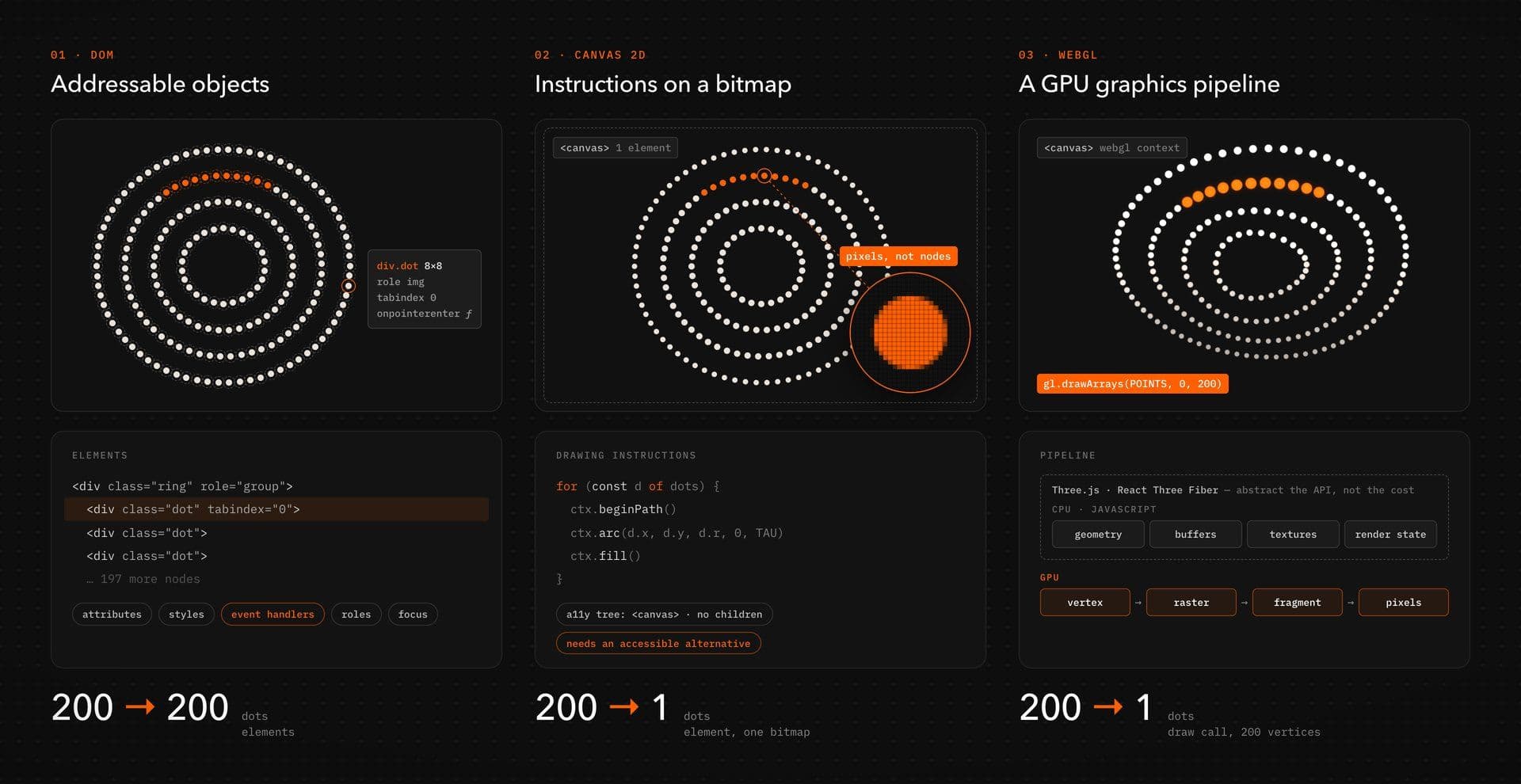
WebGL also commonly renders through <canvas>, but the machinery underneath is different again. JavaScript prepares geometry, buffers, textures and render state for WebGL’s graphics pipeline, which can take advantage of hardware graphics acceleration on compatible devices. Libraries such as Three.js abstract much of that lower-level work; React Three Fiber provides a React-oriented renderer for Three.js scenes. Those abstractions make the workflow more manageable. They do not erase the underlying graphics costs.
Think of the three models this way: DOM elements are things the document knows about. Canvas is a surface you draw. WebGL is a graphics pipeline you feed. That distinction matters more than any generic “X elements means switch renderer” rule.
Start with meaning and interaction
Before asking how many objects an effect contains, ask what those objects mean. If someone must read it, tab to it, activate it, select it, copy it, submit it or understand its role in the document, there is a strong reason to keep semantic HTML in the architecture. Headings, navigation, links, buttons, form controls and meaningful body copy do not become better interface elements because a shader can render them.
Canvas illustrates the problem clearly. The element itself exists in the DOM, but its drawn pixels do not expose individual objects the way semantic HTML does. If a shape must behave like an interactive target, you may need your own hit-testing model. WebGL interaction often has a similar responsibility: pointer coordinates must be mapped into the rendered scene through picking, raycasting or another application-level mechanism rather than ordinary DOM targeting.
That is not an argument against Canvas or WebGL. It is an argument against making the renderer own responsibilities it does not need.
A launch hero, for example, might use a full-screen WebGL scene that reacts to pointer movement while the actual <h1>, supporting copy and CTA remain normal HTML layered above it.
When DOM is the right rendering layer
The DOM should remain the boringly strong default for a large amount of creative frontend work.
Text reveals, masked headings, menu transitions, magnetic buttons, cursor-responsive UI, accordion motion, route transitions and scroll-driven layout changes all begin with things the document already understands. You get normal text behavior, familiar event handling, CSS layout, responsive styling and direct inspection in browser tooling. SVG adds addressable vector graphics without abandoning document structure, making it useful for paths, masks, icons and illustrations whose pieces benefit from being individually controlled.
For motion, properties and workload matter. A handful of element transforms is a different problem from animating large areas with expensive effects, repeatedly measuring layout or triggering broad style and paint work on every frame. “DOM animation” therefore has no useful universal performance number. The browser’s cost depends on what changes, how much of the page those changes affect, what JavaScript runs alongside them and what device is doing the work.
That is why moving to Canvas merely because an effect “has animation” is usually premature. If the effect is fundamentally about interface elements, preserving those elements often gives you a simpler system and a better interaction model.
DOM advantages
Semantic HTML gives you the browser’s strongest interface primitives: document meaning, keyboard behavior, focus handling, element-level events and CSS layout. You can inspect the actual animated element instead of reverse-engineering a coordinate inside a bitmap. That matters when content changes, localization stretches a heading, a breakpoint rearranges the section or a CMS editor adds another card.
It also keeps restraint cheap. If the final art direction only needs a short transform and opacity transition, you can ship exactly that.
Where DOM stops being a comfortable model
The DOM becomes less attractive when the visual is no longer meaningfully a collection of interface objects.
Imagine a field of tiny particles whose positions change continuously, a cursor-driven texture or a procedural grid that needs to redraw across a large surface. Representing every primitive as a separate element can become the wrong abstraction even before it becomes a measurable performance problem. Your component tree, styling model and event system are carrying objects the user never needed to perceive as document structure.
That is the point to question the renderer-not because a benchmark gave you a magic node ceiling, but because the job has become drawing rather than interface composition.
When Canvas 2D earns its place
Canvas is useful when an effect behaves like a 2D visual surface. Particle systems, dotted fields, trails, image processing, procedural textures and continuously changing decorative backgrounds can benefit from drawing into one surface rather than maintaining a separate DOM element for every primitive. Animation is commonly coordinated through JavaScript and a frame loop such as requestAnimationFrame.
The production trade changes immediately. Because the browser no longer owns a tree of all your drawn shapes, your code owns more of the system. Resizing the canvas, reconciling its CSS size with its drawing buffer, accounting for device pixel ratio, updating state, deciding what needs to redraw, suspending unnecessary work and implementing per-object interaction all become application concerns. That extra responsibility is worthwhile when it matches the visual job.

A reactive dot field is a good example. Vault’s Dotted Grid is a verified Canvas implementation with pointer interaction, a capped device pixel ratio, cleanup for listeners and its animation loop, and reduced-motion handling. The important lesson is not that every background should reproduce those exact choices. It is that this particular effect can create its 2D visual system without importing a WebGL stack it does not need.
See the Dotted Grid Canvas example
Good Canvas jobs
Canvas becomes attractive when individual visual objects have little semantic value but the surface as a whole has visual value: a particle atmosphere, animated texture, cursor trail, procedural pattern, dense decorative field or image operation whose pixels are the material.
It can also be the sensible middle ground when CSS and DOM primitives make the implementation awkward but introducing Three.js, shader code and a GPU scene graph would add machinery without adding capability the effect actually needs.
What Canvas makes you responsible for
A canvas will not quietly solve interaction, accessibility or rendering quality for you. Meaningful information still needs accessible backing. Per-object interaction may require hit testing. Resolution needs thought: styling a canvas larger than its drawing buffer can produce distorted or blurry output, while rendering more pixels than the effect needs increases work. MDN also documents OffscreenCanvas as an option for decoupling suitable canvas work from the document and moving rendering into a worker, but that is an optimization technique rather than a default architecture.
Lifecycle discipline matters just as much. Remove listeners. Tear down observers. Stop animation work when the component unmounts. Avoid spending a continuous frame budget on decorative rendering that is no longer visible.
When WebGL is justified
WebGL earns its complexity when the visual operation is shaped like GPU graphics.
Three-dimensional geometry is the obvious case, but not the only one. Shader-driven distortion, refraction, image displacement, large GPU-oriented particle scenes, lighting, depth and postprocessing can all require capabilities that Canvas 2D does not replace cleanly. WebGL provides interactive 2D and 3D graphics through a canvas and can use hardware graphics acceleration when the browser and device support it.

“Runs on the GPU” is not a synonym for “free.”
A full-screen shader can make one canvas more expensive than many ordinary DOM elements. Higher render resolution means more pixels to shade. Large textures consume memory. Extra rendering passes and expensive fragment work can add substantial GPU cost. Device capabilities also vary, so the scene still needs a realistic quality policy rather than assuming desktop-demo settings are universal.
Use WebGL because the visual needs WebGL capabilities, not because “WebGL” sounds more premium in the proposal.
WebGL capabilities that Canvas 2D does not replace cleanly
If the art direction depends on perspective cameras, 3D geometry, custom vertex or fragment shaders, refraction, depth-aware particles or multi-pass visual processing, WebGL is already part of the problem definition.
This is where Three.js and React Three Fiber become useful engineering layers. They give teams higher-level abstractions for scenes and components instead of requiring raw WebGL orchestration for every project.
Vault likewise does not impose one engine across every effect. Its current dependency guidance tells teams to install only what the selected effect requires and calls out Canvas, WebGL loops, browser APIs and client boundaries as effect-specific production concerns.
The production costs the demo does not show
The attractive part of WebGL is often what fits in a short preview. Production begins when that scene joins an actual page.
Ask what happens on a smaller phone, a high-DPR display, weaker graphics hardware and a route that already contains video or other continuous motion. Decide what happens when the section leaves the viewport. Dispose of renderer resources when the scene unmounts. Avoid making meaningful UI depend on successful graphics initialization. Give the visual an intentional lower-quality or static state that still looks designed.
A technically impressive scene that has no lifecycle strategy is still unfinished frontend work.
Performance is a workload, not a magic object count
“Switch to Canvas after N elements” is satisfying advice because it removes judgment. It is also too crude for production work.
Five hundred simple transformed elements and five hundred paint-heavy elements are not equivalent. A canvas drawing a sparse grid and a canvas repainting a large high-resolution composition are not equivalent. A minimal WebGL scene and one with large textures, several passes and expensive fragment work are not equivalent either.
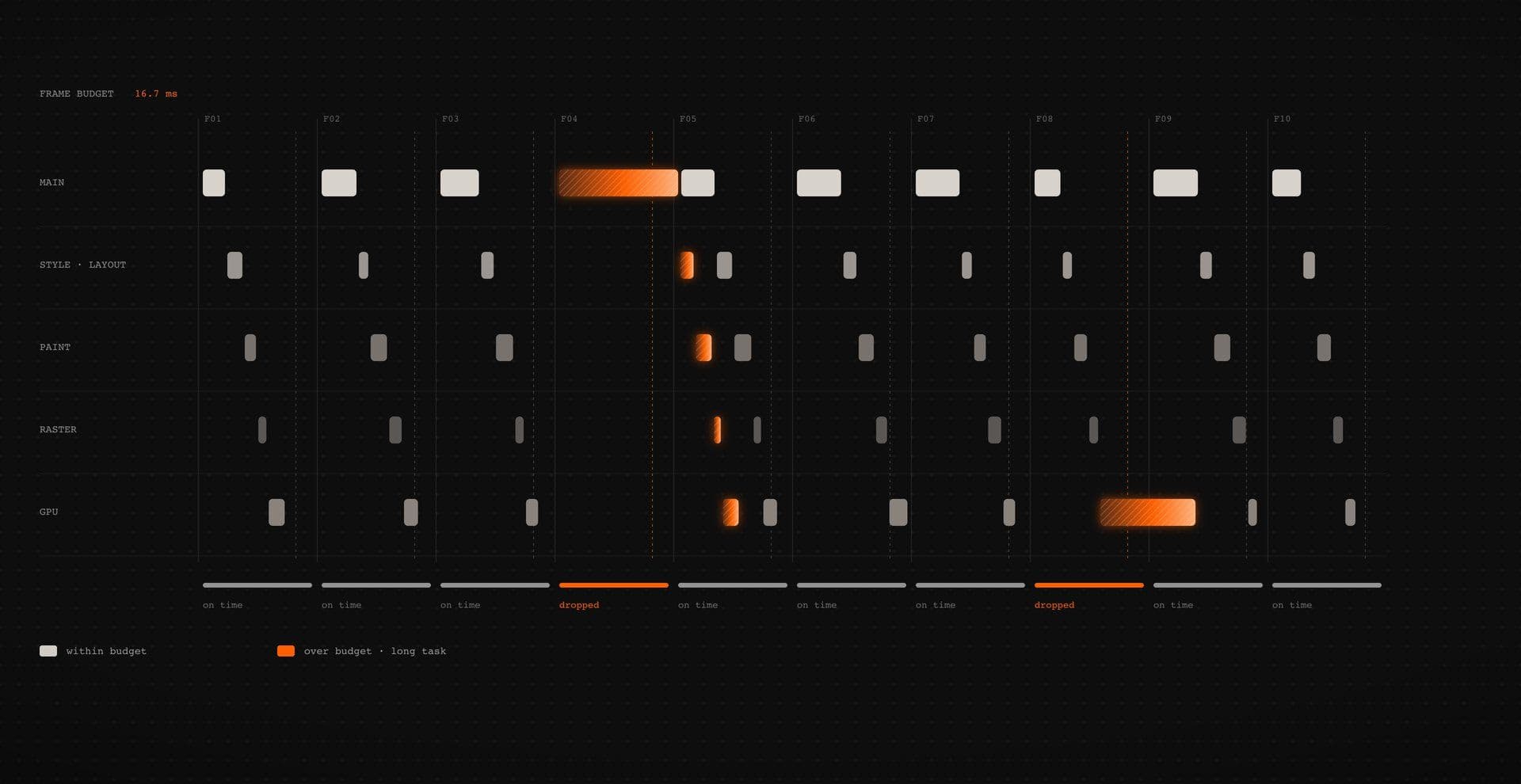
Renderer choice affects performance, but so do pixel coverage, layout work, style recalculation, JavaScript execution, scene complexity, rendering resolution, shader cost, textures, draw calls, hardware capability and everything else competing for time on the page.
The useful question is not, “Which renderer benchmarks fastest?”It is, “Where is this implementation spending its frame?”
Why hard thresholds age badly
A threshold measured on one browser, device and synthetic workload tells you about that benchmark. It does not establish a law for a marketing site running different CSS, JavaScript and visual operations. Object count can still be useful evidence. It just cannot carry the whole architecture decision.
A DOM implementation may become awkward because managing a very large set of independently styled objects is structurally expensive. Canvas may become costly because it redraws a large high-resolution surface unnecessarily. WebGL may struggle because render resolution or shader work exceeds the device budget. Count things. Then measure the expensive things.
What to measure instead
Test the production build on representative devices.
For DOM effects, inspect main-thread work, long tasks, layout and paint behavior. For Canvas, inspect redraw frequency, internal resolution, drawing operations and surrounding JavaScript. For WebGL, include render resolution, texture use, scene complexity, draw calls and shader/postprocessing work in the review.
When you need a continuous loop, requestAnimationFrame schedules work before a repaint and is paused in most browsers for background tabs or hidden iframes. Useful behavior, certainly. Not permission to leave unnecessary work running whenever an effect happens to be on the same page.
The hybrid architecture is often the production answer
The DOM-vs-Canvas-vs-WebGL framing sounds exclusive. Production pages rarely need to be. A strong architecture often separates the experience by responsibility:
HTML handles meaning. Canvas or WebGL handles atmosphere.
The hero headline remains an <h1>. The CTA remains a link or button. Navigation stays navigation. The visual renderer sits beneath or beside those elements and is free to distort pixels, move particles or render geometry without becoming the semantic model for the entire section.
That separation can also simplify responsive behavior. Copy continues to follow normal document layout while the visual surface gets its own crop, resolution, density or quality policy. Pointer behavior can be assigned deliberately: a decorative canvas might ignore pointer input entirely, while an interactive scene can receive it only where the experience actually benefits.
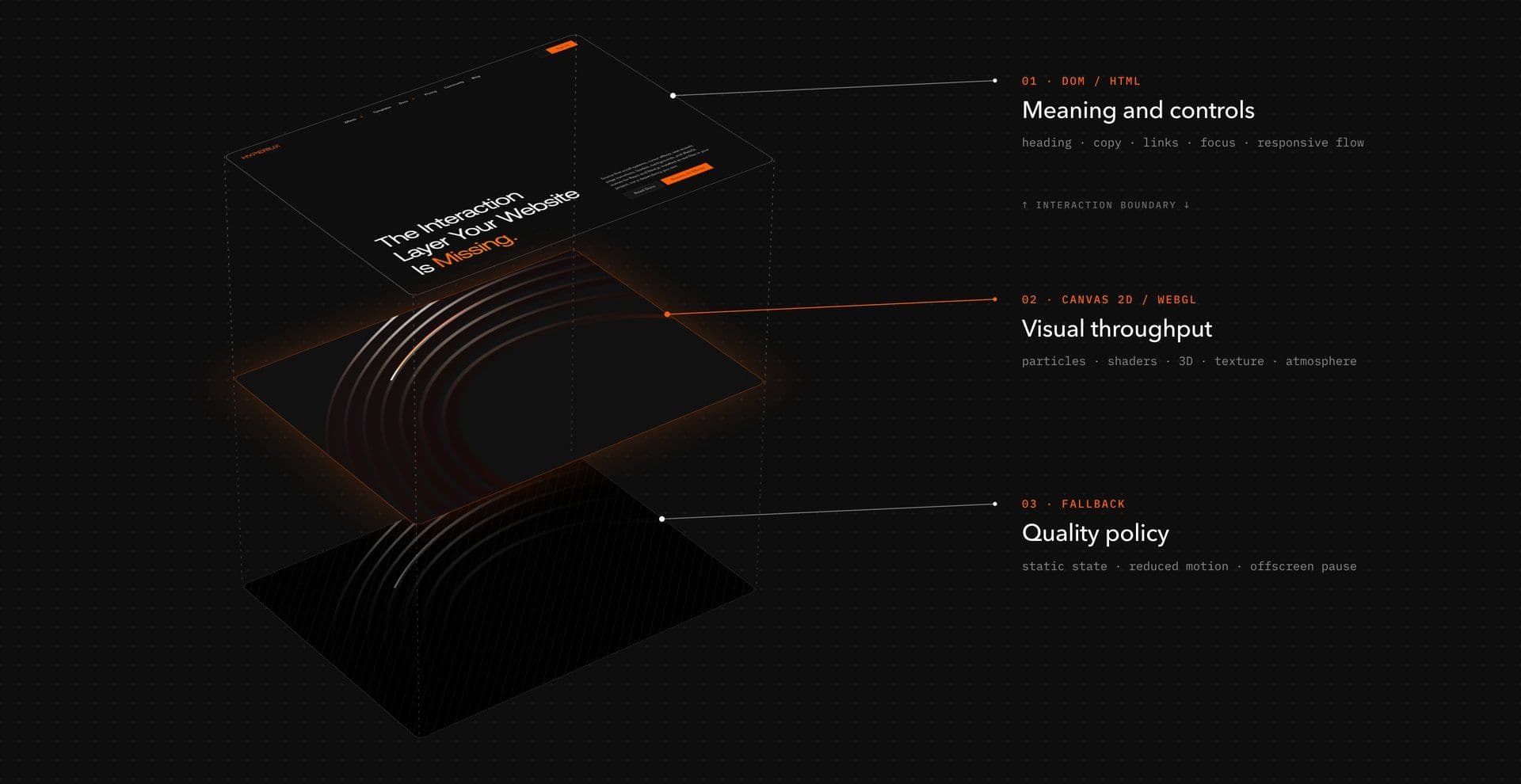
Reduced-motion and fallback states become cleaner too. A Canvas field can freeze. A WebGL environment can become a static composition or lower-motion state. The useful copy and controls survive because they never depended on the renderer.
Hybrid layer model
┌─────────────────────────────────────┐│ DOM / HTML ││ Heading · copy · links · controls ││ Semantics · focus · responsive flow │└─────────────────────────────────────┘ ↑ interaction boundary ↓┌─────────────────────────────────────┐│ Canvas 2D or WebGL ││ Particles · shaders · 3D · texture ││ Visual throughput · atmosphere │└─────────────────────────────────────┘ ↓┌─────────────────────────────────────┐│ Fallback / quality policy ││ Static state · reduced motion ││ mobile quality · offscreen pause │└─────────────────────────────────────┘The renderer is one layer of the experience, not its constitution.
Static and reduced-motion states are part of the design
prefers-reduced-motion should affect the motion system, but accessibility does not end there. The resulting state still needs readable hierarchy, usable controls, visible focus and sensible behavior across keyboard, pointer and touch input.
For an ambient visual, the right reduced-motion state may be a frozen composition. For a transition, it may be a short opacity change. For an interaction whose identity depends on continuous movement, the alternative may need to be genuinely static.
Design that state with the primary effect. Otherwise “fallback” tends to mean whatever remains after the animation is switched off.
React and Next.js implementation decisions
Renderer choice also affects where code belongs in a React or Next.js application.
In the current App Router model, layouts and pages are Server Components by default. Client Components are appropriate when an implementation needs state, event handlers, lifecycle logic or browser APIs such as window. Canvas and WebGL effects frequently need those capabilities, but that does not mean the whole page should move behind a client boundary. Next.js explicitly recommends keeping "use client" scoped to interactive components rather than making larger parts of the tree client-side unnecessarily.
A product page can therefore keep its content and surrounding structure server-rendered while mounting a client-side visual component only where the effect needs browser access.
Server page├── Heading├── Copy├── CTA└── VisualEffectClient ├── Canvas / WebGL renderer ├── pointer + resize logic └── setup + cleanupThat boundary makes ownership clear. The client component owns listeners, observers, animation loops and renderer resources. The rest of the page does not need to inherit that runtime simply because one background moves.
Keep the client boundary as narrow as the interaction allows
Do not add "use client" to an entire page because one decorative component needs window.devicePixelRatio.
Put the boundary around the implementation that requires it. Server Components can still compose Client Components in the page, while meaningful content and non-interactive structure remain outside that client module graph.
Vault’s current installation guidance follows the same practical boundary: individual effects document their browser API usage, client-component requirements, dependencies, mobile behavior, reduced-motion considerations and performance notes rather than assuming one runtime model for the entire library.
Read the Vault dependency guidance
Heavy visual code does not require the whole page to become client-only
Dynamic loading can be useful when a large visual component does not need to enter the initial client bundle immediately.
There is an important current Next.js constraint here: ssr: false with next/dynamic is supported for Client Components, but it is not supported when invoked from a Server Component. If a browser-only visual needs that configuration, put the dynamic import inside a Client Component rather than trying to disable SSR directly from the Server Component. Next.js also notes that automatic code splitting is currently not supported when a Server Component dynamically imports a Client Component.
That gives you a cleaner rule:
Server-render what can be server-rendered. Keep meaningful content available. Put browser-dependent graphics behind the smallest useful client boundary. Lazy-load them when the page architecture benefits. Clean up their runtime when they leave.
Decision recipes for common effects
When the renderer decision still feels abstract, classify the visual operation.
| Effect | Starting layer | Why |
|---|---|---|
| Headline or text reveal | DOM / SVG | The text is meaningful content and benefits from normal layout and semantics. |
| Button microinteraction | DOM / CSS / animation engine | Native roles, focus, pointer and activation behavior matter more than custom rendering. |
| Menu or navigation transition | DOM | The interface remains a collection of interactive document elements. |
| Dense 2D particle or dotted background | Canvas 2D | The scene behaves like one frequently redrawn surface rather than meaningful individual nodes. |
| Image manipulation or distortion | Canvas or WebGL | Simple 2D pixel work may suit Canvas; shader-oriented processing may justify WebGL. |
| 3D geometry, refraction or postprocessing | WebGL | The required capabilities are already shaped like GPU graphics. |
| WebGL hero with headline and CTA | Hybrid | WebGL owns the visual scene; HTML owns meaning and controls. |
| Touch-first utility flow | Usually DOM, with restrained decoration | Interaction clarity and input reliability usually matter more than continuous visual machinery. |
The point is not to produce a universal renderer taxonomy. It is to avoid paying for capabilities the effect does not use.
If CSS can create the visual cleanly, use CSS. If normal DOM elements already map to the interaction, keep them. If the effect behaves like a dense 2D surface, consider Canvas. If the art direction actually requires shaders, spatial graphics or GPU-oriented image work, WebGL has a job to do.
Vault follows the same source-first, effect-specific model: its documentation spans lighter interaction patterns, Canvas layers and WebGL/3D work, while installation guidance tells teams to copy the relevant source into the project and install only the dependencies that effect requires.
The architecture decision should still happen before the effect does.
Meaning → Interaction → Pixels → Scale → Budget.
Work through those questions in that order and the renderer tends to become clearer. More importantly, you stop treating rendering technology as art direction by itself.