

Ishita Srivastav
Developer
Category: Engineering
Ishita Srivastav
Developer
React Three Fiber can coordinate GLTF loading through Suspense, while Three.js also supports direct loader orchestration. Use useGLTF or useLoader when model readiness belongs naturally to the React component tree. Use GLTFLoader and LoadingManager directly when the application needs explicit asset groups, custom resource handling, or loading state that exists outside a Suspense boundary.
The difficult part is rarely fetching a GLB. It is deciding what the visitor sees while the model, textures, environment, and supporting resources become usable. A successful request can still leave a hero visibly empty, loader progress can finish before the device has produced a useful rendered frame, and a custom loader can expose more lifecycle controls while making your application responsible for stale requests, failures, cancellation strategy, reuse, and disposal.
Start with the reveal contract: what remains visible before the model is ready, which resources must become available together, what can arrive later, and whether React or application-level code should coordinate those states. Once those decisions are explicit, the loading API usually stops being a philosophical debate.
A Blank Canvas is Usually a Reveal Problem, Not a Loader Problem
When an R3F scene appears blank while a model loads, the first instinct is often to blame the loader. Sometimes the loader is doing exactly what it was asked to do. React Suspense replaces a suspended subtree with its nearest fallback, so a boundary using fallback={null} explicitly provides no visible fallback for that part of the tree while it waits. React also supports nested Suspense boundaries, allowing separate parts of an interface to reveal independently rather than sitting behind one large loading gate. The React Suspense documentation describes this boundary behavior directly.

That makes boundary placement an interaction decision, not just React syntax. Before writing <Suspense>, decide what the visitor should still be able to see while the expensive resource is unavailable. A landing page might keep its heading, copy, CTA, background, and poster visible while the Canvas resolves. Inside the Canvas, lightweight content might remain available while a focal GLB suspends. A high-detail asset can arrive later without blocking the structure that already tells the visitor what the section is for.
A useful reveal sequence looks like this:
Initial state
HTML title + CTA + poster or stable background
Loading state
HTML title + CTA remain visible
3D region shows an intentional fallback
Ready state
HTML title + CTA remain visible
Loaded 3D scene replaces the fallback
The important detail is continuity. Loading should change the part of the experience that actually depends on the missing resource, rather than erasing unrelated content because everything happened to sit beneath the same boundary.
Why fallback={null} is not GLTF streaming
Suspense can participate in React's broader server-rendering and streaming behavior, but that does not mean fallback={null} progressively streams GLTF bytes into a visible model. In this article, progressive reveal means application-level staging: one state can preserve a poster, another can reveal a lower-cost scene, and later content can appear when its own dependencies are ready.
Asset delivery, React reveal, and visual presentation are related milestones, but they are not interchangeable. Three.js still needs to load and parse resources, React decides when suspended UI can appear, and the browser may still have rendering work to perform afterward. Treating all of those stages as one generic percentage creates an interface that looks precise without necessarily describing the user's actual wait.
A Practical Suspense Pattern That Does Not Blank the Page
For a hero, product scene, or interactive illustration, Suspense is a strong default when model readiness belongs to the component rendering it. Keep meaningful HTML outside the 3D dependency, reserve a stable visual region for the Canvas, and give that region an intentional poster or fallback rather than an empty rectangle.
"use client"; import { Suspense } from "react";import { Canvas } from "@react-three/fiber";import { Html, useGLTF, useProgress } from "@react-three/drei"; function HeroModel() { const { scene } = useGLTF("/models/hero.glb"); return <primitive object={scene} />;} function ModelFallback() { const progress = useProgress((state) => state.progress); return ( <Html center> <div> <span role="status" aria-live="polite"> Loading interactive 3D preview. </span> <span aria-hidden="true"> {Math.round(progress)}% </span> </div> </Html> );} export default function ProductHero() { return ( <section aria-labelledby="product-heading"> <div> <p>Interaction study</p> <h1 id="product-heading"> A product story that still works before WebGL. </h1> <p> The heading, supporting copy, and primary action remain available while the decorative scene resolves. </p> <a href="/product">Explore the product</a> </div> <div aria-label="Interactive product preview" style={{ minHeight: 520, backgroundImage: "url('/images/hero-poster.webp')", backgroundPosition: "center", backgroundSize: "cover", }} > <Canvas> <Suspense fallback={<ModelFallback />}> <HeroModel /> </Suspense> </Canvas> </div> </section> );} useGLTF.preload("/models/hero.glb");The model, poster, and /product paths are illustrative project paths. The loading pattern follows R3F's documented Suspense model, while drei's useProgress exposes progress associated with Three.js's default loading manager.
The poster matters because a fixed height alone prevents layout collapse but does not make the scene area visually intentional. Here, the semantic page remains usable, the 3D region has a designed visual state before the model arrives, and the progress percentage remains visible without asking a screen reader to announce every numerical update.
A percentage is still optional. For a short wait, a poster or stable scene treatment may communicate enough. Loading UI should tell the visitor something useful, not turn every network request into a countdown.
What useLoader and useGLTF Actually Own
R3F's useLoader adapts Three.js loaders to React's component lifecycle. When an uncached resource is unresolved, it suspends so the surrounding React tree can decide what appears in the meantime. R3F also caches resources by URL, supports loader configuration, and exposes preloading. The current R3F hooks documentation also warns developers to be careful when mutating or disposing loaded assets that may be shared elsewhere.
For GLTF assets, drei's useGLTF narrows that pattern to the common GLTF case. It builds on R3F's loader behavior and Three.js GLTFLoader, while exposing GLTF-specific configuration and preload helpers. The drei useGLTF documentation covers that API directly.
The stack is easier to reason about when you stop treating these tools as competing engines:
React component ↓useGLTF ↓useLoader ↓GLTFLoader ↓Three.js resource loadingThe abstraction changes how readiness participates in React. It does not replace the underlying Three.js loader. That distinction matters because decoder configuration, preloading, or access to the loaded scene do not automatically justify building a second lifecycle system around the resource.
Caching deserves the same production judgment. Reuse is useful until shared data is treated as private disposable state. If multiple consumers depend on the same cached asset, mutating common geometries, materials, or scene objects can produce effects outside the component that made the change.
Preload Before You Build a Second Loading Architecture
Many loading complaints are request-timing problems in disguise. The application already knows which model is likely to be needed next, but waits until its consumer mounts before requesting it. The visitor then clicks or navigates directly into a fallback that might have been shorter if the request had started earlier.
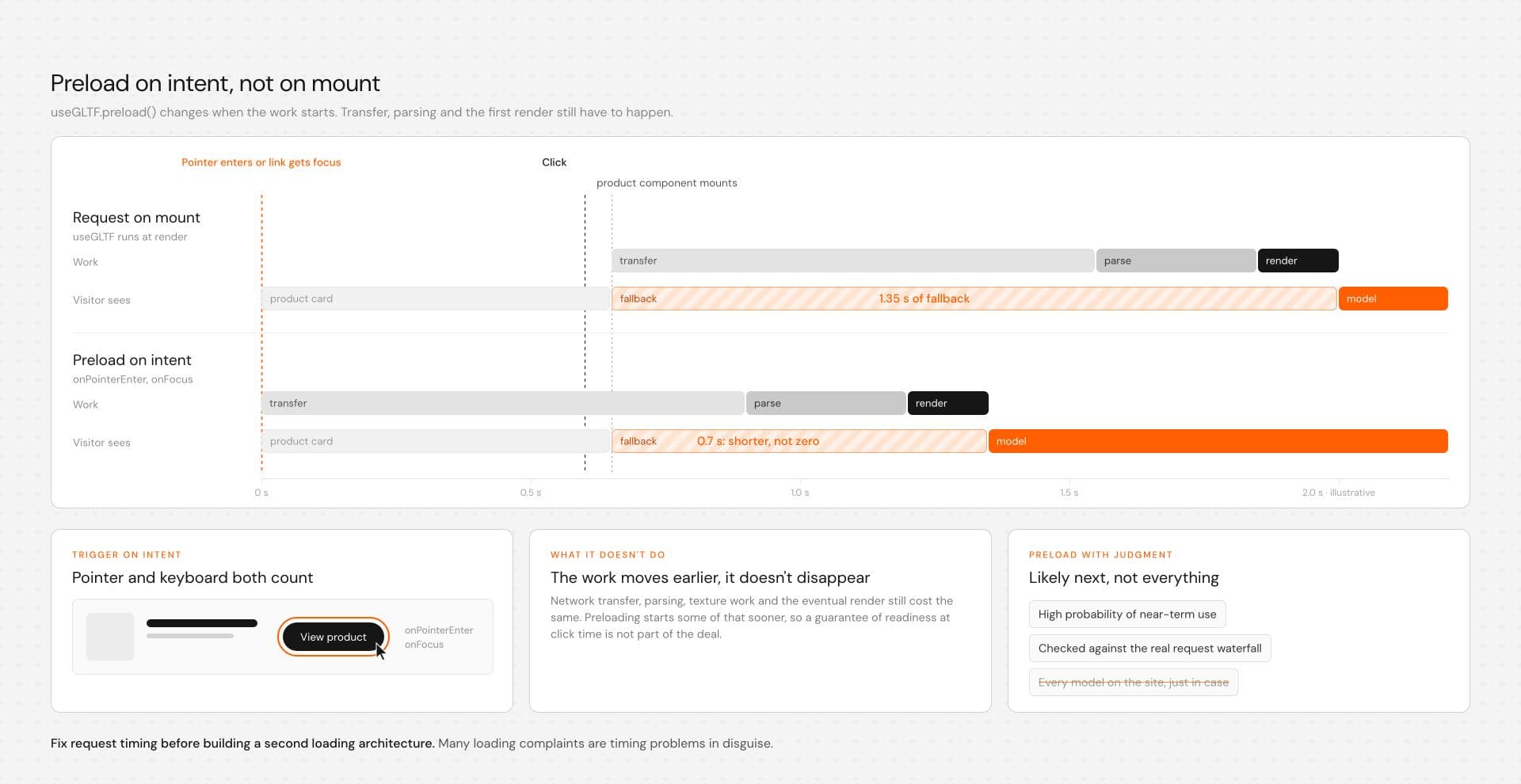
useGLTF.preload() gives you a lower-complexity intervention. When the next asset is predictable, start resolving it before the component needs to render it. Treat preloading as an early request trigger, not a guarantee that the model will be fully ready by the time the user reaches it.
A small interaction-driven trigger can include more than mouse hover:
import { useGLTF } from "@react-three/drei"; function ProductCard() { const preloadModel = () => { useGLTF.preload("/models/product.glb"); }; return ( <a href="/product" onPointerEnter={preloadModel} onFocus={preloadModel} > View product </a> );}Keyboard focus receives the same treatment as pointer intent, which matters when the optimization is attached to an interactive control. The asset path and destination remain illustrative project paths.
Preloading does not eliminate network transfer, parsing, texture work, or eventual rendering cost. It changes when some of that work begins. Preload assets with a high probability of near-term use, inspect the real request waterfall, and resist turning a useful optimization into a site-wide asset buffet.
When Manual GLTFLoader Control Is Actually Useful
Direct GLTFLoader handling earns its complexity when readiness belongs to a wider application lifecycle rather than one React subtree. Three.js GLTFLoader exposes direct completion, progress, and error callbacks, while LoadingManager can coordinate resources used by loaders attached to the same manager. The current GLTFLoader documentation and LoadingManager documentation describe those APIs directly.
Imagine an interactive launch sequence that should not open until a critical product GLB and an independent supporting texture resource have both completed their loader work. The texture is not being loaded because GLTFLoader somehow needs it automatically. It is a separate boot dependency that the experience has chosen to require before opening the primary state. That is precisely the kind of requirement an application-owned resource group can express more clearly than an individual model component.
An illustrative manual asset group
The following hook demonstrates the responsibilities involved in manual ownership. It resets state when URLs change, ignores late state updates after cleanup, uses one manager for the critical group, and exposes item progress, failure, and loaded resources.
It is an architecture example rather than a complete production asset-management system. Cancellation across a complete GLTF pipeline can involve loaders, decoders, image operations, browser support, and resources that have already been created. Resource reuse and final disposal remain application responsibilities as well.
"use client"; import { useEffect, useState } from "react";import * as THREE from "three";import { GLTFLoader } from "three/addons/loaders/GLTFLoader.js";import type { GLTF } from "three/addons/loaders/GLTFLoader.js"; type LoadState = { status: "idle" | "loading" | "ready" | "error"; progress: number; model: GLTF | null; bootTexture: THREE.Texture | null; error: Error | null;}; const initialState: LoadState = { status: "idle", progress: 0, model: null, bootTexture: null, error: null,}; export function useManagedAssetGroup( modelUrl: string, textureUrl: string): LoadState { const [state, setState] = useState<LoadState>(initialState); useEffect(() => { let active = true; let model: GLTF | null = null; let bootTexture: THREE.Texture | null = null; let failed = false; setState({ status: "loading", progress: 0, model: null, bootTexture: null, error: null, }); const manager = new THREE.LoadingManager(); const fail = (error: Error) => { if (!active || failed) return; failed = true; setState((current) => ({ ...current, status: "error", error, })); }; manager.onProgress = (_url, itemsLoaded, itemsTotal) => { if (!active || failed) return; setState((current) => ({ ...current, progress: itemsTotal > 0 ? (itemsLoaded / itemsTotal) * 100 : 0, })); }; manager.onError = (url) => { fail(new Error(`Failed to load resource: ${url}`)); }; manager.onLoad = () => { if (!active || failed || !model || !bootTexture) return; setState({ status: "ready", progress: 100, model, bootTexture, error: null, }); }; const gltfLoader = new GLTFLoader(manager); const textureLoader = new THREE.TextureLoader(manager); gltfLoader.load( modelUrl, (result) => { model = result; }, undefined, (error) => { fail( error instanceof Error ? error : new Error(`Failed to load ${modelUrl}`) ); } ); textureLoader.load( textureUrl, (result) => { bootTexture = result; }, undefined, (error) => { fail( error instanceof Error ? error : new Error(`Failed to load ${textureUrl}`) ); } ); return () => { active = false; manager.abortController.abort(); }; }, [modelUrl, textureUrl]); return state;}LoadingManager currently exposes an AbortController, but it should be treated as one part of the application's cancellation strategy rather than a promise that every decoder, browser operation, or previously created resource disappears instantly. Production use should be tested against the actual Three.js version, loader stack, browser targets, asset formats, and retry behavior the project ships.
Disposal needs equally explicit ownership. Define which component, asset cache, or application layer may eventually dispose loaded geometry, materials, and textures. Do not automatically destroy a resource during every component cleanup if another consumer may still depend on it.
What consuming the manual state looks like
The supporting texture below is deliberately an independent boot dependency. It gates the experience because the product has decided that both resources belong to the critical initial phase, even though this simplified scene does not attach that texture to the GLTF material.
function ManagedScene() { const { status, progress, model, bootTexture, error, } = useManagedAssetGroup( "/models/hero.glb", "/textures/hero-boot-texture.webp" ); if (status === "error") { return ( <div role="alert"> <p>The 3D preview could not be loaded.</p> <p>{error?.message}</p> </div> ); } if (status !== "ready" || !model || !bootTexture) { return ( <div> <span role="status" aria-live="polite"> Loading interactive scene. </span> <span aria-hidden="true"> {Math.round(progress)}% </span> </div> ); } return ( <Canvas> <primitive object={model.scene} /> </Canvas> );}A real application could use the supporting texture later in a transition, background, material, or subsequent scene state. The point here is that the boot phase can require several independently loaded resources before the primary experience is allowed to open.
Before treating a manual manager as production infrastructure, test successful loading, a missing model, a missing supporting resource, URL changes during loading, unmount during loading, retry behavior, and final resource disposal. Explicit orchestration is valuable only if the lifecycle edges receive the same attention as the happy path.
Why Separate Resource Groups Sometimes Need Separate Managers
Suppose the initial experience requires a hero GLB and one critical texture set, while a secondary gallery can arrive later. Putting every asset behind one global progress state means optional content can keep the initial loader active long after the focal interaction is already usable.
A separate LoadingManager lets the boot phase track its critical resources without waiting for optional assets:
Critical manager hero.glb hero-boot-texture.webp ↓ Open primary experience Secondary manager gallery-01.glb gallery-02.glb detail-textures.webp ↓ Reveal optional content laterThat is a concrete reason to use manual orchestration. The application has resource groups representing different phases, and those phases do not map cleanly to one React reveal boundary.
Suspense vs Manual GLTF Loading
The choice becomes clearer when you compare responsibilities rather than counting API calls. For most page-level scenes, the React-shaped path carries less lifecycle overhead. Manual loading becomes useful when the application's resource model genuinely sits outside that tree.
| Decision | Suspense + useGLTF / useLoader | Manual GLTFLoader / LoadingManager |
|---|---|---|
| Readiness owner | React component tree | Application loading logic |
| Typical fit | Model readiness maps to rendered components | Resource groups span broader lifecycle phases |
| Reveal behavior | Suspense boundaries and fallbacks | Explicit application state |
| Resource reuse | R3F cache behavior by URL | Reuse policy is yours to design |
| Preload | useGLTF.preload or useLoader.preload | Start loader work explicitly |
| Progress | useProgress observes the default loading manager | Manager callbacks can isolate a custom group |
| Independent groups | Usually represented through component boundaries | Separate managers can represent explicit groups |
| Loader configuration | Available through relevant loader configuration | Direct loader access |
| Errors | Loading errors can surface to an appropriate parent error boundary | Explicit loader and manager state |
| Cleanup | Shared loaded resources still need ownership awareness | Application owns stale work, cancellation strategy, reuse, and disposal policy |
| Complexity | Lower when loading follows React | Higher, justified by broader orchestration requirements |
For a single hero model, configurator object, or scene component that naturally appears when its resources resolve, Suspense is usually the cleaner starting point. If the application has a distinct boot phase, resource groups, or lifecycle logic that should not be expressed as component suspension, manual orchestration starts to justify its cost.
A Loading Percentage Is Not Scene Readiness
Progress is one of the easiest places to make technically valid code produce misleading UX. At least four milestones can exist between requesting an asset and showing a useful scene, and each tells you something different.
| Milestone | What it tells you | What it does not tell you |
|---|---|---|
| Transfer progress | Measurable network bytes have moved where available | Whether parsing or rendering is complete |
| Manager progress | Tracked loader items have completed relative to that manager's items | A reliable percentage of total CPU or GPU work |
| Scene readiness | Required data is available and application logic can reveal the scene | Whether the next frame is inexpensive |
| Visual readiness | The visitor receives a usable rendered result | A universal percentage exposed by one loader callback |
Three.js LoadingManager.onProgress reports loaded and total item counts for resources tracked by that manager. That is useful for resource completion, but it is not a measurement of every unit of work needed to display a final frame. The distinction is documented in the Three.js LoadingManager API.

Drei's useProgress is similarly specific. It monitors THREE.DefaultLoadingManager. If an application creates a separate custom manager for an isolated resource group, useProgress does not automatically monitor that private manager. The drei useProgress documentation makes that relationship explicit.
This is why assistive feedback and visual feedback do not need identical granularity. A screen reader can receive one stable "Loading interactive scene" announcement while a visual counter updates separately. If progress milestones genuinely matter, announce meaningful changes rather than every percentage tick.
Progressive Reveal Beats an All-or-Nothing Loader
A stable poster or useful HTML shell can be a better loading state than a full-screen progress overlay. The visitor can understand the product, read the headline, and use the primary CTA while decorative resources continue resolving.
A practical hierarchy might be:
Stage 1Semantic HTML + stable poster Stage 2Semantic HTML + lightweight 3D or loading fallback Stage 3Semantic HTML + primary model Stage 4Optional secondary detail and expensive decorationNested Suspense boundaries work well when those stages follow the component tree. React's documentation supports nested boundaries for staged reveal, so one slower dependency does not have to block an entire region.
The design judgment is restraint. Expensive detail can arrive after useful structure instead of forcing the visitor to admire a loading sequence whose main achievement is proving the page has large assets.
Error States Need Their Own Boundary
Suspense handles waiting. It is not a substitute for an Error Boundary when rendering or a supported suspended resource fails. R3F documents useLoader as suspending so loading and error handling can happen at the parental level, while React documents Error Boundaries as the mechanism for replacing failed subtrees with fallback UI. See the R3F hooks documentation and React Error Boundary guidance.
A small boundary can isolate the scene from the rest of the page:
import { Component, type ReactNode } from "react"; type Props = { children: ReactNode; fallback: ReactNode;}; type State = { hasError: boolean;}; class SceneErrorBoundary extends Component<Props, State> { state: State = { hasError: false }; static getDerivedStateFromError(): State { return { hasError: true }; } render() { if (this.state.hasError) { return this.props.fallback; } return this.props.children; }}Waiting and failure can then remain separate states:
<SceneErrorBoundary fallback={ <div role="alert"> The interactive preview is unavailable. Product information remains below. </div> }> <Suspense fallback={<ModelFallback />}> <HeroModel /> </Suspense></SceneErrorBoundary>This distinction matters because "still loading" and "failed to load" require different responses. A decorative hero can fall back to a poster, while a functional configurator may need an explicit retry or alternative workflow.
If you turn the boundary into a reusable production component, add recovery behavior appropriate to the product, such as resetting the boundary when an asset key changes or wiring an intentional retry. Do not leave a retry button in the interface unless the underlying loading path actually resets cleanly.
Next.js: Client Boundaries and ssr: false Are Different Decisions
Browser-dependent WebGL work frequently belongs behind a client boundary because Canvas, GPU rendering, layout measurement, and related browser APIs are client concerns. That does not mean every Client Component automatically skips server prerendering.
Current Next.js guidance distinguishes Client Components from explicitly disabling prerendering with next/dynamic. If a heavy browser-only scene should not render on the server, the dynamic import can live inside an appropriate Client Component:
"use client"; import dynamic from "next/dynamic"; const HeroScene = dynamic(() => import("./HeroScene"), { ssr: false, loading: () => <div aria-hidden="true" className="hero-poster" />,}); export default function HeroSceneClient() { return <HeroScene />;}This is not a universal requirement for every R3F component. Use disabled SSR when the scene genuinely needs it, and avoid turning an otherwise server-friendly page into one large client island because a single section owns a Canvas. The current Next.js lazy-loading documentation covers the distinction and placement rules for ssr: false.
Production Checks Before You Ship
Loader architecture coordinates readiness. It does not make the underlying 3D work inexpensive. A clean reveal can still lead into a scene that struggles because of large textures, excessive draw calls, expensive shaders, aggressive device pixel ratio, continuous rendering, or unnecessary post-processing.
Test network behavior and rendering behavior separately because they expose different failures:
| Test | What to inspect | Failure signal |
|---|---|---|
| Slow network | Fallback, poster, request order, preload timing | Empty scene area or misleading progress |
| Failed model request | Error state and content continuity | Permanent loader or broken Canvas |
| Failed supporting resource | Group error behavior | Manager reports failure but UI later appears ready |
| URL change during load | Stale-result protection | Previous asset replaces newer state |
| Route change during load | Cleanup and late callbacks | State changes after ownership has ended |
| Retry | State reset and resource ownership | Old failure or stale assets leak into retry |
| Mid-range mobile device | GPU load and frame behavior | Smooth loader followed by rough scene |
| Reduced-motion preference | Loader and entrance motion | Motion remains compulsory |
| Keyboard navigation | Preload triggers and controls | Hover-only behavior |
| Production build | Bundles and lazy loading | Development behavior hides shipping cost |
If a scene is decorative, keep the page meaningful without it. If it is functional, preserve the user's task as far as practical when the 3D path is unavailable. If the loader contains animation, honor motion preferences, but do not reduce accessibility to prefers-reduced-motion. Keyboard access, focus visibility, semantic structure, readable alternatives, and non-pointer input still matter.
Artificial delay deserves the same scrutiny. If resources are ready but the interface holds the user because a branded loader has not finished its choreography, that is an intro sequence rather than a loading requirement. Judge it as part of the interaction instead of disguising it as infrastructure.