
Ishita Srivastav
Developer
Category: Engineering
Ishita Srivastav
Developer
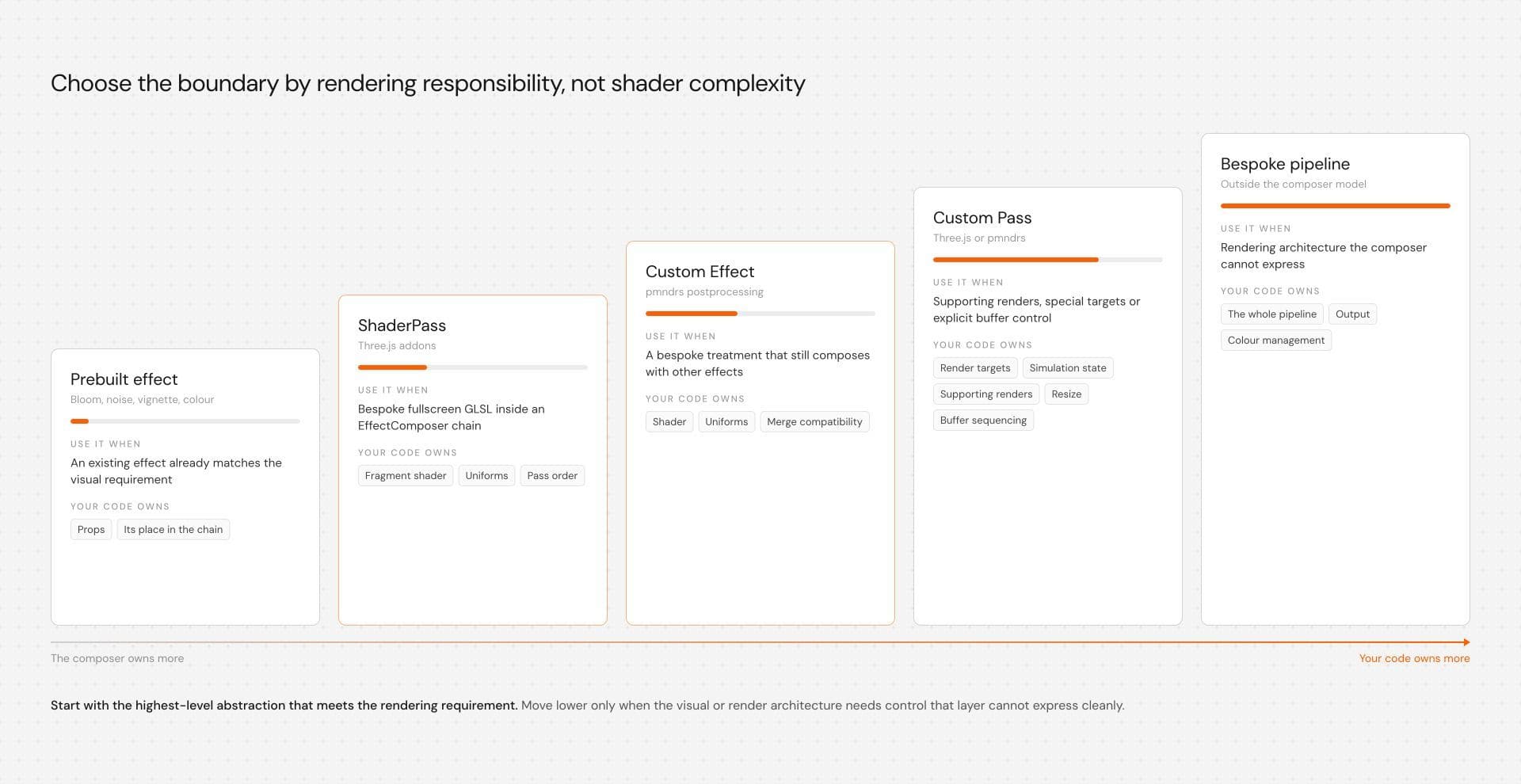
If an effect only needs to transform the rendered frame, start inside the postprocessing system you already use. Reach for a prebuilt effect when it already matches the visual requirement. In Three.js, ShaderPass gives you custom GLSL inside an EffectComposer chain. In the pmndrs ecosystem, a custom Effect gives you shader control while remaining part of the effect-composition model. Move to a custom Pass when the effect needs explicit control over supporting renders, render targets, buffer flow, or output behaviour.
Custom GLSL and postprocessing libraries are not opposing choices. Postprocessing is already shader-driven, and custom GLSL can live inside either architecture. The actual decision is how much rendering infrastructure the effect needs to own.
Start with the highest-level abstraction that meets the rendering requirement. Move lower only when the visual or render architecture requires control that the current layer cannot express cleanly.
Three related systems, three different boundaries
Three.js, postprocessing, and @react-three/postprocessing belong in the same conversation, but they are not one API hierarchy.
Three.js provides postprocessing addons such as EffectComposer, RenderPass, ShaderPass, and OutputPass. EffectComposer coordinates an ordered chain of passes and moves the rendered result through that chain. ShaderPass is a ready-made pass for applying custom shader logic to the previous result, and it accepts either a shader object or a custom ShaderMaterial. A developer can implement a more specialised pass when the work requires behaviour beyond a normal fullscreen shader stage.
The pmndrs postprocessing package uses a related but distinct model. It provides Effect, EffectPass, and Pass abstractions. Compatible Effect instances can be combined into an EffectPass, while lower-level custom passes are available when rendering needs become more specialised.
@react-three/postprocessing provides the React-facing integration for that pmndrs system. It lets React Three Fiber applications express effects through components while retaining access to custom Effect implementations when the built-in set does not match the visual requirement.
A practical ownership map looks like this:
| Rendering requirement | Useful starting point |
|---|---|
| Existing bloom, noise, vignette, color treatment | Prebuilt effect |
| Bespoke fullscreen shader in Three.js addons | ShaderPass |
| Bespoke composable fullscreen treatment in pmndrs | Custom Effect |
| Supporting renders, special targets, explicit buffer control | Custom Pass |
| Rendering architecture outside the composer model | Bespoke pipeline |
This is a map of how much rendering responsibility your code takes on.
Use the visual requirement to choose the boundary
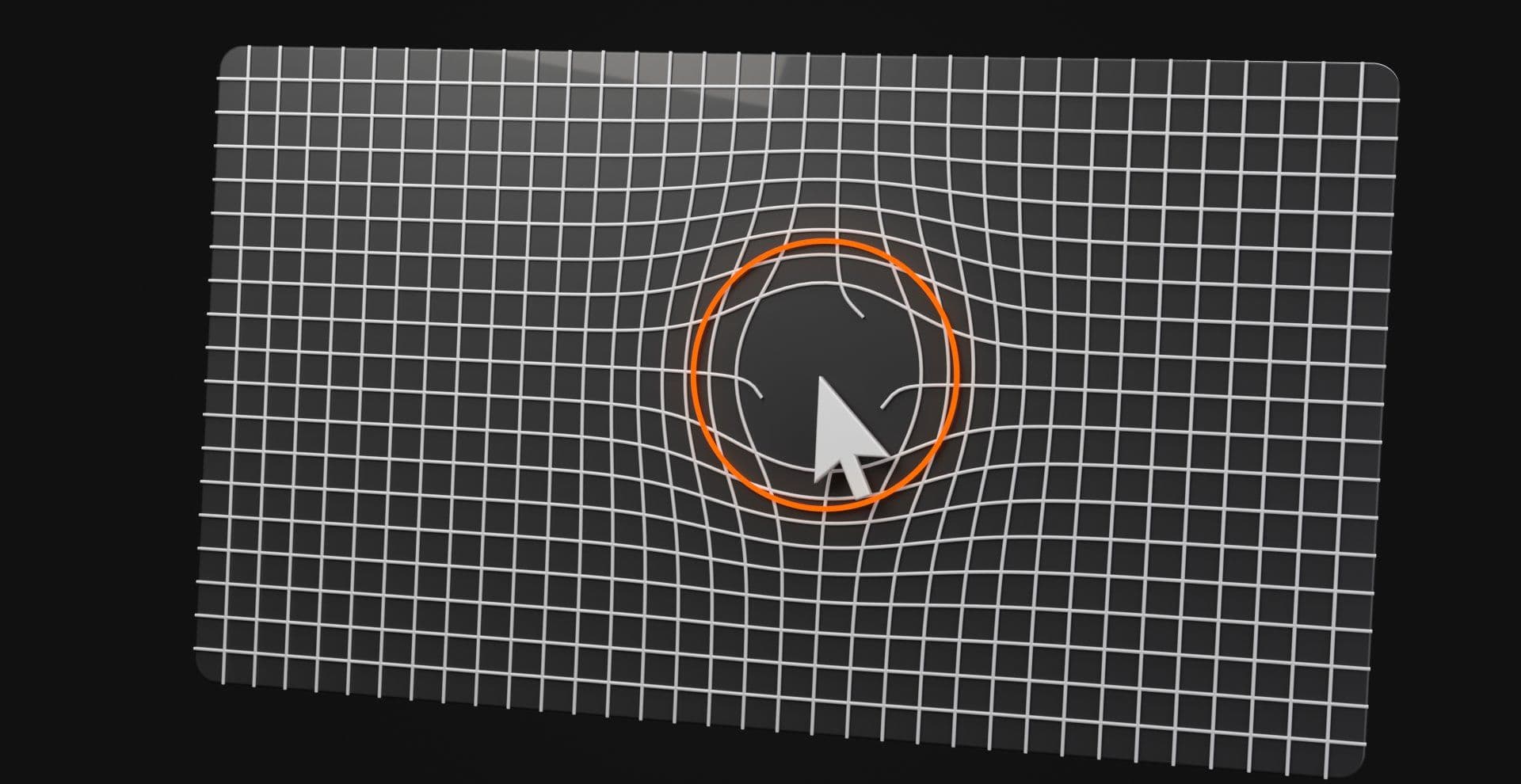
Consider a pointer-driven screen distortion. The visual goal is to bend the rendered image around the cursor, as though the pointer is pushing the pixels away from itself.
At shader level, the core operation is straightforward. Take the current screen UV, measure its distance from the pointer, calculate an influence, offset the UV, then sample the frame from that displaced coordinate.
The architecture changes according to what happens around that calculation. If the effect only needs the current frame and pointer coordinates, a composer-managed shader stage is enough. If the effect must first build a displacement texture, preserve simulation state between frames, perform supporting renders, or coordinate multiple intermediate targets, render orchestration has become part of the effect.
That gives you a useful dividing line. Custom pixel processing does not automatically require a custom rendering pipeline. Custom render orchestration often does.
Three.js ShaderPass: custom pixels inside EffectComposer
ShaderPass is a good fit when you want custom fullscreen GLSL while keeping Three.js EffectComposer responsible for the pass chain.
A typical setup already has an EffectComposer, a RenderPass for the scene, and later passes for the visual treatment and final output. ShaderPass receives the previous result through its configured texture uniform, tDiffuse by default, and writes its result back into the composer flow.
The following fragment is intentionally limited to the custom pass. It assumes the renderer, composer, scene RenderPass, resize handling, pointer events, and render loop already exist.
import { ShaderMaterial, Vector2} from "three"; import { ShaderPass } from "three/addons/postprocessing/ShaderPass.js"; const distortionMaterial = new ShaderMaterial({ uniforms: { tDiffuse: { value: null }, pointer: { value: new Vector2(0.5, 0.5) }, strength: { value: 0.08 } }, vertexShader: ` varying vec2 vUv; void main() { vUv = uv; gl_Position = vec4(position, 1.0); } `, fragmentShader: ` uniform sampler2D tDiffuse; uniform vec2 pointer; uniform float strength; varying vec2 vUv; void main() { vec2 delta = vUv - pointer; float distanceToPointer = length(delta); float influence = exp(-distanceToPointer * distanceToPointer * 18.0); vec2 direction = delta / max(distanceToPointer, 0.0001); vec2 distortedUv = vUv + direction * influence * strength; gl_FragColor = texture2D(tDiffuse, distortedUv); } `}); const distortionPass = new ShaderPass(distortionMaterial); composer.addPass(distortionPass);The surrounding interaction code can update the pointer uniform as the input changes. The coordinates still need to be normalised into the UV convention expected by the shader.
distortionPass.uniforms.pointer.value.set( pointerX, pointerY);This is still a composer-managed effect. Custom GLSL does not require custom pipeline ownership.
A complete Three.js chain should also account for output processing. OutputPass handles tone mapping and output color-space conversion and is normally placed near the end of the pass chain, although an effect that specifically requires transformed input can alter that ordering. Color processing should be deliberate rather than treated as an invisible final step.
A custom pmndrs Effect: the same distortion, a different ownership model
The same pointer distortion can live inside the pmndrs effect model.
A custom Effect can implement mainUv, which transforms the screen coordinate used by the effect pipeline. That gives us the same class of UV displacement used in the ShaderPass example while keeping the shader inside the pmndrs composition model.
import { Effect } from "postprocessing";import { Uniform, Vector2 } from "three";import { createEffectComponent} from "@react-three/postprocessing"; const fragmentShader = ` uniform vec2 pointer; uniform float strength; void mainUv(inout vec2 uv) { vec2 delta = uv - pointer; float distanceToPointer = length(delta); float influence = exp(-distanceToPointer * distanceToPointer * 18.0); vec2 direction = delta / max(distanceToPointer, 0.0001); uv += direction * influence * strength; }`; class PointerDistortionEffect extends Effect { constructor({ pointer = new Vector2(0.5, 0.5), strength = 0.08 } = {}) { super("PointerDistortionEffect", fragmentShader, { uniforms: new Map([ ["pointer", new Uniform(pointer)], ["strength", new Uniform(strength)] ]) }); } set pointer(value) { this.uniforms.get("pointer").value.copy(value); } set strength(value) { this.uniforms.get("strength").value = value; }} export const PointerDistortion = createEffectComponent(PointerDistortionEffect);Current React Postprocessing documentation supports createEffectComponent for custom Effect classes that can be constructed without required arguments. Constructor options with corresponding setters can become live props on the existing effect instance, which lets pointer and strength changes update without recreating the effect on every render.
The component can then sit inside the composer:
<EffectComposer> <PointerDistortion pointer={pointer} strength={0.08} /></EffectComposer>The surrounding component still owns pointer normalisation and input handling. A browser pointer position usually needs to be converted into the UV convention expected by the shader before becoming the pointer prop.
These snippets show the custom rendering stages, not complete applications. Verify effect composition, pointer normalisation, package-version behaviour, and resource lifecycle against the dependency versions installed in the project before treating either example as production code.
Now the comparison is meaningful. Both implementations bend the rendered image using the same radial UV displacement. One uses a Three.js ShaderPass; the other uses a pmndrs custom Effect, so the difference being compared is ownership rather than visual behaviour.
The custom Effect still has rules
A custom pmndrs Effect is not limited to changing RGB values. Effects can react to size changes, maintain state, perform supporting operations, and request depth when the implementation requires it.
Their place in the effect-composition model does impose boundaries. An Effect does not receive arbitrary ownership of the composer output buffer, and UV-transforming effects have compatibility implications when combined with other effects.
The pointer distortion above implements mainUv, which changes the screen coordinates used by the effect pipeline. pmndrs treats that behaviour as incompatible with convolution effects inside the same EffectPass. A convolution effect reads neighbouring samples from the input buffer, while a UV-transforming effect changes the coordinates being used. Combining both assumptions in the same merged shader can produce incorrect results.
The correct response is to put incompatible work into separate passes.
That detail matters because it turns a vague performance question into an architectural one. Effect merging is useful only when the visual operations are compatible.
Use a custom Pass when the rendering work becomes custom
A custom Pass earns its complexity when the effect must control rendering operations rather than only the transformation applied to the current frame.
Imagine that the pointer distortion changes. Instead of calculating displacement directly from the current pointer position, movement paints into a low-resolution texture. That texture fades over time, retains previous-frame state, and becomes the field that drives the final distortion.
The pipeline now has more responsibilities:
Scene render | vScene color | +-------------------------+ | | | Pointer simulation | | | History / field texture | | +-------------> Distortion stage | v Remaining effects | v OutputThe effect may now own custom render targets, simulation updates, supporting renders, resize behaviour, and buffer sequencing. Trying to disguise all of that as one ordinary image effect can make the code harder to understand.
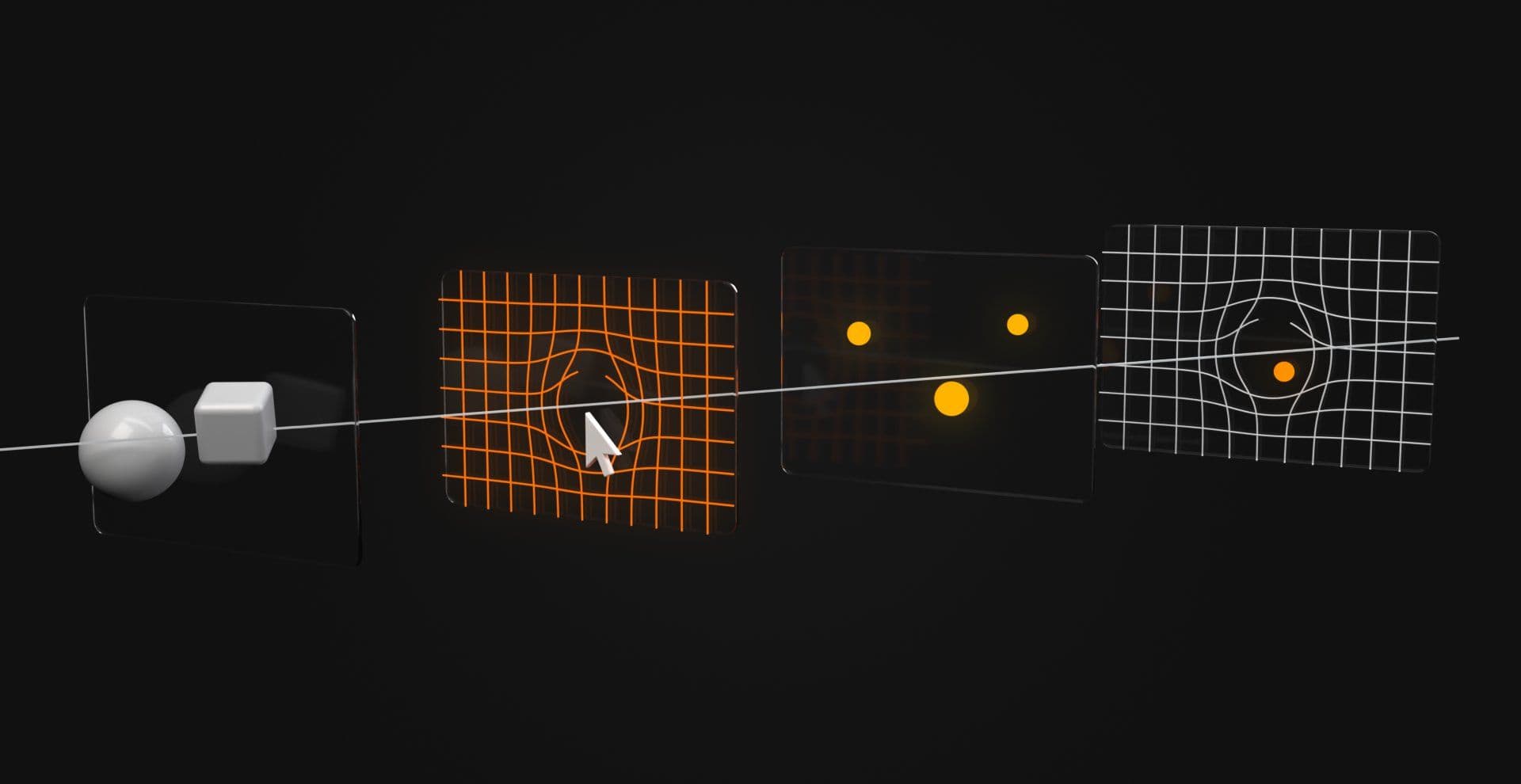
Use a custom Pass when you need explicit control over those responsibilities. In pmndrs, effects can perform supporting operations, but they do not receive an output buffer or render directly to screen themselves. A custom pass is the lower-level boundary when the effect genuinely needs that rendering control.
The same reasoning applies when implementing specialised passes in a Three.js composer. The decision depends on render responsibilities, not shader complexity.
A cleaner decision tree
Start with where the interaction actually belongs, then descend only as far as the rendering requirement demands.
Does the effect belong to one mesh or material? | +-- Yes | | | +--> Use a mesh/material shader | +-- No | vDoes it transform the rendered frame? | +-- No | | | +--> Recheck whether postprocessing | is the right layer | +-- Yes | vDoes a prebuilt effect already solve it? | +-- Yes | | | +--> Use the prebuilt effect | +-- No | vCan it operate inside the composer's normaleffect/pass model? | +-- Yes | | | +--> Three.js: ShaderPass | | | +--> pmndrs: custom Effect | +-- No | vDoes it need supporting renders, custom targets,explicit output control, or unusual buffer flow? | +-- Yes --> Custom Pass | +-- No --> Recheck the higher-level abstractionThis keeps buffer ownership as a follow-up to the fullscreen-effect decision. It prevents an original shader from becoming an automatic excuse for lower-level infrastructure.
What the library is buying you
A postprocessing abstraction is valuable when it standardises work that does not need to become project-specific.
In Three.js, EffectComposer coordinates an ordered pass chain and the read and write buffers that move results between those passes. ShaderPass can participate in that system without reimplementing the buffer choreography around a normal fullscreen shader.
In pmndrs, compatible effects can be grouped into an EffectPass and merged into a compound shader. That can reduce separate fullscreen render operations, but only when the effects share compatible sampling assumptions.
React Postprocessing adds React integration around that model. Current custom-effect tooling can update supported properties on an existing effect instance and handle disposal for effect components constructed through its wrapper. Resources created outside that ownership model still need explicit cleanup from the code that owns them. The maintenance advantage is specific rather than magical. Let the framework own common orchestration, then let your code own the visual behaviour that is actually unique.
Effect merging is useful, but compatibility decides the boundary
One reason the pmndrs effect model can be attractive is effect merging. Compatible Effect instances can be processed together inside an EffectPass, reducing the need for every visual operation to become a separate traditional fullscreen pass.
That does not mean every group of effects belongs in one merged pass. pmndrs explicitly documents UV transforms and convolution effects as incompatible, and more than one convolution effect should not share the same EffectPass.
The reason is structural. A UV-transforming effect modifies the screen coordinates passed through the effect chain. A convolution effect needs extra samples from the input buffer around the current coordinate. Those operations cannot always be combined while preserving the intended sampling behaviour.
The same issue appears with two convolution operations. The second may need to sample the output of the first rather than the unchanged original input, which creates a genuine pass boundary. The useful goal is therefore not “fewest passes.” Use the number of passes required to preserve the intended rendering result without doing redundant work.
Performance: profile the workload, not the abstraction
A handwritten shader is not automatically faster than a library-managed effect. A postprocessing library is not automatically slower because it introduces abstractions.
The GPU still has to process pixels, sample textures, execute shader instructions, read and write render targets, and perform supporting renders. Those operations determine cost more directly than the shape of the JavaScript API.
Start with total frame timing. At 60 Hz, one complete frame has roughly 16.7 milliseconds, but postprocessing only owns part of that budget. Compare the same scene with the effect enabled and disabled, then use browser or GPU profiling tools where available to identify where the additional work occurs.
Useful signals include:
| Signal | What it can tell you |
|---|---|
| Total frame timing | Whether the effect changes the overall frame budget |
| CPU scripting time | Whether interaction, React updates, or scene logic are expensive |
| Renderer calls | Whether extra render work is occurring |
| GPU profiling | Where supported, which rendering stages consume GPU time |
| Render-target resolution | How many pixels intermediate stages process |
| Render-target allocation | Memory and pipeline complexity, usually found through inspection or instrumentation |
| Texture sampling | Potential cost in blur, convolution, distortion, and similar shaders |
| DPR | How quickly screen-space pixel work scales |
| Effect grouping | Whether compatible effects remain merged or split |
| Real-device testing | Costs hidden by a powerful development machine |
None of these signals is a complete GPU-cost metric. Draw calls do not tell you how expensive a fragment shader is, a low JavaScript frame time does not prove the GPU has headroom, and counting render targets does not tell you their bandwidth cost.
Compare the same implementation under the same viewport, DPR, scene state, and device conditions. Change one variable at a time before attributing the result to an abstraction.
Start by removing unnecessary pixels and passes
Resolution can matter more than the architectural argument.
A fullscreen effect runs over the render target, not the CSS dimensions visible in the layout. Higher DPR increases both dimensions of the underlying buffer, which can multiply the number of fragments the GPU processes. Add bloom, blur, depth work, or several intermediate targets and that growth becomes meaningful quickly.
Test DPR deliberately. Test expensive intermediate stages at reduced resolution where the visual permits it. Reduce sampling before rewriting the entire pipeline, and remove a secondary treatment on constrained devices if it contributes little to the hierarchy.
The same rule applies to frames. If nothing in the scene changes, continuous rendering may be unnecessary. If the scene contains damping, simulations, temporal effects, time-based shader movement, or other evolving state, event-only rendering may no longer be sufficient.
Render scheduling should follow scene behaviour rather than a blanket optimisation rule.
Pass order and color processing are part of the effect
Postprocessing order can change the visual result.
Bloom before a color treatment can produce a different image from bloom after it. Pixelation before antialiasing behaves differently from pixelation after it. A UV transformation can alter the assumptions made by later sampling operations.
Three.js also makes output processing explicit through OutputPass. It handles tone mapping and output color-space conversion and is normally placed at the end of the chain. Three.js documents exceptions where a later pass requires sRGB input, so its position should follow the actual pass requirements rather than an absolute rule.
Do not treat color management as finishing polish that can be moved around without consequence. If a custom shader was developed against one point in the chain and later moved to another, its inputs may no longer represent the same values.
The rendering order is part of the visual design.
The hybrid architecture is usually the useful one
A real production scene rarely needs every stage to become custom at once.
Imagine a hero with a Three.js scene, the pointer distortion from our example, bloom, and final color processing. The pointer distortion carries the distinctive interaction. Bloom does not need to become bespoke simply because one stage contains custom GLSL.
A sensible flow might remain:
Scene | vScene render | vCustom pointer distortion | vBloom | vColor / output processing | vFinal frameIf the pointer treatment later grows into a simulation with persistent texture state, that one stage can become a custom pass. The rest of the pipeline can remain boring.
Keep custom infrastructure local to the part of the interaction that actually needs it. That gives the visual room to become specific without making every rendering responsibility specific too.
Production checks before shipping either approach
A technically correct shader can still be a poor production implementation. WebGL work has to survive navigation, resizing, touch input, constrained hardware, reduced-motion preferences, resource cleanup, and the possibility that the canvas does not run at all.
In Next.js, browser-dependent WebGL code needs an appropriate client execution boundary. Marking a component as client-side does not remove every rendering concern, but code that directly depends on canvas, pointer events, window, or a WebGL context must not execute as though those browser APIs exist on the server.
Keep meaningful page content in HTML. Headings, links, product copy, and calls to action should not become inaccessible because a decorative canvas fails. The interaction should support the hierarchy rather than become the hierarchy.
Touch needs an intentional state. If the desktop effect follows a pointer, decide what the visual does when precise hover input does not exist. It might use a calmer autonomous state, react to touch position, or reduce to a static composition instead of waiting for a mouse that will never arrive.
Reduced motion needs an intentional state too. That can mean reducing camera movement, freezing persistent distortion, disabling a simulation, or replacing the live scene with a still image. It should preserve the page's information and visual hierarchy rather than simply removing the section.
Cleanup should follow ownership. If your code creates a pass, render target, texture, listener, observer, or custom animation loop, your code should have a clear path for releasing or stopping it. Three.js ShaderPass and OutputPass, for example, expose dispose() methods for GPU resources allocated by those passes. React wrappers can manage resources they construct, but resources created outside that ownership model still need their own cleanup.
Resize behaviour deserves the same clarity. Composer dimensions, custom render targets, resolution-dependent uniforms, simulation textures, and pointer normalisation should remain coherent after the canvas changes size.
Finally, plan for failure. WebGL context loss, weak devices, hidden tabs, offscreen canvases, and strict performance budgets are normal production conditions. A deliberate poster or static fallback can be a better design decision than forcing a live effect to survive everywhere.