

Vidushi Saxena
Developer
Category: Engineering
Vidushi Saxena
Developer
A source-first React component is distributed as editable implementation code that becomes part of your project, rather than remaining primarily behind a library package API. A component registry makes that workflow repeatable by describing which files, package dependencies, and other registry items an installation needs so tooling can resolve them into the consuming codebase.
In practical terms, the difference can look like this.
A conventional package often leaves you with an import from a dependency:
import { AnimatedHeading } from "@acme/motion"A source-distributing registry can leave you with the implementation itself:
import AnimatedHeading from "@/components/animated-heading"That resembles copy-paste, but the registry makes the transfer structured and repeatable.
The more important difference comes afterward. When the implementation lives locally, your team can inspect it, change it, review it in Git, and adapt it around the actual product. That is useful when a component's behaviour depends heavily on content, device, input method, rendering strategy, or brand direction. It also means your team owns more of the decisions inside that implementation.
Control travels with responsibility.
What “source-first” actually means
The useful distinction is where the normal implementation boundary lives after you adopt it.
With a conventional package, the dependency generally remains the maintained unit. You install a version, import its exports, configure the API it exposes, and receive upstream changes by updating that package. The package may contain readable JavaScript, source maps, declarations, or even original source files; “package” does not mean “compiled black box.” npm itself is a registry for JavaScript packages, not the opposite of a registry.
Source-first distribution changes the normal integration contract. Selected implementation files are deliberately written into the consuming project so the project can treat them as local application code.
That becomes valuable when adaptation is part of the expected work.
A motion component might need different timing once a hero headline wraps onto four lines. A cursor effect may need to disappear completely for coarse-pointer input. A scroll sequence may need to coordinate with route transitions, sticky layout, or CMS-driven content that the original author could never anticipate.
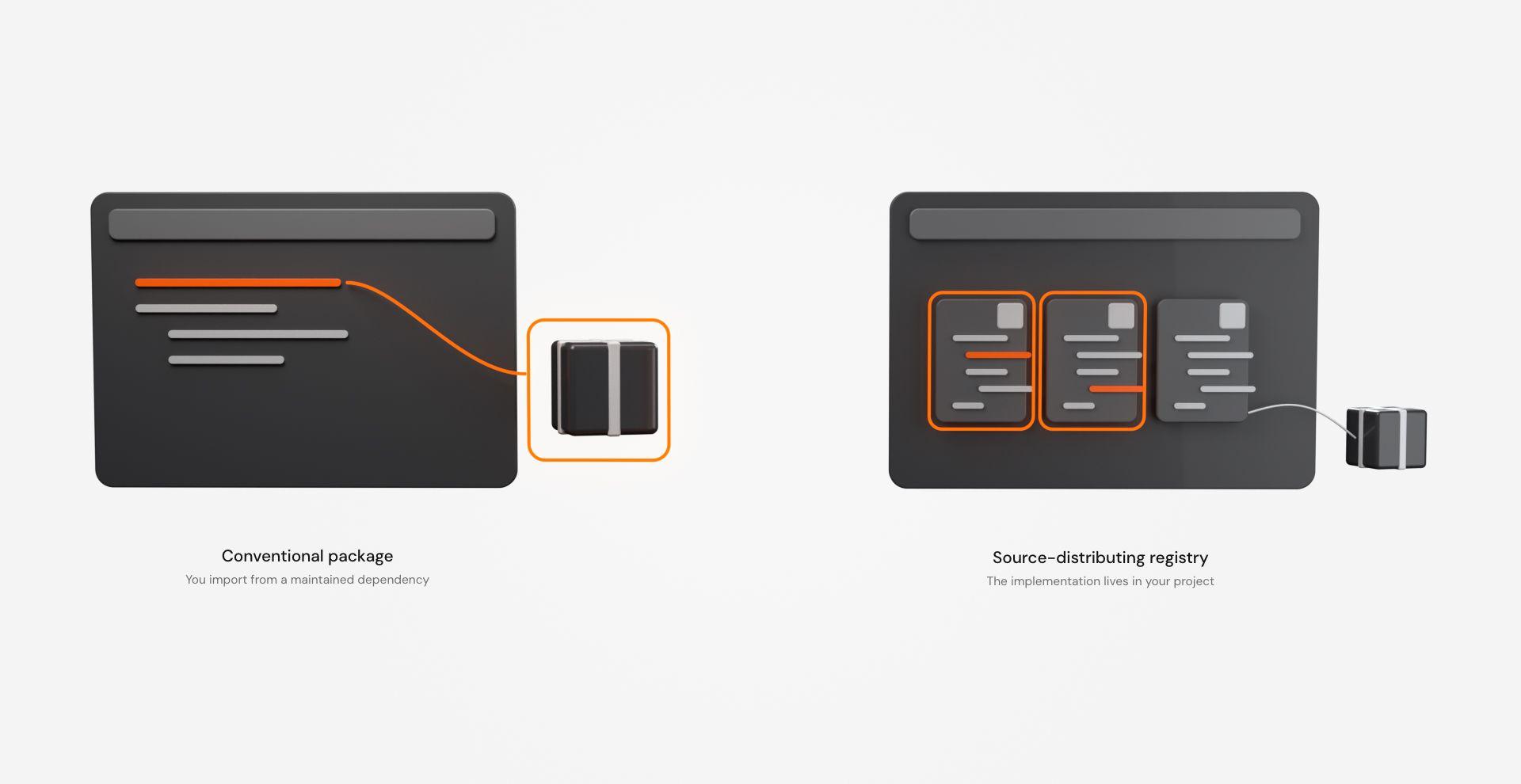
With a package abstraction, those changes depend on the extension points the package exposes. With local implementation source, the team can alter the implementation itself.
Neither is inherently superior. A stable abstraction is enormously useful when the abstraction matches the problem. Source-first becomes interesting when changing the internals is a normal part of shipping the experience.
Source-first is not the same as open source
Editable source and open-source licensing are separate questions.
Code can be delivered into your repository while remaining subject to licence terms governing modification, redistribution, commercial use, or sharing. Likewise, an open-source package can be consumed conventionally through npm without becoming application-owned source files.
So “this code is in our repository” should not automatically become “we can redistribute it however we like.”
The technically accurate claim is narrower: source-first distribution gives the consuming team implementation-level access. What the team is legally permitted to do with that source depends on the applicable licence.
Source-first does not mean dependency-free
Moving implementation files into your project does not make their wider dependency graph disappear.
A source-first animation component can still import Motion. Another can depend on GSAP. A WebGL effect might use Three.js, React Three Fiber, shader utilities, or other packages.
Modern component registry formats can describe those dependencies explicitly. The current shadcn registry-item specification distinguishes npm dependencies, development dependencies, registry-to-registry dependencies, and the actual files belonging to an item.
That leads to a more accurate model:
source registry + package registry + local source can all exist in the same installation.
They solve different parts of the problem.
What is a React component registry?
A component registry is structured distribution metadata plus a mechanism for resolving it.
Instead of telling a developer to visit a repository, locate four files, copy two of them, install a package from a footnote, and remember that one utility belongs somewhere else, the registry describes the installation in a format tooling can understand.
In shadcn's current schema, a registry item can define its name and type, npm dependencies, other registry dependencies, files, and optional target locations. The CLI can then use that information to determine what should enter the consuming project.
Here is a small illustrative registry item based on the documented shadcn schema:
{ "$schema": "https://ui.shadcn.com/schema/registry-item.json", "name": "animated-heading", "type": "registry:block", "dependencies": ["motion"], "files": [ { "path": "registry/animated-heading.tsx", "type": "registry:component", "target": "@components/animated-heading.tsx" }, { "path": "registry/use-reduced-motion.ts", "type": "registry:hook", "target": "@hooks/use-reduced-motion.ts" } ]}This is an explanatory example. It assumes that registry/animated-heading.tsx and registry/use-reduced-motion.ts already exist in the hypothetical registry. The manifest describes those implementations; it does not generate them.
There are two distinct layers in that object.
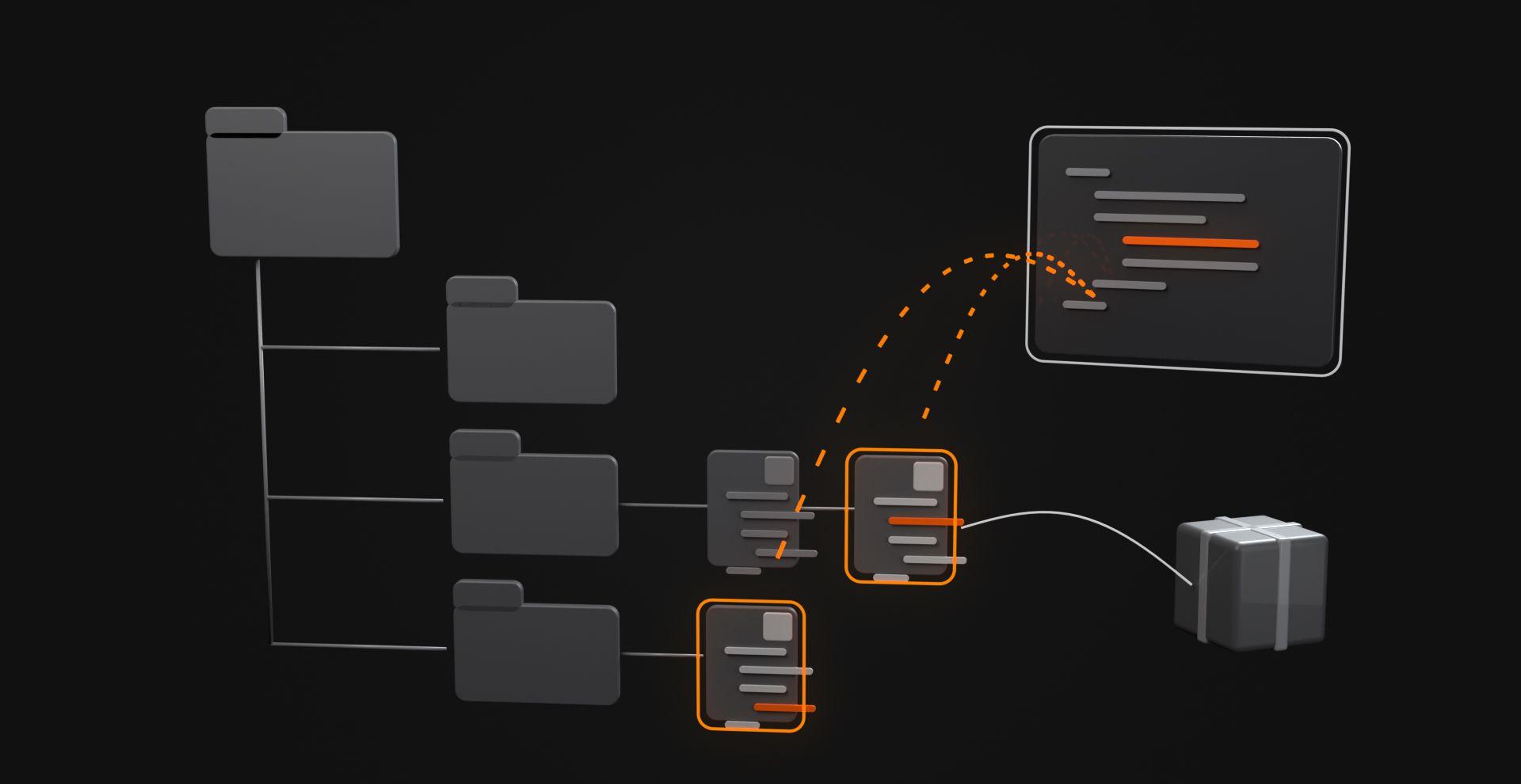
The registry metadata says what needs to move and where it belongs. The .tsx and hook files contain the implementation being moved. It also says something important about dependencies: the source can become local while motion remains a conventional npm dependency.
The registry resolves the files; the consuming project receives the implementation.
From registry item to local files
shadcn also supports GitHub repositories as source registries. A repository can include a root registry.json, and users can install declared items through the shadcn CLI. The current GitHub registry documentation uses this form:
pnpm dlx shadcn@latest add <username>/<repo>/<item>The values inside angle brackets are placeholders. A real command must replace them with an actual GitHub owner, repository, and registry item.
In this workflow, the GitHub repository acts as the source registry; a separate generated registry server is not required. Registry items can also distribute material beyond React components, including configuration, utilities, templates, documentation, workflows, and project conventions.
Suppose the consuming project's aliases map components and hooks into src/components and src/hooks. The illustrative registry item above could turn a project like this:
src/├── app/│ └── page.tsx└── components/ └── button.tsxinto this:
src/├── app/│ └── page.tsx├── components/│ ├── button.tsx│ └── animated-heading.tsx└── hooks/ └── use-reduced-motion.tsIts package.json could also gain the declared motion package if the dependency were not already installed.
That output is illustrative too. shadcn target placeholders such as @components/ and @hooks/ resolve through the consuming project's configuration, so actual paths depend on its aliases.
This is the critical transition:
registry definition → resolver → local implementation files + required package dependencies
Once those files arrive, ordinary frontend work resumes.
The source-first lifecycle is longer than the install command
Installation is one stage of a longer source-ownership workflow:
Discover → Resolve → Install → Adapt → Maintain
Discover. Find a pattern that solves the actual interface problem. For interaction work, this should include more than watching the demo. Check dependencies, input assumptions, responsive behaviour, rendering requirements, reduced-motion handling, and the general cost class of the effect.
Resolve. Tooling reads the registry item or equivalent manifest and works out which files and dependencies belong to the requested item.
Install. Source files enter the project. Required packages can be installed separately or by the tooling, depending on the registry implementation.
Adapt. The implementation meets the real website. This is where timing, easing, markup, responsive behaviour, animation boundaries, fallbacks, and application architecture stop being hypothetical.
Maintain. Your locally modified implementation can now diverge from upstream.
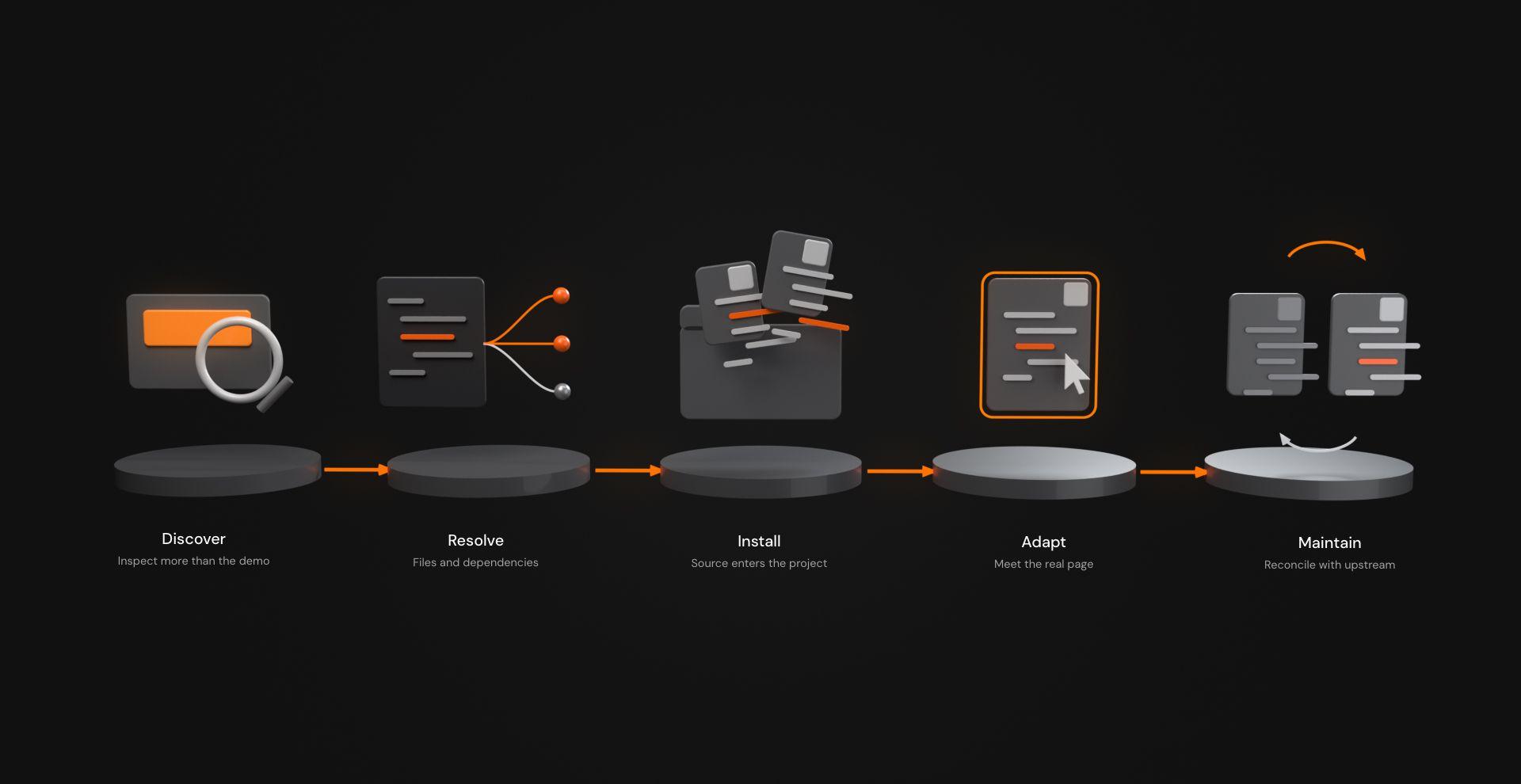
If your team changes a locally installed component, a later upstream version cannot always replace it blindly. You may need to compare revisions, retain local choices, port upstream fixes, or consciously leave your version alone.
Source-first removes one abstraction boundary. It does not remove software maintenance.
Source-distributing registries vs npm packages
“Registry versus npm” is convenient shorthand, but technically sloppy.
npm itself consists of a website, CLI, and registry, and its public registry distributes JavaScript packages and their metadata. A component registry such as shadcn's uses registry metadata for a different distribution contract: it can resolve selected source files and supporting resources into the consuming project.
A better comparison is conventionally consumed package versus source-distributing registry item.
| Conventional package consumption | Source-distributing registry item |
|---|---|
| Package remains the normal maintained unit | Selected implementation files enter the consuming project |
| Public exports form the intended integration surface | Local implementation can become the modification surface |
| Updates commonly arrive through package versions | Updates may involve comparing upstream source with locally modified files |
| Central maintenance can preserve consistent behaviour across projects | Individual projects can adapt implementation deeply |
| Package can contain readable or open-source code | Local files can still be subject to licence restrictions |
| Can depend on other packages | Installed source can also depend on npm packages |
The two models can coexist inside one application- and often do.
A source-first component that imports Motion is using local source distribution and package distribution at the same time. One mechanism gets the implementation into your repository; the other supplies a reusable runtime dependency.
The question is where you want the implementation boundary to live.
What local source changes for a frontend team
The obvious advantage is direct customization. The more important consequence is that implementation decisions become visible to the team maintaining the product.
Code review can inspect actual event listeners rather than inferring them from an API. A performance investigation can trace a requestAnimationFrame loop. A mobile path can be rewritten rather than negotiated through props. Markup can be changed to preserve semantics. An implementation that does too much work on scroll can be fixed at the source.
An editable component therefore deserves the same scrutiny as code the team wrote themselves.
Before accepting a source-first item, inspect questions such as:
| Area | What to inspect |
|---|---|
| Dependencies | Which npm packages and registry items arrive with it? Are their versions compatible with the project? |
| Rendering | Does it continuously render, measure layout, or update React state during animation? |
| Listeners and observers | Are event listeners, observers, subscriptions, and timelines cleaned up on unmount? |
| Animation loops | Does requestAnimationFrame stop when work is no longer needed? |
| Scroll and touch | Does the interaction assume hover, a fine pointer, or desktop viewport behaviour? |
| Accessibility | Does content remain understandable without motion? Are keyboard and focus behaviour intact? |
| Reduced motion | Is the fallback genuinely calmer, or merely the same sequence at another speed? |
| Canvas/WebGL | What are the DPR, asset, shader, render-loop, and context-lifecycle costs? |
| Next.js | Are server/client boundaries, hydration, and browser-only initialization handled correctly? |
| Updates | How will the team review upstream changes after modifying the local copy? |
A registry can make code arrive neatly. It cannot make responsibility evaporate.
Why source-first matters more for interaction components
Interaction code tends to be unusually contextual.
A button primitive can often expose a stable interface because most teams agree on the core job: respond to input, display a label, preserve semantics, support variants.
An interaction effect may depend on far more of the surrounding page.
Consider a scroll-driven sequence. Its pacing can depend on copy length. Its measurements can depend on the final layout. Its visual hierarchy can change completely at a narrow breakpoint. Its input model can become meaningless on touch. Its animation might need to stop when the section leaves the viewport. Its route behaviour may matter in an application with client-side transitions.
Those decisions are difficult to compress into one universal collection of props without eventually building a miniature programming language.
Source access gives the consuming team another option: change the implementation to match the page.
A useful interaction review might look like this:
- Desktop: Does the effect strengthen hierarchy or merely delay content?
- Touch: Is the interaction meaningful without hover or pointer tracking?
- Mobile: Should the same interaction survive, simplify, or disappear?
- Reduced motion: What information remains when the animated sequence is removed?
- Runtime: Does anything keep rendering or listening after the effect is no longer visible?
- Navigation: Does the implementation clean itself up across route changes?
- Content: Does the effect tolerate real CMS copy rather than neat demo text?
- Failure mode: If JavaScript, WebGL, or an animation dependency fails, is the page still understandable?
That is where source-first becomes more than a distribution preference. It changes how easily the team can answer those questions in code.
Performance still belongs to the implementation
Source-first is not a performance optimization.
Runtime cost still comes from the work a browser performs: DOM volume, component renders, layout measurement, observers, listeners, image decoding, package code, animation loops, canvas resolution, shaders, textures, device-pixel ratio, and everything else running on the page.
A transform-based text reveal and a continuously rendered Three.js scene do not deserve the same performance conversation.
For a DOM interaction, inspect unnecessary state updates, repeated measurements, observers, and cleanup. For a continuous canvas or WebGL effect, inspect whether rendering can pause offscreen, whether DPR needs a ceiling, how large the assets are, and whether the visual result justifies keeping the GPU busy.
“Animated” is not a performance profile.
Source access lets the consuming team inspect and alter the implementation instead of treating its performance behaviour as somebody else's private decision.
Accessibility needs more than a reduced-motion toggle
The same rule applies to accessibility.
prefers-reduced-motion is valuable, but accessibility does not end there. A source-first interaction may also need attention to semantics, keyboard operation, focus visibility, reading order, touch behaviour, and whether important information depends on the animation completing.
- Sometimes reduced motion means removing parallax.
- Sometimes it means replacing an elaborate entrance with a short opacity transition.
- Sometimes it means rendering the interface statically.
- Motion has to earn the milliseconds and the attention.
A Next.js client boundary is not the same as “run everything in the browser”
Interaction-heavy components frequently need a Client Component boundary in Next.js because they use state, event handlers, lifecycle APIs, or browser APIs such as window. The official Next.js Server and Client Components documentation describes "use client" as the boundary for those capabilities.
That does not mean putting "use client" at the top makes every browser API safe to call anywhere in the component. Client Components can participate in server prerendering on the initial load, so browser-only work still needs to happen at an appropriate lifecycle point.
This deliberately minimal example demonstrates listener setup and cleanup rather than a finished pointer effect:
"use client" import { useEffect } from "react" export function PointerEffect() { useEffect(() => { const onPointerMove = (event: PointerEvent) => { // Illustrative interaction work would happen here. } window.addEventListener("pointermove", onPointerMove) return () => { window.removeEventListener("pointermove", onPointerMove) } }, []) return <div aria-hidden="true" />}If code requires live layout measurements, window, an animation timeline tied to mounted DOM, or a WebGL context, it may need lifecycle-aware setup and cleanup rather than running unguarded during render.
The important point is that client boundary, initialization timing, and cleanup are separate engineering decisions.
Source-first distribution makes those decisions visible. It does not make them automatically correct.
When source-first is - and isn't - the better model
Source-first is most useful when local adaptation is part of the requirement and the consuming team is prepared to maintain what it changes.
A conventional package is often better when centralized behaviour and predictable upstream updates matter more than implementation-level control.
| Decision | Prefer conventional package consumption when… | Consider source-first when… |
|---|---|---|
| Customization | The public API already covers the real use cases | Project-specific implementation changes are routine |
| Consistency | Behaviour must stay uniform across many products | Local differentiation is part of the product |
| Updates | One upstream version should propagate improvements predictably | The consuming team wants to review and reconcile changes itself |
| Implementation ownership | Consumers should depend on the abstraction, not edit internals | The team needs to inspect and modify internal behaviour |
| Maintenance capacity | Local divergence would become debt | The team can test and maintain the installed source |
| Interaction complexity | Behaviour is stable and context-independent | Timing, input, layout, rendering, or accessibility need project-specific decisions |
This is why a centrally maintained Button and a campaign-specific scroll story can reasonably belong to different distribution models.
The button benefits from a stable contract. The scroll story may benefit from becoming part of the page's implementation.
Source-first components give teams the option to move that boundary. Code registries make the move repeatable: define the files, resolve the dependencies, install the source, then let the consuming project decide what the implementation should become.
After that, the usual rules apply. Review the code. Inspect the dependencies. Test the real content. Check mobile and touch. Respect reduced motion. Profile before guessing. Clean up what you initialize.
Then decide whether the motion earns its place. If that model fits the interaction layer you are building, browse Hyperiux Vault effects, inspect the implementation requirements and dependencies for the pattern you need, and decide whether it deserves a place in your project.