
Harsh Goyal
Developer
Category: Engineering
Harsh Goyal
Developer
Modern interactive websites rarely rely on one animation system. A hero may use GSAP for typography, Canvas for a rendered object, scroll progress for camera movement, React state for product changes, and video playback further down the page. Each system can behave correctly on its own while the complete interaction still feels slightly disconnected. The heading finishes first, the rendered object settles a little later, and a progress indicator reaches its endpoint somewhere between the two.
Adding another 100ms delay might make the problem disappear on one machine, but it does not answer the more important question: which system is actually responsible for deciding where the interaction should be? To synchronize multiple JavaScript animations reliably, dependent outputs should use one authoritative source of time or progress. That source might be a GSAP playhead, a requestAnimationFrame() timestamp, normalized scroll progress, or media time from a video. Synchronization is not about starting everything at once. It is about keeping the systems that depend on each other on the same clock.
Choose the Timing Authority Before Its Implementation
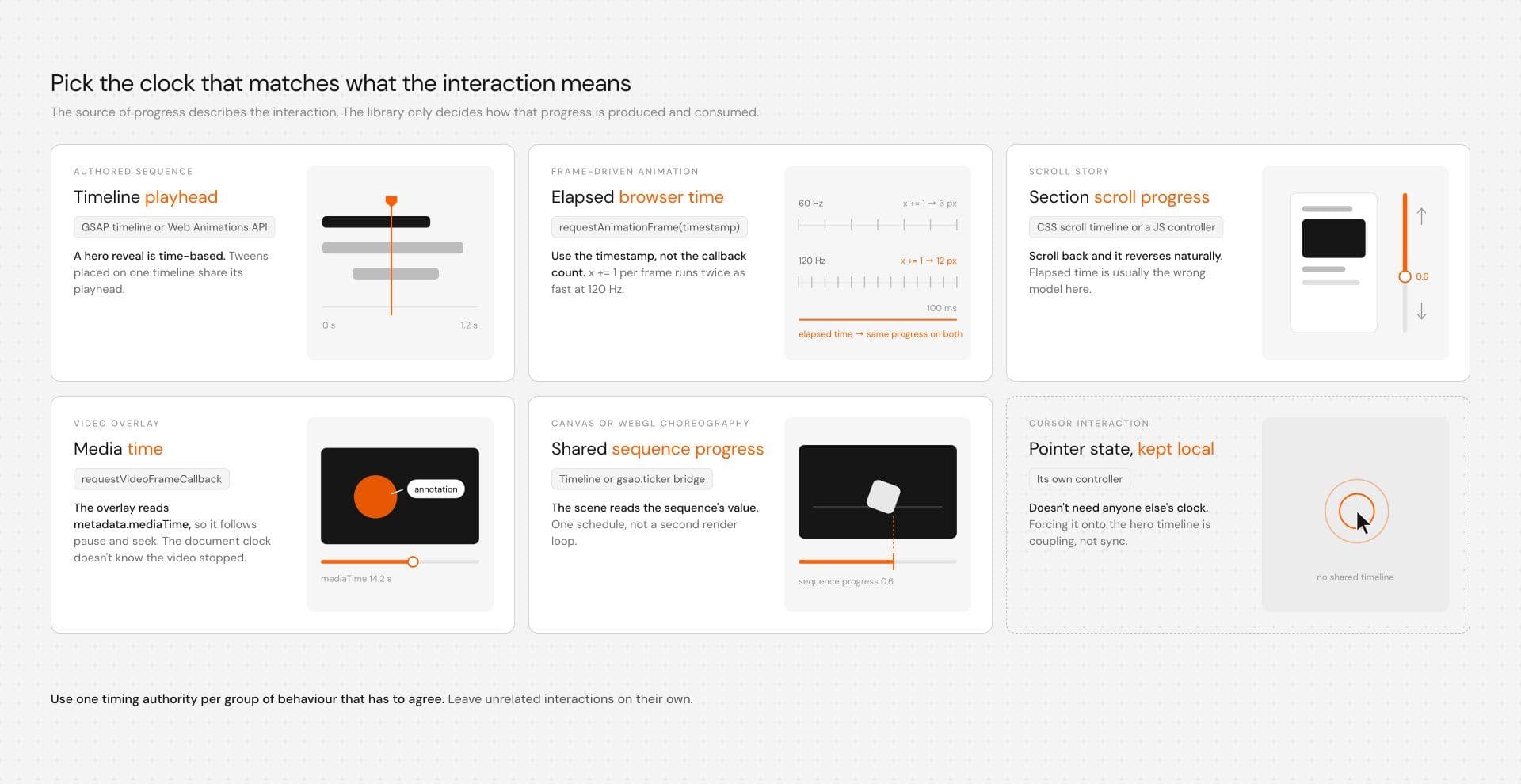
A choreographed hero reveal is fundamentally time-based. A sticky product story is usually scroll-based. An annotation attached to video content should follow media playback. A cursor effect responds to pointer state and may not need to share timing with anything else.
| Interaction | Natural source of progress | Typical mechanism |
|---|---|---|
| Authored sequence | Timeline playhead | GSAP or Web Animations API |
| Frame-driven animation | Elapsed browser time | requestAnimationFrame() |
| Scroll story | Section scroll progress | CSS or JavaScript controller |
| Video overlay | Media time | requestVideoFrameCallback() |
| Canvas or WebGL choreography | Shared sequence progress | Timeline or ticker bridge |
| Cursor interaction | Pointer state | Local controller |
The source of progress describes what the interaction means, while the library determines how that progress is produced and consumed. Consider a product reveal containing a heading, progress line, and Canvas object. If every system calculates its own timing, you have three interpretations of one interaction. A cleaner model gives one system responsibility for progress and lets every dependent renderer consume that value.
Authoritative progress | v Shared visual state / | \Heading Progress CanvasThe renderers do not need to know whether progress came from GSAP, browser time, scroll position, or video. They need one stable value with a clear owner.
The Renderer Should Consume Progress, Not Calculate Time
A normalized value from 0 to 1 is enough for many coordinated interactions. At 0, the interaction has not started. At 1, it has finished. Everything in between represents its current state.
function render(progress) { title.style.opacity = progress; bar.style.transform = `scaleX(${progress})`; drawScene(progress);}The important part is what render() does not do. It does not call performance.now(), inspect scroll position, or increment an internal counter. The system responsible for timing calculates progress and passes it in.
The title can map that value to vertical movement:
const y = 28 * (1 - progress); title.style.transform = `translateY(${y}px)`;Canvas can map the same value to a different property:const x = startX + (endX - startX) * progress; drawObject(x);The outputs are visually different, but their state comes from the same source. This also separates sequencing from synchronization. Sequencing answers what comes before or after something else, while synchronization answers where several dependent systems are at the same moment. A GSAP sequence can be perfectly arranged while the WebGL scene beside it still follows a different clock.
Shared Time and Shared Visual Progress Are Different
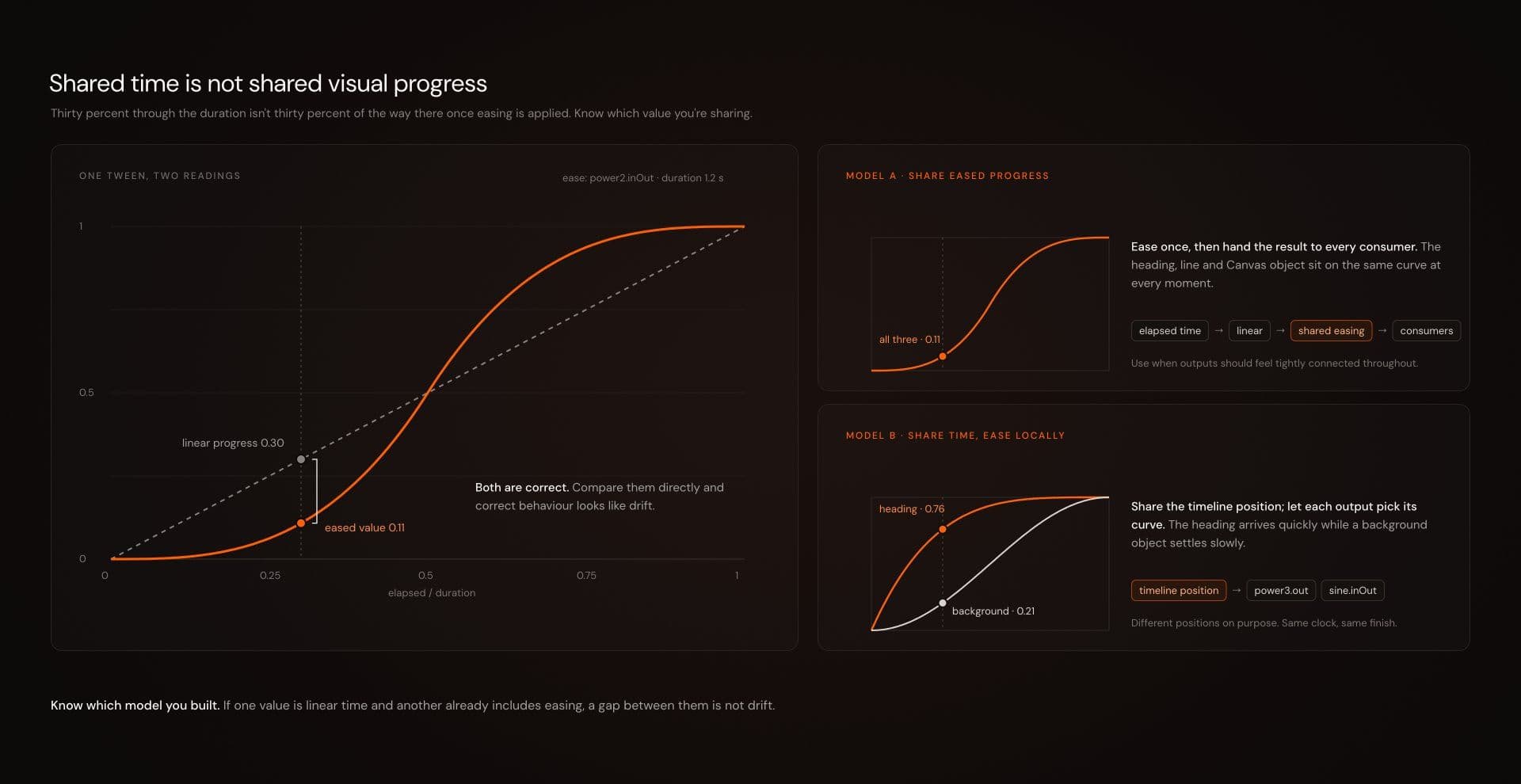
Suppose an animation is exactly halfway through its duration. Its linear progress is 0.5, but once easing is applied, its visual position may not be halfway between the start and end values. There are two reasonable ways to coordinate that interaction.
The first approach shares eased progress:
elapsed time |linear progress |shared easing |visual progress |consumersThis works well when several outputs should feel tightly connected throughout the transition. The second approach shares timeline position while allowing each output to use its own easing curve. A heading might arrive quickly while a background object settles more slowly. That can be completely intentional because the systems still share time, even though their intermediate visual positions differ.
The important part is knowing which model you built. If one value represents linear time and another already includes easing, comparing them directly can make correct behavior look like drift.
Use Browser Time Instead of Counting Frames
For manual frame-driven animation, requestAnimationFrame() gives you a browser timestamp. Using elapsed time avoids tying movement speed to the number of callbacks the browser happens to produce.
A frame-count-based animation is fragile:
let x = 0; function frame() { x += 1; updatePosition(x); requestAnimationFrame(frame);} requestAnimationFrame(frame);A display producing more callbacks can advance that movement faster. Instead, calculate progress from elapsed time:
const duration = 1000;let startTime = null; function frame(timestamp) { startTime ??= timestamp; const progress = Math.min( (timestamp - startTime) / duration, 1 ); render(progress); if (progress < 1) { requestAnimationFrame(frame); }} requestAnimationFrame(frame);MDN documents the timestamp supplied to requestAnimationFrame() and warns against relying on callback count for animation progress on high-refresh displays. Learn More
Multiple frame loops are not automatically a problem. A page can contain independent interactions with legitimate reasons to update separately. The problem begins when dependent systems calculate their own progress and each one behaves as though its result is authoritative.
Share One Progress Value Across GSAP, DOM, and Canvas
A common coordination problem appears when an animation library controls timing while custom rendering happens somewhere else. Suppose GSAP controls a reveal containing a DOM heading, progress indicator, and Canvas scene. The ownership model can be demonstrated with one shared state object.
const state = { progress: 0};Every dependent output receives the same value:function render(progress) { title.style.opacity = progress; bar.style.transform = `scaleX(${progress})`; drawScene(progress);}Canvas maps that progress to its own visual state:function drawScene(progress) { const x = startX + (endX - startX) * progress; drawObject(x);}GSAP owns the transition:const tween = gsap.to(state, { progress: 1, duration: 1.2, ease: "power2.inOut", onUpdate() { render(state.progress); }});The onUpdate() callback explicitly sends state.progress into render(). GSAP updates the shared state object, while the DOM and Canvas layers consume the result. There is no second Canvas timer and no independent DOM clock.
This is the architecture worth carrying into larger interactions: one system owns progress, while every dependent renderer translates that progress into its own visual output.
Keep React State for Values That Mean Something
React state is useful for values that describe application state, such as which product is active, which scene is selected, or whether a panel is expanded.
activeProduct = "headphones";scene = "details";isExpanded = true;A camera coordinate halfway through an animation often does not have the same meaning. React can decide that the scene changed from overview to details, while GSAP, Motion, Canvas, or WebGL handles the intermediate visual values required to present that transition.
When a React Effect creates animation work, cleanup should mirror setup:
useEffect(() => { const tween = gsap.to(state, { progress: 1, duration: 1.2, onUpdate() { render(state.progress); } }); return () => { tween.kill(); };}, []);React's Effect documentation describes Effects as a way to synchronize components with external systems and recommends cleaning those systems up when the Effect is disposed. Learn More
That cleanup matters during route changes and remounts. An animation loop that survives longer than its component can behave like a timing problem even though the real issue is lifecycle ownership.
Use a Timeline When Timing Has Authored Meaning
Not every coordinated interaction needs a shared state object. If several animations belong to one intentionally choreographed sequence, a timeline can be the clearest authority.
const timeline = gsap.timeline({ paused: true}); timeline.fromTo( headline, { opacity: 0, y: 28 }, { opacity: 1, y: 0, duration: 0.7 }, 0);Another element can use the same playhead:
timeline.fromTo( progressBar, { scaleX: 0 }, { scaleX: 1, duration: 1 }, 0); timeline.play();Creating the timeline with paused: true keeps it stopped until something explicitly plays or controls it. GSAP's timeline API supports that shared-playhead model directly. Read About Timelines
The useful rule is still dependency-based. A hero reveal can share one timeline, but that does not mean the cursor, footer, background scene, and product carousel should all join it. If changing one interaction's duration unexpectedly affects another part of the page, the timing boundary may be too broad.
Use gsap.ticker Only When It Clarifies Scheduling
Canvas and WebGL scenes often have their own update functions. If the scene genuinely needs to render alongside GSAP's update cycle, gsap.ticker can provide a useful bridge.
function updateScene() { renderer.render(scene, camera);} gsap.ticker.add(updateScene);Teardown should remove the same listener:
gsap.ticker.remove(updateScene);GSAP documents the ticker as its requestAnimationFrame()-driven update mechanism and supports adding and removing custom listeners. Learn About Tickers
Use the ticker when it replaces competing scheduling or creates a clear integration boundary. If a scene already renders from another frame loop and the ticker renders it again, the scene now has two schedules. That creates duplicate work rather than better synchronization.
A renderer can keep its own loop when it genuinely needs one. The important question is whether GSAP and the renderer share state, share scheduling, or stay independent.
Decide What Hidden Time Means
Browser visibility introduces another timing decision. If the visitor changes tabs for five seconds, should those five seconds advance the interaction? For a decorative entrance, probably not. For some forms of playback or simulation, they may need to.
For a manual frame loop where hidden time should not count, pause accounting can look like this:
let pausedAt = null;let pausedDuration = 0; function handleVisibilityChange() { if (document.hidden) { pausedAt = performance.now(); return; } if (pausedAt !== null) { pausedDuration += performance.now() - pausedAt; pausedAt = null; }}Register the listener when the interaction starts:
document.addEventListener( "visibilitychange", handleVisibilityChange);Then remove hidden time from the elapsed calculation:
const elapsed = timestamp - startTime - pausedDuration;Teardown should remove the listener:document.removeEventListener( "visibilitychange", handleVisibilityChange);This is one policy, not a universal rule. A physics simulation may use capped deltas or fixed simulation steps. A real-time playback experience may intentionally catch up after the page becomes visible again. The pause policy depends on whether hidden time should count for that specific interaction.
Scroll Progress Can Be the Clock
A sticky product story may look animated, but elapsed time is often the wrong model for it. At 20 percent through a section, one message might be active. At 60 percent, the camera may have rotated toward the product. If the visitor scrolls backward, the experience should reverse naturally.
That makes section progress the meaningful state.
section progress | v 0 to 1 / | \copy camera UIFor lightweight presentation effects, CSS scroll-driven animation can work as progressive enhancement. Start with a readable fallback and define the actual animation:
.reveal { opacity: 1; transform: none;} @keyframes reveal { from { opacity: 0; transform: translateY(24px); } to { opacity: 1; transform: translateY(0); }}Enable the scroll-linked behavior where supported:
@supports (animation-timeline: view()) { .reveal { animation: reveal linear both; animation-timeline: view(); }}Reduced motion should return the content to a stable, readable state:
@media (prefers-reduced-motion: reduce) { .reveal { animation: none; opacity: 1; transform: none; }}CSS scroll timelines are not universally available across every target browser, so progressive enhancement and a readable default still matter.
When Canvas, WebGL, navigation state, or other JavaScript also needs the same scroll progress, a JavaScript controller can be easier to integrate because one normalized value can be distributed to every consumer.
Video Should Follow Media Time
Video is a useful example of why the document clock should not own every interaction. If an overlay corresponds to something happening inside a video, video playback is the meaningful state. requestVideoFrameCallback() exposes frame metadata including mediaTime, which can drive that overlay.
let callbackId = null;let active = true; function updateOverlay(now, metadata) { if (!active) return; renderOverlay(metadata.mediaTime); callbackId = video.requestVideoFrameCallback( updateOverlay );}Start the loop only when the API is available:
if ("requestVideoFrameCallback" in video) { callbackId = video.requestVideoFrameCallback( updateOverlay );}Teardown prevents another update and cancels the latest pending callback:
function stopOverlay() { active = false; if (callbackId !== null) { video.cancelVideoFrameCallback( callbackId ); callbackId = null; }}Call that teardown when the component unmounts or when the player or overlay is disposed. MDN documents the callback metadata and callback-ID cancellation model. Learn More
Media time gives the overlay the correct semantic clock, but it does not guarantee that custom overlay pixels and video pixels will always reach the screen at exactly the same instant. Rendering still has a cost.
Reduced Motion Should Resolve the Whole Interaction
Reduced motion is another place where fragmented ownership becomes obvious. If a heading stops animating while the Canvas object continues moving, the alternative experience no longer behaves as one interaction.
For the shared-progress example, check the preference before creating the tween:
const motionQuery = window.matchMedia( "(prefers-reduced-motion: reduce)"); if (motionQuery.matches) { state.progress = 1; render(1);} else { startTween();}If the experience also needs to respond when the preference changes during playback, define that behavior explicitly:
function handleMotionChange(event) { if (!event.matches) return; tween?.kill(); state.progress = 1; render(1);}Setup and cleanup should remain paired:
motionQuery.addEventListener( "change", handleMotionChange); return () => { motionQuery.removeEventListener( "change", handleMotionChange ); tween?.kill();};For a decorative entrance, jumping to the completed state is reasonable. A scroll story may instead keep all content visible while removing parallax and camera movement. A video annotation may still need to follow media time if it communicates useful information rather than decoration.
Reduced motion is therefore not simply an instruction to turn every animation off. It is an alternate interaction state that should preserve content, hierarchy, controls, and meaning.
Shared Progress Does Not Guarantee Shared Paint Time
Two renderers can receive exactly the same progress value and still appear slightly misaligned. A DOM transform may be inexpensive while Canvas performs heavy drawing. A WebGL scene may spend more time on shaders, textures, object updates, or a high device-pixel ratio. JavaScript may also trigger layout or other main-thread work before rendering.
At that point, the problem may no longer be timing ownership.
Record the interaction in the browser's Performance panel and inspect the frames around the visible mismatch. Look for long scripting work, style calculation, layout, paint, and rendering cost. If two systems receive the same logical progress but one frame takes significantly longer to produce, changing the animation clock will not fix the bottleneck.
Synchronization aligns desired state, but it cannot create extra frame budget.
Debug Timing Ownership in This Order
A useful debugging process starts with ownership rather than delay values.
| Symptom | Likely cause | Inspect |
|---|---|---|
| Elements stay consistently separated | Phase offset or easing difference | Start values, delays, easing |
| Difference grows during playback | Different clocks or frame counting | Timing source and delta calculations |
| Camera appears to fight itself | Multiple writers | Timeline, scroll handler, render loop |
| Works once, fails after navigation | Cleanup failure | Effects, listeners, ticker callbacks |
| Scroll sequence shifts after resize | Stale measurements | Layout-dependent boundaries |
| Values agree but visuals still lag | Rendering cost | Main thread, Canvas, GPU work |
First, identify the timing authority. Decide whether the interaction should follow elapsed time, timeline progress, scroll position, media time, or another source. Second, list every system capable of writing the value that appears wrong. A camera might be modified by a GSAP timeline, a Three.js loop, a scroll handler, and a resize callback. If several systems write the same property, changing delays will not resolve the ownership conflict.
Third, compare values that describe the same thing:
console.table({ timeline: timeline.progress(), scene: sceneState.progress, scroll: scrollProgress});Do not compare linear progress with an eased visual value and immediately treat the difference as drift. Fourth, distinguish a stable offset from changing drift. A stable gap often points toward initialization, delay, or easing. A gap that grows during playback is a stronger sign of separate clocks, frame-based movement, or different rate assumptions.
Finally, test the interaction outside its clean forward playback. Hide the tab, resize the viewport, reverse the sequence, scroll quickly in both directions, navigate away and back, seek video, remount the component, and enable reduced motion. Those conditions expose weak timing assumptions much faster than repeatedly tuning delays.
Keep Independent Interactions Independent
A shared clock is useful when several outputs genuinely depend on one another. It becomes unnecessary coupling when unrelated interactions are forced onto it. A hero reveal does not need to share progress with a cursor effect. A footer transition should not depend on the duration of a product carousel. A background WebGL scene may have legitimate reasons to keep its own update schedule.
Use one timing authority for each group of behavior that needs to agree, and leave unrelated interactions local. This keeps changes contained and makes debugging easier because each interaction has a smaller ownership boundary.
Editable interaction source can also help when an existing React or Next.js effect needs to follow a project's timeline, scroll controller, lifecycle rules, or reduced-motion policy. Hyperiux Vault follows a source-first workflow where selected effect files are added directly to the project and dependencies vary by effect. That does not make synchronization automatic, but it gives the project access to the code where those timing decisions can be inspected and adapted.
Hyperiux Vault Installation Guide
Fewer Authorities Make Motion Easier to Reason About
Good synchronization does not mean putting the whole website on one master timeline. It means identifying which visual states genuinely depend on each other, choosing the source of progress that best represents that interaction, and making dependent systems consume it deliberately.
A choreographed hero can follow a timeline. A frame-based animation can use browser timestamps. A sticky product story can follow scroll progress. A video overlay can follow media time. An unrelated cursor interaction can remain independent. From there, ownership should remain visible in the code. One system owns progress, renderers consume it, easing choices are deliberate, cleanup mirrors setup, hidden-tab behavior follows an explicit policy, reduced motion resolves to a coherent state, and rendering cost is diagnosed separately from clock disagreement.
When several animation systems stop agreeing, another delay is usually the wrong first move. Find the clock, find every writer, compare values that mean the same thing, remove competing ownership, and then profile what remains.