
Ishita Srivastav
Developer
Category: Engineering
Ishita Srivastav
Developer
React Three Fiber vs Three.js is often treated as a performance contest. That framing skips the more useful question.
React Three Fiber, usually shortened to R3F, is a React renderer for Three.js. It does not replace Three.js with another 3D engine. It gives React a declarative way to create, configure and manage Three.js objects through components, JSX, hooks and lifecycle. The underlying scene still consists of Three.js objects. React Three Fiber introduction
The decision is therefore less about choosing one graphics engine over another and more about deciding who should own scene composition, resource lifetime and rendering behavior.
If your 3D experience is closely connected to React application state, reusable components and the lifecycle of the surrounding interface, R3F can make that architecture easier to reason about. If the scene is isolated, heavily imperative or depends on unusually explicit control over rendering and resource lifetime, direct Three.js can be simpler.
Neither architecture changes the GPU cost of the scene it renders. Geometry, shaders, textures, postprocessing, resolution and draw calls still need to be paid for.
This article uses React Three Fiber v9 as the stable baseline. The current R3F documentation identifies v10 as an alpha release and describes a rewritten frame-loop scheduler alongside its newer WebGPU model. Those v10-specific capabilities should not be silently attributed to stable v9 behavior. R3F v10 alpha documentation
R3F is Still Three.js
React Three Fiber is a React renderer for Three.js. JSX elements such as <mesh>, <boxGeometry> and <meshStandardMaterial> map onto Three.js objects. R3F creates and manages those objects through React's component model rather than asking you to construct the complete scene graph manually.
In direct Three.js, a basic mesh might look like this:
const scene = new THREE.Scene() const geometry = new THREE.BoxGeometry(1, 1, 1) const material = new THREE.MeshStandardMaterial({ color: "hotpink",}) const mesh = new THREE.Mesh(geometry, material) scene.add(mesh)The R3F equivalent can be expressed as JSX:
<mesh> <boxGeometry args={[1, 1, 1]} /> <meshStandardMaterial color="hotpink" /></mesh>Both approaches ultimately construct and render Three.js objects. The architectural difference is what surrounds those objects.
In direct Three.js, application code constructs the object, adds it to the scene, updates it and decides when its resources should be released. In R3F, the object can become part of a React tree whose mounting, props and unmounting participate in the scene lifecycle.
That distinction matters more in production than the surface difference between constructors and JSX.
What JSX as a Scene Graph Actually Buys You
R3F is useful when scene composition closely follows React application structure.
Consider a product configurator. A user changes a finish in ordinary HTML controls. The same selection affects pricing text, a material inside the 3D scene and perhaps another part of the interface. In direct Three.js, you need to decide how React state reaches the scene and how the scene responds to that state. In R3F, the selected finish can become a prop.
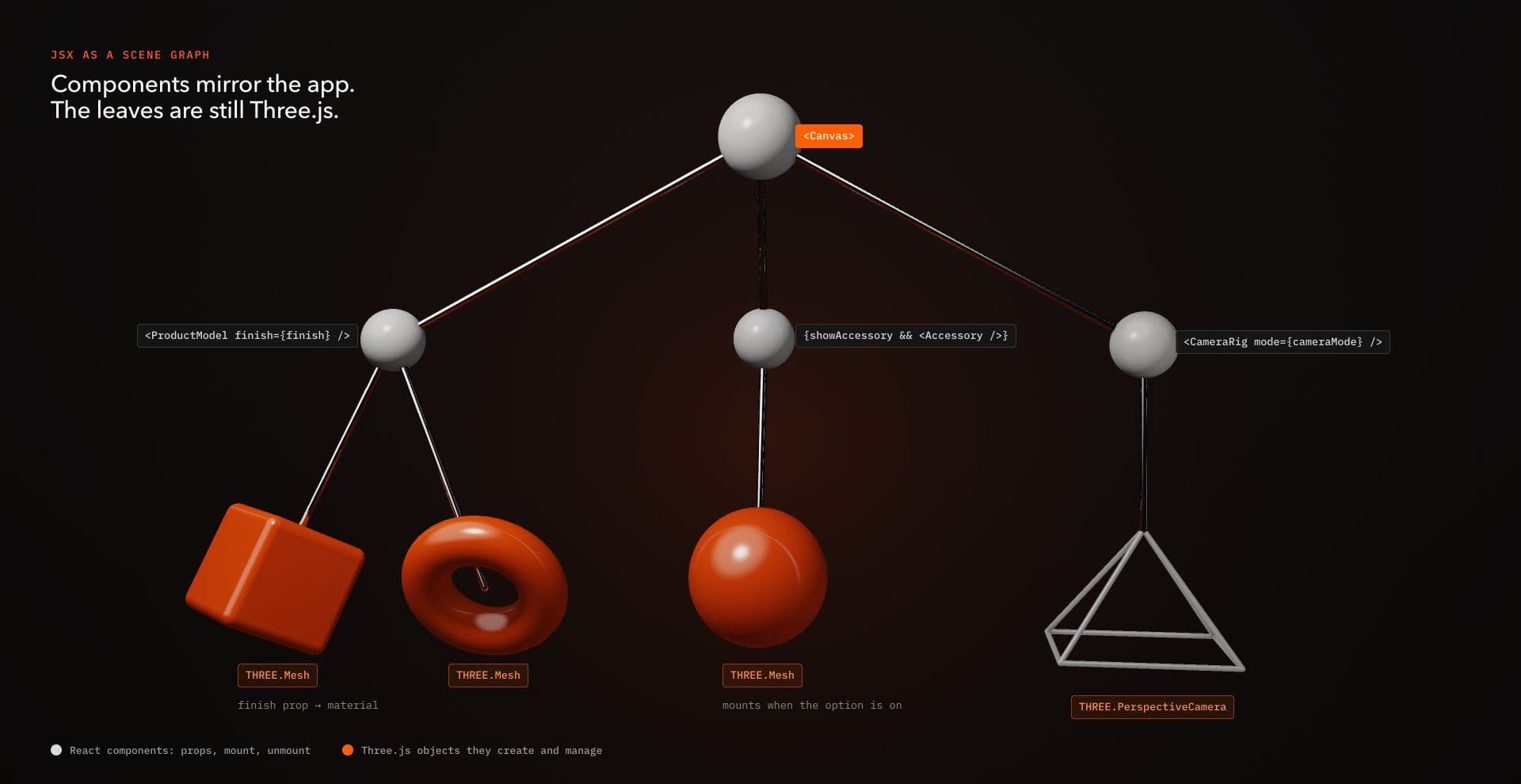
A conceptual scene might look like this:
<Canvas> <ProductModel finish={finish} /> <CameraRig activeView={view} /></Canvas>ProductModel and CameraRig are project-specific components in this example, not built-in R3F components.
A larger R3F scene may also use third-party abstractions such as Drei for controls, environments, loaders or helpers. Those are additional dependencies and should be evaluated like any other package rather than disappearing into the phrase "React Three Fiber."
The advantage is architectural alignment. Components can describe meaningful scene boundaries, props can represent application-level state, and mounting behavior can correspond to routes, modes or product configurations. The abstraction gets harder when GPU resource lifetime outlasts component lifetime.
The First Cost: Resource Ownership Becomes Less Visible
Direct Three.js leaves resource ownership visibly in your hands.
Three.js resources such as geometries, materials, textures and render targets can allocate GPU-side resources. Removing a mesh from a scene does not automatically release its geometry or material because those resources may still be shared or reused elsewhere. Three.js therefore requires applications to explicitly dispose resources when they are genuinely no longer needed. Three.js disposal guide
Imagine a feature creates its own geometry and material:
const geometry = new THREE.BoxGeometry(1, 1, 1) const material = new THREE.MeshStandardMaterial({ color: "hotpink",}) const mesh = new THREE.Mesh(geometry, material) scene.add(mesh)If those resources belong exclusively to that feature, teardown can dispose them:
scene.remove(mesh) geometry.dispose()material.dispose()If the renderer itself is also being permanently retired, renderer teardown belongs to the broader scene lifecycle:
renderer.setAnimationLoop(null)renderer.dispose()Calling renderer.dispose() every time one mesh disappears would represent the wrong ownership boundary. Renderer disposal belongs to the renderer lifecycle, not the lifecycle of an arbitrary scene object. Three.js similarly treats textures separately from materials because a texture may be shared by several consumers.
What R3F manages for you
R3F-managed objects can participate in React lifecycle, which removes useful manual ceremony for resources created declaratively inside the managed tree.
A simple component might look like this:
function Box() { return ( <mesh> <boxGeometry args={[1, 1, 1]} /> <meshStandardMaterial color="hotpink" /> </mesh> )}When this managed subtree disappears, its resources can participate in R3F's disposal process rather than requiring explicit cleanup inside the component.
That should not be translated into the broader rule that R3F solves GPU cleanup automatically. It manages resources whose lifetime belongs to its tree. As soon as ownership extends beyond that tree, the application still needs an explicit policy.
Existing objects passed through primitive
Suppose an application constructs a Three.js object itself:
const geometry = new THREE.BoxGeometry(1, 1, 1) const material = new THREE.MeshStandardMaterial({ color: "hotpink",}) const mesh = new THREE.Mesh(geometry, material) function ExistingMesh() { return <primitive object={mesh} />}R3F does not automatically dispose an object supplied through <primitive> when it unmounts. The object was created outside the declarative tree, so its lifetime remains the responsibility of whichever part of the application owns it.
That distinction matters for imported scenes, externally constructed meshes, cached objects and other integrations that cross the R3F ownership boundary.
If another part of the application created the resource, do not assume component unmounting settles its lifetime for you.
Shared resources require the opposite decision
Automatic disposal can also be undesirable when resources intentionally outlive the component currently using them.
For example:
const sharedGeometry = new THREE.BoxGeometry(1, 1, 1) const sharedMaterial = new THREE.MeshStandardMaterial({ color: "hotpink",}) function SharedBox() { return ( <group dispose={null}> <mesh geometry={sharedGeometry} material={sharedMaterial} /> </group> )}dispose={null} prevents R3F from automatically disposing that managed subtree when the application has chosen a broader ownership model.
It does not make cleanup disappear. The application-level owner that created sharedGeometry and sharedMaterial must eventually call their disposal methods after every consumer has finished using them.
The distinction is ownership, not automatic cleanup versus manual cleanup.
Same Scene, Two Ownership Models
A useful architectural comparison should keep the rendering conditions as close as practical.
The examples below create the same basic scene: one perspective camera, one directional light, one cube, continuous Y rotation, antialiasing and an effective DPR of 1.
A fixed DPR is intentional here. It avoids making the examples obviously different because one implementation happened to choose another device-pixel-ratio policy.
Direct Three.js
"use client" import { useEffect, useRef } from "react"import * as THREE from "three" export function VanillaScene() { const containerRef = useRef(null) useEffect(() => { const container = containerRef.current if (!container) return const scene = new THREE.Scene() const camera = new THREE.PerspectiveCamera( 45, 1, 0.1, 100 ) camera.position.z = 4 const renderer = new THREE.WebGLRenderer({ antialias: true, }) renderer.setPixelRatio(1) container.appendChild(renderer.domElement) const geometry = new THREE.BoxGeometry(1, 1, 1) const material = new THREE.MeshStandardMaterial({ color: "hotpink", }) const mesh = new THREE.Mesh(geometry, material) scene.add(mesh) const light = new THREE.DirectionalLight("white", 2) light.position.set(2, 2, 3) scene.add(light) const clock = new THREE.Clock() function resize() { const width = container.clientWidth const height = container.clientHeight if (!width || !height) return camera.aspect = width / height camera.updateProjectionMatrix() renderer.setSize(width, height, false) } const resizeObserver = new ResizeObserver(resize) resizeObserver.observe(container) resize() renderer.setAnimationLoop(() => { const delta = clock.getDelta() mesh.rotation.y += delta renderer.render(scene, camera) }) return () => { renderer.setAnimationLoop(null) resizeObserver.disconnect() scene.remove(mesh) scene.remove(light) geometry.dispose() material.dispose() renderer.dispose() renderer.domElement.remove() } }, []) return ( <div ref={containerRef} style={{ width: "100%", height: 400 }} /> )}This version exposes the lifecycle directly. Application code creates the renderer, observes container size, updates the camera, owns the loop and disposes the resources it created.
React Three Fiber v9
"use client" import { useRef } from "react"import { Canvas, useFrame } from "@react-three/fiber" function RotatingBox() { const meshRef = useRef(null) useFrame((state, delta) => { if (!meshRef.current) return meshRef.current.rotation.y += delta }) return ( <mesh ref={meshRef}> <boxGeometry args={[1, 1, 1]} /> <meshStandardMaterial color="hotpink" /> </mesh> )} export function R3FScene() { return ( <div style={{ width: "100%", height: 400 }}> <Canvas dpr={1} gl={{ antialias: true }} camera={{ position: [0, 0, 4], fov: 45, near: 0.1, far: 100, }} > <directionalLight position={[2, 2, 3]} intensity={2} /> <RotatingBox /> </Canvas> </div> )}The main scene parameters and pixel density now match closely enough to demonstrate the difference in ownership. R3F owns the renderer and canvas sizing associated with <Canvas>, while the frame-critical rotation remains an imperative mutation inside useFrame.
These examples are not a controlled visual or performance benchmark. Matching geometry, camera, light, animation, antialiasing and DPR is not enough to prove renderer parity. A strict comparison should also align Three.js and R3F versions, renderer configuration, output color space, tone mapping, canvas dimensions and any other defaults that could affect the rendered result or workload.
The examples are designed to compare architecture, not declare a performance winner.
The Second Cost: The Render Loop Becomes Mediated
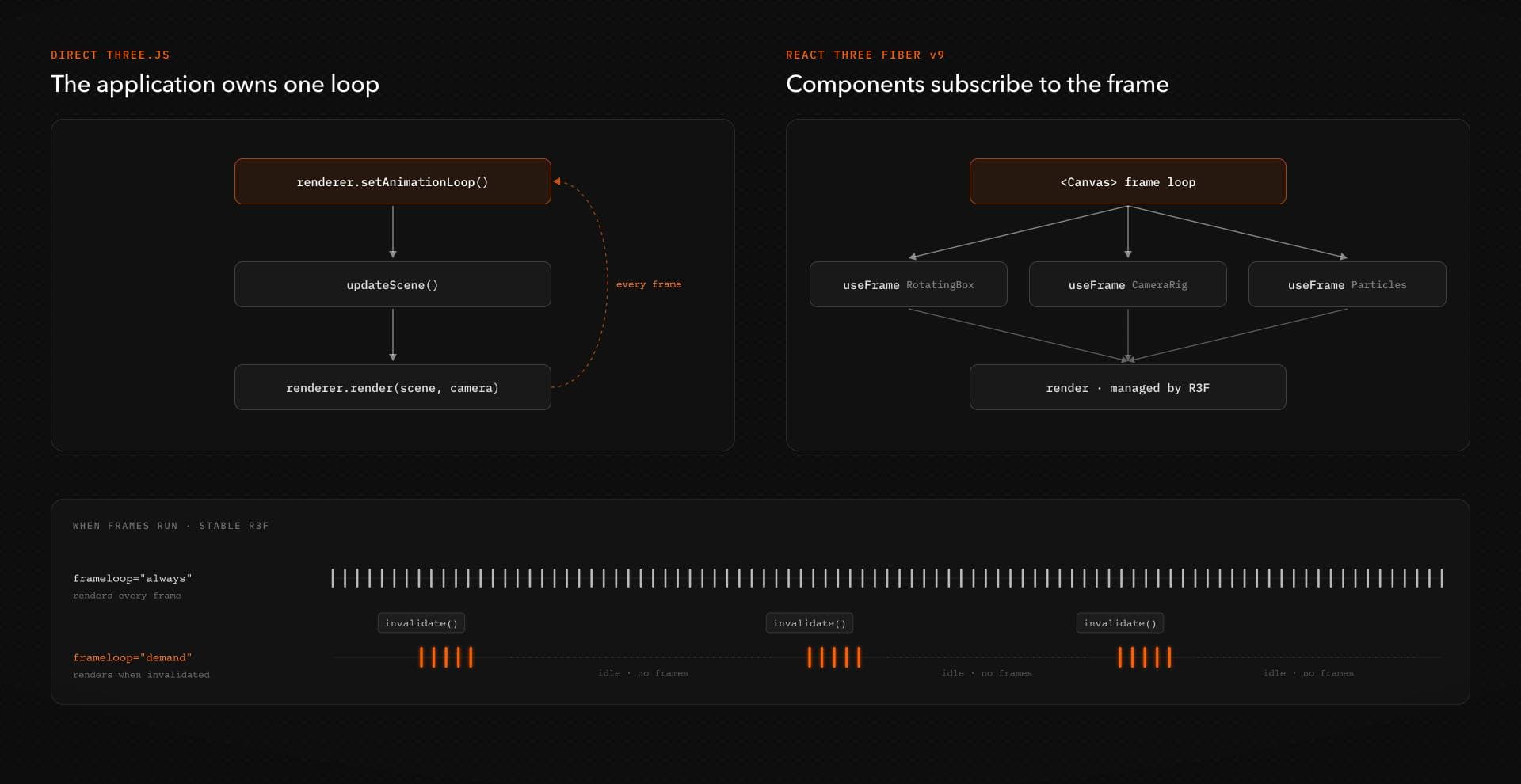
In direct Three.js, the application can own the animation loop itself:
renderer.setAnimationLoop(() => { updateScene() renderer.render(scene, camera)})Three.js exposes setAnimationLoop() as part of the renderer API. Three.js WebGLRenderer documentation
In stable R3F, ordinary frame work usually participates through useFrame:
function RotatingMesh() { const meshRef = useRef(null) useFrame((state, delta) => { if (!meshRef.current) return meshRef.current.rotation.y += delta }) return <mesh ref={meshRef} />}The useful distinction is not that R3F removes render-loop control. It expresses that control through R3F's frame architecture rather than asking the application to own one global loop by default.
That can simplify scenes where several components each own a small piece of frame behavior. It can be less attractive when a feature requires highly specialized scheduling, unusual render ordering or a simulation architecture with little relationship to React.
Demand rendering
A continuously animated shader usually needs continuous frames. A product viewer that becomes completely still may not.
R3F supports demand-driven rendering for scenes whose output only changes occasionally:
<Canvas frameloop="demand"> <ProductViewer /></Canvas>When something mutates the scene outside React's normal update path, invalidate() can request another frame.
Demand rendering is valuable when a scene genuinely becomes idle. It cannot reduce the inherent work of an experience that needs to update continuously.
Version scope matters
R3F v10 introduces a rewritten frame-loop scheduler and additional WebGPU-related architectural changes. Because v10 remains documented as alpha, those capabilities should be evaluated separately from stable v9 production behavior. R3F v10 migration guide
The Third Cost: React State is Not Frame State
React state is useful for application decisions. It is usually the wrong transport for values changing every rendered frame.
Consider this pattern:
function Box() { const [rotation, setRotation] = useState(0) useFrame((state, delta) => { setRotation((value) => value + delta) }) return <mesh rotation-y={rotation} />}The value changes every frame, but the update has been routed through React state before reaching the Three.js object.
For transient graphical state, direct mutation through a ref is usually the cleaner path:
function Box() { const meshRef = useRef(null) useFrame((state, delta) => { if (!meshRef.current) return meshRef.current.rotation.y += delta }) return <mesh ref={meshRef} />}A selected product finish is reasonable React state because it represents an application-level choice. The active camera mode may be React state. A UI control deciding whether an object exists may also belong in React.
The precise rotation of a cube during the next rendered frame usually does not.
R3F works best as a hybrid model. React can own scene composition and slower application state while refs and frame callbacks handle transient graphics state directly.
Is React Three Fiber Actually Slower?
A useful performance comparison needs more specificity than a framework label.
A claim such as "R3F is 10 percent slower" or "R3F has zero cost" is not useful without a defined scene, browser, hardware profile, library versions, renderer settings and measurement procedure.
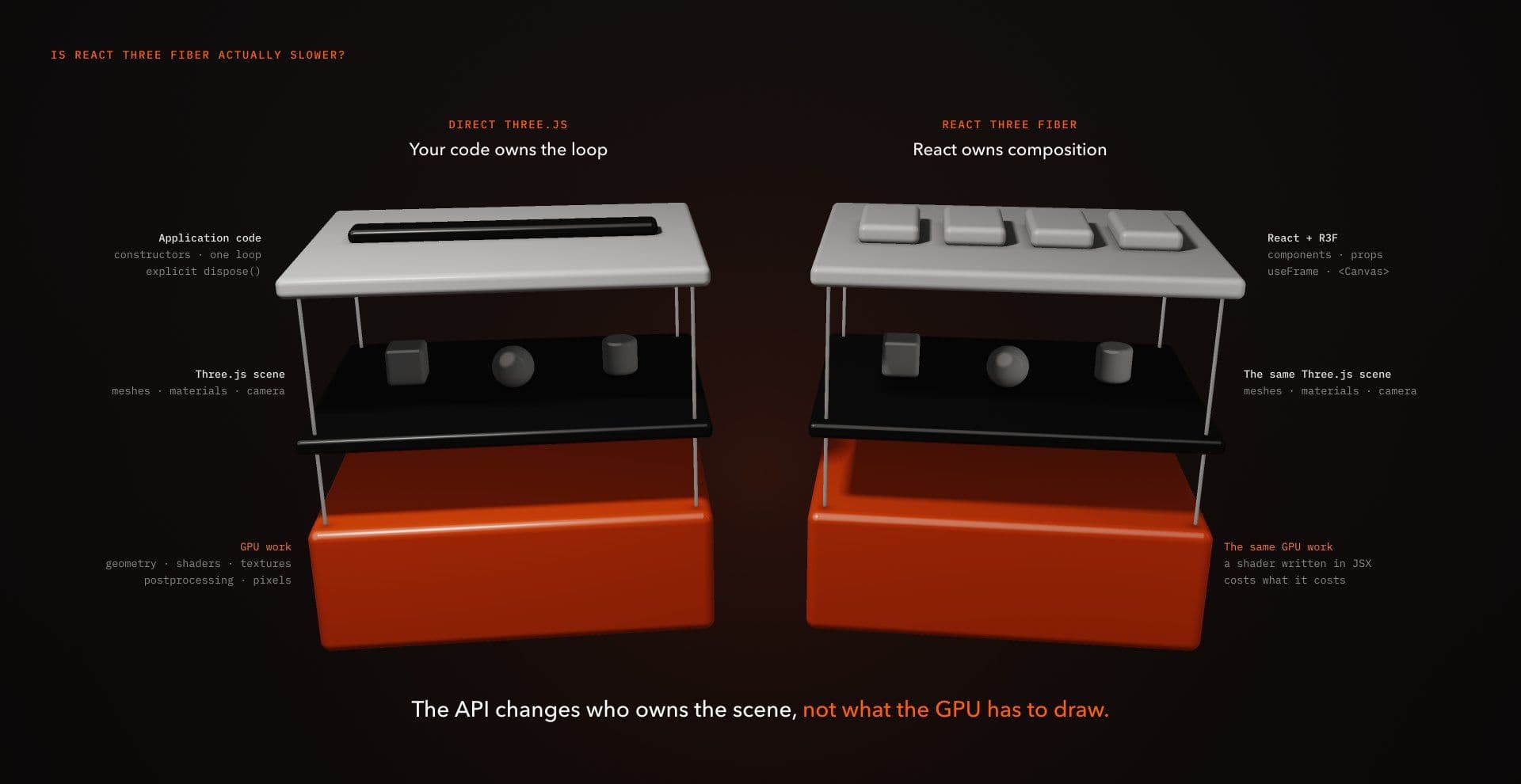
Performance problems can come from several different layers.
Application and orchestration work
React reconciliation, component renders, object construction, state updates and application logic consume CPU time.
An R3F application that causes unnecessary React renders or repeatedly remounts expensive scene objects can create avoidable work.
A direct Three.js application can create the same category of problem by continually rebuilding geometry, allocating temporary objects or performing unnecessary JavaScript work inside the render loop.
Dependency and initialization cost
R3F adds another architectural layer to a React application. Additional ecosystem packages add their own code when used.
The useful measurement is the production application you actually ship, including code splitting and package usage, rather than an arbitrary bundle-size figure copied from another project.
GPU rendering cost
Geometry complexity, draw calls, texture memory, postprocessing, pixel density and shader complexity belong largely to a different performance budget.
Writing a bloom-heavy scene in JSX does not make bloom cheaper. Direct constructors do not reduce the cost of a fragment shader.
The scene API does not reduce the number of pixels a costly shader must process.
A Repeatable Way to Compare Performance
If performance is one of the reasons you are choosing between architectures, build the smallest comparable implementation you can and hold the rendering work constant.
Use the same geometry, materials, lights, camera, effective DPR, renderer configuration, drawing-buffer dimensions and animation behavior. If one implementation adds postprocessing while the other does not, you are measuring different scenes rather than architectural overhead.
1. Record the environment
Write down the browser version, device, operating system, Three.js version, React version and R3F version.
Without that context, a frame-time result is difficult to interpret and harder to reproduce.
2. Measure initial scene creation
Record a page load with browser performance tooling.
Look for expensive object construction, asset parsing, shader compilation and unnecessary React work around scene initialization.
Browser performance tooling is useful for understanding JavaScript, scheduling, main-thread work and related CPU-side behavior. It should not be treated as a complete measurement of GPU cost by itself.
3. Measure steady-state interaction
Perform the same interaction in both implementations.
Look for long JavaScript tasks, repeated component rendering, garbage collection pressure and expensive frame work. If the visual result is identical but one version performs substantially more application-side work, investigate the source before attributing the difference to the framework name.
4. Trigger a controlled remount
Unmount and remount the feature deliberately.
Watch whether geometries, materials, models or other expensive resources are reconstructed. Repeated resource creation may be a lifecycle problem rather than an inherent cost of the API used to describe the scene.
5. Inspect renderer diagnostics
Three.js exposes renderer.info, including information about rendered objects and tracked resources such as geometries and textures.
Use those counters as a diagnostic aid, not as a leak verdict.
Three.js notes that some internally managed resources can remain in renderer.info.memory after application resources are disposed because the renderer retains them for reuse. The counters also do not expose every possible GPU allocation or replace platform-specific profiling.
6. Inspect the production build
Compare what the browser actually receives.
Check the client JavaScript involved in the 3D feature, optional packages, code splitting and whether the scene is shipping libraries it does not need.
Development-mode behavior should not be used as the final basis for production bundle conclusions.
The result should identify where each implementation spends time, not declare a universal winner.
Remounts and Resource Reuse
Creating Three.js resources is not free. Materials can require shader compilation, geometries need processing, and textures may require decoding and GPU upload.
If a geometry and material are intentionally shared across several meshes, their lifetime should be broader than the lifetime of any individual mesh:
const geometry = new THREE.BoxGeometry(1, 1, 1) const material = new THREE.MeshStandardMaterial({ color: "hotpink",}) function Boxes({ positions }) { return ( <group dispose={null}> {positions.map((position) => ( <mesh key={position.join(":")} position={position} geometry={geometry} material={material} /> ))} </group> )}The dispose={null} is important here because the resources are deliberately owned outside the component subtree.
That creates a clear contract: unmounting Boxes should not dispose geometry or material, because other consumers may still use them. The application-level owner that created those resources must dispose them once every consumer has finished:
geometry.dispose()material.dispose()If those resources are shared between multiple Canvas roots or other systems, the owner needs to know when all of those consumers are finished before releasing them.
For large numbers of similar objects, instancing may be more appropriate than creating one independent draw call for each mesh.
Component syntax can make mounting feel inexpensive even when the underlying graphics resources are not.
Where Direct Three.js is Cleaner
Direct Three.js makes a strong case when the WebGL feature behaves like a self-contained graphics system.
Imagine a landing page with one shader-driven background. The scene has a camera, one full-screen surface, a few uniforms and one animation loop. React's responsibility is mostly to mount the effect when the page appears and destroy it when the page disappears.
A conceptual lifecycle might look like this:
useEffect(() => { const renderer = createRenderer() const scene = createScene() const camera = createCamera() const surface = createShaderSurface() scene.add(surface) renderer.setAnimationLoop(() => { updateUniforms() renderer.render(scene, camera) }) return () => { renderer.setAnimationLoop(null) surface.geometry.dispose() surface.material.dispose() renderer.dispose() }}, [])The helper functions are deliberately project-specific. This snippet illustrates the ownership model rather than representing a copy-paste implementation.
The feature owns its renderer, scene resources and animation lifecycle. If R3F would mostly wrap that already compact imperative architecture, the additional renderer may not remove enough coordination to justify itself.
Where R3F Earns the Abstraction
R3F becomes more compelling as scene composition starts reflecting application composition.
Consider a product experience with configurable materials, several camera modes, optional product parts, hotspots and ordinary DOM controls. React may already own the selected product configuration, route state and interface.
A conceptual scene can then express those decisions directly:
function ProductScene({ finish, showAccessory, cameraMode,}) { return ( <> <ProductModel finish={finish} /> {showAccessory && <Accessory />} <CameraRig mode={cameraMode} /> </> )}ProductModel, Accessory and CameraRig are application components in this example.
React can own the relatively slow decisions about what exists and how the experience is configured, while frame-critical camera smoothing, shader values and object movement remain imperative where appropriate.
The abstraction is useful because the component tree now matches meaningful application structure, not simply because JSX is shorter.
A Faster Architecture Fit Check
Choose based on the responsibilities your feature actually has.
| Question | If yes, it tends to favor |
|---|---|
| Does React state frequently determine which scene objects or systems exist? | R3F |
| Will the scene be composed from reusable parts maintained like React components? | R3F |
| Does the surrounding application already rely heavily on React state and lifecycle? | R3F |
| Is the effect mostly an isolated canvas or shader with little application state? | Direct Three.js |
| Does the feature require unusually explicit renderer or simulation scheduling? | Direct Three.js |
| Are most high-frequency values going to be mutated imperatively either way? | Depends on the rest of the architecture |
| Are important resources shared outside one component's lifetime? | Either, but ownership must be explicit |
| Is the application not built with React? | Direct Three.js is usually the natural fit |
| Does the team expect to use R3F-specific ecosystem tools extensively? | R3F |
| Would adding R3F mostly wrap an already compact imperative scene? | Direct Three.js may be simpler |
A mixed answer is normal. One site can use R3F for a stateful product configurator and direct Three.js for a self-contained shader effect when those features have different ownership models.
Production Checks Before Shipping Either Approach
Framework choice changes where responsibilities live, but it does not remove the production work.
Render-loop strategy
Decide whether the scene genuinely needs to render continuously.
A shader whose appearance changes every frame probably does. A product viewer that becomes completely still may not.
For stable R3F scenes that can become idle, demand rendering can avoid continuous frames while nothing changes. Direct Three.js can implement an equivalent strategy by controlling when rendering is requested.
Do not add demand rendering merely because it sounds efficient. It matters when the experience actually has idle states.
Device pixel ratio
High DPR can dramatically increase the number of pixels processed by the GPU.
Test actual drawing-buffer dimensions and the hardware you expect visitors to use. Do not assume that maximum device pixel ratio is automatically the right choice for a full-screen shader or postprocessed scene.
The appropriate cap depends on the effect and device profile rather than a universal target.
Resource lifetime
For direct Three.js, dispose obsolete resources when the application genuinely stops owning or reusing them.
For R3F, identify which resources belong to the managed tree, which arrive through <primitive>, which are cached and which intentionally have a broader lifetime.
Remember that <primitive> objects are not automatically disposed by R3F, while dispose={null} deliberately opts managed objects or subtrees out of automatic disposal. In both cases, the application still needs a clear final owner responsible for cleanup.
Repeated scene construction
Watch what happens when routes change, conditional components toggle or a product configuration replaces large portions of a scene.
If those transitions continually reconstruct models, materials or render targets, decide whether new resources are genuinely required.
Next.js client boundaries
WebGL initialization, DOM events and browser-only APIs require an appropriate client-side execution boundary.
In the Next.js App Router, layouts and pages are Server Components by default. Client Components are appropriate when a subtree needs state, event handlers, lifecycle logic or browser APIs. Next.js Server and Client Components documentation
That means the canvas boundary can remain focused. Static copy, metadata and unrelated page sections do not need to move into the client bundle simply because one part of the page contains WebGL.
Browser-dependent initialization still needs to happen in the correct runtime location. Marking a file with 'use client' should not become an excuse to access browser globals carelessly during module initialization.
Touch and alternative input
A desktop effect driven by pointer movement needs an intentional mobile behavior.
Sometimes touch interaction makes sense. Sometimes drag or a simplified interaction is more appropriate. Sometimes the correct mobile version is less interactive.
Preserve the experience goal rather than mechanically preserving the desktop input method.
Reduced motion
Reduced motion should distinguish between motion that communicates state and motion that is primarily expressive.
Continuous decorative movement may deserve reduction or removal. Essential state transitions may instead need a calmer alternative that keeps their meaning intact.
The fallback should still communicate the relevant hierarchy or interaction state.
Keyboard and focus
If meaningful controls can exist in HTML, keep them in HTML.
If the 3D experience itself contains essential interactive choices, define an equivalent keyboard path and deliberate focus behavior. A canvas surrounded by accessible DOM does not automatically make the contents of the canvas operable.
Readable fallback
If the WebGL scene fails, is disabled or is intentionally reduced for a constrained device, the page should still communicate its essential content.
For decorative scenes, that may be a simple visual replacement. For product information or task-critical interaction, the fallback needs to preserve the information or action the scene was responsible for.
Before R3F vs Three.js, Ask Whether You Need WebGL
The architectural comparison only matters after the interaction has earned the cost of a 3D renderer.
If a static image communicates the same idea just as effectively, the static image may be the better production decision. If a CSS transform provides the required feedback, introducing WebGL adds rendering, testing and accessibility responsibilities without necessarily improving the experience.
WebGL is most defensible when spatial depth, shader behavior, direct manipulation, particles or genuine three-dimensional relationships materially change what the visitor perceives or can do.
Choosing the simpler medium when it communicates the idea equally well is not a technical compromise. It is good frontend judgment.
React Three Fiber vs Three.js: The Decision
React Three Fiber and direct Three.js ultimately work with the same underlying Three.js scene concepts, but they distribute application responsibilities differently.
R3F is usually the stronger fit when React should own scene composition, component lifecycle and application-level state. Direct Three.js is often cleaner when the scene behaves like an isolated graphics system or when direct renderer, scheduling and resource ownership make the implementation easier to reason about.
For performance, compare equivalent scenes rather than framework reputations. Hold rendering work constant, align renderer configuration, profile initialization and steady-state behavior, inspect remounts and resource reuse, and evaluate the production bundle. Expensive shaders, geometry, postprocessing and resolution remain expensive whichever API constructed the scene.

Choose the architecture whose lifecycle most closely matches the feature you are actually building. When React naturally owns the scene structure, R3F can remove integration work. When React mostly sits outside the graphics system, direct Three.js may be the smaller abstraction.
For real implementation references across different WebGL approaches, explore the collection after you have decided what architecture the interaction actually needs.