Loading
Split Canvas
A canvas-led scroll effect that splits or reveals visual states for before-after stories, AI launches, and transformation sections.
Published On: June 4, 2026
Last Updated: August 17, 2026
GSAP Three.jsLenis
Overview
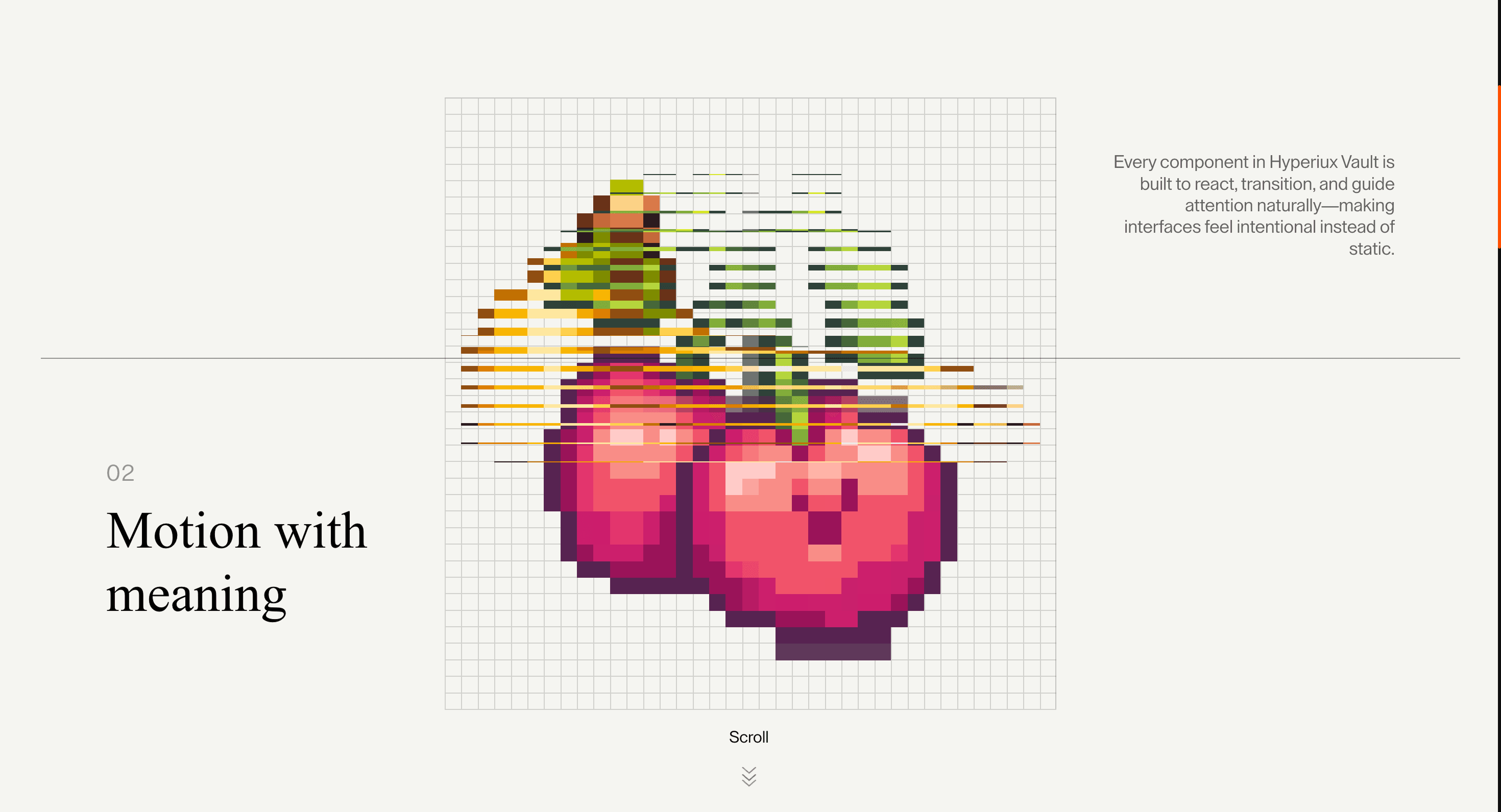
Split Canvas makes scroll feel like a cut through the visual field. It is for pages where the transition between states matters.
Use Split Canvas when the page message benefits from a visual split that feels deliberate. Creative studios, AI launches, and experimental brand pages can use it to frame contrast, reveal, or transformation. The page job is contrast: two sides of the idea should feel connected by the interaction.
The production risk is canvas dependency. If the split effect fails, the core message, headline, and CTA must still exist in HTML and remain visually complete.
Install Command
npx hyperiux add split-canvasUsage Code
page.jsx
import SplitCanvas from '@/components/effects/split-canvas'

const page = () => {
  return (
    <>
    <SplitCanvas />
    </>
  )
}
Component Code
index.jsx
// Built using Hyperiux Vault: https://vault.hyperiux.com
'use client';
import { useRef } from 'react';
import { ReactLenis } from 'lenis/react';
import PixelScrollCanvas from './PixelScrollCanvas';
import { sections } from './content';
export default function SplitCanvas({ bgColor = "#F5F5F0", gridSize = 16, numSlices = 32, canvasSize = 599, }) {
    const wrapperRef = useRef(null);
    return (<ReactLenis root options={{ autoRaf: true, duration: 1.5 }}>
            <main className="min-h-screen text-black" style={{ backgroundColor: bgColor }}>
                {/* Hero Section */}

                {/* Scrollable Content */}
                <div ref={wrapperRef} className="relative" style={{ height: `${sections.length * 100}vh` }}>
                    {/* Fixed Canvas Container - higher z-index to be visible */}
                    <div className="sticky top-0 overflow-hidden h-screen w-full flex items-center justify-center z-30 max-md:items-center">
                        <PixelScrollCanvas wrapperRef={wrapperRef} gridSize={gridSize} numSlices={numSlices} canvasSize={canvasSize}/>
                    </div>

                    {/* Content Sections */}
                    <div className="absolute inset-0 z-30 pointer-events-none px-10 max-[1025px]:px-6 ">
                        {sections.map((section, i) => (<div key={i} className="h-screen flex py-24 max-md:py-10 border-t border-black/40 max-[1025px]:pb-20 max-md:pb-20 ">
                                <div className="w-full h-full mx-auto px-16 max-[1025px]:px-0 max-md:px-0 flex flex-row justify-between items-start max-md:flex-col max-md:justify-end max-md:items-center pb-0 max-md:pb-0">
                                    {/* Left Column - Number & Title */}
                                    <div className="w-80 shrink-0 flex flex-col items-start text-left max-[1025px]:w-[40%] max-md:w-full max-md:items-center max-md:text-center">
                                        <span className="text-[1.5vw] tracking-wider text-black/40 block mb-2 max-[1025px]:text-[3vw] max-md:text-[5vw]">
                                            {section.number}
                                        </span>
                                        <h2 className="text-[3.5vw] max-[1025px]:text-[7vw] max-md:text-[9vw] leading-[1.05] font-normal" style={{ fontFamily: '"Times New Roman", Georgia, serif' }}>
                                            {section.title}
                                        </h2>
                                        {/* Mobile Description */}
                                        <p className="hidden max-md:block mt-4 text-[1.2vw] leading-[1.2] max-[1025px]:text-[2.5vw] max-md:text-[4.2vw] text-black/60 max-w-70">
                                            {section.description}
                                        </p>
                                    </div>

                                    {/* Center - Space for Canvas (482px) */}
                                    <div className="w-125 shrink-0 max-[1025px]:hidden"/>

                                    {/* Right Column - Description */}
                                    <div className="w-70 shrink-0 mt-auto max-[1025px]:w-[50%] max-md:hidden">
                                        <p className="text-[1.2vw] leading-[1.2] max-[1025px]:text-[2.5vw] max-md:text-[3vw]   text-black/60 text-right">
                                            {section.description}
                                        </p>
                                    </div>
                                </div>
                            </div>))}
                    </div>
                </div>

                {/* Bottom divider */}
                <div className="w-full h-px bg-black/10"/>
            </main>
        </ReactLenis>);
}
PixelScrollCanvas.jsx
'use client';
import { useEffect, useRef } from 'react';
import * as THREE from 'three';
import gsap from 'gsap';
import { ScrollTrigger } from 'gsap/ScrollTrigger';
import { PixelTransitionFragment, PixelTransitionVertex } from './pixel-transition';
import { imageSources } from './content';
import { createSuspendedRaf } from './createSuspendedRaf';
gsap.registerPlugin(ScrollTrigger);
// True when the user has asked the OS to minimise animation. Safe to call
// during render - returns false on the server.
function prefersReducedMotion() {
    if (typeof window === 'undefined')
        return false;
    return window.matchMedia?.('(prefers-reduced-motion: reduce)')?.matches ?? false;
}
// Load SVG as image and render to canvas for proper texture
const loadSvgAsCanvas = (src, size) => {
    return new Promise((resolve, reject) => {
        const img = new Image();
        img.crossOrigin = 'anonymous';
        img.onload = () => {
            const canvas = document.createElement('canvas');
            canvas.width = size;
            canvas.height = size;
            const ctx = canvas.getContext('2d');
            // Keep transparent background - grid is drawn in shader
            ctx.clearRect(0, 0, size, size);
            // Draw the SVG image
            ctx.drawImage(img, 0, 0, size, size);
            resolve(canvas);
        };
        img.onerror = reject;
        img.src = src;
    });
};
export default function PixelScrollCanvas({ wrapperRef, gridSize = 16, numSlices = 32, canvasSize: canvasSizeProp = 599, }) {
    const containerRef = useRef(null);
    const hasInit = useRef(false);
    useEffect(() => {
        const container = containerRef.current;
        const wrapper = wrapperRef?.current;
        if (!container || !wrapper)
            return;
        if (hasInit.current)
            return;
        hasInit.current = true;
        let renderer;
        let scene;
        let camera;
        let mesh;
        let material;
        let textures = [];
        let isMounted = true;
        let loop = null;
        const getCanvasSize = () => {
            if (typeof window === 'undefined')
                return canvasSizeProp;
            const ratio = canvasSizeProp / 599;
            if (window.innerWidth < 640)
                return Math.round(320 * ratio);
            if (window.innerWidth < 768)
                return Math.round(420 * ratio);
            return canvasSizeProp;
        };
        const canvasSize = getCanvasSize();
        const reducedMotion = prefersReducedMotion();
        const init = (canvasTextures) => {
            if (!isMounted || !container)
                return;
            textures = canvasTextures;
            container.style.width = `${canvasSize}px`;
            container.style.height = `${canvasSize}px`;
            renderer = new THREE.WebGLRenderer({ alpha: true, antialias: true });
            renderer.setSize(canvasSize, canvasSize);
            renderer.setPixelRatio(Math.min(window.devicePixelRatio, 2));
            renderer.setClearColor(0x000000, 0); // Transparent background
            container.innerHTML = '';
            container.appendChild(renderer.domElement);
            scene = new THREE.Scene();
            camera = new THREE.OrthographicCamera(-canvasSize / 2, canvasSize / 2, canvasSize / 2, -canvasSize / 2, -1, 1);
            const geometry = new THREE.PlaneGeometry(canvasSize, canvasSize);
            material = new THREE.ShaderMaterial({
                uniforms: {
                    u_texture1: { value: textures[0] },
                    u_texture2: { value: textures[1] || textures[0] },
                    u_progress: { value: 0 },
                    u_numSlices: { value: numSlices },
                    u_resolution: { value: new THREE.Vector2(canvasSize, canvasSize) },
                    u_gridSize: { value: gridSize }, // Grid cell size in pixels
                    u_reducedMotion: { value: reducedMotion ? 1 : 0 },
                },
                vertexShader: PixelTransitionVertex,
                fragmentShader: PixelTransitionFragment,
                transparent: true,
            });
            mesh = new THREE.Mesh(geometry, material);
            scene.add(mesh);
            // Each section is 100vh, canvas is canvasSize pixels
            // Transition happens when section border passes through canvas
            // Border enters at bottom of canvas, exits at top
            const numSections = imageSources.length;
            const viewportHeight = window.innerHeight;
            const sectionHeight = viewportHeight; // 100vh per section
            ScrollTrigger.create({
                trigger: wrapper,
                start: 'top top',
                end: 'bottom bottom',
                scrub: true,
                onUpdate: (self) => {
                    // Use the actual rendered canvas position so transitions stay aligned
                    // even when breakpoint styles shift the canvas up or down.
                    const canvasRect = container.getBoundingClientRect();
                    const canvasTop = canvasRect.top;
                    const canvasBottom = canvasRect.bottom;
                    const canvasHeight = canvasRect.height || canvasSize;
                    // Current scroll position within wrapper (in pixels)
                    const wrapperHeight = wrapper.offsetHeight;
                    const scrolled = self.progress * (wrapperHeight - viewportHeight);
                    // For each section border (at section * sectionHeight from wrapper top):
                    // The border is at position (sectionIndex * sectionHeight - scrolled) from viewport top
                    // Transition starts when border reaches canvasBottom
                    // Transition ends when border reaches canvasTop
                    let currentTransition = 0;
                    let transitionProgress = 0;
                    for (let i = 1; i < numSections; i++) {
                        // Border position relative to viewport top
                        const borderPos = i * sectionHeight - scrolled;
                        // Check if this border is currently passing through the canvas
                        if (borderPos <= canvasBottom && borderPos >= canvasTop) {
                            currentTransition = i - 1;
                            // Progress: 0 when border at canvasBottom, 1 when border at canvasTop
                            transitionProgress = (canvasBottom - borderPos) / canvasHeight;
                            break;
                        }
                        else if (borderPos < canvasTop) {
                            // Border has passed above canvas, this transition is complete
                            currentTransition = i - 1;
                            transitionProgress = 1;
                        }
                    }
                    // Clamp values
                    currentTransition = Math.max(0, Math.min(currentTransition, textures.length - 2));
                    transitionProgress = Math.max(0, Math.min(1, transitionProgress));
                    // Determine which textures to show
                    const fromIndex = currentTransition;
                    const toIndex = Math.min(currentTransition + 1, textures.length - 1);
                    // If transition is complete, show the"to" texture as the base
                    if (transitionProgress >= 1) {
                        material.uniforms.u_texture1.value = textures[toIndex];
                        material.uniforms.u_texture2.value = textures[Math.min(toIndex + 1, textures.length - 1)];
                        material.uniforms.u_progress.value = 0;
                    }
                    else {
                        material.uniforms.u_texture1.value = textures[fromIndex];
                        material.uniforms.u_texture2.value = textures[toIndex];
                        material.uniforms.u_progress.value = transitionProgress;
                    }
                },
            });
            const loopInstance = createSuspendedRaf({
                root: container,
                onFrame: () => {
                    if (!isMounted)
                        return;
                    renderer.render(scene, camera);
                },
            });
            loop = loopInstance;
            loop.start();
        };
        // Load all SVGs as canvases, then create textures
        const loadAllImages = async () => {
            try {
                const canvases = await Promise.all(imageSources.map(src => loadSvgAsCanvas(src, canvasSize)));
                const canvasTextures = canvases.map(canvas => {
                    const texture = new THREE.CanvasTexture(canvas);
                    texture.needsUpdate = true;
                    texture.minFilter = THREE.NearestFilter;
                    texture.magFilter = THREE.NearestFilter;
                    return texture;
                });
                init(canvasTextures);
            }
            catch (error) {
                console.error('Error loading images:', error);
            }
        };
        loadAllImages();
        return () => {
            isMounted = false;
            hasInit.current = false;
            if (loop) {
                loop.destroy();
                loop = null;
            }
            ScrollTrigger.getAll().forEach(t => t.kill());
            if (renderer) {
                renderer.dispose();
                renderer.forceContextLoss();
            }
            textures.forEach(t => t?.dispose());
            if (container) {
                container.innerHTML = '';
            }
        };
    }, [wrapperRef, gridSize, numSlices, canvasSizeProp]);
    return (<div ref={containerRef} className="max-md:-translate-y-20 border-r border-t border-black/20"/>);
}
pixelTransition.jsx
export const PixelTransitionVertex = `
 varying vec2 vUv;

 void main() {
 vUv = uv;
 gl_Position = projectionMatrix * modelViewMatrix * vec4(position, 1.0);
 }
`;
export const PixelTransitionFragment = `
 uniform sampler2D u_texture1;
 uniform sampler2D u_texture2;
 uniform float u_progress;
 uniform float u_numSlices;
 uniform vec2 u_resolution;
 uniform float u_gridSize;
 uniform float u_reducedMotion;

 varying vec2 vUv;

 vec2 getPixelatedUv(vec2 uv, vec2 resolution, float gridSize) {
 vec2 gridCount = max(floor(resolution / gridSize), vec2(1.0));
 vec2 cellSize = resolution / gridCount;
 vec2 pixelPos = uv * resolution;
 vec2 cellIndex = floor(pixelPos / cellSize);
 vec2 cellCenter = (cellIndex + 0.5) * cellSize;

 return cellCenter / resolution;
 }

 // Draw grid lines only (transparent background)
 float drawGridLines(vec2 uv, vec2 resolution, float gridSize) {
 vec2 gridCount = max(floor(resolution / gridSize), vec2(1.0));
 vec2 cellSize = resolution / gridCount;
 vec2 pixelPos = uv * resolution;
 float lineWidth = 1.0;

 // Vertical and horizontal lines
 float vLine = step(mod(pixelPos.x, cellSize.x), lineWidth);
 float hLine = step(mod(pixelPos.y, cellSize.y), lineWidth);

 return max(vLine, hLine);
 }

 void main() {
 vec2 uv = vUv;
 vec2 pixelatedUv = getPixelatedUv(uv, u_resolution, u_gridSize);

 // Grid lines (just the lines, transparent elsewhere)
 float gridLine = drawGridLines(uv, u_resolution, u_gridSize);
 vec4 gridColor = vec4(0.0, 0.0, 0.0, gridLine * 0.15); // Semi-transparent black lines

 vec4 texColor;

 if (u_reducedMotion > 0.5) {
 // Reduced motion: plain crossfade, no pixelation/slice-blind motion.
 vec4 tex1 = texture2D(u_texture1, uv);
 vec4 tex2 = texture2D(u_texture2, uv);
 texColor = mix(tex1, tex2, u_progress);
 } else {
 // Number of horizontal slices (blinds)
 float slices = u_numSlices;
 float sliceIndex = floor(uv.y * slices);
 float sliceNorm = sliceIndex / slices;
 float sliceHeight = 1.0 / slices;
 float posInSlice = fract(uv.y * slices);

 // Bottom slices transition first
 float sliceDelay = sliceNorm * 0.6;
 float sliceProgress = smoothstep(sliceDelay, sliceDelay + 0.4, u_progress);

 // Blind collapse effect
 float blindScale = 1.0 - sliceProgress;
 float visibleThreshold = 1.0 - blindScale;

 // Determine which texture to show based on blind position
 if (posInSlice < visibleThreshold) {
 // Collapsed part - show texture2
 texColor = texture2D(u_texture2, pixelatedUv);
 } else {
 // Visible part - show texture1 with slide offset
 vec2 adjustedUV = uv;
 float slideOffset = visibleThreshold * sliceHeight;
 adjustedUV.y = clamp(uv.y - slideOffset, 0.0, 1.0);
 texColor = texture2D(u_texture1, getPixelatedUv(adjustedUV, u_resolution, u_gridSize));
 }
 }

 // Composite: transparent background + grid lines + image
 // Start with grid on transparent background
 vec4 result = gridColor;

 // Blend image on top (image alpha determines visibility)
 result = vec4(
 mix(result.rgb, texColor.rgb, texColor.a),
 max(result.a, texColor.a)
 );

 gl_FragColor = result;
 }
`;
content.jsx
/**
 * @typedef {Object} SplitCanvasSection
 * @property {string} number
 * @property {string} title
 * @property {string} description
 */
/** @type {SplitCanvasSection[]} */
export const sections = [
    {
        number: '01',
        title: 'Design that feels alive',
        description: 'Every component in Hyperiux Vault is built to react, transition, and guide attention naturally—making interfaces feel intentional instead of static.',
    },
    {
        number: '02',
        title: 'Motion with meaning',
        description: 'Animations should explain, not distract. Interactions are designed to create clarity, rhythm, and confidence across every screen.',
    },
    {
        number: '03',
        title: 'Built for shipping',
        description: 'Reusable structures, clean APIs, and production-ready patterns help ideas move from prototype to launch without rebuilding everything.',
    },
    {
        number: '04',
        title: 'Expressive by default',
        description: 'Create visual identity through layout, typography, transitions, and composition—without sacrificing usability or performance.',
    },
    {
        number: '05',
        title: 'Human over interface',
        description: 'Technology disappears when experiences feel effortless. The goal is simple: make products people enjoy returning to.',
    },
];
export const imageSources = [
    'https://pub-8abee449136941f5b0a1cd2c014534e9.r2.dev/vault-listing-images/assets-images/pixelated-image/banana.png',
    'https://pub-8abee449136941f5b0a1cd2c014534e9.r2.dev/vault-listing-images/assets-images/pixelated-image/cherry.png',
    'https://pub-8abee449136941f5b0a1cd2c014534e9.r2.dev/vault-listing-images/assets-images/pixelated-image/mango.png',
    'https://pub-8abee449136941f5b0a1cd2c014534e9.r2.dev/vault-listing-images/assets-images/pixelated-image/pineapple.png',
    'https://pub-8abee449136941f5b0a1cd2c014534e9.r2.dev/vault-listing-images/assets-images/pixelated-image/watermelon.png',
];
createSuspendedRaf.jsx
const DEFAULT_ROOT_MARGIN = "256px";
function resolveElement(root) {
    if (!root)
        return null;
    if (typeof root === "function")
        return root() ?? null;
    if (typeof root === "object" && "current" in root)
        return root.current ?? null;
    return root;
}
function createVisibilityGate({ root = null, rootMargin = DEFAULT_ROOT_MARGIN, threshold = 0, observeTab = true, observeOffscreen = true, onChange, } = {}) {
    let tabVisible = typeof document === "undefined" ? true : !document.hidden;
    // Match border-beam: assume onscreen until the observer reports otherwise.
    let onscreen = true;
    let destroyed = false;
    let observer = null;
    const isActive = () => {
        if (destroyed)
            return false;
        if (observeTab && !tabVisible)
            return false;
        if (observeOffscreen && resolveElement(root) && !onscreen)
            return false;
        return true;
    };
    let lastActive = isActive();
    const emit = () => {
        if (destroyed)
            return;
        const next = isActive();
        if (next === lastActive)
            return;
        lastActive = next;
        onChange?.(next);
    };
    const onVisibilityChange = () => {
        tabVisible = !document.hidden;
        emit();
    };
    if (observeTab && typeof document !== "undefined") {
        document.addEventListener("visibilitychange", onVisibilityChange);
    }
    const bindObserver = () => {
        if (!observeOffscreen || typeof IntersectionObserver === "undefined") {
            return;
        }
        const el = resolveElement(root);
        if (!el)
            return;
        observer = new IntersectionObserver((entries) => {
            for (const entry of entries) {
                onscreen = entry.isIntersecting;
            }
            emit();
        }, { rootMargin, threshold });
        observer.observe(el);
    };
    bindObserver();
    return {
        /** Whether the animation should currently run. */
        get isActive() {
            return isActive();
        },
        /**
         * Re-bind IntersectionObserver after the root element mounts late
         * (e.g. ref not ready on first call). Safe to call multiple times.
         */
        observe(nextRoot) {
            if (destroyed)
                return;
            if (nextRoot != null)
                root = nextRoot;
            if (observer) {
                observer.disconnect();
                observer = null;
            }
            onscreen = true;
            bindObserver();
            emit();
        },
        destroy() {
            if (destroyed)
                return;
            destroyed = true;
            if (observeTab && typeof document !== "undefined") {
                document.removeEventListener("visibilitychange", onVisibilityChange);
            }
            if (observer) {
                observer.disconnect();
                observer = null;
            }
        },
    };
}
/**
 * Owns a requestAnimationFrame loop that auto-pauses when the tab is hidden
 * or the root element is offscreen.
 */
function createSuspendedRaf({ onFrame, root = null, rootMargin = DEFAULT_ROOT_MARGIN, threshold = 0, observeTab = true, observeOffscreen = true, }) {
    if (typeof onFrame !== "function") {
        throw new TypeError("createSuspendedRaf: onFrame is required");
    }
    let rafId = null;
    let running = false;
    let destroyed = false;
    const stopRaf = () => {
        if (rafId != null) {
            cancelAnimationFrame(rafId);
            rafId = null;
        }
    };
    const tick = (time) => {
        rafId = null;
        if (destroyed || !running || !gate.isActive)
            return;
        onFrame(time);
        if (!destroyed && running && gate.isActive) {
            rafId = requestAnimationFrame(tick);
        }
    };
    const sync = () => {
        if (destroyed)
            return;
        if (running && gate.isActive) {
            if (rafId == null) {
                rafId = requestAnimationFrame(tick);
            }
        }
        else {
            stopRaf();
        }
    };
    const gate = createVisibilityGate({
        root,
        rootMargin,
        threshold,
        observeTab,
        observeOffscreen,
        onChange: sync,
    });
    return {
        /** Start (or resume) the loop when visibility allows. */
        start() {
            if (destroyed)
                return;
            running = true;
            sync();
        },
        /** Stop requesting frames (visibility listeners stay attached until destroy). */
        stop() {
            running = false;
            stopRaf();
        },
        /** Whether the caller has started the loop (may still be paused by visibility). */
        get isRunning() {
            return running;
        },
        /** Whether a frame is currently allowed to schedule. */
        get isActive() {
            return gate.isActive;
        },
        /** Re-attach offscreen observer to a (new) root element. */
        observe(nextRoot) {
            gate.observe(nextRoot);
            sync();
        },
        /** Tear down listeners and cancel any pending frame. */
        destroy() {
            if (destroyed)
                return;
            destroyed = true;
            running = false;
            stopRaf();
            gate.destroy();
        },
    };
}
export { createSuspendedRaf, createVisibilityGate, DEFAULT_ROOT_MARGIN, };
Example Production Use Case
An AI launch page contrasting before-and-after product states: Split Canvas frames the transformation as a designed reveal rather than a static comparison. The outcome is contrast: the visitor feels the shift before reading the detail.
Best Used For
- Brand sections where the change between two visual states is the point of the scroll moment.
- Before/after and state-change moments where the cut is the message.
- Split Canvas creates a concrete scroll outcome that a static section would not deliver.
Not For
Not for content where the before/after state is not obvious without motion.
Not for pages where split motion would hide the CTA or interrupt reading.
Performance Budget
Animate transform and opacity, avoid layout reads in scroll handlers, pre-size media, and clean up timelines/listeners when the route changes.
Accessibility and Mobile
The animated sequence must match DOM order. On mobile, replace pinned or horizontal mechanics with stacked sections, native swipe, or static cards.
Common Mistakes
- Putting meaningful copy only inside a canvas layer.
- Letting the seam hide the before/after comparison.
- Using a split when there is no real two-state story.
Changelog
v1.0.1
Jul 21, 2026Added prefers-reduced-motion support: the pixel-grid shutter transition becomes a plain crossfade between images
v1.0.0
Jul 20, 2026Initial release
Props
| Prop | Type | Default | Description |
|---|---|---|---|
bgColor | color | #F5F5F0 | Page background color. |
gridSize | number | 16 | Pixel-dissolve shader's grid cell size, in px. |
numSlices | number | 32 | Number of horizontal slices the pixel-wipe transition is split into. |
canvasSize | number | 599 | Size (px) of the central transitioning canvas panel on desktop — mobile/tablet sizes scale proportionally. |
Frequently Asked Questions
What makes Split Canvas different from a standard scroll reveal?
Scroll acts like a cut through the visual field, splitting and shifting the canvas between two states rather than revealing one element. The transition between states is the message. Use it where the change itself is what you want noticed.
How should Split Canvas simplify on mobile devices?
Reduce the split travel and ensure the two states stack or transition cleanly on a narrow screen. Keep any text content in the DOM, not painted into the canvas. Reduced-motion users should see the end state directly.
What should developers test before shipping Split Canvas?
If a real canvas is used, confirm it pauses offscreen, cleans up on route change, and exposes meaningful HTML alongside it. Check the split doesn't clip content at the seam. Verify the static fallback shows the final state.
Which content structure works best with Split Canvas?
A two-state moment — before/after, open/closed, or a strong scene change — where the cut dramatizes a transition. It's wrong for continuous reading or many states. Keep it to a single, clear split.
When should I avoid Split Canvas even if the preview looks good?
Avoid it where the meaning lives in text that would end up inside a canvas, on content-dense pages, or where the seam could hide information. If there's no real two-state story, the cut is empty. Skip it when a fade would do the same job.
Request a Custom Scroll Effect Animation
Need a custom effect? Tell us what to create.


