Loading
Arc Flow Carousel
A curved image carousel for portfolios, campaign galleries, editorial showcases, product stories, and brand sections where visual cards should feel like they are moving through a shared arc.
GSAP
Overview
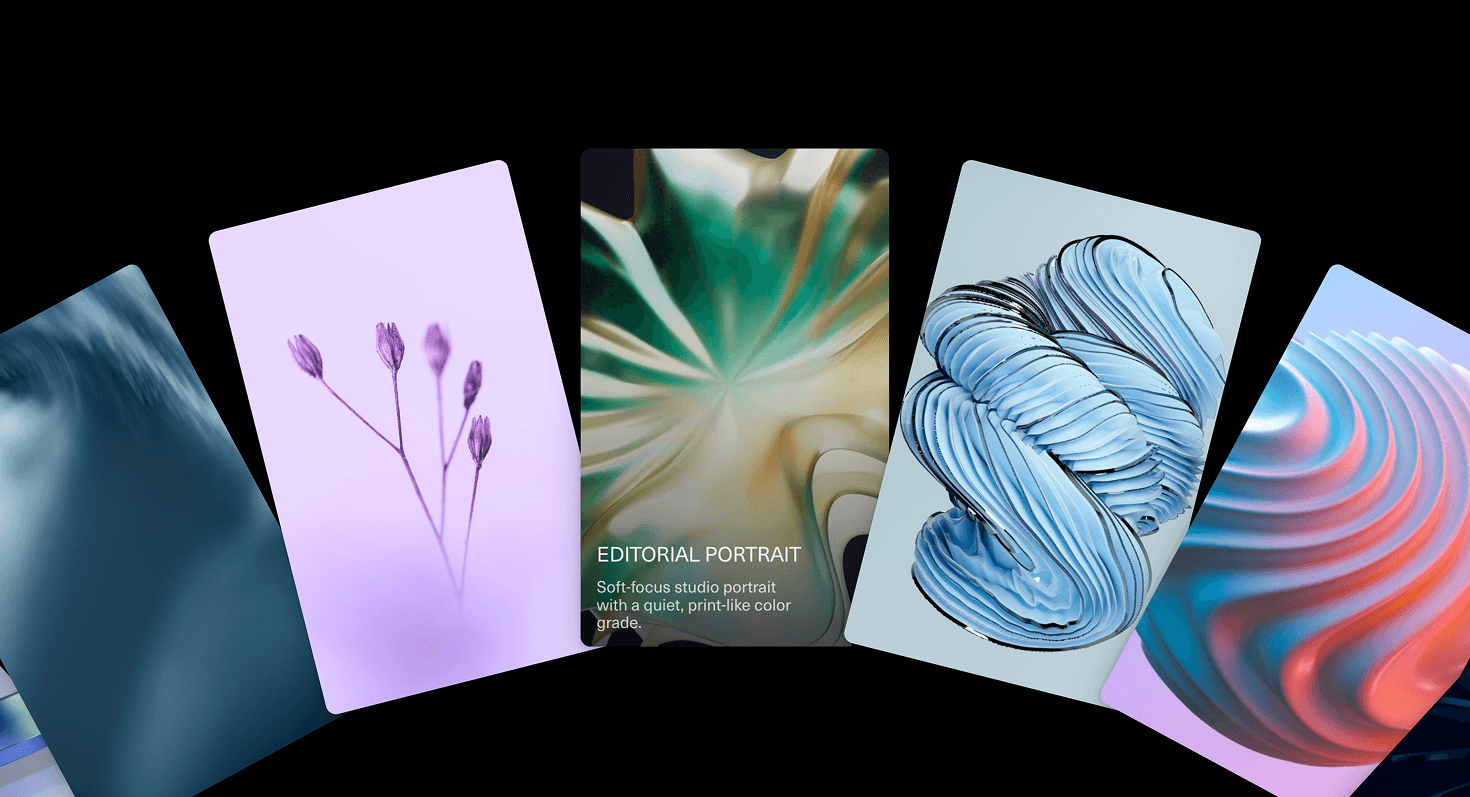
Arc Flow Carousel turns a row of cards into a flowing visual stage.
Instead of placing images in a flat strip, the carousel positions cards along an arc. Each item tilt, shift, and scale as it moves through the curve, creating a sense of depth and procession. The active area feels selected, while the surrounding cards remain visible enough to suggest what came before and what is coming next.
Use Arc Flow Carousel when a visual sequence should feel more cinematic than a standard slider. It works for portfolio highlights, campaign assets, product imagery, editorial stories, fashion lookbooks, creative archives, and landing-page sections where the image set deserves atmosphere.
The page job is guided browsing. The visitor should understand that this is a sequence, feel invited to move through it, and still retain orientation. The arc should add rhythm, not make the carousel feel like the images are trying to escape the layout.
Install Command
npx hyperiux add arc-flow-carouselUsage Code
page.jsx
import ArcFlowCarousel from '@/components/effects/arc-flow-carousel'

const Page = () => {
 return (
 <>
 <ArcFlowCarousel/>
 </>
 )
}

export default Page
Component Code
index.jsx
// Built using Hyperiux Vault: https://vault.hyperiux.com
"use client";
import { gsap } from "gsap";
import { useCallback, useEffect, useLayoutEffect, useRef, useState, useSyncExternalStore } from "react";
function usePrefersReducedMotion() {
    return useSyncExternalStore((callback) => {
        if (typeof window === "undefined")
            return () => { };
        const mediaQueryList = window.matchMedia("(prefers-reduced-motion: reduce)");
        mediaQueryList.addEventListener("change", callback);
        return () => mediaQueryList.removeEventListener("change", callback);
    }, () => (typeof window === "undefined" ? false : window.matchMedia?.("(prefers-reduced-motion: reduce)")?.matches ?? false), () => false);
}
const DRAG_SMOOTHING = 14;
const VELOCITY_WINDOW = 90;
const MAX_FLICK = 9;
/** How much slower a card follows per unit distance from the active one. 0 = no lag, 1 = edge cards barely move. */
const STAGGER_LAG_STRENGTH = 0.85;
/** Floor on a card's follow rate, as a fraction of the base rate, so far cards never stall. */
const MIN_FOLLOW_FRACTION = 0.6;
function ArcFlowCarouselComp({ items = [], radiusRatio = 0.85, cardRatio = 0.21, minCardWidth = 150, maxCardWidth = 320, cardAspect = 0.62, overlap = -0.04, arcOffset = 0.5, smoothing = 5.5, dragSensitivity = 1.2, momentum = 1, snap = false, wheelControl = "horizontal", autoRotateSpeed = 0, pauseOnHover = true, surfaceColor = "#000000", className = "", }) {
    const stageRef = useRef(null);
    const discRef = useRef(null);
    const cardRefs = useRef([]);
    const innerRefs = useRef([]);
    const reduceMotion = usePrefersReducedMotion();
    // How many card slots the wheel needs so the wrap point stays off screen.
    const [slotCount, setSlotCount] = useState(() => Math.max(items.length, 12));
    // Live geometry, recomputed on resize. Read by the ticker, never by render.
    const layoutRef = useRef({
        radius: 900,
        cardWidth: 220,
        cardHeight: 330,
        step: 0.14,
        centerX: 0,
        centerY: 0,
        maxAngle: 1,
    });
    // Wheel position in radians. `current` chases `target` every frame.
    const currentRef = useRef(0);
    const targetRef = useRef(0);
    // Each card's own eased position - chases `current`, not `target`, so
    // motion ripples outward from the active card instead of moving as one.
    const slotOffsetsRef = useRef([]);
    const draggingRef = useRef(false);
    const pointerIdRef = useRef(null);
    const lastXRef = useRef(0);
    const samplesRef = useRef([]);
    const revealRef = useRef(reduceMotion ? 1 : 0);
    const revealStartRef = useRef(0);
    const wheelSettleRef = useRef(0);
    const hoveredRef = useRef(false);
    const total = items.length;
    const measure = useCallback(() => {
        const stage = stageRef.current;
        if (!stage || !total)
            return;
        const width = stage.offsetWidth;
        const height = stage.offsetHeight;
        const cardWidth = gsap.utils.clamp(minCardWidth, maxCardWidth, width * cardRatio);
        const cardHeight = cardWidth / cardAspect;
        const radius = Math.max(width * radiusRatio, cardWidth * 4.2);
        // Arc length between two card centres -> angle between them.
        const step = (cardWidth * (1 - gsap.utils.clamp(-0.5, 0.85, overlap))) / radius;
        // Card centres ride the circle; `arcOffset` places the leading one.
        const centerX = width / 2;
        const centerY = height * arcOffset + radius;
        // The disc rim clears the card bottoms by a hair, reading as a ground line.
        const discRadius = radius - cardHeight * 0.66;
        // A card is worth drawing while any part of it can reach the viewport.
        const reach = Math.min(1, (width / 2 + cardWidth * 1.2) / radius);
        const maxAngle = Math.asin(reach) + 0.12;
        layoutRef.current = { radius, cardWidth, cardHeight, step, centerX, centerY, maxAngle };
        const disc = discRef.current;
        if (disc) {
            disc.style.width = `${discRadius * 2}px`;
            disc.style.height = `${discRadius * 2}px`;
            disc.style.left = `${centerX}px`;
            disc.style.top = `${centerY - discRadius}px`;
        }
        // Enough slots that the wrap seam is always past `maxAngle`.
        const needed = Math.ceil((maxAngle * 2) / step) + 2;
        setSlotCount((prev) => {
            const next = Math.max(total, Math.ceil(needed / total) * total);
            return next === prev ? prev : next;
        });
    }, [arcOffset, cardAspect, cardRatio, maxCardWidth, minCardWidth, overlap, radiusRatio, total]);
    useLayoutEffect(() => {
        measure();
        const stage = stageRef.current;
        if (!stage || typeof ResizeObserver === "undefined") {
            window.addEventListener("resize", measure);
            return () => window.removeEventListener("resize", measure);
        }
        const observer = new ResizeObserver(measure);
        observer.observe(stage);
        return () => observer.disconnect();
    }, [measure]);
    // Render loop: one exponential lerp, then a transform per card.
    useEffect(() => {
        if (!total)
            return;
        const draw = (dt) => {
            const { radius, cardWidth, cardHeight, step, centerX, centerY, maxAngle } = layoutRef.current;
            const span = slotCount * step;
            const half = span / 2;
            const reveal = revealRef.current;
            const rate = draggingRef.current ? DRAG_SMOOTHING : reduceMotion ? DRAG_SMOOTHING : smoothing;
            const useUnifiedOffset = reduceMotion;
            const slotOffsets = slotOffsetsRef.current;
            if (slotOffsets.length !== slotCount) {
                slotOffsets.length = slotCount;
                slotOffsets.fill(currentRef.current);
            }
            for (let i = 0; i < slotCount; i += 1) {
                const card = cardRefs.current[i];
                if (!card)
                    continue;
                if (useUnifiedOffset) {
                    slotOffsets[i] = currentRef.current;
                }
                else {
                    // Rank this card's distance from the active one using its own last
                    // position - continuous enough to pick a follow rate from.
                    let rankAngle = (i * step - slotOffsets[i]) % span;
                    if (rankAngle < -half)
                        rankAngle += span;
                    else if (rankAngle >= half)
                        rankAngle -= span;
                    const distanceFactor = gsap.utils.clamp(0, 1, Math.abs(rankAngle) / maxAngle);
                    // The touched/active card tracks the drag almost immediately; cards
                    // further out follow it with more lag, so motion ripples outward
                    // instead of the whole fan moving as one rigid piece.
                    const followRate = Math.max(rate * (1 - distanceFactor * STAGGER_LAG_STRENGTH), rate * MIN_FOLLOW_FRACTION);
                    const followLerp = 1 - Math.exp(-followRate * dt);
                    slotOffsets[i] += (currentRef.current - slotOffsets[i]) * followLerp;
                }
                // Wrap into [-half, half) so the strip of cards is endless.
                let baseAngle = (i * step - slotOffsets[i]) % span;
                if (baseAngle < -half)
                    baseAngle += span;
                else if (baseAngle >= half)
                    baseAngle -= span;
                if (Math.abs(baseAngle) > maxAngle) {
                    if (card.style.visibility !== "hidden")
                        card.style.visibility = "hidden";
                    continue;
                }
                if (card.style.visibility === "hidden")
                    card.style.visibility = "visible";
                const x = centerX + radius * Math.sin(baseAngle) - cardWidth / 2;
                const y = centerY - radius * Math.cos(baseAngle) - cardHeight / 2;
                card.style.transform = `translate3d(${x}px, ${y}px, 0) rotate(${baseAngle}rad)`;
                card.style.width = `${cardWidth}px`;
                card.style.height = `${cardHeight}px`;
                // Right always stacks over left, no exception for the active card -
                // a plain fanned hand of cards, ordered purely by position.
                card.style.zIndex = `${Math.round((baseAngle + half) * 1000)}`;
                const inner = innerRefs.current[i];
                if (inner && reveal < 1) {
                    // Staggered entrance, outwards from the middle of the fan.
                    const delay = Math.min(1, Math.abs(baseAngle) / maxAngle) * 0.45;
                    const p = gsap.utils.clamp(0, 1, (reveal - delay) / (1 - delay || 1));
                    const eased = 1 - Math.pow(1 - p, 3);
                    inner.style.opacity = `${eased}`;
                    inner.style.transform = `translate3d(0, ${(1 - eased) * cardHeight * 0.35}px, 0)`;
                }
                else if (inner && inner.style.opacity !== "1") {
                    inner.style.opacity = "1";
                    inner.style.transform = "translate3d(0, 0, 0)";
                }
            }
        };
        const tick = (_time, deltaTime) => {
            const dt = Math.min(deltaTime, 50) / 1000;
            const rate = draggingRef.current ? DRAG_SMOOTHING : reduceMotion ? DRAG_SMOOTHING : smoothing;
            const lerp = 1 - Math.exp(-rate * dt);
            const delta = targetRef.current - currentRef.current;
            currentRef.current += delta * lerp;
            if (Math.abs(delta) < 0.00002)
                currentRef.current = targetRef.current;
            if (revealRef.current < 1) {
                // Wall-clock, so a dropped frame can't stretch the entrance.
                const now = performance.now();
                if (!revealStartRef.current)
                    revealStartRef.current = now;
                revealRef.current = Math.min(1, (now - revealStartRef.current) / 1100);
            }
            // A slow constant drift, like the wheel is idling - paused mid-flick,
            // mid-hover, or once reduced motion asks for stillness.
            if (autoRotateSpeed &&
                !reduceMotion &&
                !draggingRef.current &&
                !(pauseOnHover && hoveredRef.current)) {
                targetRef.current += autoRotateSpeed * dt;
            }
            draw(dt);
        };
        // Land on the first card and paint one frame before the ticker starts.
        draw(1);
        gsap.ticker.add(tick);
        return () => gsap.ticker.remove(tick);
    }, [autoRotateSpeed, pauseOnHover, reduceMotion, slotCount, smoothing, total]);
    // Pointer drag + flick.
    useEffect(() => {
        const stage = stageRef.current;
        if (!stage || !total)
            return;
        const pushSample = () => {
            const now = performance.now();
            const samples = samplesRef.current;
            samples.push({ t: now, value: targetRef.current });
            while (samples.length > 2 && now - samples[0].t > VELOCITY_WINDOW)
                samples.shift();
        };
        const onPointerDown = (e) => {
            if (e.button !== 0 && e.pointerType === "mouse")
                return;
            draggingRef.current = true;
            pointerIdRef.current = e.pointerId;
            lastXRef.current = e.clientX;
            samplesRef.current = [{ t: performance.now(), value: targetRef.current }];
            // Kill any leftover flick the moment a finger lands.
            targetRef.current = currentRef.current;
            stage.setPointerCapture(e.pointerId);
            stage.style.cursor = "grabbing";
        };
        const onPointerMove = (e) => {
            if (!draggingRef.current || e.pointerId !== pointerIdRef.current)
                return;
            const dx = e.clientX - lastXRef.current;
            lastXRef.current = e.clientX;
            // Pixels along the rim -> radians, scaled by dragSensitivity.
            targetRef.current -= (dx * dragSensitivity) / layoutRef.current.radius;
            pushSample();
        };
        const endDrag = (e) => {
            if (!draggingRef.current || e.pointerId !== pointerIdRef.current)
                return;
            draggingRef.current = false;
            pointerIdRef.current = null;
            stage.style.cursor = "grab";
            if (stage.hasPointerCapture(e.pointerId))
                stage.releasePointerCapture(e.pointerId);
            pushSample();
            const { step } = layoutRef.current;
            let projected = targetRef.current;
            if (!reduceMotion) {
                const samples = samplesRef.current;
                const first = samples[0];
                const last = samples[samples.length - 1];
                const dt = last && first ? (last.t - first.t) / 1000 : 0;
                if (dt > 0.008) {
                    // Velocity in rad/s. Handing the lerp `v / rate` keeps the card
                    // speed continuous through the release - no jolt, no dead stop.
                    const velocity = (last.value - first.value) / dt;
                    const throw_ = gsap.utils.clamp(-MAX_FLICK, MAX_FLICK, velocity / smoothing) * momentum;
                    projected = targetRef.current + throw_;
                }
            }
            targetRef.current = snap ? gsap.utils.snap(step, projected) : projected;
            samplesRef.current = [];
        };
        const onWheel = (e) => {
            if (wheelControl === "off")
                return;
            const horizontal = Math.abs(e.deltaX) > Math.abs(e.deltaY);
            if (wheelControl === "horizontal" && !horizontal)
                return;
            const delta = horizontal ? e.deltaX : e.deltaY;
            e.preventDefault();
            targetRef.current += (delta * dragSensitivity) / layoutRef.current.radius;
            if (snap) {
                // Wheel input arrives in bursts; settle on a card once it stops.
                window.clearTimeout(wheelSettleRef.current);
                wheelSettleRef.current = window.setTimeout(() => {
                    targetRef.current = gsap.utils.snap(layoutRef.current.step, targetRef.current);
                }, 140);
            }
        };
        const onKeyDown = (e) => {
            const { step } = layoutRef.current;
            if (e.key === "ArrowRight") {
                e.preventDefault();
                targetRef.current += step;
            }
            else if (e.key === "ArrowLeft") {
                e.preventDefault();
                targetRef.current -= step;
            }
        };
        const onPointerEnter = () => {
            hoveredRef.current = true;
        };
        const onPointerLeave = () => {
            hoveredRef.current = false;
        };
        stage.addEventListener("pointerdown", onPointerDown);
        stage.addEventListener("pointermove", onPointerMove);
        stage.addEventListener("pointerup", endDrag);
        stage.addEventListener("pointercancel", endDrag);
        stage.addEventListener("pointerenter", onPointerEnter);
        stage.addEventListener("pointerleave", onPointerLeave);
        stage.addEventListener("wheel", onWheel, { passive: false });
        stage.addEventListener("keydown", onKeyDown);
        return () => {
            stage.removeEventListener("pointerdown", onPointerDown);
            stage.removeEventListener("pointermove", onPointerMove);
            stage.removeEventListener("pointerup", endDrag);
            stage.removeEventListener("pointercancel", endDrag);
            stage.removeEventListener("pointerenter", onPointerEnter);
            stage.removeEventListener("pointerleave", onPointerLeave);
            stage.removeEventListener("wheel", onWheel);
            stage.removeEventListener("keydown", onKeyDown);
            window.clearTimeout(wheelSettleRef.current);
        };
    }, [dragSensitivity, momentum, reduceMotion, smoothing, snap, total, wheelControl]);
    if (!total)
        return null;
    const slots = Array.from({ length: slotCount }, (_, i) => items[i % total]);
    return (<section className={`relative bg-black h-dvh w-full overflow-hidden select-none ${className}`} style={{ backgroundColor: surfaceColor }}>
      <div ref={stageRef} tabIndex={0} role="region" aria-label="Draggable image carousel" className="absolute inset-0 cursor-grab outline-none" style={{ touchAction: "pan-y" }}>
        {/* The wheel the cards ride on. */}
        <div ref={discRef} aria-hidden className="pointer-events-none absolute -translate-x-1/2 rounded-full" style={{
            backgroundColor: surfaceColor,
            boxShadow: "none",
        }}/>

        {slots.map((item, i) => (<div key={i} ref={(el) => {
                cardRefs.current[i] = el;
            }} className="group absolute top-0 left-0 will-change-transform" style={{ visibility: "hidden" }}>
            <div ref={(el) => {
                innerRefs.current[i] = el;
            }} className="relative h-full w-full overflow-hidden rounded-[10px] bg-black/5" style={{
                opacity: reduceMotion ? 1 : 0,
                boxShadow: "0 18px 40px -12px rgba(0,0,0,0.45), 0 2px 6px rgba(0,0,0,0.15)",
            }}>
              {/* eslint-disable-next-line @next/next/no-img-element */}
              <img src={item.src} alt={item.alt ?? `Slide ${(i % total) + 1}`} draggable={false} className="pointer-events-none block h-full w-full object-cover select-none"/>
              {(item.title || item.description) ? (<div className={`pointer-events-none absolute inset-0 transition-opacity duration-300 ease-out ${reduceMotion ? "opacity-100" : "opacity-0 group-hover:opacity-100"}`} style={{
                    background: "linear-gradient(180deg, rgba(0,0,0,0.08) 0%, rgba(0,0,0,0.16) 45%, rgba(0,0,0,0.62) 100%)",
                }}/>) : null}
              {(item.title || item.description) ? (<div className={`pointer-events-none absolute inset-x-0 bottom-0 p-4 text-white transition-all duration-300 ease-out ${reduceMotion
                    ? "translate-y-0 opacity-100"
                    : "translate-y-4 opacity-0 group-hover:translate-y-0 group-hover:opacity-100"}`} style={{
                    background: "linear-gradient(180deg, rgba(0,0,0,0) 0%, rgba(0,0,0,0.08) 35%, rgba(0,0,0,0.26) 100%)",
                }}>
                  {item.title ? (<p className="text-[1.4vw] font-medium uppercase  text-white/95">
                      {item.title}
                    </p>) : null}
                  {item.description ? (<p className="mt-2 max-w-[22ch] text-[1.1vw] leading-[1.1] text-white/75">
                      {item.description}
                    </p>) : null}
                </div>) : null}
              {item.label ? (<span className="absolute bottom-3 left-1/2 -translate-x-1/2 text-[0.7rem] tracking-[0.18em] text-white/90 uppercase">
                  {item.label}
                </span>) : null}
            </div>
          </div>))}
      </div>
    </section>);
}
const defaultItems = [
    {
        src: "https://picsum.photos/seed/h10/1600/1200",
        alt: "Editorial portrait",
        title: "Editorial Portrait",
        description: "Soft-focus studio portrait with a quiet, print-like color grade.",
    },
    {
        src: "https://picsum.photos/seed/h11/1600/1200",
        alt: "Studio still life",
        title: "Studio Still Life",
        description: "A minimal composition built around light falloff and glassy texture.",
    },
    {
        src: "https://picsum.photos/seed/h12/1600/1200",
        alt: "Type poster",
        title: "Type Poster",
        description: "Poster exploration balancing negative space, blur, and sharp letterforms.",
    },
    {
        src: "https://picsum.photos/seed/h13/1600/1200",
        alt: "Product campaign",
        title: "Product Campaign",
        description: "Commercial visual with polished highlights and a restrained luxury tone.",
    },
    {
        src: "https://picsum.photos/seed/h14/1600/1200",
        alt: "Landscape study",
        title: "Landscape Study",
        description: "Atmospheric frame capturing motion, depth, and a misty horizon line.",
    },
    {
        src: "https://picsum.photos/seed/h15/1600/1200",
        alt: "Motion frame",
        title: "Motion Frame",
        description: "A cinematic still chosen for its sweeping blur and directional energy.",
    },
    {
        src: "https://picsum.photos/seed/h22/1600/1200",
        alt: "Brand artwork",
        title: "Brand Artwork",
        description: "Graphic composition designed to feel tactile, glossy, and dimensional.",
    },
    {
        src: "https://picsum.photos/seed/h23/1600/1200",
        alt: "Cover art",
        title: "Cover Art",
        description: "A cover-style visual with sculptural forms and a cool editorial palette.",
    },
];
export default function ArcFlowCarousel({ items = defaultItems, ...rest }) {
    return <ArcFlowCarouselComp items={items} {...rest}/>;
}
Example Production Use Case
A creative studio can use Arc Flow Carousel on a homepage to present selected projects as a cinematic visual band. Each card moves through the arc, giving every project a moment of presence while still showing the broader collection.
The outcome is momentum. The visitor sees the work as a curated flow rather than a static grid.
A product company can use the same component to present feature visuals, template previews, launch assets, or product-world imagery. The curve adds depth and editorial pacing without turning the section into a heavy 3D scene.
Best Used For
- Portfolio and case-study highlights where visuals need a staged presentation.
- Campaign galleries, lookbooks, and editorial image sequences.
- Product showcases where each image deserves a focused card moment.
- Brand-led landing pages where motion and composition are part of the selling point.
- Visual archives that need more theatre than a grid but more structure than scattered cards.
Not For
Not for dense ecommerce catalogues, pricing tables, testimonial lists, documentation, comparison sections, or content that users need to scan quickly.
Not for large uncurated image sets. A curved carousel should feel selected, not like a folder view with ambition.
Not for pages where direct comparison matters more than presentation. Use a grid when users need to compare items side by side.
Performance Budget
Keep the number of visible cards controlled, optimise images, reserve carousel dimensions, and animate transform and opacity rather than layout properties. Avoid excessive blur, oversized shadows, and constant recalculation during drag or scroll.
If the carousel supports dragging, throttle pointer work and avoid React state updates on every tiny movement. The interaction should feel fluid before it feels elaborate.
Accessibility and Mobile
Use real buttons for navigation and provide clear labels for previous, next, and active item states. Preserve keyboard navigation, visible focus styles, and a logical reading order.
On mobile, reduce arc depth, overlap, and card rotation. A flatter swipe-friendly layout may be better than forcing the full desktop arc into a narrow screen. For reduced motion, switch between cards with a minimal fade, instant state change, or simplified translate without depth rotation.
Common Mistakes
- Using too many cards.
- Making the curve so dramatic that images become hard to inspect.
- Letting cards overlap captions or controls.
- Ignoring keyboard navigation.
- Using inconsistent image ratios without a layout rule.
- Treating the carousel as storage for every unused visual.
- Keeping autoplay active near important reading or conversion sections.
Changelog
v1.0.0
Aug 20, 2026Initial release
API Reference
| Prop | Type | Default | Description |
|---|---|---|---|
smoothing | number | 5.5 | How fast the fan catches up to the pointer. Higher feels snappier. |
momentum | number | 1 | Flick distance multiplier after release. |
dragSensitivity | number | 1.2 | How far the fan travels per pixel dragged or scrolled. |
autoRotateSpeed | number | 0 | Constant idle drift in rad/s. Positive drifts new cards in from the left. |
pauseOnHover | boolean | true | Pauses the idle drift while a pointer hovers the carousel. |
snap | boolean | false | Snaps to the nearest card once a flick or wheel input settles. |
radiusRatio | number | 0.85 | Circle radius as a multiple of the container width. Bigger is a flatter arc. |
cardRatio | number | 0.21 | Card width as a fraction of the container width, clamped by min/max card width. |
maxCardWidth | number | 320 | Upper bound on card width, in pixels. |
cardAspect | number | 0.62 | Card width divided by height. |
overlap | number | -0.04 | 0 = cards touch edge to edge, 0.3 = overlap by 30%, negative = a gap between them. |
arcOffset | number | 0.5 | Vertical position of the leading card's centre, as a fraction of height. |
surfaceColor | string | #000000 | Shared hex color for the carousel background and wheel surface. |
Frequently Asked Questions
What is Arc Flow Carousel?
Arc Flow Carousel is a React carousel effect that arranges visual cards along a curved arc, giving the image set a panoramic and depth-led motion pattern.
When should I use Arc Flow Carousel?
Use it for curated visual sequences such as portfolio highlights, campaign galleries, product showcases, editorial image sets, and brand-led landing sections.
Is Arc Flow Carousel good for large image libraries?
No. It works best with a focused set of strong visuals. Large libraries usually need filtering, search, pagination, or grid-based browsing.
Can the cards include captions?
Yes. Captions work well when they are short and placed consistently. Avoid long text blocks inside the card itself.
How do I keep Arc Flow Carousel accessible?
Use semantic navigation controls, visible focus states, keyboard support, accessible labels, meaningful image alt text, and real DOM captions where needed.
What should reduced motion do?
Reduced motion should simplify or remove curved depth movement. Use a fade, instant switch, or minimal translate while keeping the same content available.
Does Arc Flow Carousel work on mobile?
Yes, with adaptation. Reduce card rotation, overlap, and arc depth. A flatter swipe layout may be more usable on smaller screens.
Can Hyperiux adapt Arc Flow Carousel for a real brand system?
Yes. A custom version should define arc geometry, card spacing, image ratios, interaction model, keyboard behavior, mobile fallback, accessibility states, reduced-motion handling, source handoff, and implementation notes.
Request a Custom Carousel Animation
Need a custom effect? Tell us what to create.


