Loading
Interactive List Preview
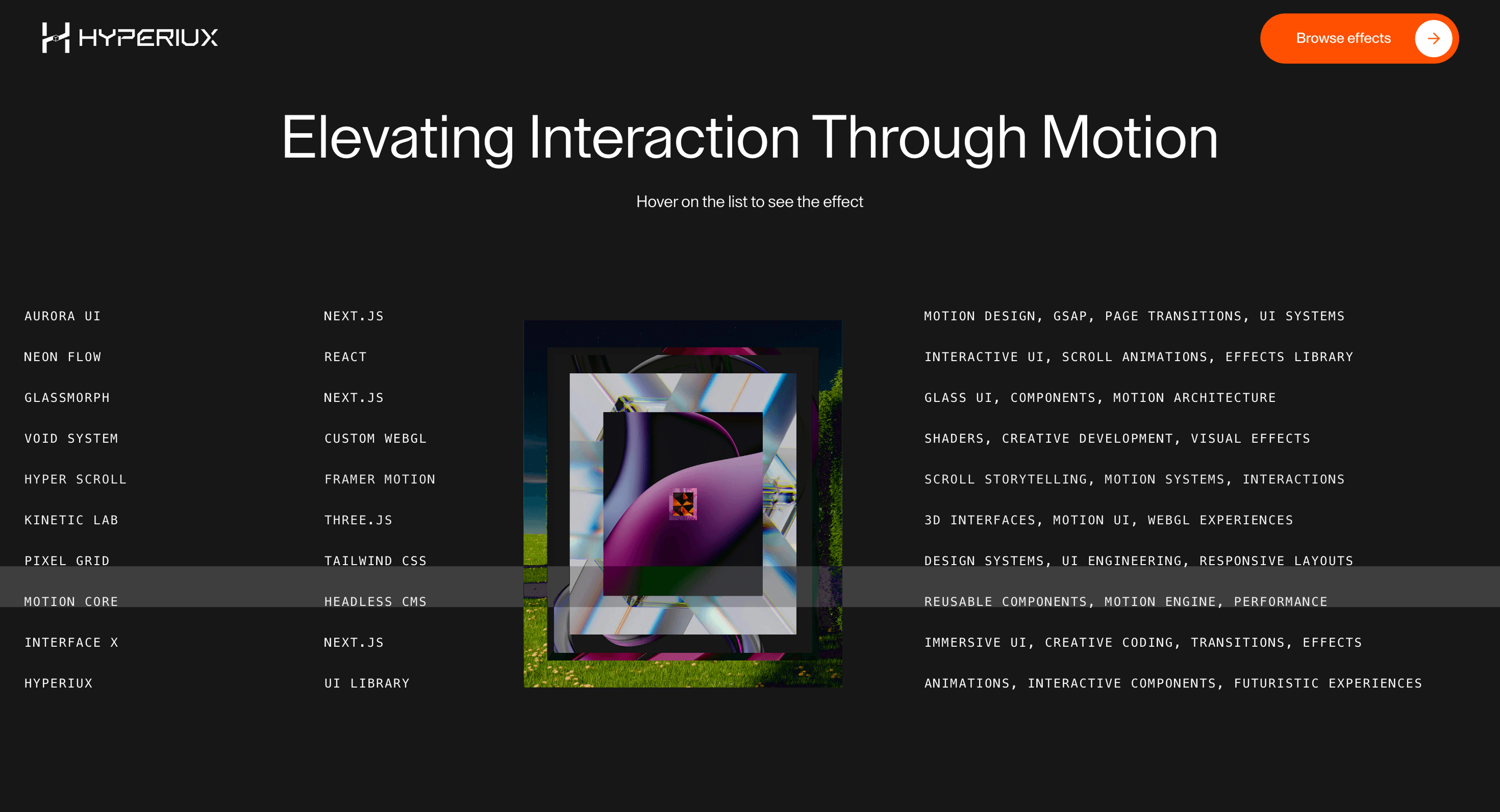
A list-preview component that connects feature names, services, or proof items to visible contextual previews.
Published On: June 4, 2026
Last Updated: August 17, 2026
GSAP
Overview
Interactive List Preview adds motion to a component that already has a job: list items reveal contextual previews.
Use Interactive List Preview when list items need quick visual context, such as feature screenshots, service examples, or proof snippets. The list remains the primary navigation; the preview adds confidence.
The production risk is hidden detail. Previews must be optional support, not the only place where key feature or product information appears.
Install Command
npx hyperiux add interactive-list-previewUsage Code
page.jsx
import InteractiveListPreview from '@/components/effects/interactive-list-preview'

const page = () => {
  return (
    <>
    <InteractiveListPreview/>
    </>
  )
}
Component Code
index.jsx
// Built using Hyperiux Vault: https://vault.hyperiux.com
import React from 'react';
import InteractiveListPreviewComp from './InteractiveListPreviewComp';
const InteractiveListPreview = ({ imageSize, duration, smoothness, lerp, }) => {
    return (<>
      <div className='flex items-center flex-col gap-20 max-md:gap-20 max-md:py-[15%] max-[1025px]:py-[10%] justify-center h-screen max-[1025px]:h-full bg-neutral-900'>

        <div className='text-center space-y-[1vw] max-[1025px]:space-y-[4vw]'>
          <h2 className='font-mono text-[4vw] max-[1025px]:text-center  max-md:px-10  text-white max-[1025px]:text-5xl max-md:text-4xl capitalize'>
            Elevating interaction through motion
          </h2>
          <p>
            Hover on the list to see the effect
          </p>

        </div>

        <InteractiveListPreviewComp items={projects} imageSize={imageSize} duration={duration} smoothness={smoothness} lerp={lerp}/>
      </div>
    </>);
};
export default InteractiveListPreview;
const projects = [
    {
        client: "AURORA UI",
        platform: "NEXT.JS",
        services: "Motion Design, GSAP, Page Transitions, UI Systems",
        img: "https://pub-8abee449136941f5b0a1cd2c014534e9.r2.dev/vault-listing-images/assets-images/v-01.jpg",
    },
    {
        client: "NEON FLOW",
        platform: "REACT",
        services: "Interactive UI, Scroll Animations, Effects Library",
        img: "https://pub-8abee449136941f5b0a1cd2c014534e9.r2.dev/vault-listing-images/assets-images/v-02.jpg",
    },
    {
        client: "GLASSMORPH",
        platform: "NEXT.JS",
        services: "Glass UI, Components, Motion Architecture",
        img: "https://pub-8abee449136941f5b0a1cd2c014534e9.r2.dev/vault-listing-images/assets-images/v-03.jpg",
    },
    {
        client: "VOID SYSTEM",
        platform: "CUSTOM WEBGL",
        services: "Shaders, Creative Development, Visual Effects",
        img: "https://pub-8abee449136941f5b0a1cd2c014534e9.r2.dev/vault-listing-images/assets-images/v-04.jpg",
    },
    {
        client: "HYPER SCROLL",
        platform: "FRAMER MOTION",
        services: "Scroll Storytelling, Motion Systems, Interactions",
        img: "https://pub-8abee449136941f5b0a1cd2c014534e9.r2.dev/vault-listing-images/assets-images/v-05.jpg",
    },
    {
        client: "KINETIC LAB",
        platform: "THREE.JS",
        services: "3D Interfaces, Motion UI, WebGL Experiences",
        img: "https://pub-8abee449136941f5b0a1cd2c014534e9.r2.dev/vault-listing-images/assets-images/v-06.jpg",
    },
    {
        client: "PIXEL GRID",
        platform: "TAILWIND CSS",
        services: "Design Systems, UI Engineering, Responsive Layouts",
        img: "https://pub-8abee449136941f5b0a1cd2c014534e9.r2.dev/vault-listing-images/assets-images/v-07.jpg",
    },
    {
        client: "MOTION CORE",
        platform: "HEADLESS CMS",
        services: "Reusable Components, Motion Engine, Performance",
        img: "https://pub-8abee449136941f5b0a1cd2c014534e9.r2.dev/vault-listing-images/assets-images/v-08.jpg",
    },
    {
        client: "INTERFACE X",
        platform: "NEXT.JS",
        services: "Immersive UI, Creative Coding, Transitions, Effects",
        img: "https://pub-8abee449136941f5b0a1cd2c014534e9.r2.dev/vault-listing-images/assets-images/v-09.jpg",
    },
    {
        client: "HYPERIUX",
        platform: "UI LIBRARY",
        services: "Animations, Interactive Components, Futuristic Experiences",
        img: "https://pub-8abee449136941f5b0a1cd2c014534e9.r2.dev/vault-listing-images/assets-images/v-10.jpg",
    },
];
InteractiveListPreviewComp.jsx
"use client";
import { useEffect, useRef } from "react";
import gsap from "gsap";
const DEFAULT_IMAGE_Z_INDEX = 10;
const DEFAULT_IMAGE_SIZE = 1;
const DEFAULT_DURATION = 0.6;
const DEFAULT_SMOOTHNESS = 0.35;
const DEFAULT_LERP = 0.18;
const BASE_IMAGE_WIDTH_REM = 19.5;
const BASE_IMAGE_HEIGHT_REM = 22.5;
const IMAGE_OFFSET_MULTIPLIER = 20;
const ACTIVE_ROW_TEXT_COLOR = "#000000";
const INACTIVE_ROW_TEXT_COLOR = "#ffffff";
const IMAGE_HIDDEN_CLIP_PATH = "inset(50%)";
const IMAGE_VISIBLE_CLIP_PATH = "inset(0%)";
const IMAGE_VISIBILITY_HIDDEN = "hidden";
const IMAGE_VISIBILITY_VISIBLE = "visible";
function clampNumber(value, min, max, fallback) {
    const number = Number(value);
    if (!Number.isFinite(number))
        return fallback;
    return Math.min(Math.max(number, min), max);
}
/**
 * @typedef {Object} InteractiveListPreviewCompProps
 * @property {InteractiveListItem[]} items
 */
/** @param {InteractiveListPreviewCompProps} props */
export default function InteractiveListPreviewComp({ items, imageSize = DEFAULT_IMAGE_SIZE, duration = DEFAULT_DURATION, smoothness = DEFAULT_SMOOTHNESS, lerp = DEFAULT_LERP, }) {
    const imageRefs = useRef([]);
    const imageContainerRef = useRef(null);
    const tableRef = useRef(null);
    const highlightRef = useRef(null);
    const rowRefs = useRef({});
    const pendingLeaveRef = useRef({});
    const tweenGenerationRef = useRef({});
    const activeIndexRef = useRef(null);
    const zIndexRef = useRef(DEFAULT_IMAGE_Z_INDEX);
    const pointerTargetRef = useRef({ x: 0, y: 0 });
    const pointerCurrentRef = useRef({ x: 0, y: 0 });
    const reduceMotionRef = useRef(typeof window !== "undefined" &&
        (window.matchMedia?.("(prefers-reduced-motion: reduce)")?.matches ?? false));
    const safeImageSize = clampNumber(imageSize, 0.5, 2, DEFAULT_IMAGE_SIZE);
    const safeDuration = clampNumber(duration, 0.1, 2, DEFAULT_DURATION);
    const safeSmoothness = clampNumber(smoothness, 0.05, 1.5, DEFAULT_SMOOTHNESS);
    const safeLerp = clampNumber(lerp, 0.02, 1, DEFAULT_LERP);
    useEffect(() => {
        const mq = window.matchMedia?.("(prefers-reduced-motion: reduce)");
        if (!mq)
            return;
        const onChange = (event) => {
            reduceMotionRef.current = event.matches;
            if (event.matches && imageContainerRef.current) {
                gsap.killTweensOf(imageContainerRef.current);
                gsap.set(imageContainerRef.current, { x: 0, y: 0 });
                pointerTargetRef.current = { x: 0, y: 0 };
                pointerCurrentRef.current = { x: 0, y: 0 };
            }
        };
        reduceMotionRef.current = mq.matches;
        if (mq.matches && imageContainerRef.current) {
            gsap.set(imageContainerRef.current, { x: 0, y: 0 });
            pointerTargetRef.current = { x: 0, y: 0 };
            pointerCurrentRef.current = { x: 0, y: 0 };
        }
        mq.addEventListener?.("change", onChange);
        return () => mq.removeEventListener?.("change", onChange);
    }, []);
    useEffect(() => {
        let frameId;
        const tick = () => {
            const imageContainer = imageContainerRef.current;
            if (imageContainer && !reduceMotionRef.current) {
                const current = pointerCurrentRef.current;
                const target = pointerTargetRef.current;
                current.x += (target.x - current.x) * safeLerp;
                current.y += (target.y - current.y) * safeLerp;
                gsap.set(imageContainer, {
                    x: current.x,
                    y: current.y,
                });
            }
            frameId = requestAnimationFrame(tick);
        };
        frameId = requestAnimationFrame(tick);
        return () => cancelAnimationFrame(frameId);
    }, [safeLerp]);
    useEffect(() => {
        imageRefs.current.forEach((imageElement) => {
            if (!imageElement)
                return;
            if (reduceMotionRef.current) {
                // Reduced-motion: opacity only — keep full clip, start hidden.
                gsap.set(imageElement, {
                    clipPath: IMAGE_VISIBLE_CLIP_PATH,
                    opacity: 0,
                    visibility: IMAGE_VISIBILITY_HIDDEN,
                });
            }
            else {
                gsap.set(imageElement, {
                    clipPath: IMAGE_HIDDEN_CLIP_PATH,
                    visibility: IMAGE_VISIBILITY_HIDDEN,
                });
            }
        });
        if (!highlightRef.current)
            return;
        gsap.set(highlightRef.current, {
            opacity: 0,
            y: 0,
            height: 0,
        });
    }, []);
    /** @param {number} index */
    const getNextTweenGeneration = (index) => {
        tweenGenerationRef.current[index] =
            (tweenGenerationRef.current[index] || 0) + 1;
        return tweenGenerationRef.current[index];
    };
    /**
     * @param {number} index
     * @param {HTMLDivElement|null} element
     */
    const setImageRef = (index, element) => {
        imageRefs.current[index] = element;
    };
    /**
     * @param {number} index
     * @param {string} color
     */
    const setRowTextColor = (index, color) => {
        const rowElement = rowRefs.current[index];
        if (!rowElement)
            return;
        gsap.to(rowElement.querySelectorAll("td"), {
            color,
            duration: safeSmoothness,
            ease: "power2.out",
            overwrite: "auto",
        });
    };
    /** @param {HTMLTableRowElement|null} rowElement */
    const moveHighlightToRow = (rowElement) => {
        const tableElement = tableRef.current;
        const highlightElement = highlightRef.current;
        if (!tableElement || !highlightElement || !rowElement)
            return;
        const tableBounds = tableElement.getBoundingClientRect();
        const rowBounds = rowElement.getBoundingClientRect();
        gsap.to(highlightElement, {
            y: rowBounds.top - tableBounds.top,
            height: rowBounds.height,
            opacity: 1,
            duration: safeSmoothness,
            ease: "power3.out",
            overwrite: "auto",
        });
    };
    /** @param {number} index */
    const animateImageOut = (index) => {
        const imageElement = imageRefs.current[index];
        if (!imageElement)
            return;
        const tweenGeneration = getNextTweenGeneration(index);
        const reduceMotion = reduceMotionRef.current;
        gsap.killTweensOf(imageElement);
        gsap.to(imageElement, {
            ...(reduceMotion
                ? { opacity: 0 }
                : { clipPath: IMAGE_HIDDEN_CLIP_PATH, opacity: 0 }),
            duration: reduceMotion ? Math.min(safeSmoothness, 0.35) : safeDuration,
            ease: reduceMotion ? "power2.out" : "power3.inOut",
            onComplete: () => {
                if (tweenGenerationRef.current[index] !== tweenGeneration)
                    return;
                gsap.set(imageElement, {
                    visibility: IMAGE_VISIBILITY_HIDDEN,
                });
            },
        });
    };
    /**
     * @param {HTMLTableRowElement} rowElement
     * @param {number} index
     */
    const onRowEnter = (rowElement, index) => {
        const imageElement = imageRefs.current[index];
        if (!imageElement)
            return;
        const reduceMotion = reduceMotionRef.current;
        const previousIndex = activeIndexRef.current;
        pendingLeaveRef.current[index] = false;
        rowRefs.current[index] = rowElement;
        // Reduced-motion: only one image at a time — fade the previous out first.
        if (reduceMotion && previousIndex !== null && previousIndex !== index) {
            pendingLeaveRef.current[previousIndex] = false;
            animateImageOut(previousIndex);
        }
        zIndexRef.current += 1;
        const tweenGeneration = getNextTweenGeneration(index);
        gsap.killTweensOf(imageElement);
        if (reduceMotion) {
            gsap.set(imageElement, {
                zIndex: zIndexRef.current,
                visibility: IMAGE_VISIBILITY_VISIBLE,
                clipPath: IMAGE_VISIBLE_CLIP_PATH,
                opacity: 0,
            });
            gsap.to(imageElement, {
                opacity: 1,
                duration: Math.min(safeSmoothness, 0.35),
                ease: "power2.out",
                onComplete: () => {
                    if (tweenGenerationRef.current[index] !== tweenGeneration)
                        return;
                    if (!pendingLeaveRef.current[index])
                        return;
                    pendingLeaveRef.current[index] = false;
                    animateImageOut(index);
                },
            });
        }
        else {
            gsap.set(imageElement, {
                zIndex: zIndexRef.current,
                visibility: IMAGE_VISIBILITY_VISIBLE,
                clipPath: IMAGE_HIDDEN_CLIP_PATH,
                opacity: 1,
            });
            gsap.to(imageElement, {
                clipPath: IMAGE_VISIBLE_CLIP_PATH,
                opacity: 1,
                duration: safeDuration,
                ease: "power2.inOut",
                onComplete: () => {
                    if (tweenGenerationRef.current[index] !== tweenGeneration)
                        return;
                    if (!pendingLeaveRef.current[index])
                        return;
                    pendingLeaveRef.current[index] = false;
                    animateImageOut(index);
                },
            });
        }
        if (previousIndex !== null && previousIndex !== index) {
            setRowTextColor(previousIndex, INACTIVE_ROW_TEXT_COLOR);
        }
        activeIndexRef.current = index;
        setRowTextColor(index, ACTIVE_ROW_TEXT_COLOR);
        moveHighlightToRow(rowElement);
    };
    /** @param {number} index */
    const onRowLeave = (index) => {
        const imageElement = imageRefs.current[index];
        if (!imageElement)
            return;
        if (gsap.isTweening(imageElement)) {
            pendingLeaveRef.current[index] = true;
            return;
        }
        animateImageOut(index);
    };
    const onTableLeave = () => {
        if (activeIndexRef.current !== null) {
            setRowTextColor(activeIndexRef.current, INACTIVE_ROW_TEXT_COLOR);
            activeIndexRef.current = null;
        }
        if (!highlightRef.current)
            return;
        gsap.to(highlightRef.current, {
            opacity: 0,
            duration: safeSmoothness,
            ease: "power2.out",
            overwrite: "auto",
        });
        pointerTargetRef.current = { x: 0, y: 0 };
    };
    /** @param {import('react').MouseEvent<HTMLDivElement>} event */
    const onMouseMove = (event) => {
        // Reduced-motion: no cursor parallax on the preview images.
        if (reduceMotionRef.current)
            return;
        if (!imageContainerRef.current)
            return;
        const bounds = event.currentTarget.getBoundingClientRect();
        const x = (event.clientX - bounds.left) / bounds.width - 0.5;
        const y = (event.clientY - bounds.top) / bounds.height - 0.5;
        pointerTargetRef.current = {
            x: x * IMAGE_OFFSET_MULTIPLIER,
            y: y * IMAGE_OFFSET_MULTIPLIER,
        };
    };
    return (<>
      <div className="relative min-h-[50vh] w-full overflow-hidden bg-neutral-900 font-mono text-white max-[1025px]:hidden" onMouseMove={onMouseMove}>
        <div ref={highlightRef} className="pointer-events-none absolute inset-x-0 top-0 z-10 bg-white"/>

        <div ref={imageContainerRef} className="pointer-events-none absolute inset-0 z-20" style={{ mixBlendMode: "difference" }}>
          {items.map((item, index) => (<div key={`${item.client}-${index}`} ref={(element) => setImageRef(index, element)} className="invisible absolute left-[35%] top-1/2 h-90 w-78 -translate-y-1/2" style={{
                width: `${BASE_IMAGE_WIDTH_REM * safeImageSize}rem`,
                height: `${BASE_IMAGE_HEIGHT_REM * safeImageSize}rem`,
                willChange: "clip-path, opacity",
                zIndex: DEFAULT_IMAGE_Z_INDEX,
            }}>
              <img src={item.img} alt="hover-item-image" className="absolute inset-0 h-full w-full object-cover"/>
            </div>))}
        </div>

        <div ref={tableRef} className="relative w-full" onMouseLeave={onTableLeave}>
          <table className="relative z-30 w-full table-fixed border-collapse">
            <colgroup>
              <col style={{ width: "20%" }}/>
              <col style={{ width: "20%" }}/>
              <col style={{ width: "20%" }}/>
              <col style={{ width: "40%" }}/>
            </colgroup>

            <tbody>
              {items.map((item, index) => (<tr key={`${item.client}-${index}`} onMouseEnter={(event) => onRowEnter(event.currentTarget, index)} onMouseLeave={() => onRowLeave(index)}>
                  <td className="whitespace-nowrap px-6 py-3 text-xs uppercase tracking-widest">
                    {item.client}
                  </td>

                  <td className="whitespace-nowrap px-6 py-3 text-xs uppercase tracking-widest">
                    {item.platform}
                  </td>

                  <td className="whitespace-nowrap px-6 py-3 text-center text-xs uppercase tracking-widest">

                  </td>

                  <td className="whitespace-nowrap px-6 py-3 text-xs uppercase tracking-widest">
                    {item.services}
                  </td>
                </tr>))}

              <tr>
                <td colSpan={4} className="p-0"/>
              </tr>
            </tbody>
          </table>
        </div>
      </div>

      <div className="hidden w-full bg-neutral-900 font-mono text-white max-[1025px]:block">
        {items.map((item, index) => (<div key={`${item.client}-${index}`} className="flex border-b border-white/10">
            <div className="flex w-1/2 flex-col justify-between gap-3 p-4">
              <div className="flex flex-col gap-1">
                <p className="font-bold uppercase tracking-widest max-md:text-sm max-[1025px]:text-xl">
                  {item.client}
                </p>

                {item.platform && (<p className="uppercase tracking-widest text-white/60 max-md:text-xs max-[1025px]:text-lg">
                    {item.platform}
                  </p>)}

                <p className="leading-relaxed text-white/50 max-md:text-xs max-[1025px]:text-base">
                  {item.services}
                </p>
              </div>


            </div>

            <div className="relative aspect-3/4 h-full w-1/2 max-[1025px]:h-[30vh]">
              <img src={item.img} alt={item.client} className="absolute inset-0 h-full w-full object-cover"/>
            </div>
          </div>))}
      </div>
    </>);
}
Example Production Use Case
A SaaS product page can use Interactive List Preview to pair feature names with screenshots, diagrams, or proof snippets. The preview helps comparison only when keyboard and touch users can open the same content.
Best Used For
- Feature lists that pair short labels with screenshots, diagrams, or proof snippets.
- Product pages where preview content helps comparison without requiring pointer-only access.
- Product feature lists where previews clarify choices without replacing the list.
Not For
Not for lists where every preview contains mandatory content that is inaccessible without pointer movement.
Performance Budget
Keep preview assets compressed and pre-sized, avoid re-rendering the full list on every hover, and pause media previews when the item is inactive.
Accessibility and Mobile
Use focusable controls or links for list items and expose selected or active state clearly. On mobile, use tap-to-preview or stacked detail panels.
Common Mistakes
- Using mouseenter as the only state change.
- Making the preview cover the active list item.
- Loading heavy previews for items the user never opens.
Changelog
v1.0.1
Jul 30, 2026Added reduced motion support.
v1.0.0
Jul 21, 2026Initial release
Props
| Prop | Type | Default | Description |
|---|---|---|---|
imageSize | number | 1 | Scale multiplier for the hover preview image. |
duration | number | 0.6 | Preview image reveal and hide duration. |
smoothness | number | 0.35 | Highlight and row text transition smoothing duration. |
lerp | number | 0.18 | Pointer-follow smoothing amount; higher values track faster. |
Frequently Asked Questions
When should I use Interactive List Preview?
Use it when a list-driven page needs items revealing contextual previews.
How should Interactive List Preview expose active state?
The active item needs a visible selected state, keyboard focus state, and a preview relationship that remains understandable when the preview image is not loaded.
How should Interactive List Preview work on mobile?
Use tap-to-preview, stacked detail panels, or inline previews under each item. Avoid hover-only layouts and keep previews from covering the active item.
Can Interactive List Preview improve feature comparison?
Yes, when feature names need quick supporting context. It hurts the decision when previews are heavy, pointer-only, or hide the list being compared.
What should reduced motion do for Interactive List Preview?
Switch previews instantly or with a short fade, and stop image travel, parallax, and animated panel movement.
Request a Custom Creative Component Animation
Need a custom effect? Tell us what to create.


