

Vidushi Saxena
Developer
Category: Engineering
Vidushi Saxena
Developer
React Three Fiber gives you several credible ways to animate a scene. The difficult part is deciding who owns time.
Use useFrame when motion is continuous and belongs to each rendered frame. Use GSAP when the interaction depends on authored sequencing, easing, and playhead control. Use @react-spring/three when application state defines a changing destination and the animation should fluidly follow it.
| Interaction job | Default owner |
|---|---|
| Continuous rotation, camera following, shader updates | useFrame |
| Designed entrance, multi-step choreography, replay/reverse | GSAP |
| Hover, selection, or changing state targets | React Spring |
| GLTF-authored clips | R3F/Drei animation APIs instead |
The useful question is who should own time for this property?
A spinning model, a six-beat product reveal, and a hover scale can all appear inside the same <Canvas>. They still represent different timing problems. Treating them as one problem usually produces either an overbuilt render-loop callback or several animation systems competing over the same transforms.
A useful architecture is:
React intent → animation owner → Three.js object → R3F render
React owns durable application intent. The animation system decides how transient values move through time. Three.js objects receive those values. React Three Fiber renders the scene.
R3F already owns scene rendering
React Three Fiber is a React renderer for Three.js. It does not require React state to carry every intermediate transform in an animation.

Its useFrame hook executes a callback inside the shared render loop just before a frame is rendered. The hook also receives the frame delta, expressed in seconds. R3F’s documentation explicitly cautions against calling React setState inside that hot path.
A basic rotating mesh is enough to see the boundary:
import { useRef } from "react";import { useFrame } from "@react-three/fiber";import type { Mesh } from "three"; export function Spinner() { const mesh = useRef<Mesh>(null); useFrame((_, delta) => { if (!mesh.current) return; mesh.current.rotation.y += delta * 0.8; }); return ( <mesh ref={mesh}> <boxGeometry /> <meshStandardMaterial /> </mesh> );}React declares the mesh, geometry and material. R3F advances the frame callback. The callback mutates a transient scene value directly.
React state should describe intent, not transport every frame
Suppose the model can be selected:
const [selected, setSelected] = useState(false);That is durable application state. Other components may care about it. The value may change content, controls, analytics or accessibility behavior.
This is a different category:
useFrame(() => { setRotation((rotation) => rotation + 0.01);});Now React is carrying a high-frequency animation value through component state. R3F’s guidance instead puts transient frame updates in useFrame, generally through refs and direct object mutation.
React can decide what the interaction means. It does not need to narrate every intermediate transform.
useFrame: when motion belongs to the frame
useFrame is the clearest default when a value is procedural rather than authored.
A camera easing toward pointer input is one example. A shader timer is another. Continuous model rotation, damping, particle updates and simulation-style behavior fit the same class.
Consider pointer following:
import { useRef } from "react";import { useFrame, useThree } from "@react-three/fiber";import type { Mesh } from "three"; export function PointerFollower() { const mesh = useRef<Mesh>(null); const pointer = useThree((state) => state.pointer); useFrame((_, delta) => { if (!mesh.current) return; const smoothing = 1 - Math.exp(-8 * delta); const targetX = pointer.x * 2; const targetY = pointer.y * 1.2; mesh.current.position.x += (targetX - mesh.current.position.x) * smoothing; mesh.current.position.y += (targetY - mesh.current.position.y) * smoothing; }); return ( <mesh ref={mesh}> <sphereGeometry args={[0.6, 32, 32]} /> <meshStandardMaterial /> </mesh> );}R3F pointer values are normalized coordinates. Multiplying them by 2 or 1.2 here is an interaction decision, not a universal conversion to Three.js world space. The camera and viewport determine what world-space mapping makes sense for a particular scene.
The architecture is the important part: the destination changes continuously, so the motion is evaluated continuously.
A complete shader-time example
A shader timer needs more context than a dangling material.current.uniforms reference. Here is the full boundary:
import { useMemo, useRef } from "react";import { useFrame } from "@react-three/fiber";import { ShaderMaterial, type IUniform,} from "three"; const vertexShader = ` varying vec2 vUv; void main() { vUv = uv; gl_Position = projectionMatrix * modelViewMatrix * vec4(position, 1.0); }`; const fragmentShader = ` uniform float uTime; varying vec2 vUv; void main() { float pulse = 0.5 + 0.5 * sin(uTime * 2.0); gl_FragColor = vec4(vUv.x, pulse, vUv.y, 1.0); }`; export function AnimatedShaderPlane() { const material = useRef<ShaderMaterial>(null); const elapsed = useRef(0); const uniforms = useMemo<Record<string, IUniform>>( () => ({ uTime: { value: 0 }, }), [] ); useFrame((_, delta) => { elapsed.current += delta; if (material.current) { material.current.uniforms.uTime.value = elapsed.current; } }); return ( <mesh> <planeGeometry args={[2, 2]} /> <shaderMaterial ref={material} uniforms={uniforms} vertexShader={vertexShader} fragmentShader={fragmentShader} /> </mesh> );}The timer is frame-owned. React does not need to rerender when uTime changes.
Where useFrame earns its place
Use it for work that naturally answers the question:
What should this value be on this frame?
That commonly includes continuous rotation, pointer following, damping, camera drift, shader uniforms and procedural simulation.Its advantage is architectural clarity, not an automatic performance win.
A useFrame callback can still allocate too much, run expensive calculations, keep unnecessary rendering alive or perform work better moved elsewhere.The hook gives frame work the correct home. It does not make frame work free.
GSAP: when motion belongs to a sequence
Now imagine a product hero with a designed entrance.The camera starts first. The product rotates before the camera finishes. A light intensifies. The object settles. During iteration, the sequence needs to pause, replay and reverse.The difficult part is no longer calculating a frame.It is coordinating time.
GSAP maintains an animation-frame-driven ticker that advances its global timeline, and its Timeline API supplies playhead and sequencing control for groups of tweens.
"use client"; import { useLayoutEffect, useRef } from "react";import { gsap } from "gsap";import type { Group } from "three"; export function ProductIntro() { const group = useRef<Group>(null); useLayoutEffect(() => { if (!group.current) return; const timeline = gsap.timeline(); timeline .fromTo( group.current.position, { z: -3 }, { z: 0, duration: 1.2, ease: "power3.out", } ) .fromTo( group.current.rotation, { y: -0.7 }, { y: 0, duration: 1, ease: "power2.out", }, "<0.2" ); return () => { timeline.kill(); }; }, []); return ( <group ref={group}> <mesh> <boxGeometry /> <meshStandardMaterial /> </mesh> </group> );}GSAP documents kill() as removing a timeline from its parent and stopping it, which makes lifecycle cleanup explicit when the React component unmounts.
The value here is not merely that GSAP can mutate a Three.js vector. The timeline owns the relationship between authored moments.
GSAP’s ticker and R3F’s renderer have different jobs
GSAP’s ticker advances GSAP animation time.R3F renders the Three.js scene.Those are different responsibilities.
Having two RAF-backed systems present does not by itself mean the WebGL scene is rendered twice. GSAP may update object values while R3F performs the actual scene render through its own frame scheduling.
The production question is: “Which system owns this property, and which system owns the scene render?”
React Spring: when motion belongs to a changing destination
Springs solve a different problem again. An object is inactive, then active. A card is unselected, then selected. A model is resting, then hovered. Before it reaches the destination, the target changes again.
React Spring is useful here because the meaningful input is the destination. The spring owns interpolation toward that target.
For React Three Fiber, the official integration is @react-spring/three. Its documentation uses animated scene elements and shows spring values updating Three.js properties without requiring a React render for each intermediate animation value.
import { useState } from "react";import { animated, useSpring,} from "@react-spring/three"; export function SelectableMesh() { const [selected, setSelected] = useState(false); const springs = useSpring({ scale: selected ? 1.2 : 1, position: selected ? ([0, 0.25, 0] as const) : ([0, 0, 0] as const), }); return ( <animated.mesh scale={springs.scale} position={springs.position} onClick={() => setSelected((value) => !value)} > <boxGeometry /> <meshStandardMaterial /> </animated.mesh> );}React owns selected. The spring owns the movement toward the resulting position and scale. “Declarative” here describes the relationship between state and destination. It does not mean React becomes the frame engine.
Runnable comparison: one visual, three animation owners
The cleanest way to compare the models is to keep the visual subject constant and change the timing requirement.
The following client component creates one R3F scene with three selectable modes:
- Frame: the mesh continuously follows pointer input using
useFrame. - GSAP: the mesh runs a replayable and reversible entrance timeline.
- Spring: clicking repeatedly changes a spring destination, including while the previous transition is still moving.
Only the active mode is mounted, so inactive systems cannot write to the same mesh property.
"use client"; import { useLayoutEffect, useRef, useState,} from "react";import { Canvas, useFrame, useThree,} from "@react-three/fiber";import { animated, useSpring,} from "@react-spring/three";import { gsap } from "gsap";import type { Mesh } from "three"; type Mode = "frame" | "gsap" | "spring"; export default function AnimationOwnershipDemo() { const [mode, setMode] = useState<Mode>("frame"); return ( <div> <div role="group" aria-label="Animation owner" > <button type="button" aria-pressed={mode === "frame"} onClick={() => setMode("frame")} > useFrame </button> <button type="button" aria-pressed={mode === "gsap"} onClick={() => setMode("gsap")} > GSAP </button> <button type="button" aria-pressed={mode === "spring"} onClick={() => setMode("spring")} > Spring </button> </div> <Canvas camera={{ position: [0, 0, 5], fov: 45, }} > <ambientLight intensity={1.2} /> <directionalLight position={[3, 4, 5]} intensity={2} /> {mode === "frame" && <FrameMode />} {mode === "gsap" && <GsapMode />} {mode === "spring" && <SpringMode />} </Canvas> </div> );} function SharedGeometry() { return ( <> <torusKnotGeometry args={[0.85, 0.28, 128, 24]} /> <meshStandardMaterial roughness={0.3} metalness={0.15} /> </> );} function FrameMode() { const mesh = useRef<Mesh>(null); const pointer = useThree((state) => state.pointer); useFrame((_, delta) => { if (!mesh.current) return; const smoothing = 1 - Math.exp(-7 * delta); mesh.current.position.x += (pointer.x * 1.4 - mesh.current.position.x) * smoothing; mesh.current.position.y += (pointer.y * 0.8 - mesh.current.position.y) * smoothing; mesh.current.rotation.y += delta * 0.6; }); return ( <mesh ref={mesh}> <SharedGeometry /> </mesh> );} function GsapMode() { const mesh = useRef<Mesh>(null); const timeline = useRef<gsap.core.Timeline | null>( null ); useLayoutEffect(() => { if (!mesh.current) return; const tl = gsap.timeline({ paused: true, }); tl.fromTo( mesh.current.position, { z: -4, y: -0.8, }, { z: 0, y: 0, duration: 1.1, ease: "power3.out", } ).fromTo( mesh.current.rotation, { y: -1.2, }, { y: 0, duration: 0.9, ease: "power2.out", }, "<0.2" ); timeline.current = tl; tl.play(0); return () => { tl.kill(); timeline.current = null; }; }, []); return ( <group> <mesh ref={mesh}> <SharedGeometry /> </mesh> <HtmlControls onReplay={() => timeline.current?.restart() } onReverse={() => timeline.current?.reverse() } /> </group> );} function HtmlControls({ onReplay, onReverse,}: { onReplay: () => void; onReverse: () => void;}) { // In a production demo, place these controls // in DOM adjacent to Canvas rather than inside // the WebGL scene. Kept separate here to make // timeline ownership explicit. return null;} function SpringMode() { const [selected, setSelected] = useState(false); const springs = useSpring({ scale: selected ? 1.25 : 1, position: selected ? ([0, 0.45, 0] as const) : ([0, 0, 0] as const), rotation: selected ? ([0, Math.PI * 0.35, 0] as const) : ([0, 0, 0] as const), }); return ( <animated.mesh scale={springs.scale} position={springs.position} rotation={springs.rotation} onClick={() => setSelected((value) => !value) } > <SharedGeometry /> </animated.mesh> );}For a published interactive demo, put GSAP replay and reverse buttons in the normal DOM beside the canvas and pass their handlers into the scene rather than hiding interface controls inside WebGL. The important architecture remains the same: changing mode unmounts the previous animation owner before the next one receives the object.
This comparison exposes what three disconnected “move from zero to one” snippets cannot. useFrame responds continuously to scene input. GSAP exposes an authored playhead. The spring responds to a changing destination. They are not three syntaxes for the same job.
Mixing systems: separate ownership before adding libraries
Production scenes often need more than one animation owner.
A hero can use GSAP for its entrance, useFrame for a continuously changing shader, and a spring for a hover state after the entrance completes.The problem begins when those systems write to the same property without a handoff.
Suppose GSAP controls:
group.current.rotation.ywhile a frame callback also writes:
group.current.rotation.y = pointer.x * 0.3;The last writer wins. More importantly, ownership is now difficult to reason about.
A useful scene hierarchy separates those transforms:
<group ref={introGroup}> <group ref={interactionGroup}> <ProductModel /> </group></group>GSAP can own the parent group during the entrance. Pointer interaction can own the child group. Another valid boundary is lifecycle: GSAP owns the property until the intro finishes, then the interactive writer becomes active. The implementation can vary. The principle should not:
One animated property should have one clear owner at a time.
frameloop="demand" changes the integration contract
A continuously rendered scene is straightforward: scene values change and R3F keeps drawing frames. Demand rendering is different.
When a canvas uses:
<Canvas frameloop="demand">R3F can stop rendering when nothing observable requires another frame. That is useful for scenes that spend meaningful time completely still.It also means an external animation library can mutate a Three.js property without R3F automatically knowing that another frame needs to be drawn.
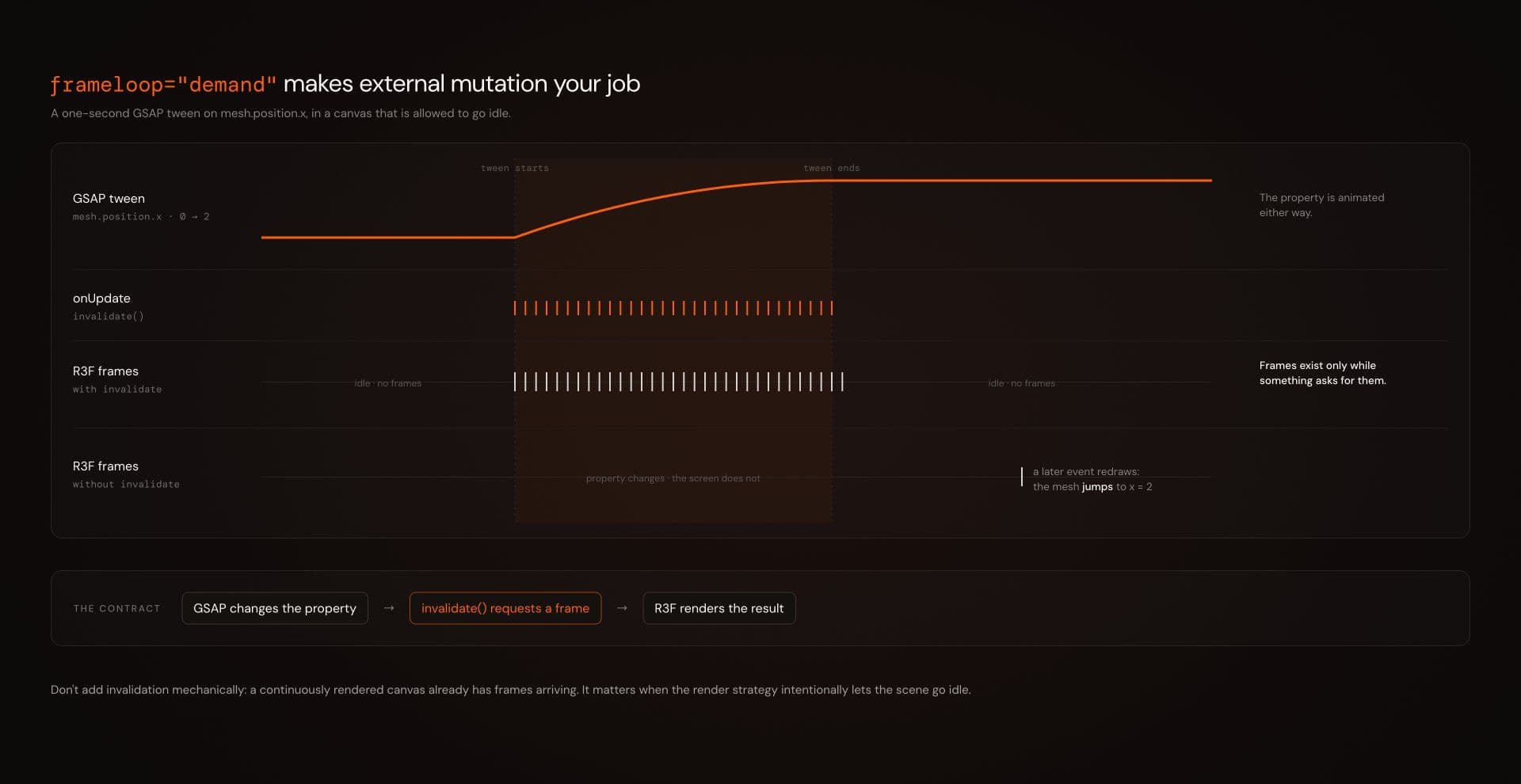
R3F exposes invalidate() to request rendering in that situation. The current scheduler documentation keeps invalidation as part of the API.
A GSAP tween can therefore request a frame while it is active:
"use client"; import { useLayoutEffect, useRef,} from "react";import { Canvas, useThree,} from "@react-three/fiber";import { gsap } from "gsap";import type { Mesh } from "three"; function DemandTween() { const mesh = useRef<Mesh>(null); const invalidate = useThree( (state) => state.invalidate ); useLayoutEffect(() => { if (!mesh.current) return; const tween = gsap.to( mesh.current.position, { x: 2, duration: 1, ease: "power2.out", onUpdate: invalidate, } ); return () => { tween.kill(); }; }, [invalidate]); return ( <mesh ref={mesh}> <boxGeometry /> <meshStandardMaterial /> </mesh> );} export function DemandScene() { return ( <Canvas frameloop="demand"> <ambientLight intensity={1.5} /> <DemandTween /> </Canvas> );}The contract is clear:
GSAP changes the property. invalidate() requests another R3F frame. R3F renders the result.
Do not add invalidation to every animation mechanically. A continuously rendered canvas already has frames arriving. This becomes relevant when the render strategy intentionally allows the scene to go idle.
Reduced motion: do not start the animation before you know the preference
A naive reduced-motion hook often begins with:
const [reduced, setReduced] = useState(false);The media query is then read after mount.That creates an awkward edge case: an intro can begin at full motion before the user’s preference has been resolved.
Representing “not checked yet” explicitly avoids that assumption:
"use client"; import { useEffect, useState,} from "react"; export function usePrefersReducedMotion() { const [reduced, setReduced] = useState<boolean | null>(null); useEffect(() => { const query = window.matchMedia( "(prefers-reduced-motion: reduce)" ); const update = () => { setReduced(query.matches); }; update(); query.addEventListener("change", update); return () => { query.removeEventListener( "change", update ); }; }, []); return reduced;}An animation can now wait until the preference is known:
function MotionAwareIntro() { const reduced = usePrefersReducedMotion(); if (reduced === null) { return <StaticProduct />; } if (reduced) { return <StaticProduct />; } return <AnimatedProductIntro />;}The first render does not assume full motion. The reduced-motion version also does not need to be “the same camera flight, only faster.”
For a dramatic spatial move, the better alternative may be a static final composition or a short opacity change. For a decorative perpetual shader, it may be a still frame. For a hover effect, a smaller displacement may be enough.
Vault’s current dependency guidance makes the same broader recommendation: reduced motion can mean disabling movement, reducing distance, removing parallax or showing the resulting state immediately rather than blindly preserving the original effect.
The canvas is an interaction surface. It is not an accessibility exemption.
Keep essential copy and controls in semantic HTML where appropriate. Make hover-dependent interactions usable on touch. Preserve visible focus and keyboard operation for actual controls.
Profile the scene, not the animation-library logo
Choosing the correct owner does not make WebGL cheap. A transform tween and a fullscreen fragment shader are both “animation.” Their costs can be radically different.
Before shipping a motion-heavy R3F scene, test the production build and ask concrete questions:
- Does the canvas continue rendering while nothing is visually changing?
- What happens on a real mid-range phone rather than only a desktop development machine?
- Does device pixel ratio materially increase GPU cost?
- Are post-processing, particles, shader complexity, texture size or draw calls the actual bottleneck?
- Are Three.js objects or temporary vectors being allocated unnecessarily inside the frame loop?
- Are timelines, observers, listeners and other external resources cleaned up when components unmount?
- Is heavy WebGL code imported only where it is needed?
- Does the reduced-motion version remain coherent?
- Does touch input have a deliberate behavior?
- Do interactive DOM controls still work with keyboard and visible focus?
Vault’s live dependency documentation makes similar production recommendations for WebGL effects: keep browser-only work in client components, lazy-load heavy scenes where appropriate, run production builds, test mobile behavior and avoid running expensive canvas work unnecessarily.
Do not turn those questions into folklore such as “useFrame is faster” or “springs are more performant.” The renderer still pays for the scene you give it. Motion has to earn its place in the experience and in the frame budget.
Choose the owner, then tune the motion
Most React Three Fiber animation decisions can start with three questions.
- Does the value need to be recalculated continuously from scene state? Start with
useFrame. - Does the motion have authored beats, overlap and playhead logic? Start with GSAP.
- Does application state define a destination that may change while the object is still moving? Start with
@react-spring/three.
Then inspect the edges.
- If two systems touch the same property, define an ownership boundary.
- If the canvas renders on demand, make external mutation visible to R3F.
- If the interaction has substantial spatial motion, design a reduced-motion alternative before the animation starts.
- If the scene is expensive, profile its actual rendering workload instead of ranking animation libraries by intuition.
Declarative React does not mean declarative every frame. It means declaring the parts of the experience that deserve durable state, then letting the right machine handle the motion in between.
Explore WebGL & 3D Effects to preview patterns using effect-specific Three.js, React Three Fiber, GSAP and WebGL stacks