Ishita Srivastav
Developer
Category: Engineering
Ishita Srivastav
Developer
A practical framework for prefers-reduced-motion beyond the on/off switch.
If motion is decorative, continuous, parallax-based, or otherwise unnecessary, turn it off. If it communicates state, orientation, or feedback, replace or simplify the movement instead. Keep motion only when movement itself is necessary to understand or operate the interface.
prefers-reduced-motion: reduce is a simple signal, but the design response should not be. Some animation should disappear completely when a visitor has requested reduced motion. A pointer-following cursor trail, decorative parallax layer, looping 3D object, or shader wobble usually has little reason to survive because the interface loses nothing meaningful when that motion disappears. Other animation is doing actual interface work: confirming a state change, helping someone understand that a panel opened, orienting someone during navigation, or connecting one state to another. Removing that feedback without replacing it can make an interface less clear rather than more accessible.
The useful question is not “Should reduced motion disable animations?” It is “What job is this animation doing, and what is the calmest way to preserve that job?” MDN’s prefers-reduced-motion reference describes the feature as a way to respond when a user has requested less non-essential movement, while WCAG 2.3.3: Animation from Interactions distinguishes non-essential interaction-triggered animation from movement that is essential to functionality or information.
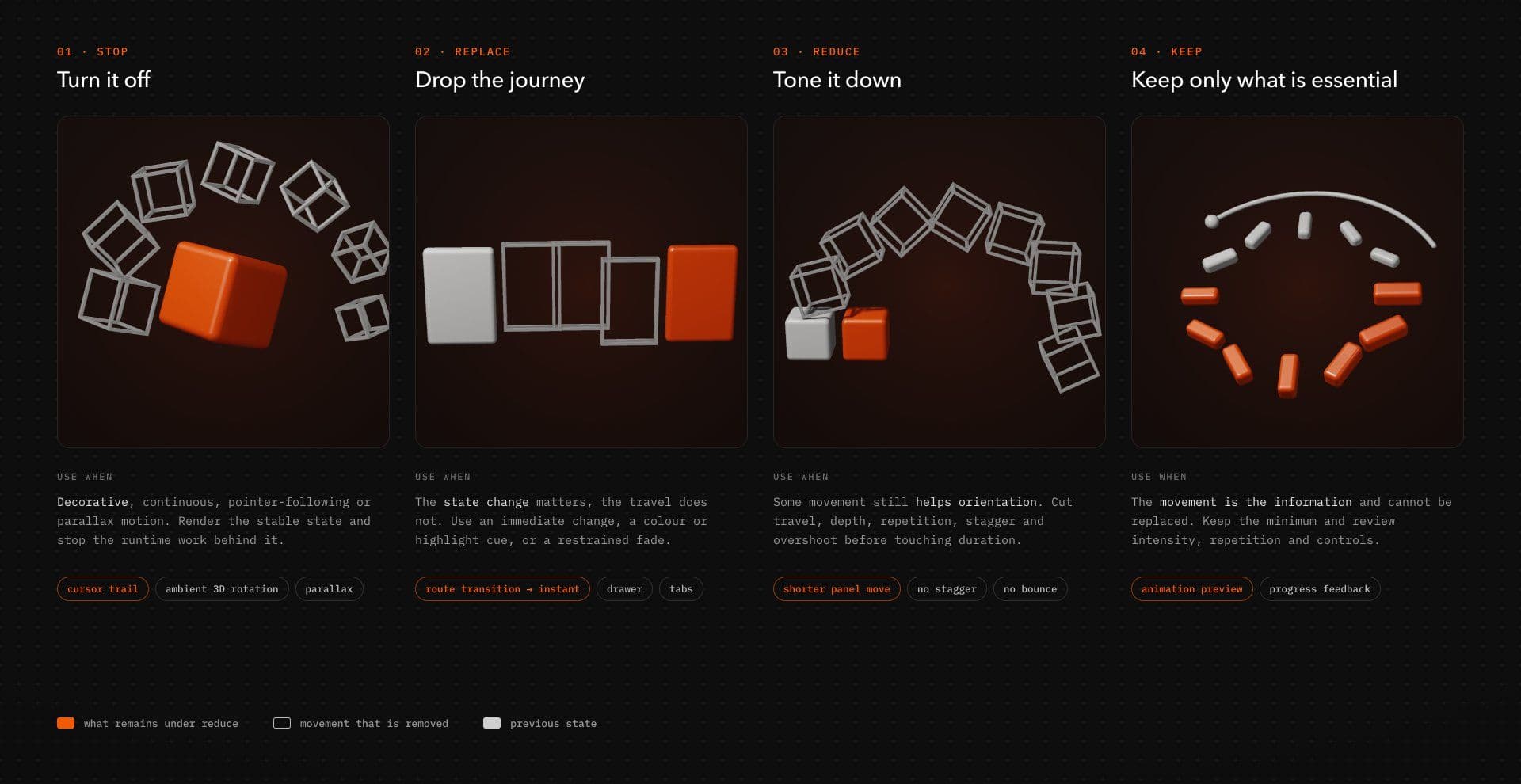
That gives us a more useful production model than a global kill switch: Stop, Replace, Reduce, or Keep.
prefers-reduced-motion is a preference signal, not an animation policy
The media feature has two values: reduce and no-preference. reduce means the user has expressed a preference for less non-essential motion. no-preference means no preference has been made known to the browser. It does not mean the user has requested maximum animation.
The browser detects the preference; your component decides what movement is expendable. It cannot know whether a transform is decorative, whether a route transition genuinely helps with orientation, whether a loading animation communicates ongoing work, or whether a WebGL scene is itself the content. Those decisions remain part of interaction design and implementation.
That is why broad rules such as animation: none need context. They can be perfectly reasonable for a deliberately simple site-wide policy, but they become blunt instruments inside richer interaction systems. A blanket reset may remove useful feedback, interrupt animation-dependent code paths, or leave JavaScript-driven work running because CSS never owned that animation in the first place.
For optional effects, there is also a useful inverse strategy: start static and opt into motion. W3C Technique C39 explicitly documents both approaches — disabling animation under reduce and starting from static styles before applying motion under no-preference. The latter is particularly useful for decorative effects because the unanimated version is already the valid baseline instead of becoming a fallback added after the animation is finished.
Use four decisions: Stop, Replace, Reduce, Keep
Start with the job of the interaction, not the library or CSS property used to animate it.
| Decision | Use when | Typical treatment | Example |
|---|---|---|---|
| STOP | Motion is decorative, continuous, pointer-following, parallax/depth based, or unnecessary to understand the interface. | Render the stable state and stop runtime work used only by the effect. | Cursor trail, ambient 3D rotation, decorative parallax |
| REPLACE | Motion communicates a useful state change, but the spatial movement is unnecessary. | Use an immediate state change, restrained opacity treatment, color/highlight change, or another stable cue. | Full-screen route transition → instant navigation |
| REDUCE | Some movement still improves feedback or orientation, but the normal treatment is excessive. | Cut travel, depth, repetition, stagger, overshoot, or amplitude. | Panel transition with shorter, smaller movement |
| KEEP | Movement itself is necessary to understand or operate the feature and cannot be replaced with an equivalent treatment. | Preserve only the necessary movement and still review intensity, repetition, and controls. | Previewing motion inside an animation-authoring tool |
Two animations can look technically similar while doing completely different jobs. A loading indicator and a looping decorative blob may both rotate, but the first communicates ongoing activity while the second usually contributes atmosphere. One may need a quieter replacement; the other can probably disappear.
Stop decorative motion - and its runtime work
Stop an effect when removing it costs the interface nothing meaningful. Decorative parallax is the obvious case. If a background moves at a different rate from foreground content purely to create depth, the reduced-motion state does not need a gentler version of that illusion. It can simply render the composition without the depth movement.
The same reasoning applies to ambient loops, pointer trails, decorative magnetic movement, continuous object rotation, and many cursor-following flourishes. If the motion exists primarily to add atmosphere, the stable state is often the correct fallback.
Stopping the pixels is not enough. Stop the work behind them. If a cursor trail disappears while the application continues listening to pointermove, calculating interpolation, measuring layout, and running requestAnimationFrame every frame, the interface is visually static but the effect is still alive. Cancel frame loops, unsubscribe from listeners, disconnect observers, stop timelines, and avoid renderer updates that exist solely for the removed effect.
That distinction becomes even more important with Canvas and WebGL. A continuously rendered scene can combine camera updates, shaders, texture transitions, pointer interpolation, scroll calculations, and a persistent render loop. When that movement is presentational rather than informational, the reduced version may be better represented by a static image, conventional gallery, or stable HTML content. If the renderer does not serve the reduced state, there is little reason to keep it running behind an invisible canvas.
Replace motion when the message matters more than the journey
Replace an animation when the interface still needs to communicate a change but does not need the original physical movement.
Consider a route transition built from panels sweeping across the viewport. The meaningful event is the route change and arrival at a new destination. The sweeping panels are one presentation of that event, not the event itself. Under reduced motion, immediate navigation may be the cleanest treatment. A restrained opacity transition can also be appropriate in some cases, but it should be chosen because it adds useful feedback, not because every spatial animation supposedly needs a fade as its accessible substitute.
The same logic applies to drawers, modals, menus, tabs, toggles, and expandable regions. A sidebar that normally travels several hundred pixels can retain a perfectly clear open state without reproducing that journey. An accordion can expose its content immediately rather than animating height. A selected tab can update its text, color, border, or indicator state without sliding the entire content region into position.
The goal is to preserve the information while removing movement that is not necessary to communicate it.
Reduce motion when some transition still helps
Some motion remains useful because it helps establish continuity, hierarchy, or feedback. In those cases, reduce the treatment instead of deleting it mechanically.
A card may not need to travel 80 pixels, overshoot, bounce, stagger its children, and then settle before the state becomes readable. A heading may not need every character entering from a different direction. A carousel may benefit from a small state transition without needing shader distortion or a deep camera move.
Duration is only one control. Slower is not automatically calmer. A large spatial transition stretched across twice the time can simply prolong exposure to the same movement. Cut travel, depth, repetition, stagger, overshoot, scale changes, and amplitude before deciding how long the remaining transition should take.
A reduced-motion treatment should feel intentionally designed, not like the normal animation has been slowed until it becomes tolerable.
Keep movement only when movement itself is essential
Keep is the narrowest category. WCAG 2.3.3 allows interaction-triggered motion when that animation is essential to the functionality or the information being conveyed. The bar is considerably higher than “motion is important to our brand.”
An animation-authoring interface is an obvious example: previewing the animation can itself be part of the functionality. By contrast, a loading state may require clear ongoing status without requiring a large spinning object. A state change can be essential while its spatial transition remains optional.
Before choosing Keep, separate essential information from essential movement. Even when the movement survives that test, there is still room to reduce viewport coverage, acceleration, repetition, automatic playback, or intensity.
Prefer static-first animation when the effect is optional
For decorative or enhancement-only motion, a static-first implementation can be cleaner than building the animated state first and attempting to shut it down later.
The baseline component can be complete and usable without motion:
.hero-art { opacity: 1; transform: none;}Then animation can be added only when no reduced-motion preference is known:
@media (prefers-reduced-motion: no-preference) { .hero-art { transform: translateY(20px); transition: transform 240ms ease, opacity 240ms ease; } .hero-art[data-state="visible"] { transform: translateY(0); }}This is illustrative CSS rather than a complete reveal component: the surrounding application would still need to define how data-state changes and what initial visual state is appropriate. The point is architectural. The stable version is complete first; motion is layered on top only when it serves the experience.
That approach is especially useful for decorative effects and progressive enhancement. It is not necessarily the right choice for every stateful component. Some interactions have useful default transitions that deserve a tailored reduced treatment rather than complete removal.
Implement the policy where the motion is owned
Reduced-motion support becomes fragile when every animation is treated as a CSS problem. Put the fallback where the actual behavior lives: CSS for CSS transitions, JavaScript lifecycle controls for JavaScript effects, component state for React behavior, and renderer controls for Canvas or WebGL.
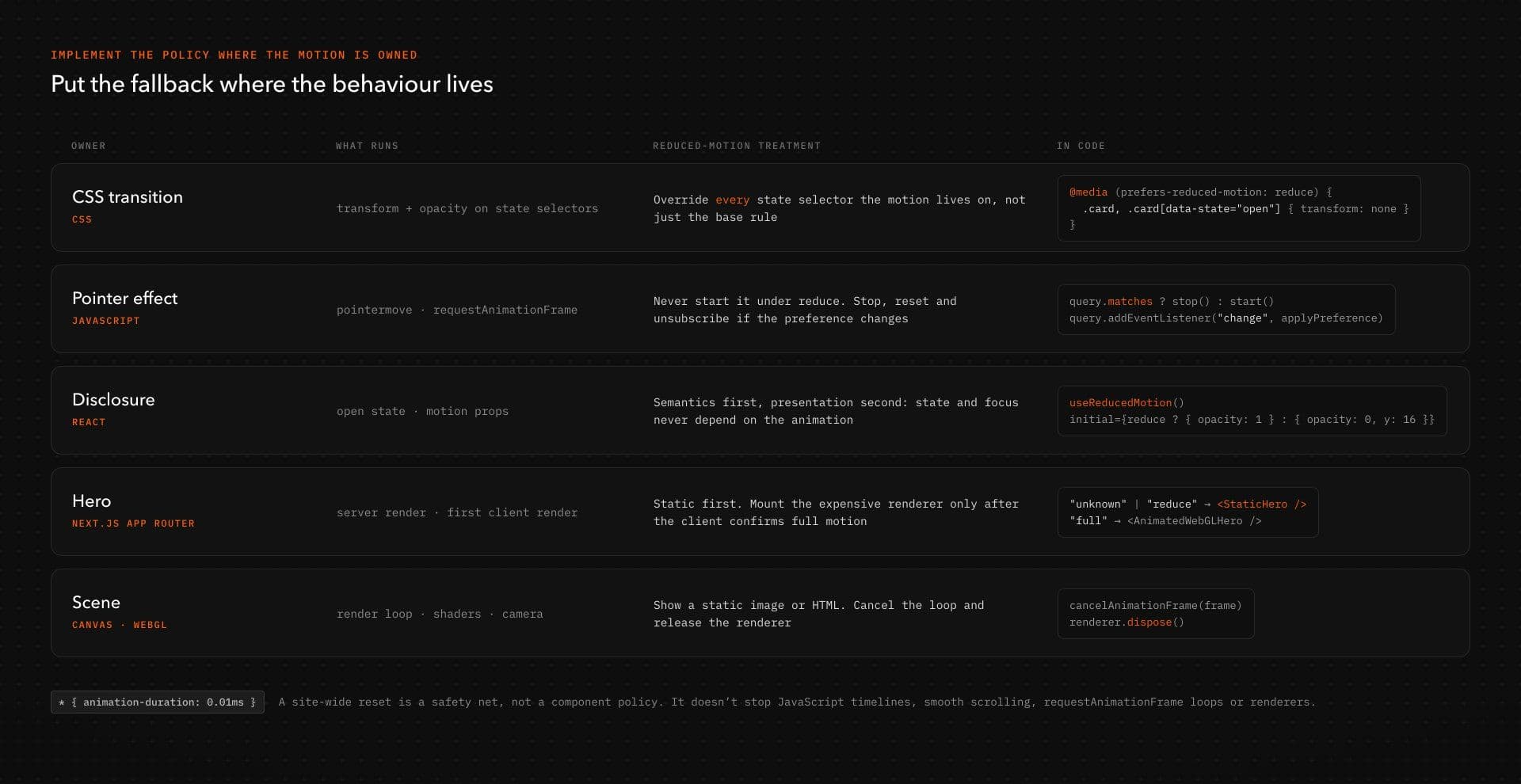
CSS: override the complete state
Consider a card whose open state uses opacity and translation:
.card { opacity: 0; transform: translateY(24px); transition: transform 240ms ease, opacity 240ms ease;} .card[data-state="open"] { opacity: 1; transform: translateY(0);}If reduced motion removes translation, the media-query override should cover the relevant state selectors rather than relying on a less-specific .card rule:
@media (prefers-reduced-motion: reduce) { .card, .card[data-state="open"] { transform: none; } .card { transition: opacity 120ms linear; }}The normal version communicates the state change through opacity and vertical travel. The reduced version keeps only the opacity treatment and explicitly removes transforms in both states. The duration is illustrative rather than prescriptive; the important implementation detail is that the reduced state actually overrides the movement it intends to remove.
Broad reset patterns that reduce every animation and transition to a tiny duration can still be useful as a site-level safeguard, but they are not a complete component policy. Extremely short timelines may interact with logic that relies on animation completion, and such resets do not automatically stop JavaScript timelines, smooth-scrolling systems, requestAnimationFrame loops, or renderers.
JavaScript: do not start decorative work when it is already unnecessary
When JavaScript owns the effect, window.matchMedia() can be used both to read the current preference and respond when it changes.
The following example demonstrates the lifecycle around a decorative pointer effect:
const query = window.matchMedia( "(prefers-reduced-motion: reduce)"); let frameId = null;let pointerX = 0; function onPointerMove(event) { pointerX = event.clientX;} // Project-specific visual update.// Replace with the logic that moves or renders your effect.function updateDecorativeEffect(x) { // ...} // Project-specific reset.// Return the effect to its stable visual state here.function resetDecorativeEffect() { // ...} function render() { updateDecorativeEffect(pointerX); frameId = requestAnimationFrame(render);} function startDecorativeMotion() { if (frameId !== null) return; window.addEventListener("pointermove", onPointerMove); frameId = requestAnimationFrame(render);} function stopDecorativeMotion() { window.removeEventListener("pointermove", onPointerMove); if (frameId !== null) { cancelAnimationFrame(frameId); frameId = null; } resetDecorativeEffect();} function applyPreference() { if (query.matches) { stopDecorativeMotion(); } else { startDecorativeMotion(); }} function destroyDecorativeMotion() { stopDecorativeMotion(); query.removeEventListener("change", applyPreference);} applyPreference();query.addEventListener("change", applyPreference);updateDecorativeEffect() and resetDecorativeEffect() are intentionally project-specific; they represent the visual work your own effect needs to perform and undo. The lifecycle around them is the important part.
If reduced motion is already active on initial load, the pointer listener and animation loop never need to start. If the preference changes while the page remains open, stopDecorativeMotion() cancels the running work. When the component, page, or route that owns the effect is disposed, call destroyDecorativeMotion() so the media-query subscription is removed as well.
That final teardown matters. Otherwise the article would correctly explain how to stop the animation while quietly leaving the preference listener alive.
React: preserve semantics first, animate presentation second
Reduced-motion examples become misleading when animation controls whether a component is actually usable. A closed panel that is merely set to opacity: 0 can still leave focusable descendants available to keyboard users and assistive technology.
For a disclosure, treat open state as the source of truth and animation as presentation around it:
"use client"; import { useState } from "react";import { motion, useReducedMotion } from "motion/react"; export function DetailsDisclosure() { const [open, setOpen] = useState(false); const reduceMotion = useReducedMotion(); return ( <div> <button type="button" aria-expanded={open} aria-controls="details-panel" onClick={() => setOpen((value) => !value)} > {open ? "Hide details" : "Show details"} </button> {open && ( <motion.div id="details-panel" initial={ reduceMotion ? { opacity: 1 } : { opacity: 0, y: 16 } } animate={{ opacity: 1, y: 0 }} transition={ reduceMotion ? { duration: 0 } : { duration: 0.2 } } > <p>Details remain fully available without spatial motion.</p> <a href="/example">Example link</a> </motion.div> )} </div> );}The closed content is not left sitting invisibly in the page waiting to receive keyboard focus. The button exposes state through aria-expanded, and the panel only exists while the disclosure is open. Under reduced motion, it appears without the vertical travel.
Motion’s useReducedMotion() hook actively responds when the user’s setting changes and causes the component to re-render with the latest preference. That should not be interpreted as a guarantee that every animation already in flight will instantly terminate in exactly the way your product expects. How an active transition responds depends on the values, animation configuration, and component state involved. Test preference changes during active motion instead of assuming the hook alone defines that behavior.
The example also intentionally avoids exit choreography. If a production component needs animated exit behavior, that implementation still needs correct unmounting, focus handling, and semantic state. The accessibility contract belongs to the component; animation is presentation around it.
Next.js: do not assume the server knows the browser preference
A browser media preference is client information. In a Next.js App Router project, code that reads window.matchMedia() belongs on the client.
For expensive decorative renderers, one strategy is to start from a stable static state and initialize the animated version only after the client confirms that reduced motion is not requested:
"use client"; import { useEffect, useState } from "react"; type MotionMode = "unknown" | "reduce" | "full"; export function Hero() { const [motionMode, setMotionMode] = useState<MotionMode>("unknown"); useEffect(() => { const query = window.matchMedia( "(prefers-reduced-motion: reduce)" ); const update = () => { setMotionMode(query.matches ? "reduce" : "full"); }; update(); query.addEventListener("change", update); return () => { query.removeEventListener("change", update); }; }, []); if (motionMode !== "full") { return <StaticHero />; } return <AnimatedWebGLHero />;}StaticHero and AnimatedWebGLHero are project-specific components intentionally omitted from the example. They represent two implementations of the same content: a stable presentation and the richer animated renderer.
The server render and first client render both use the static branch, so this version does not assume a browser preference during SSR. The animated branch mounts only after the client has determined that full motion is appropriate.
That trade-off should not be treated as a universal Next.js pattern. It deliberately prioritizes a stable initial state and avoids prematurely initializing an expensive decorative renderer. For a lightweight component, waiting until hydration before enabling motion may introduce a visual change that is not worth it. Choose the boundary based on the cost and purpose of the effect.
Applying the four decisions to an animated disclosure
Imagine a disclosure panel whose normal design uses several layers of choreography: the panel moves upward as it appears, opacity changes from 0 to 1, and child elements enter with a stagger. The useful event is simple: hidden content has become available.
Apply the framework to that interaction and the policy becomes much clearer. Stop the child stagger if it is purely decorative. Replace the larger vertical travel with immediate appearance if the spatial movement does not add useful orientation. Reduce the transition if a small amount of movement still helps connect the button action with the content that just appeared. There is little reason to classify the disclosure’s movement as Keep, because its meaning is already carried by the button state, content visibility, and semantics.
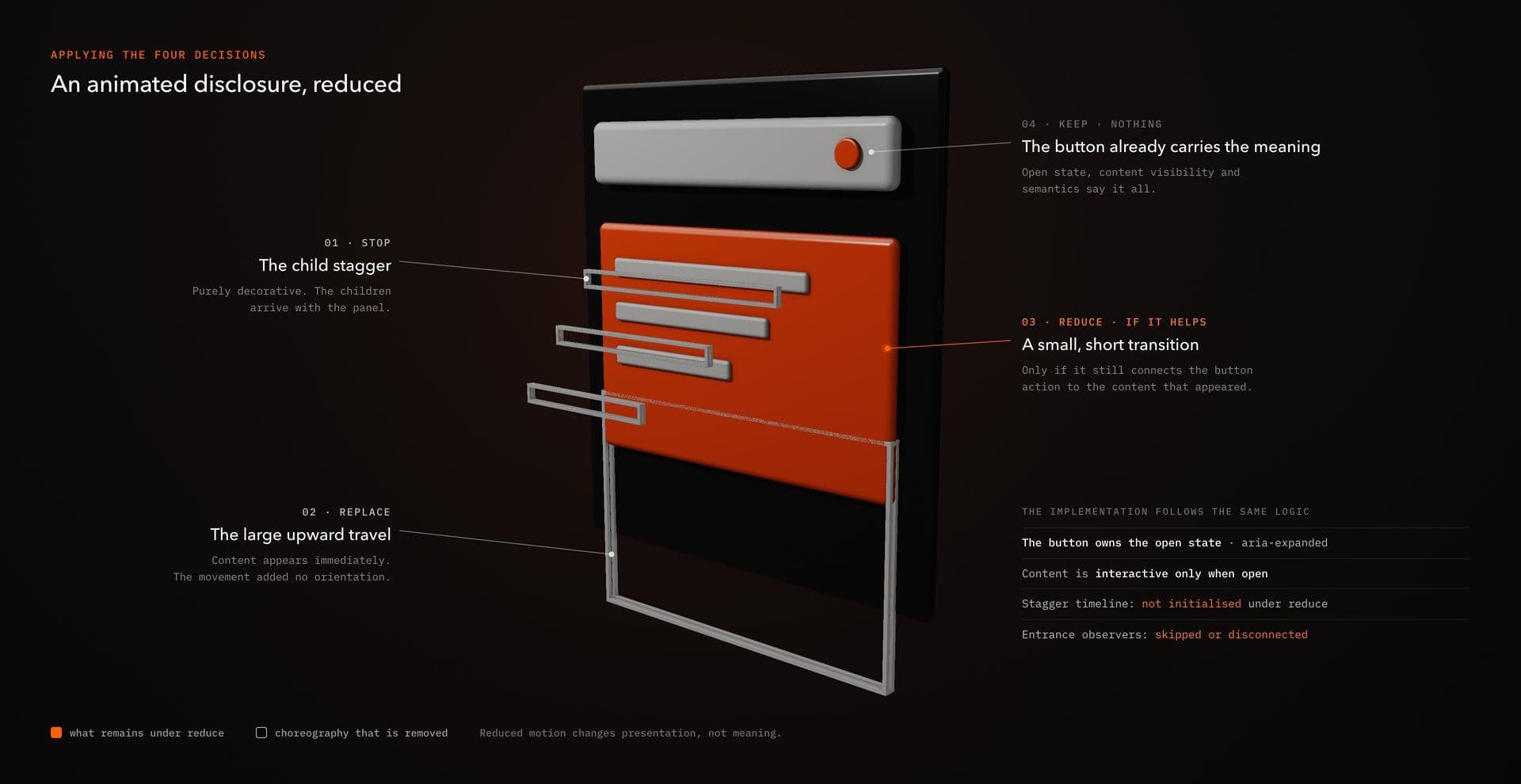
The implementation should follow the same logic. The button owns the open state. Content is only interactive when open. Reduced motion changes presentation without changing meaning. If a JavaScript timeline exists only to run the stagger, it does not need to initialize in the reduced state. If observers exist solely to trigger the entrance effect, they can be skipped or disconnected.
This is intentionally an applied decision walkthrough rather than a claim that the earlier React snippet implements staggered entrance and animated exit behavior. The purpose is to show how the framework changes an interaction before choosing the exact animation code.
Reduced motion does not replace broader accessibility requirements
prefers-reduced-motion is one accessibility mechanism, not a compliance switch.
WCAG 2.3.3, Animation from Interactions, is a Level AAA success criterion covering non-essential motion animation triggered by interaction. It requires qualifying animation to be disableable unless the animation is essential to functionality or information.
Automatically moving content is covered by additional requirements. WCAG 2.2.2, Pause, Stop, Hide, is Level A. For moving, blinking, or scrolling information, its requirements apply when the content starts automatically, lasts for more than five seconds, and appears in parallel with other content, unless the movement is essential. Auto-updating information has its own conditions and does not use the same five-second exception.
That distinction matters because an autoplaying carousel does not automatically become acceptable merely because it checks prefers-reduced-motion. Reduced-motion handling also does not fix missing keyboard operation, invisible focus states, inaccessible canvas content, hover-only information, incorrect dialog focus management, or controls whose meaning exists only through animation.
Motion sensitivity is one part of the interface. The fallback should strengthen the component rather than becoming a certificate pasted onto it.
Test reduced motion like a real product state
A reduced-motion branch that compiles is not enough. Test the actual state before, during, and after interaction.
Chrome DevTools provides an explicit reduced-motion emulation control. Open the Rendering panel, find Emulate CSS media feature prefers-reduced-motion, and select prefers-reduced-motion: reduce. Chrome documents the process in its CSS media feature emulation guide.
Use that state to verify more than visual differences:
| Check | What to verify |
|---|---|
| Initial render | Content is readable and functional without waiting for an animation that will not run. |
| State changes | Buttons, disclosures, tabs, navigation, and other controls still communicate their state clearly. |
| Keyboard access | Visually hidden content is not accidentally left focusable or interactive. |
| Preference changes | JavaScript- or React-driven effects respond appropriately if the media query changes while the page is open. |
| Runtime work | Frame loops, observers, timelines, event listeners, and renderers used only by removed effects actually stop. |
| Navigation | Route-transition logic cannot block the destination when the visual transition is bypassed. |
| Touch/mobile | Removing motion does not expose hover-dependent assumptions or leave desktop-only interactions unusable. |
| Canvas/WebGL | Equivalent content remains available when camera movement, shader distortion, or continuous rendering is removed. |
| Autoplay | Reduced motion is not being used as a substitute for pause/stop controls where another requirement applies. |
A useful acceptance test is straightforward: enable reduce, reload from a cold state, operate the component with a keyboard, and confirm that every important state remains understandable without the original animation. Then switch the emulation while the page remains open and inspect whether JavaScript work starts or stops correctly.
Look at the runtime as well as the viewport. If a supposedly disabled cursor effect still has a pointer listener attached and a frame callback firing continuously, the reduced state is incomplete.
How the four decisions apply to common interaction patterns
Different interaction classes deserve different reduced-motion treatments because they carry different perceptual and runtime costs.
| Interaction | Normal treatment | Reduced-motion treatment | Decision |
|---|---|---|---|
| Pointer-following hero | Pointer position drives text deformation or decorative elements. | Render stable content and do not initialize continuous pointer tracking. | STOP |
| Route transition | Full-screen blocks or panels cover and reveal the destination. | Navigate immediately; use a restrained non-spatial cue only if it genuinely helps orientation. | REPLACE |
| Animated toggle | Motion reinforces a binary state change with sliding or secondary emphasis. | Preserve the selected state; remove exaggerated travel, stagger, or looping emphasis. | REDUCE / REPLACE |
| WebGL carousel | Shader distortion, depth, camera movement, or texture transitions shape slide changes. | Use stable slides, an immediate state change, or a simpler HTML/CSS alternative; stop renderer work that no longer serves the fallback. | STOP / REPLACE |
| Accordion | Height and content animate between collapsed and open states. | Preserve disclosure semantics and show the content directly or with materially smaller movement. | REDUCE / REPLACE |
| Decorative parallax | Layers move at different speeds while scrolling. | Keep the visual composition static and skip parallax calculations. | STOP |
| Loading state | Repeated motion signals that a process is still active. | Preserve understandable status or progress feedback while reducing unnecessary movement. | REDUCE / KEEP |
Use these as starting decisions, not automatic accessibility verdicts. A cursor experiment should not inherit the same policy as a loading state, and a continuously rendered 3D scene should not be evaluated like a short button transition. The interaction’s job and cost matter more than the fact that all of them happen to be animation.
A reduced-motion decision tree
When reviewing an interaction, begin with one question: does removing the movement lose necessary information or functionality? If not, STOP it and stop any runtime work that exists solely for the effect.
If information would be lost, ask whether an immediate or static cue can communicate the same thing. If it can, REPLACE the movement. If some transition still materially improves orientation or feedback, REDUCE the spatial intensity by cutting travel, depth, repetition, stagger, overshoot, or amplitude before reaching for duration as the only control.
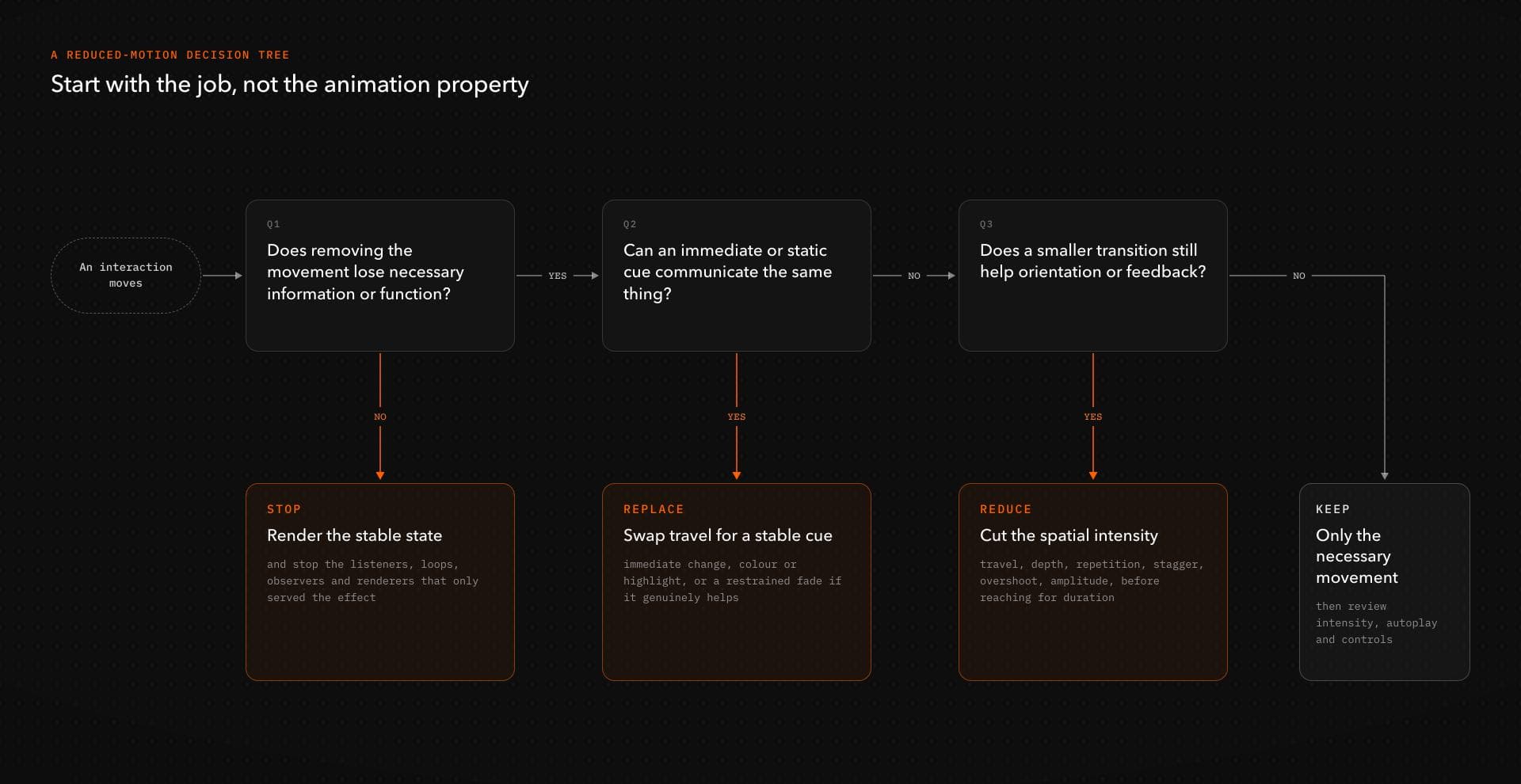
Only when the movement itself cannot be replaced without fundamentally changing the information or operation should you KEEP it. Even then, review intensity, automatic playback, repetition, viewport coverage, and available user control.
This is an interaction-design and implementation framework, not an automatic WCAG determination. Accessibility still depends on the actual component, its purpose, its controls, and its behavior in context.
Audit the interaction, not just its animation properties
prefers-reduced-motion gives you one signal: the user has asked for less non-essential motion. It does not tell you whether to remove a shader, skip a route transition, cancel a renderer, retain a progress cue, remove a stagger, preserve a small state change, or substitute movement with another form of feedback.
Those decisions belong at the interaction level. Stop motion that contributes nothing necessary. Replace movement when its message matters more than its choreography. Reduce it when a calmer transition still improves understanding. Keep it only when movement itself is genuinely required, and then keep no more than the experience needs.
The preference may be binary. The design decision should not be.
For editable React and Next.js interaction patterns where these decisions can be applied directly in project source, browse Hyperiux Vault’s effects.