
Vidushi Saxena
Developer
Category: Engineering
Vidushi Saxena
Developer
A React animation can be gone from the screen and still very much alive.
The section unmounted. The route changed. The hero disappeared. Yet somewhere in the runtime, a resize listener is still measuring old geometry. A requestAnimationFrame loop is scheduling another frame. An observer is still watching. A ScrollTrigger is still registered. Navigate back and the setup runs again. Now you have two of everything.
The practical fix is simple to state: put every external resource an interaction creates inside a clear lifecycle, then stop or undo every one of those resources when that lifecycle ends. In React, that usually means pairing Effect setup with symmetrical cleanup and using an animation library's scoped cleanup primitives where they exist.
The difficult part is noticing everything the interaction actually started.
React animation cleanup is not just return () => timeline.kill(). Animation code routinely crosses React's boundary into browser events, observers, timers, animation engines, scroll infrastructure and continuous render loops. React treats an Effect as synchronization with an external system: when dependencies change, it runs the previous cleanup before the new setup, and it runs cleanup again when the component is removed.
A better mental model is:
Setup → Own → Dispose → Verify
The last word matters. A cleanup function that looks plausible is not the same thing as proving the ghost is gone.
The Animation Can Disappear While Its Work Keeps Running
Removing a React component removes the rendered UI that component owned. It does not automatically remove an event listener you registered manually on window. It does not know that your ResizeObserver should disconnect or your RAF loop should stop scheduling itself. Third-party animation libraries may clean resources they own, but they cannot infer responsibility for arbitrary browser work created beside them.
Here is a deliberately broken example:
"use client"; import { useEffect } from "react"; export default function LeakyPointerLoop() { useEffect(() => { function handlePointerMove(event) { console.log("pointer:", event.clientX); } function tick() { console.count("animation frame"); requestAnimationFrame(tick); } window.addEventListener("pointermove", handlePointerMove); requestAnimationFrame(tick); }, []); return <div>Move the pointer, then remove this component.</div>;}It renders. It reacts to the pointer. The frame loop runs.
It also has no cleanup.Remove the component and the listener remains registered. The RAF callback keeps scheduling its successor. Mount the component again and you add another listener and another loop.The runtime begins collecting souvenirs.
The fixed version owns both resources:
"use client"; import { useEffect } from "react"; export default function PointerLoop() { useEffect(() => { let frameId = 0; let active = true; function handlePointerMove(event) { console.log("pointer:", event.clientX); } function tick() { if (!active) return; console.count("animation frame"); frameId = requestAnimationFrame(tick); } window.addEventListener("pointermove", handlePointerMove); frameId = requestAnimationFrame(tick); return () => { active = false; window.removeEventListener("pointermove", handlePointerMove); cancelAnimationFrame(frameId); }; }, []); return <div>Move the pointer, then remove this component.</div>;}Cancelling the stored frame stops the pending request. The active guard prevents additional scheduling if the callback is entered after cleanup. It is defensive; it does not replace tracking the latest request ID correctly.The important difference is architectural, not syntactic.

Setup creates two pieces of external work. Cleanup disposes of those same two pieces of work.
Before:
mount → listener + RAF loop → remove component → listener + RAF continue
After:
mount → listener + RAF loop → cleanup → remove listener + cancel loop → zero section-owned work
That is React animation cleanup in its useful form.
React Gives Every Side Effect a Lifetime
React's Effect model already provides the correct boundary. The common mistake is treating cleanup as a final unmount chore instead of the other half of setup.
An Effect can run when a component enters the tree. If its dependencies later change, React first runs the previous cleanup and then starts setup again with the new values. When the component is removed, React runs cleanup one final time. React explicitly recommends thinking in terms of independent setup/cleanup processes whose teardown mirrors their setup.That distinction matters because animation work is often rebuilt without the component disappearing.
A breakpoint changes. A measured width changes. A prop selects a different interaction state. Reduced-motion preferences send the component down another path. An animation sequence is reconstructed because one of its inputs changed.
If cleanup only works when you mentally picture “unmount,” you will miss bugs caused by resynchronization.
Consider an observer-driven state change:
"use client"; import { useEffect, useRef } from "react"; export default function VisibilityProbe() { const sectionRef = useRef(null); useEffect(() => { const section = sectionRef.current; if (!section) return; const observer = new IntersectionObserver( ([entry]) => { section.dataset.visible = String(entry.isIntersecting); }, { threshold: 0.25 } ); observer.observe(section); return () => { observer.disconnect(); }; }, []); return ( <section ref={sectionRef} data-visible="false"> Observe me </section> );}Nothing is left implied. The element exists through a ref. The callback exists. The observer is attached to that element. The same Effect disconnects it.That symmetry scales better than memorising cleanup commands.
Strict Mode is Showing You the Leak, Not Creating it
A familiar debugging story goes like this: an animation appears to initialize twice in development, Strict Mode is enabled, and Strict Mode gets blamed for breaking the page.Usually it is the witness.
When Strict Mode applies to the relevant tree, React performs an additional Effect setup-and-cleanup cycle in development specifically to surface missing teardown. Those checks do not apply to the production build.
That behavior is particularly useful for imperative animation code. A setup with incomplete teardown may look perfectly healthy when it runs once. An additional setup → cleanup → setup cycle makes a leftover listener, trigger or subscription much harder to hide.
If Strict Mode leaves two listeners after the component settles, the useful question is : “Why didn't cleanup undo the first setup?”
At the end of setup → cleanup → setup, you should have one active instance of everything the mounted component needs. Not two.
Audit Everything the Animation Starts
A production interaction is rarely one object called “the animation.”
A cursor may have pointer listeners plus a RAF interpolation loop. A scroll section may combine a GSAP timeline, ScrollTrigger and resize measurement. A reveal may need only an observer and a CSS class. A WebGL scene may carry a continuous renderer, textures, geometry and resize handling.
Different interaction classes deserve different teardown work.
| Resource created during setup | Typical teardown | Owner | What should be true afterwards? |
|---|---|---|---|
| DOM event listener | removeEventListener() with matching target, type and handler | Component/hook that registered it | Handler no longer fires |
| IntersectionObserver | disconnect() or appropriate unobserve() | Component that created it | Section is no longer observed |
| ResizeObserver | disconnect() or unobserve() | Component measuring layout | Removed section produces no measurements |
| setTimeout / setInterval | clearTimeout() / clearInterval() | Effect that scheduled it | Callback stops firing |
| RAF loop | cancelAnimationFrame() plus stop future scheduling | Interaction loop owner | Frame work ends after teardown |
| GSAP tween/timeline | Kill or revert according to desired state restoration | GSAP scope/context | Section-owned animation no longer runs |
| ScrollTrigger | Scoped GSAP cleanup or instance cleanup | Section that created it | Trigger stops responding |
| Library subscription | Corresponding unsubscribe/remove API | Effect that subscribed | Active subscription returns to baseline |
| Delayed GSAP work | Record in context or explicitly dispose | Callback owner | Late animation cannot outlive its owner |
The final column turns cleanup from intention into a test.If a component creates a resource, that component- or a hook clearly owned by it-should normally be able to dispose of it without searching the rest of the application.
Global destruction is usually a warning sign. Killing every trigger in an application because one section disappeared may remove your duplicate animation, but it also tells you the local interaction does not know what it owns.
Local setup deserves local teardown.
GSAP: Use a Scope You Can Actually Revert
GSAP provides a strong answer to the ownership problem through gsap.context() and its React-specific useGSAP() hook.
GSAP documents useGSAP() as a React-oriented wrapper that uses gsap.context() for cleanup. GSAP animations, ScrollTriggers and other supported GSAP objects created while the hook executes can be recorded in that context and reverted when the hook is torn down.
"use client"; import { useRef } from "react";import gsap from "gsap";import { ScrollTrigger } from "gsap/ScrollTrigger";import { useGSAP } from "@gsap/react"; gsap.registerPlugin(ScrollTrigger, useGSAP); export default function FeatureSection() { const sectionRef = useRef(null); useGSAP( () => { gsap.from(".feature-title", { y: 32, opacity: 0, duration: 0.8, scrollTrigger: { trigger: ".feature-title", start: "top 80%", }, }); }, { scope: sectionRef } ); return ( <section ref={sectionRef}> <h2 className="feature-title">A scoped feature section</h2> </section> );}The useful part is the ownership boundary: the feature section creates its animation, the context records the GSAP work created inside that execution, and teardown can revert the work belonging to that context.
Read GSAP's current React integration guidance
Dependency changes need one extra decision
Do not assume useGSAP() mirrors useEffect cleanup semantics for dependency updates by default.
GSAP currently documents revertOnUpdate as false by default. If you give useGSAP() dependencies, changing one of them does not automatically revert the existing GSAP context on every update. If your interaction should tear down the previous GSAP work before rebuilding from the new dependency values, set revertOnUpdate: true.
useGSAP( () => { gsap.to(".panel", { x: endX, }); }, { dependencies: [endX], scope: sectionRef, revertOnUpdate: true, });That distinction matters in an article about lifecycle ownership. React's Effect rules are not a licence to assume every third-party React hook implements dependency teardown identically.
Late-created GSAP animations need to join the context
There is another boundary worth knowing.Animations created later inside click handlers, timers or other deferred callbacks are created after the initial useGSAP() execution. GSAP documents contextSafe() as the way to make those later functions record GSAP work in the same context.
"use client"; import { useRef } from "react";import gsap from "gsap";import { useGSAP } from "@gsap/react"; gsap.registerPlugin(useGSAP); export default function InteractiveCard() { const cardRef = useRef(null); const { contextSafe } = useGSAP({ scope: cardRef, }); const handleClick = contextSafe(() => { gsap.to(".card-face", { rotation: "+=8", duration: 0.3, yoyo: true, repeat: 1, }); }); return ( <article ref={cardRef}> <button className="card-face" onClick={handleClick}> Nudge card </button> </article> );}If you manually register a browser event listener, however, you still own that listener. GSAP explicitly calls out manual listener removal in its React guidance.
The abstraction cleans what it owns. You own the rest.
Motion Shows the Other Side of the Design Space
Not every animation API asks you to manage animation disposal in the same way.
Motion's useAnimate gives a component a scoped ref plus an animate function. Selectors passed through that function are scoped to the component, and Motion documents automatic cleanup for animations started through that animate function when the component is removed.
"use client"; import { useEffect } from "react";import { useAnimate } from "motion/react"; export default function MotionList() { const [scope, animate] = useAnimate(); useEffect(() => { animate("li", { opacity: 1, y: 0 }); }, [animate]); return ( <ul ref={scope}> <li style={{ opacity: 0, transform: "translateY(12px)" }}> First item </li> <li style={{ opacity: 0, transform: "translateY(12px)" }}> Second item </li> </ul> );}Read Motion's useAnimate documentation
That automatic cleanup does not extend to unrelated resources you create manually. A raw pointer listener, observer or custom subscription is still your responsibility.There is no universal React animation cleanup command.
How to Catch a Ghost Animation Before It Ships
A return () => { ... } block proves cleanup code exists. It does not prove that you cleaned the right thing.
Use a repeatable diagnostic pass:
- Establish the expected baseline for the section's active resources.
- Exercise the full interaction: scroll, pointer movement, clicks, delayed callbacks.
- End the owner's actual lifecycle or trigger the dependency change that should replace its current setup.
- Probe the relevant resource after teardown.
- Mount or initialize the interaction again.
- Confirm active work returns to the expected baseline instead of accumulating.
- Repeat through Strict Mode, responsive variants and reduced-motion branches where those paths affect setup.
Do not rely only on cumulative logs. console.count("setup") and console.count("cleanup") can tell you that lifecycle functions ran, but matching totals do not prove some unrelated listener or loop did not survive.
For resources you control, an active-instance probe is more useful:
let activePointerLoops = 0; export function getActivePointerLoops() { return activePointerLoops;} export function startPointerLoop() { let active = true; let frameId = 0; activePointerLoops += 1; function tick() { if (!active) return; frameId = requestAnimationFrame(tick); } frameId = requestAnimationFrame(tick); return function stopPointerLoop() { if (!active) return; active = false; cancelAnimationFrame(frameId); activePointerLoops -= 1; };}Used from an Effect:useEffect(() => { const stop = startPointerLoop(); console.log("active pointer loops:", getActivePointerLoops()); return () => { stop(); console.log("active pointer loops:", getActivePointerLoops()); };}, []);In development, this is a diagnostic instrument, not application architecture. The point is to ,measure current active work, not merely how many times setup has ever happened.
After teardown, the count for that section-owned resource should return to its expected baseline.The exact instrumentation depends on the resource. Browsers do not offer one universal counter for event listeners, observers, RAF loops, GSAP contexts and arbitrary subscriptions.
Debug the owner, not the entire universe.
Route Changes Are Useful Tests-When They Actually End the Lifetime
“Navigate away and back” is useful advice only if navigation actually ends the lifecycle you are testing.
In the Next.js App Router, layouts are explicitly persistent across navigation: they preserve state, remain interactive and do not rerender on navigation. A component living inside such a retained layout therefore should not be expected to unmount simply because a child route changed.
Read Next.js's current layouts and pages documentation
If your animated product section belongs to a page that disappears, navigation can be a good teardown test.
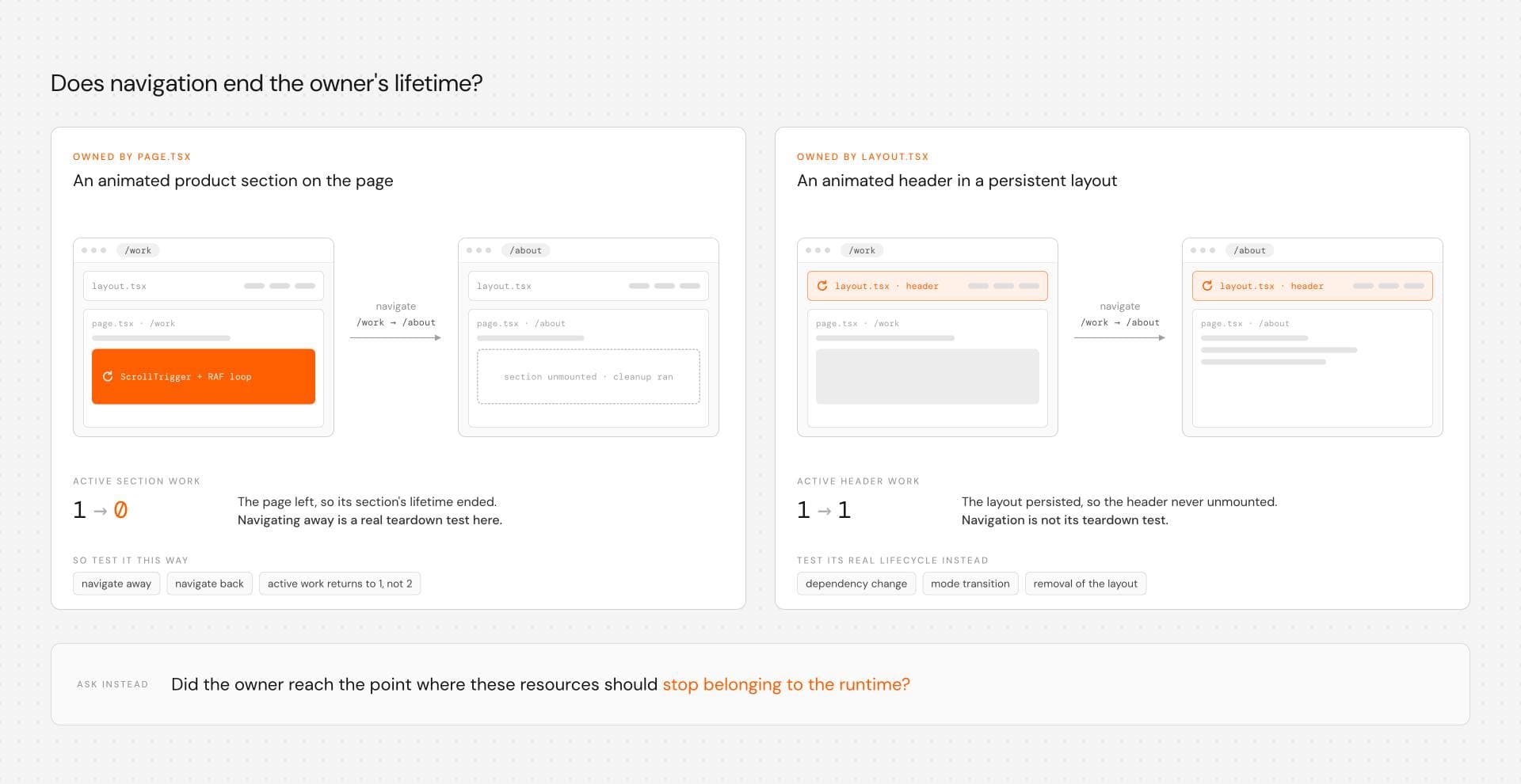
If an animated header belongs to a persistent layout, navigation between child pages is not an unmount test for that header. Its relevant lifecycle might instead be a dependency change, mode transition or eventual removal of the layout.
The question is :
“Did the owner reach the point where these resources should stop belonging to the runtime?”
For the larger question of how to divide page-level and section-level scroll animation ownership, keep that architecture discussion separate. Read How to Build Scroll Animations in React Without Turning the Page Into a Timeline Mess
This page has a narrower job: once you know who owns the interaction, make sure its work does not outlive that ownership.
Reduced Motion and Responsive Variants Need Cleanup Too
Lifecycle bugs are not confined to the default desktop path.
Suppose a component creates a continuous pointer interaction on desktop but switches to a static treatment on mobile. Or a reduced-motion preference replaces a scroll-driven transform with an immediately visible state. If those modes can change while the application is running, the previous mode's resources need to be disposed of before the new mode takes control.
Test the transition, not only each endpoint:
desktop setup → desktop cleanup → mobile setup
animated setup → animated cleanup → reduced-motion setup
If a listener from the first mode survives after the second has taken ownership, two interaction models are now disagreeing over the same component.
Reduced motion is also not the complete accessibility story. Motion-heavy UI still needs readable fallbacks, sensible keyboard and focus behavior, and input assumptions that work beyond pointer devices.
Cleanup keeps the runtime coherent. It does not replace interaction design judgment.
Production Motion Needs an Owner
Real React and Next.js sites have route transitions, persistent layouts, responsive states, content changes, reduced-motion paths and several effects sharing one browser.
Production quality depends less on whether an easing curve looks expensive and more on whether an interaction can answer a few operational questions:
- What creates it?
- What keeps running?
- What changes when its inputs change?
- What survives?
- What gets restored?
- What owns teardown?
- How do you prove active work does not accumulate?
Sometimes the right answer is GSAP. Sometimes Motion's scoped API is enough. Sometimes CSS carries the interaction with less runtime responsibility. Sometimes the page does not need motion at all.Motion has to earn its runtime.
Hyperiux Vault uses a source-first installation model: selected effect files land in the project where teams can inspect and adapt them, while dependencies vary by effect rather than being hidden behind one universal runtime.
Source ownership does not automatically make cleanup correct.It gives you somewhere concrete to verify it. Before integrating an interaction, inspect what external work it creates. Find the client boundary. Check its dependencies. Identify listeners, observers, timers, triggers and continuous loops. Run the lifecycle test. Verify responsive and reduced-motion paths do not leave their previous mode behind.
Then ship it.Because the best sign that your animation cleanup works is wonderfully boring:
You leave. Nothing follows you.
Browse Hyperiux Vault effects and inspect the implementation, dependencies and lifecycle before integrating one into your project