Loading
Pixel Text Fill
A text animation for long headlines and brand statements where key words fill, light up, or resolve with a pixel-led treatment while the full sentence remains readable.
Published On: August 17, 2026
Last Updated: August 18, 2026
GSAP
Overview
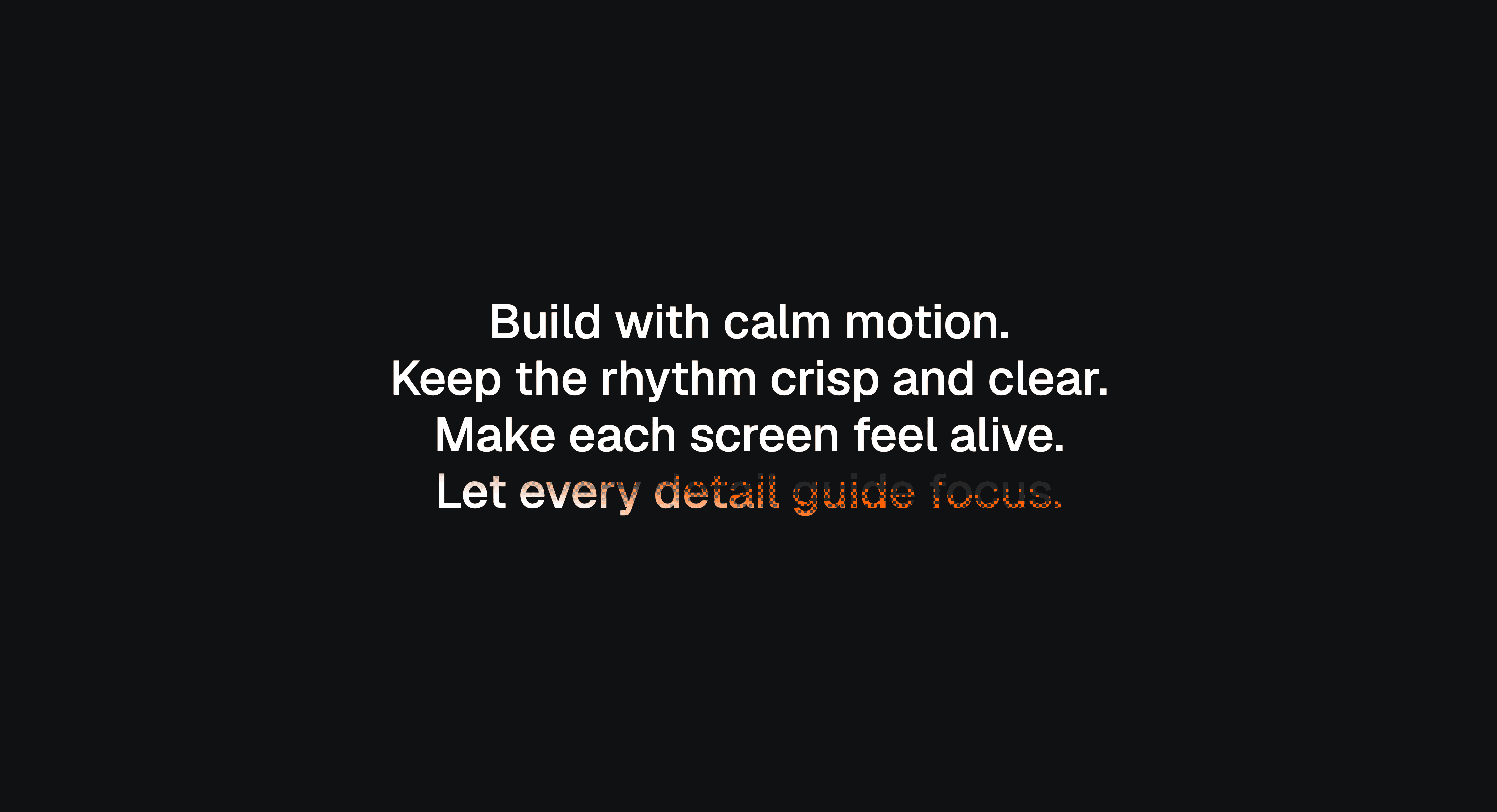
Pixel Text Fill makes text feel like it is being assembled in front of the visitor.
The words begin in a pixelated, incomplete, or block-fragmented state. As the user scrolls, the fill becomes stronger, cleaner, and more complete until the text resolves into solid readable typography. The movement gives the headline a digital sense of construction: the message starts as texture, then becomes signal.
Use Pixel Text Fill when a page needs to turn a headline into a moment of resolution. It works for AI products, developer tools, cybersecurity pages, gaming-adjacent brands, creative portfolios, technical launches, and experimental landing pages where pixel language fits the product or visual system.
The page job is transformation. The visitor should feel the text moving from fragmented to complete, but the final message still has to arrive quickly, stay readable, and support the page argument. Pixelation is the entrance. The readable sentence is the point.
Install Command
npx hyperiux add pixel-text-fillUsage Code
page.jsx
import PixelTextFill from "@/components/effects/pixel-fill";

const page = () => {
  return (
    <>
    <PixelTextFill/>
</>
  )
}
Component Code
index.jsx
// Built using Hyperiux Vault: https://vault.hyperiux.com
"use client";
import { useEffect, useRef, useState } from "react";
import gsap from "gsap";
import ScrollTrigger from "gsap/ScrollTrigger";
if (typeof window !== "undefined") {
gsap.registerPlugin(ScrollTrigger);
}
const DEFAULT_TEXT = "Build with calm motion.
Keep the rhythm crisp and clear.
Make each screen feel alive.
Let every detail guide focus.";
const BAYER = [
0, 32, 8, 40, 2, 34, 10, 42, 48, 16, 56, 24, 50, 18, 58, 26, 12, 44, 4, 36,
14, 46, 6, 38, 60, 28, 52, 20, 62, 30, 54, 22, 3, 35, 11, 43, 1, 33, 9, 41,
51, 19, 59, 27, 49, 17, 57, 25, 15, 47, 7, 39, 13, 45, 5, 37, 63, 31, 55, 23,
61, 29, 53, 21,
];
function hashNoise(x, y) {
let h = Math.imul(x, 374761393) + Math.imul(y, 668265263);
h = Math.imul(h ^ (h >>> 13), 1274126177);
return ((h ^ (h >>> 16)) >>> 0) / 4294967295;
}
function cellThreshold(x, y) {
const ordered = (BAYER[(y & 7) * 8 + (x & 7)] + 0.5) / 64;
return ordered * 0.75 + hashNoise(x, y) * 0.25;
}
function clamp01(value) {
return value < 0 ? 0 : value > 1 ? 1 : value;
}
function smoothstep01(value) {
const x = clamp01(value);
return x * x * (3 - 2 * x);
}
function wrapLines(ctx, text, maxWidth) {
const lines = [];
const paragraphs = String(text).split("
");
for (const paragraph of paragraphs) {
const words = paragraph.split(/\s+/).filter(Boolean);
let line = "";
if (!words.length) {
lines.push("");
continue;
}
for (const word of words) {
const candidate = line ? `${line} ${word}` : word;
if (line && ctx.measureText(candidate).width > maxWidth) {
lines.push(line);
line = word;
}
else {
line = candidate;
}
}
if (line)
lines.push(line);
}
return lines;
}
export default function PixelTextFill({ text = DEFAULT_TEXT, textColor = "#ffffff", primaryColor = "#ff5f00", dimColor = "#272727", backgroundColor = "#101113", fontSize = 3.2, fontWeight = 500, lineHeight = 1.18, textAlign = "center", maxWidth = 80, sectionHeight = 250, pixelSize = 3, stagger = 32, bandFraction = 1.15, effectWidth = 1.4, settleBlend = 0.45, direction = "up", start = "top top", end = "bottom bottom", id = "pixel-text-fill", className = "", }) {
const sectionRef = useRef(null);
const wrapperRef = useRef(null);
const textRef = useRef(null);
const canvasRef = useRef(null);
const [prefersReducedMotion, setPrefersReducedMotion] = useState(false);
useEffect(() => {
const mediaQuery = window.matchMedia?.("(prefers-reduced-motion: reduce)");
if (!mediaQuery)
return;
setPrefersReducedMotion(mediaQuery.matches);
const onReduceMotionChange = (event) => {
setPrefersReducedMotion(event.matches);
};
mediaQuery.addEventListener?.("change", onReduceMotionChange);
return () => {
mediaQuery.removeEventListener?.("change", onReduceMotionChange);
};
}, []);
useEffect(() => {
let frame = null;
let disposed = false;
let scrollTrigger = null;
let progress = 0;
let targetProgress = 0;
let layout = null;
const canvas = canvasRef.current;
const wrapper = wrapperRef.current;
const textElement = textRef.current;
const makeLayer = (width, height) => {
const layer = document.createElement("canvas");
layer.width = Math.max(1, Math.ceil(width));
layer.height = Math.max(1, Math.ceil(height));
return layer;
};
const build = () => {
if (!canvas || !wrapper || !textElement)
return;
const rect = wrapper.getBoundingClientRect();
const width = rect.width;
const height = rect.height;
if (width < 1 || height < 1) {
layout = null;
return;
}
const dpr = Math.min(window.devicePixelRatio || 1, 2);
const styles = window.getComputedStyle(textElement);
const parsedFontSize = Number.parseFloat(styles.fontSize) || 16;
const parsedLineHeight = Number.parseFloat(styles.lineHeight);
const computedLineHeight = Number.isFinite(parsedLineHeight)
? parsedLineHeight
: parsedFontSize * lineHeight;
const font = `${styles.fontStyle} ${styles.fontWeight} ${parsedFontSize}px ${styles.fontFamily}`;
const letterSpacing = styles.letterSpacing;
const align = styles.textAlign;
const hasLetterSpacing = letterSpacing && letterSpacing !== "normal";
canvas.width = Math.ceil(width * dpr);
canvas.height = Math.ceil(height * dpr);
canvas.style.width = `${width}px`;
canvas.style.height = `${height}px`;
const ctx = canvas.getContext("2d");
if (!ctx)
return;
ctx.setTransform(dpr, 0, 0, dpr, 0, 0);
ctx.font = font;
if (hasLetterSpacing && "letterSpacing" in ctx) {
ctx.letterSpacing = letterSpacing;
}
const lines = wrapLines(ctx, text, width);
const metrics = ctx.measureText("Hg");
const ascent = metrics.fontBoundingBoxAscent || parsedFontSize * 0.8;
const descent = metrics.fontBoundingBoxDescent || parsedFontSize * 0.2;
const firstBaseline = (computedLineHeight - (ascent + descent)) / 2 + ascent;
const lineGeometry = lines.map((line, index) => {
const lineWidth = ctx.measureText(line).width;
const x = align === "right"
? width - lineWidth
: align === "left" || align === "start"
? 0
: (width - lineWidth) / 2;
return { line, x, baseline: firstBaseline + index * computedLineHeight };
});
const chars = [];
for (const { line, x, baseline } of lineGeometry) {
let previous = 0;
for (let index = 0; index < line.length; index += 1) {
const next = ctx.measureText(line.slice(0, index + 1)).width;
const character = line[index];
if (character.trim()) {
const glyph = ctx.measureText(character);
const top = baseline - (glyph.actualBoundingBoxAscent || ascent * 0.72) - 1;
const bottom = baseline + (glyph.actualBoundingBoxDescent || 0) + 1;
chars.push({
x: x + previous,
width: next - previous,
top,
bottom,
height: bottom - top,
});
}
previous = next;
}
}
const paint = (target, color) => {
const tctx = target.getContext("2d");
if (!tctx)
return;
tctx.setTransform(dpr, 0, 0, dpr, 0, 0);
tctx.clearRect(0, 0, width, height);
tctx.font = font;
tctx.textBaseline = "alphabetic";
tctx.fillStyle = color;
if (hasLetterSpacing && "letterSpacing" in tctx) {
tctx.letterSpacing = letterSpacing;
}
for (const { line, x, baseline } of lineGeometry) {
tctx.fillText(line, x, baseline);
}
};
const crispDim = makeLayer(width * dpr, height * dpr);
const crispFill = makeLayer(width * dpr, height * dpr);
const crispAccent = makeLayer(width * dpr, height * dpr);
const scratch = makeLayer(width * dpr, height * dpr);
const mask = makeLayer(width * dpr, height * dpr);
paint(crispDim, dimColor);
paint(crispFill, textColor);
paint(crispAccent, primaryColor);
layout = {
width,
height,
dpr,
chars,
crispDim,
crispFill,
crispAccent,
scratch,
mask,
};
};
const draw = () => {
frame = null;
if (!layout || !canvas)
return;
const { width, height, dpr, chars } = layout;
const ctx = canvas.getContext("2d");
if (!ctx)
return;
ctx.setTransform(dpr, 0, 0, dpr, 0, 0);
ctx.clearRect(0, 0, width, height);
ctx.drawImage(layout.crispDim, 0, 0, width, height);
const total = chars.length;
if (!total)
return;
const head = progress * (total + stagger);
const soft = Math.max(0.35, bandFraction) * Math.max(0.25, effectWidth);
const settle = clamp01(settleBlend);
const horizontal = direction === "right";
const dissolve = new Path2D();
let hasDissolve = false;
let hasFillMask = false;
const maskCanvas = layout.mask;
const mctx = maskCanvas.getContext("2d");
if (!mctx)
return;
mctx.setTransform(dpr, 0, 0, dpr, 0, 0);
mctx.clearRect(0, 0, width, height);
mctx.globalCompositeOperation = "source-over";
for (let index = 0; index < total; index += 1) {
const local = (head - index) / stagger;
if (local <= 0)
continue;
const char = chars[index];
const axisSize = horizontal ? char.width : char.height;
const invAxis = axisSize > 0 ? 1 / axisSize : 0;
const right = char.x + char.width;
const front = Math.min(local, 1 + soft * 0.5);
const fillDelay = clamp01(0.22 + (1 - settle) * 0.28);
const fillT = smoothstep01((local - fillDelay) / Math.max(0.28, 1 - fillDelay));
const fadePx = Math.max(axisSize * 0.42, soft * axisSize * 0.75);
if (fillT >= 0.999) {
mctx.fillStyle = "#fff";
mctx.fillRect(char.x, char.top, char.width, char.height);
hasFillMask = true;
}
else if (fillT > 0.001) {
if (horizontal) {
const crestX = char.x + fillT * (char.width + fadePx * 0.95);
const grad = mctx.createLinearGradient(crestX - fadePx, 0, crestX + fadePx * 0.2, 0);
grad.addColorStop(0, "rgba(255,255,255,1)");
grad.addColorStop(0.65, "rgba(255,255,255,0.4)");
grad.addColorStop(1, "rgba(255,255,255,0)");
mctx.fillStyle = grad;
mctx.fillRect(char.x, char.top, char.width, char.height);
}
else {
const crestY = char.bottom - fillT * (char.height + fadePx * 0.95);
const gradTop = crestY - fadePx * 0.2;
const grad = mctx.createLinearGradient(0, gradTop, 0, crestY + fadePx);
grad.addColorStop(0, "rgba(255,255,255,0)");
grad.addColorStop(0.35, "rgba(255,255,255,0.4)");
grad.addColorStop(1, "rgba(255,255,255,1)");
mctx.fillStyle = grad;
mctx.fillRect(char.x, Math.max(char.top, gradTop), char.width, char.bottom - Math.max(char.top, gradTop));
}
hasFillMask = true;
}
const firstRow = Math.floor(char.top / pixelSize);
const lastRow = Math.ceil(char.bottom / pixelSize);
const firstCol = Math.floor(char.x / pixelSize);
const lastCol = Math.ceil(right / pixelSize);
for (let row = firstRow; row < lastRow; row += 1) {
const y = row * pixelSize;
const cy = y + pixelSize * 0.5;
const top = Math.max(y, char.top);
const cellHeight = Math.min(y + pixelSize, char.bottom) - top;
if (cellHeight <= 0)
continue;
for (let col = firstCol; col < lastCol; col += 1) {
const x = Math.max(col * pixelSize, char.x);
const cellWidth = Math.min((col + 1) * pixelSize, right) - x;
if (cellWidth <= 0)
continue;
const cx = x + cellWidth * 0.5;
const fromStart = horizontal ? (cx - char.x) * invAxis : (char.bottom - cy) * invAxis;
const coverage = clamp01((front + soft * 0.5 - fromStart) / soft);
if (coverage <= 0.001)
continue;
if (coverage <= cellThreshold(col, row))
continue;
dissolve.rect(x, top, cellWidth, cellHeight);
hasDissolve = true;
}
}
}
const stampMasked = (source, maskSource) => {
const sctx = layout?.scratch.getContext("2d");
if (!layout || !sctx)
return;
sctx.setTransform(dpr, 0, 0, dpr, 0, 0);
sctx.globalCompositeOperation = "source-over";
sctx.clearRect(0, 0, width, height);
sctx.drawImage(source, 0, 0, width, height);
sctx.globalCompositeOperation = "destination-in";
sctx.drawImage(maskSource, 0, 0, width, height);
sctx.globalCompositeOperation = "source-over";
ctx.drawImage(layout.scratch, 0, 0, width, height);
};
const stampPath = (source, path) => {
const sctx = layout?.scratch.getContext("2d");
if (!layout || !sctx)
return;
sctx.setTransform(dpr, 0, 0, dpr, 0, 0);
sctx.globalCompositeOperation = "source-over";
sctx.clearRect(0, 0, width, height);
sctx.drawImage(source, 0, 0, width, height);
sctx.globalCompositeOperation = "destination-in";
sctx.fill(path);
sctx.globalCompositeOperation = "source-over";
ctx.drawImage(layout.scratch, 0, 0, width, height);
};
if (hasDissolve)
stampPath(layout.crispAccent, dissolve);
if (hasFillMask)
stampMasked(layout.crispFill, maskCanvas);
};
const schedule = () => {
if (frame !== null || disposed)
return;
frame = requestAnimationFrame(draw);
};
const renderProgress = (nextProgress) => {
targetProgress = clamp01(nextProgress);
schedule();
};
const tickProgress = () => {
if (disposed)
return;
progress += (targetProgress - progress) * 0.18;
if (Math.abs(targetProgress - progress) < 0.001) {
progress = targetProgress;
}
draw();
if (progress !== targetProgress) {
frame = requestAnimationFrame(tickProgress);
}
};
const scheduleSmooth = () => {
if (disposed)
return;
if (frame !== null)
cancelAnimationFrame(frame);
frame = requestAnimationFrame(tickProgress);
};
const renderSmoothProgress = (nextProgress) => {
targetProgress = clamp01(nextProgress);
scheduleSmooth();
};
const init = () => {
if (disposed)
return;
build();
if (prefersReducedMotion) {
progress = 1;
targetProgress = 1;
draw();
return;
}
scrollTrigger = ScrollTrigger.create({
trigger: sectionRef.current,
start,
end,
fastScrollEnd: true,
invalidateOnRefresh: true,
onUpdate: (self) => {
renderSmoothProgress(self.progress);
},
onRefresh: (self) => {
renderProgress(self.progress);
},
onEnter: (self) => renderSmoothProgress(self.progress),
onEnterBack: (self) => renderSmoothProgress(self.progress),
onLeave: () => renderSmoothProgress(1),
onLeaveBack: () => renderSmoothProgress(0),
});
schedule();
requestAnimationFrame(() => ScrollTrigger.refresh());
};
if (document.fonts?.ready) {
document.fonts.ready.then(init);
}
else {
init();
}
const observer = new ResizeObserver(() => {
build();
schedule();
ScrollTrigger.refresh();
});
if (wrapper)
observer.observe(wrapper);
return () => {
disposed = true;
observer.disconnect();
scrollTrigger?.kill();
if (frame !== null)
cancelAnimationFrame(frame);
};
}, [
bandFraction,
dimColor,
direction,
end,
effectWidth,
lineHeight,
pixelSize,
prefersReducedMotion,
primaryColor,
settleBlend,
stagger,
start,
text,
textColor,
]);
return (<section id={id} ref={sectionRef} className={`relative w-full ${className}`} style={{
backgroundColor,
height: `${sectionHeight}vh`,
}}>
<div className="sticky top-0 flex h-screen w-full items-center overflow-hidden px-0">
<div ref={wrapperRef} className="relative z-10 mx-auto" style={{
width: `${maxWidth}%`,
maxWidth: "none",
margin: "0 auto",
}}>
<p ref={textRef} className="m-0 text-transparent" style={{
fontSize: `clamp(2.5rem, ${fontSize}vw, 16rem)`,
fontWeight,
lineHeight,
textAlign,
whiteSpace: "pre-line",
}}>
{text}
</p>
<canvas ref={canvasRef} aria-hidden="true" className="pointer-events-none absolute inset-0 h-full w-full"/>
</div>
</div>
</section>);
}
Example Production Use Case
A developer-tool homepage can use Pixel Text Fill in the hero or first proof section to make the headline resolve as the visitor scrolls. The phrase begins as fragmented pixel texture, then fills into a clear claim as the section comes into focus.
The outcome is signal. The page visually moves from low-resolution noise to a complete product message, which fits technical brands that want the interface to feel constructed, computed, or unlocked.
A creative portfolio can use the same effect for a project intro where the first line should feel digital before it becomes fully legible.
Best Used For
- AI, developer-tool, cybersecurity, and technical landing pages where pixel language supports the brand.
- Hero or section headlines where the message should resolve through scroll.
- Campaign pages that need a digital transition from visual noise to clear copy.
- Portfolio intros where typography can carry a low-resolution to high-resolution transformation.
- Short statements that can tolerate a brief fragmented state before becoming fully readable.
Not For
Not for body copy, legal text, documentation, pricing details, form labels, instructions, error messages, or any copy that users must read instantly.
Not for long paragraphs. Pixelation is useful for a headline, not for making someone decode a terms-of-service page like it is a corrupted cartridge.
Not for brands where clarity, calm, and immediate trust matter more than digital texture.
Performance Budget
Keep the animated text short, limit pixel density, reserve the final text space, and avoid layout shifts while the fill progresses. If scroll drives the effect, throttle updates, clean up observers or timelines on unmount, and avoid expensive per-frame layout reads.
Do not run multiple large Pixel Text Fill blocks in the same viewport unless the page is deliberately built around kinetic typography.
Accessibility and Mobile
Expose the final text once as readable HTML. Do not make assistive technology read decorative pixel fragments, duplicated layers, or intermediate fill states.
On mobile, reduce pixel density and shorten the scroll distance required to complete the fill. For reduced motion, render the final filled text immediately or use a short fade. Do not force users to scroll through a fragmented text state when they have asked for less motion.
Common Mistakes
- Describing Pixel Text Fill as selective keyword highlighting.
- Leaving text pixelated for too long.
- Making the final phrase unavailable as real HTML.
- Using heavy pixel density that causes scroll jank.
- Letting line breaks change while the fill progresses.
- Making the scroll distance too long for a short headline.
- Treating unreadability as the effect instead of the starting state.
Changelog
v1.0.0
Aug 14, 2026Initial release
Props
| Prop | Type | Default | Description |
|---|---|---|---|
direction | string | up | Fill direction. |
pixelSize | number | 3 | Pixel cell size used by the dither edge. |
stagger | number | 32 | Character stagger window for the fill head. |
bandFraction | number | 1.15 | Soft pixel band width as a fraction of each glyph. |
effectWidth | number | 1.4 | Pixelated fill band width multiplier. |
settleBlend | number | 0.45 | How early the final text color blends in behind the pixel edge. |
textColor | string | #ffffff | Final text color. |
primaryColor | string | #ff5f00 | Pixel dither edge color. |
dimColor | string | #272727 | Initial dim text color. |
backgroundColor | string | #101113 | Section background color. |
fontSize | number | 3.2 | Font size in vw units. |
lineHeight | number | 1.18 | Text line height. |
textAlign | string | center | Text alignment. |
maxWidth | number | 80 | Text wrapper width as a percentage of the section. |
Frequently Asked Questions
What is Pixel Text Fill?
Pixel Text Fill is a React text animation where typography starts in a pixelated or fragmented fill state and becomes fully filled as the user scrolls.
When should I use Pixel Text Fill?
Use it for short headlines, hero statements, and technical brand moments where the message should resolve from digital noise into readable clarity.
Is Pixel Text Fill a keyword highlight effect?
No. Pixel Text Fill affects the full text reveal. The words move from pixelated or partially filled to solid and readable. It is not meant to highlight only selected keywords.
Should Pixel Text Fill be scroll-driven?
It works especially well when tied to scroll because the user physically resolves the text. It can also be triggered on entry, but scroll gives the effect a stronger sense of progression.
How do I keep Pixel Text Fill accessible?
Render the final phrase as real text and expose it once to assistive technology. Hide decorative pixel layers or duplicated fragments where needed.
Does Pixel Text Fill affect SEO?
Not if the final text renders as real HTML. Avoid putting the only meaningful copy inside canvas, image layers, or decorative pixel fragments.
What should reduced motion do for Pixel Text Fill?
Show the final fully filled text immediately or with a minimal fade. Remove scroll-linked pixel progression, fragmented fill movement, and repeated animation.
Can Hyperiux adapt Pixel Text Fill for a real brand system?
Yes. A custom version should define pixel density, scroll progress, fill timing, typography rules, contrast limits, mobile behavior, accessibility handling, reduced-motion fallback, source handoff, and implementation notes.
Request a Custom Text Animation
Need a custom effect? Tell us what to create.


