Loading
Chromatic Text
A chromatic headline effect for portfolios, campaign pages, AI products, cyber brands, and experimental landing pages where the type should briefly distort without losing the message.
Published On: August 17, 2026
Last Updated: August 17, 2026
GSAP
Overview
Chromatic Text turns a headline into an optical signal.
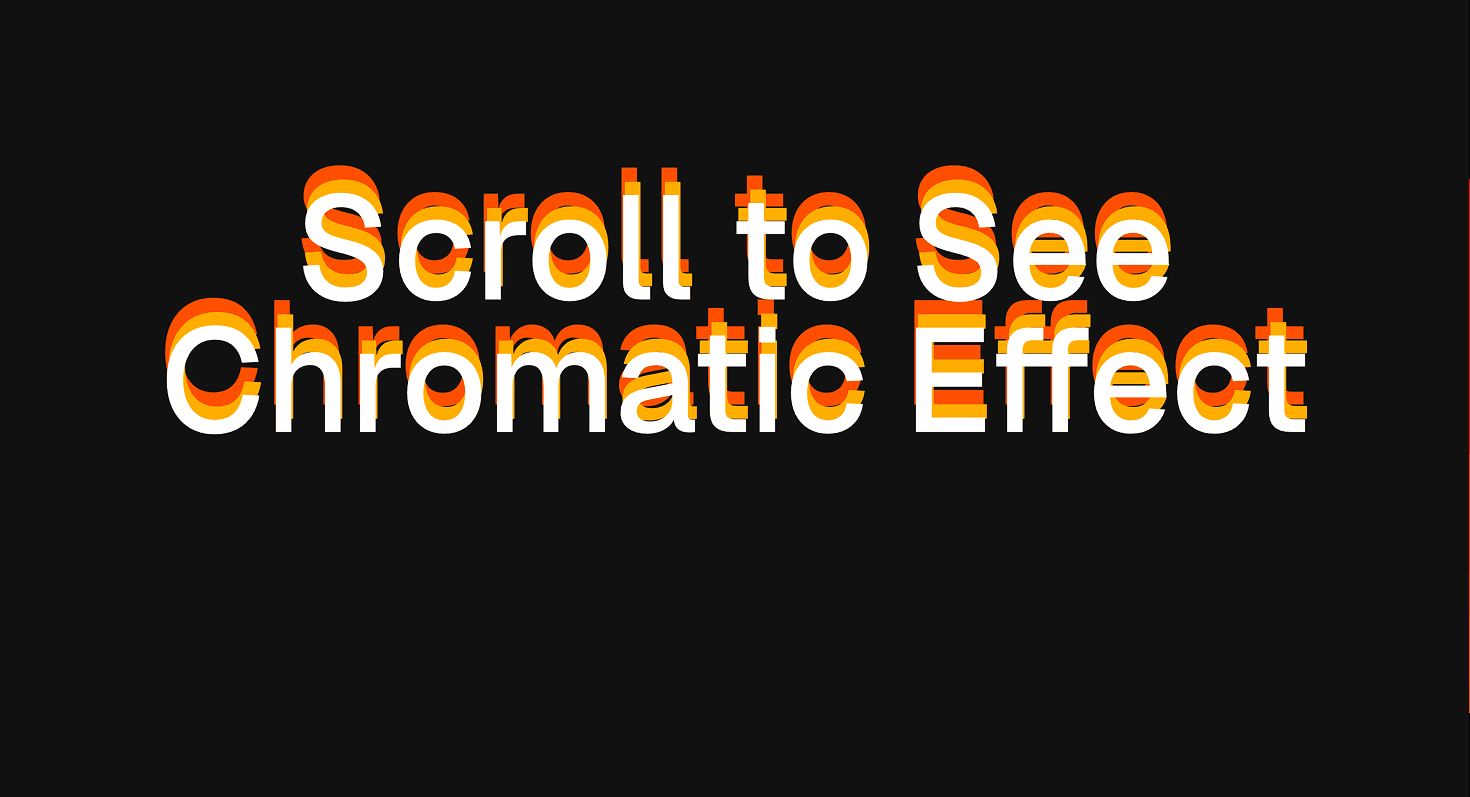
The effect separates the edges of large type into chromatic offsets, creating a controlled RGB-split or aberration treatment. The text can blur, drift, separate, and resolve depending on the trigger model. The result feels digital, unstable, and engineered, but the headline must still come back into focus.
Use Chromatic Text when the headline should feel technical, optical, or slightly charged. It works for AI pages, developer tools, cyber interfaces, music and culture campaigns, creative portfolios, and launch sections where the type can carry a controlled distortion.
The page job is attention with restraint. The visitor should notice the chromatic shift, understand the headline, and keep moving. If the effect makes the words harder to read than the message deserves, the animation has become the main character.
Install Command
npx hyperiux add chromatic-textUsage Code
page.jsx
import ChromaticText from "@/components/effects/chromatic-text";

const page = () => {
  return (
    <>
    <ChromaticText/>
</>
  )
}
Component Code
index.jsx
"use client";
import { useEffect, useRef, useState } from "react";
import gsap from "gsap";
import ScrollTrigger from "gsap/dist/ScrollTrigger";
gsap.registerPlugin(ScrollTrigger);
const DEFAULT_TEXT = "Scroll to See Chromatic Effect";
const ChromaticText = ({ baseTextColor = "#ffffff", firstTextColor = "#FFB200", secondTextColor = "#EB5B00", fontSize = 10, fontWeight = 500, backgroundColor = "#111111", className = "", }) => {
    const rootRef = useRef(null);
    const textOneRef = useRef(null);
    const textTwoRef = useRef(null);
    const textThreeRef = useRef(null);
    const [prefersReducedMotion, setPrefersReducedMotion] = useState(false);
    const layerClassName = "absolute inset-0 m-auto flex h-fit w-full max-w-[12ch] items-center justify-center px-4 text-center leading-[0.9]";
    const textStyle = {
        fontSize: `${fontSize}vw`,
        fontWeight,
    };
    useEffect(() => {
        const mediaQuery = window.matchMedia("(prefers-reduced-motion: reduce)");
        setPrefersReducedMotion(mediaQuery.matches);
        const handleChange = (event) => {
            setPrefersReducedMotion(event.matches);
        };
        mediaQuery.addEventListener("change", handleChange);
        return () => mediaQuery.removeEventListener("change", handleChange);
    }, []);
    useEffect(() => {
        const root = rootRef.current;
        const textOne = textOneRef.current;
        const textTwo = textTwoRef.current;
        const textThree = textThreeRef.current;
        if (!root || !textOne)
            return;
        const ctx = gsap.context(() => {
            if (prefersReducedMotion) {
                gsap.set(textOne, { x: 0, y: 0, opacity: 1 });
                return;
            }
            if (!textTwo || !textThree)
                return;
            gsap.set([textOne, textTwo, textThree], {
                x: 0,
                y: 0,
                opacity: 1,
            });
            let resetCall;
            ScrollTrigger.create({
                trigger: root,
                start: "10% top",
                end: "bottom 10%",
                onUpdate: (self) => {
                    const direction = self.direction === 1 ? -1 : 1;
                    const velocity = Math.min(Math.abs(self.getVelocity()) / 100, 44);
                    const isDesktop = window.innerWidth > 1024;
                    const whiteDepth = isDesktop ? 0.7 : 0.45;
                    const redDepth = isDesktop ? 1.9 : 1.3;
                    const blueDepth = isDesktop ? 3.6 : 2.2;
                    resetCall?.kill();
                    gsap.to(textOne, {
                        x: 0,
                        y: direction * velocity * whiteDepth,
                        duration: 0.08,
                        overwrite: true,
                    });
                    gsap.to(textTwo, {
                        x: 2,
                        y: direction * velocity * redDepth,
                        duration: 0.1,
                        overwrite: true,
                    });
                    gsap.to(textThree, {
                        x: -2,
                        y: direction * velocity * blueDepth,
                        duration: 0.16,
                        overwrite: true,
                    });
                    resetCall = gsap.delayedCall(0.2, () => {
                        gsap.to([textOne, textTwo, textThree], {
                            x: 0,
                            y: 0,
                            duration: 0.5,
                            ease: "power2.out",
                        });
                    });
                },
            });
        }, root);
        return () => ctx.revert();
    }, [prefersReducedMotion]);
    return (<section ref={rootRef} className={`relative flex h-[150vh] w-full items-center justify-center px-7 ${className}`} style={{ backgroundColor }}>
      <div className="sticky top-0 flex h-screen w-full items-end justify-center overflow-hidden px-4">
        <p ref={textOneRef} className={`${layerClassName} z-20`} style={{ ...textStyle, color: baseTextColor }}>
          {DEFAULT_TEXT}
        </p>

        {!prefersReducedMotion && (<>
            <p ref={textTwoRef} aria-hidden="true" className={`pointer-events-none ${layerClassName} z-10 motion-reduce:hidden`} style={{ ...textStyle, color: firstTextColor }}>
              {DEFAULT_TEXT}
            </p>

            <p ref={textThreeRef} aria-hidden="true" className={`pointer-events-none ${layerClassName} z-0 motion-reduce:hidden`} style={{ ...textStyle, color: secondTextColor }}>
              {DEFAULT_TEXT}
            </p>
          </>)}
      </div>
    </section>);
};
export default ChromaticText;
Example Production Use Case
A cyber or AI product page can use Chromatic Text in the hero to give the first claim a controlled signal-distortion effect. The headline briefly separates into chromatic edges, then resolves into readable copy.
The outcome is tension. The page feels technical and alive without sacrificing the clarity of the claim.
Best Used For
- AI, cyber, developer-tool, and experimental brand pages where RGB-split motion fits the visual language.
- Portfolio and campaign headlines where type can carry a short optical distortion.
- Dark hero sections where white typography and chromatic edges can create contrast.
- Short headline moments that resolve quickly into readable text.
Not For
Not for body copy, legal text, product instructions, forms, dashboards, documentation, pricing copy, or long paragraphs.
Not for accessibility-critical wording or anything the user must read instantly. Distortion is an accent, not a reading strategy.
Performance Budget
Limit the effect to one or two large headings, avoid heavy blur across large text blocks, throttle scroll-driven updates, and clean up listeners or animation instances on unmount. Keep channel offsets controlled so the effect feels sharp rather than smeared.
Accessibility and Mobile
Expose the headline once. Decorative RGB layers should not be announced as repeated text. On mobile, reduce blur, offset distance, and scroll-linked intensity. For reduced motion, show the resolved headline immediately with no channel travel, blur, or displacement.
Common Mistakes
- Applying chromatic distortion to long copy.
- Letting RGB offsets make the headline unreadable.
- Duplicating text layers without hiding decorative copies from assistive technology.
- Running scroll-linked updates without throttling or cleanup.
- Using chromatic motion on a brand that needs calm clarity more than signal noise.
Changelog
v1.0.0
Aug 14, 2026Initial release
Props
| Prop | Type | Default | Description |
|---|---|---|---|
baseTextColor | string | #ffffff | Color of the front/base text layer. |
firstTextColor | string | #FFB200 | Color of the red chromatic depth layer. |
secondTextColor | string | #EB5B00 | Color of the blue chromatic depth layer. |
fontSize | number | 10 | Font size in vw units shared by every text layer. |
fontWeight | number | 500 | Font weight shared by every text layer. |
backgroundColor | string | #111111 | Background color for the scroll section. |
Frequently Asked Questions
What is Chromatic Text?
Chromatic Text is a React text animation that adds RGB-split, chromatic-aberration, or channel-offset motion to large typography.
When should I use Chromatic Text?
Use it for short hero headlines, campaign statements, and technical brand moments where optical distortion supports the visual identity.
Is Chromatic Text good for body copy?
No. Use it on large, short text only. Body copy should remain stable, readable, and boring in the best possible way.
How do I keep Chromatic Text accessible?
Expose the real headline once and hide decorative duplicated text layers from assistive technology where appropriate.
Does Chromatic Text affect SEO?
Not if the headline remains real HTML. Avoid rendering the only meaningful text inside canvas, image layers, or client-only visual duplicates.
What should reduced motion do for Chromatic Text?
Show the final readable headline immediately. Remove scroll-linked distortion, RGB-channel travel, blur, and repeated motion.
Can Hyperiux adapt Chromatic Text for a real brand system?
Yes. A custom version should define channel colors, offset distance, trigger behavior, blur limits, typography constraints, mobile tuning, accessibility handling, reduced-motion fallback, source handoff, and implementation notes.
Request a Custom Text Animation
Need a custom effect? Tell us what to create.


