Loading
Rotation Slider
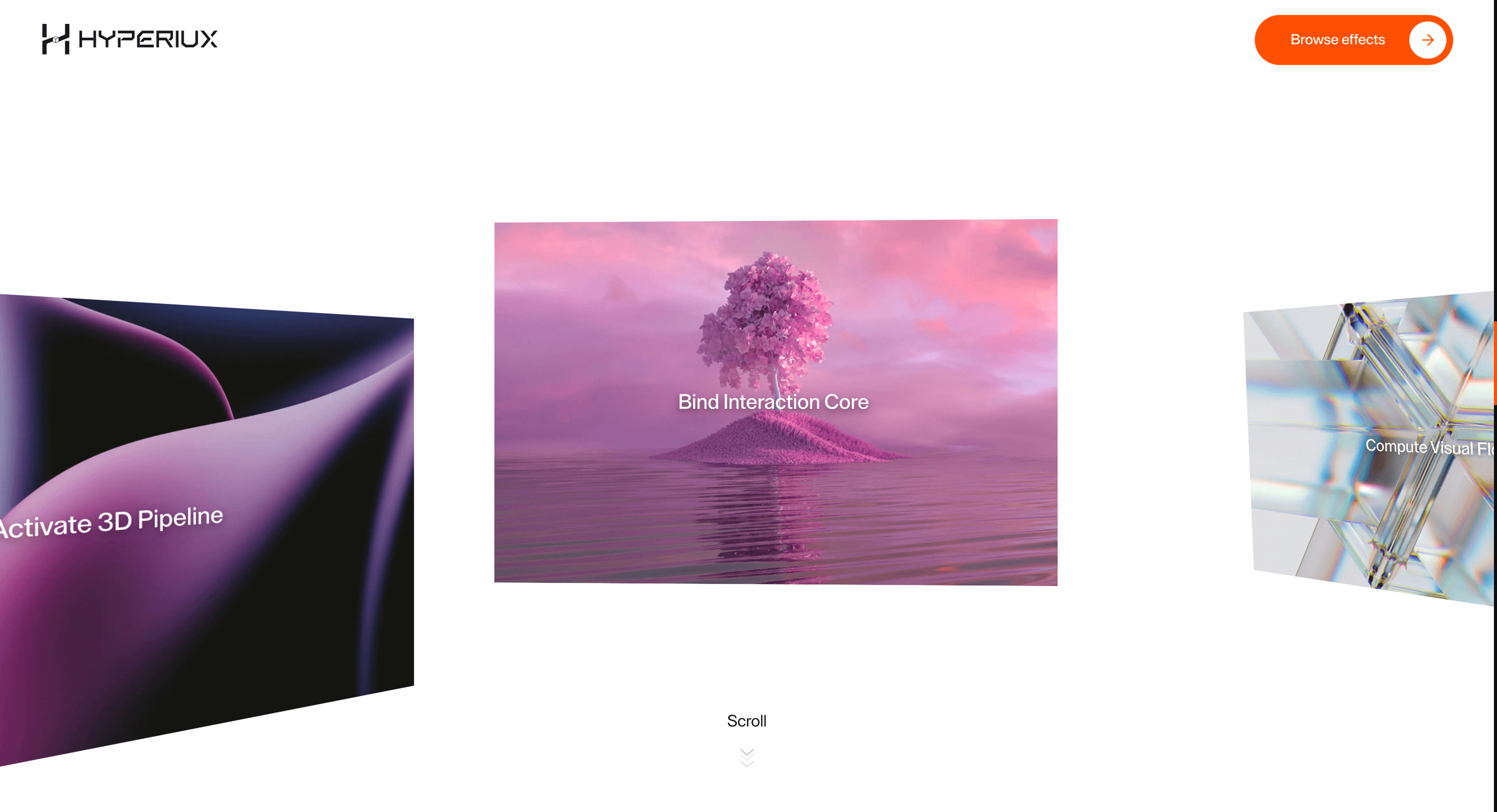
A lightweight slider that uses angled rotation between slides for campaign visuals, product shots, and energetic visual sequences.
Published On: June 4, 2026
Last Updated: August 17, 2026
GSAPLucide-react
Overview
Rotation Slider uses angle instead of distance. It makes a transition feel designed without pretending to be 3D.
Use Rotation Slider when directional rotation should create momentum between slides. Campaign galleries and product visuals are the strongest fit because the motion can make transitions feel graphic and intentional. The page job is energy: the next visual should arrive with force without obscuring controls.
The thing to watch is rotational exaggeration. Too much angle or duration makes the slider harder to track, especially on mobile or reduced-motion settings.
Install Command
npx hyperiux add rotation-sliderUsage Code
page.jsx
import RotationSlider from "@/components/effects/rotation-slider";

export default function Page() {
  return (
    <>
      <RotationSlider />
    </>
  );
}
Component Code
index.jsx
// Built using Hyperiux Vault: https://vault.hyperiux.com
import { RotationSliderComp } from "./RotationSliderComp";
export default function RotationSlider({ rotationAmount = 1, verticalDrift = 1, scrollSmoothing = 1, perspective = 1200, showCaptions = true, textColor = "#ffffff", }) {
    const images = [
        { src: "https://pub-8abee449136941f5b0a1cd2c014534e9.r2.dev/vault-listing-images/assets-images/v-01.jpg", text: "Initialize Motion Layer" },
        { src: "https://pub-8abee449136941f5b0a1cd2c014534e9.r2.dev/vault-listing-images/assets-images/v-02.jpg", text: "Inject Depth Matrix" },
        { src: "https://pub-8abee449136941f5b0a1cd2c014534e9.r2.dev/vault-listing-images/assets-images/v-03.jpg", text: "Sync Scroll Engine" },
        { src: "https://pub-8abee449136941f5b0a1cd2c014534e9.r2.dev/vault-listing-images/assets-images/v-04.jpg", text: "Calibrate Perspective" },
        { src: "https://pub-8abee449136941f5b0a1cd2c014534e9.r2.dev/vault-listing-images/assets-images/v-05.jpg", text: "Activate 3D Pipeline" },
        { src: "https://pub-8abee449136941f5b0a1cd2c014534e9.r2.dev/vault-listing-images/assets-images/v-06.jpg", text: "Bind Interaction Core" },
        { src: "https://pub-8abee449136941f5b0a1cd2c014534e9.r2.dev/vault-listing-images/assets-images/v-07.jpg", text: "Compute Visual Flow" },
        { src: "https://pub-8abee449136941f5b0a1cd2c014534e9.r2.dev/vault-listing-images/assets-images/v-08.jpg", text: "Render Adaptive Frames" },
        { src: "https://pub-8abee449136941f5b0a1cd2c014534e9.r2.dev/vault-listing-images/assets-images/v-09.jpg", text: "Stabilize Motion Curve" },
        { src: "https://pub-8abee449136941f5b0a1cd2c014534e9.r2.dev/vault-listing-images/assets-images/v-10.jpg", text: "Optimize Transition Graph" },
        { src: "https://pub-8abee449136941f5b0a1cd2c014534e9.r2.dev/vault-listing-images/assets-images/h-01.jpg", text: "Deploy Experience Layer" },
        { src: "https://pub-8abee449136941f5b0a1cd2c014534e9.r2.dev/vault-listing-images/assets-images/h-02.jpg", text: "Finalize Hyperiux State" },
    ];
    return (<>
 <RotationSliderComp images={images} rotationAmount={rotationAmount} verticalDrift={verticalDrift} scrollSmoothing={scrollSmoothing} perspective={perspective} showCaptions={showCaptions} textColor={textColor}/>
 </>);
}
RotationSliderComp.jsx
// Built using Hyperiux Vault: https://vault.hyperiux.com

"use client";
import React, { forwardRef, useEffect, useLayoutEffect, useRef } from "react";
import gsap from "gsap";
import { ScrollTrigger } from "gsap/ScrollTrigger";
// True when the user has asked the OS to minimise animation. Safe to call
// during render - returns false on the server.
function prefersReducedMotion() {
    if (typeof window === "undefined")
        return false;
    return window.matchMedia?.("(prefers-reduced-motion: reduce)")?.matches ?? false;
}
// Reduced motion: a much larger perspective distance flattens the 3D card
// rotation (less depth distortion) instead of removing it outright.
const REDUCED_PERSPECTIVE = "4800px";
const MOBILE_BREAKPOINT = 640;
const TABLET_BREAKPOINT = 1025;
const MOBILE_STEP = 2;
const TABLET_STEP = 6;
const DESKTOP_STEP = 10;
const MOBILE_ROTATE_IN = -60;
const TABLET_ROTATE_IN = -80;
const DESKTOP_ROTATE_IN = -100;
const MOBILE_ROTATE_OUT = 50;
const TABLET_ROTATE_OUT = 65;
const DESKTOP_ROTATE_OUT = 80;
const ROTATE_X_NEGATIVE = 5;
const ROTATE_X_POSITIVE = -5;
// Reduced motion: cut the card rotation down a lot (not just the perspective
// flattening above) - "reduce a lot", so a stronger cut than the 25% factor
// used elsewhere.
const ROTATION_REDUCTION_FACTOR = 0.15;
const useIsomorphicLayoutEffect = typeof window !== "undefined" ? useLayoutEffect : useEffect;
gsap.registerPlugin(ScrollTrigger);
export function RotationSliderComp({ images, rotationAmount = 1, verticalDrift = 1, scrollSmoothing = 1, perspective = 1200, showCaptions = true, textColor = "#ffffff", }) {
    const outerRef = useRef(null);
    const trackRef = useRef(null);
    const cardsRef = useRef([]);
    const wrappersRef = useRef([]);
    const reducedMotion = prefersReducedMotion();
    useEffect(() => {
        const outer = outerRef.current;
        const track = trackRef.current;
        if (!outer || !track)
            return;
        const onResize = () => {
            const travel = track.scrollWidth - window.innerWidth;
            outer.style.height = `${travel + window.innerHeight}px`;
        };
        onResize();
        const resizeObserver = new ResizeObserver(onResize);
        resizeObserver.observe(track);
        window.addEventListener("resize", onResize);
        return () => {
            resizeObserver.disconnect();
            window.removeEventListener("resize", onResize);
        };
    }, [images]);
    useIsomorphicLayoutEffect(() => {
        const outer = outerRef.current;
        const track = trackRef.current;
        if (!outer || !track)
            return;
        const isMobile = window.innerWidth < MOBILE_BREAKPOINT;
        const isTablet = window.innerWidth >= MOBILE_BREAKPOINT &&
            window.innerWidth < TABLET_BREAKPOINT;
        const context = gsap.context(() => {
            const horizontalTween = gsap.to(track, {
                x: () => -(track.scrollWidth - window.innerWidth),
                ease: "none",
                scrollTrigger: {
                    trigger: outer,
                    start: "top top",
                    end: () => `+=${track.scrollWidth - window.innerWidth}`,
                    // Reduced motion: scrub:true tracks scroll position
                    // directly (no smoothing lag) instead of the ~1s
                    // catch-up delay - the "lerp" here is that scrub value.
                    scrub: reducedMotion ? true : scrollSmoothing,
                    invalidateOnRefresh: true,
                },
            });
            cardsRef.current.forEach((card, index) => {
                const wrapper = wrappersRef.current[index];
                if (!card || !wrapper)
                    return;
                const total = images.length;
                const mid = Math.floor(total / 2);
                const step = (isMobile
                    ? MOBILE_STEP
                    : isTablet
                        ? TABLET_STEP
                        : DESKTOP_STEP) * verticalDrift;
                let offset;
                if (index < mid) {
                    offset = -((mid - index) * step);
                }
                else {
                    offset = (index - mid + 1) * step;
                }
                const rotationScale = reducedMotion ? ROTATION_REDUCTION_FACTOR : 1;
                const rotateXValue = (offset < 0 ? ROTATE_X_NEGATIVE : ROTATE_X_POSITIVE) * rotationScale;
                const rotateInValue = (isMobile
                    ? MOBILE_ROTATE_IN
                    : isTablet
                        ? TABLET_ROTATE_IN
                        : DESKTOP_ROTATE_IN) * rotationScale * rotationAmount;
                const rotateOutValue = (isMobile
                    ? MOBILE_ROTATE_OUT
                    : isTablet
                        ? TABLET_ROTATE_OUT
                        : DESKTOP_ROTATE_OUT) * rotationScale * rotationAmount;
                const tl = gsap.timeline({
                    scrollTrigger: {
                        trigger: wrapper,
                        containerAnimation: horizontalTween,
                        start: "left 100%",
                        end: "right 0%",
                        scrub: true,
                        // markers:true
                    },
                });
                tl.fromTo(card, {
                    rotateY: rotateInValue,
                    rotateX: rotateXValue,
                    opacity: 0.8,
                    y: `${offset}vh`,
                }, {
                    rotateY: 0,
                    rotateX: 0,
                    opacity: 1,
                    y: 0,
                    ease: "none",
                }).to(card, {
                    rotateY: rotateOutValue,
                    opacity: 0.9,
                    y: `${-offset}vh`,
                    ease: "none",
                });
            });
            ScrollTrigger.refresh();
        });
        return () => context.revert();
    }, [images, rotationAmount, verticalDrift, scrollSmoothing]);
    return (<div ref={outerRef} className="relative bg-white">
            <div className="sticky top-0 flex h-screen items-center overflow-hidden" style={{ perspective: reducedMotion ? REDUCED_PERSPECTIVE : `${perspective}px` }}>
                <div ref={trackRef} className="
            flex h-full items-center will-change-transform
            gap-[5vw] max-[1025px]:gap-[8vw] max-md:gap-[12vw]
            pl-[31vw] pr-[31vw]
            max-[1025px]:pl-[22vw] max-[1025px]:pr-[22vw]
            max-md:pl-[12vw] max-md:pr-[12.5vw]
          " style={{ transformStyle: "preserve-3d" }}>
                    {images.map((img, index) => (<div key={index} ref={(element) => {
                wrappersRef.current[index] = element;
            }} className="
                relative flex h-[45vh] w-[38vw] shrink-0 items-center justify-center
                max-[1025px]:h-[40vh] max-[1025px]:w-[55vw]
                max-md:h-[35vh] max-md:w-[75vw]
                max-[1025px]:[&>div]:h-[40vh] max-[1025px]:[&>div]:w-[50vw]
                max-md:[&>div]:h-[35vh] max-md:[&>div]:w-[75vw]
              " style={{ transformStyle: "preserve-3d" }}>
                            <RotationCard ref={(element) => {
                cardsRef.current[index] = element;
            }} src={img.src} text={img.text} index={index} total={images.length} showCaptions={showCaptions} textColor={textColor}/>
                        </div>))}
                </div>

            </div>
        </div>);
}
const RotationCard = forwardRef(({ src, index, total, text, showCaptions, textColor }, ref) => {
    return (<div ref={ref} className="absolute h-[45vh] w-[38vw] origin-right overflow-hidden opacity-0 max-md:h-[35vh] max-md:w-[75vw]" style={{
            transformStyle: "preserve-3d",
            zIndex: total - index,
        }}>
            <div className="relative h-full w-full" style={{
            transformStyle: "preserve-3d",
        }}>
                <img src={src} alt="slider" className="absolute inset-0 h-full w-full object-cover"/>
            </div>

            {showCaptions && text && (<div className="absolute left-1/2 top-1/2 z-10 -translate-x-1/2 -translate-y-1/2 text-center text-[1.4vw] font-medium max-[1025px]:text-[2.4vw] max-md:text-[4vw]" style={{
                color: textColor,
                textShadow: "0 0.15vw 0.35vw rgba(0,0,0,0.35), 0 0.45vw 1.2vw rgba(0,0,0,0.35)",
            }}>
                    {text}
                </div>)}
        </div>);
});
RotationCard.displayName = "RotationCard";
Example Production Use Case
A launch campaign presenting a short visual sequence: Rotation Slider gives each transition a directional turn that matches the campaign art. The outcome is energy: the sequence feels active without needing autoplay.
Best Used For
- Short visual sequences where an angled transition matches the campaign art direction.
- Short visual slide sets that want a crafted, angled transition.
- Rotation Slider creates a concrete scroll outcome that a static section would not deliver.
Not For
Not for task-heavy pages or large visual sets where angled transitions slow evaluation.
Not for sections where the transition has more personality than the content.
Performance Budget
Animate transform and opacity, avoid layout reads in scroll handlers, pre-size media, and clean up timelines/listeners when the route changes
Accessibility and Mobile
The animated sequence must match DOM order. On mobile, replace pinned or horizontal mechanics with stacked sections, native swipe, or static cards.
Common Mistakes
- Increasing the angle until slide content becomes harder to read.
- Using rotation on dense text or task-heavy screens.
- Letting decorative motion outlast the user's intent.
Changelog
v1.0.1
Jul 21, 2026Added prefers-reduced-motion support: perspective is flattened, the main scroll tracking loses its smoothing lag, and card rotation is cut to 15% strength
v1.0.0
Jul 20, 2026Initial release
Props
| Prop | Type | Default | Description |
|---|---|---|---|
rotationAmount | number | 1 | Multiplier on the built-in per-breakpoint rotateY entrance/exit strength as cards scroll by. |
verticalDrift | number | 1 | Multiplier on the built-in per-breakpoint vertical offset each card travels while scrolling past. |
scrollSmoothing | number | 1 | GSAP ScrollTrigger scrub value on the main horizontal track — higher lags/smooths more, lower tracks scroll 1:1. |
perspective | number | 1200 | 3D perspective distance, in pixels, applied to the sticky track — lower values look deeper/more distorted. |
showCaptions | boolean | true | Shows the text caption overlay on each card. |
textColor | color | #ffffff | Color of the card caption text. |
Frequently Asked Questions
What makes Rotation Slider different from a standard scroll reveal?
It transitions slides by angle rather than distance, so the change feels designed without pretending to be full 3D. The rotation is a styling choice on a 2D sequence. Use it when you want a crafted transition that stays lightweight.
How should Rotation Slider simplify on mobile devices?
Reduce the rotation angle or switch to a simple swipe so the motion doesn't disorient on a small screen. Keep slide content readable throughout. Reduced-motion users see slides change without rotation.
What should developers test before shipping Rotation Slider?
Confirm rotated slides don't clip or overflow, that focus follows slide order, and that the transition reads cleanly at each breakpoint. Test the angle on real content, not placeholders. Verify the non-rotating fallback works.
Which content structure works best with Rotation Slider?
A short slide set where a directional, angled transition adds character — campaign frames or product angles. It's wrong for text-heavy or comparison content. Keep slides visual and concise.
When should I avoid Rotation Slider even if the preview looks good?
Avoid it where rotation would hurt legibility, on dense content, or where users need fast scanning. If the angle is decorative with no purpose, drop it. Skip it on utility routes.
Request a Custom Scroll Effect Animation
Need a custom effect? Tell us what to create.


