Loading
Elevate Navbar
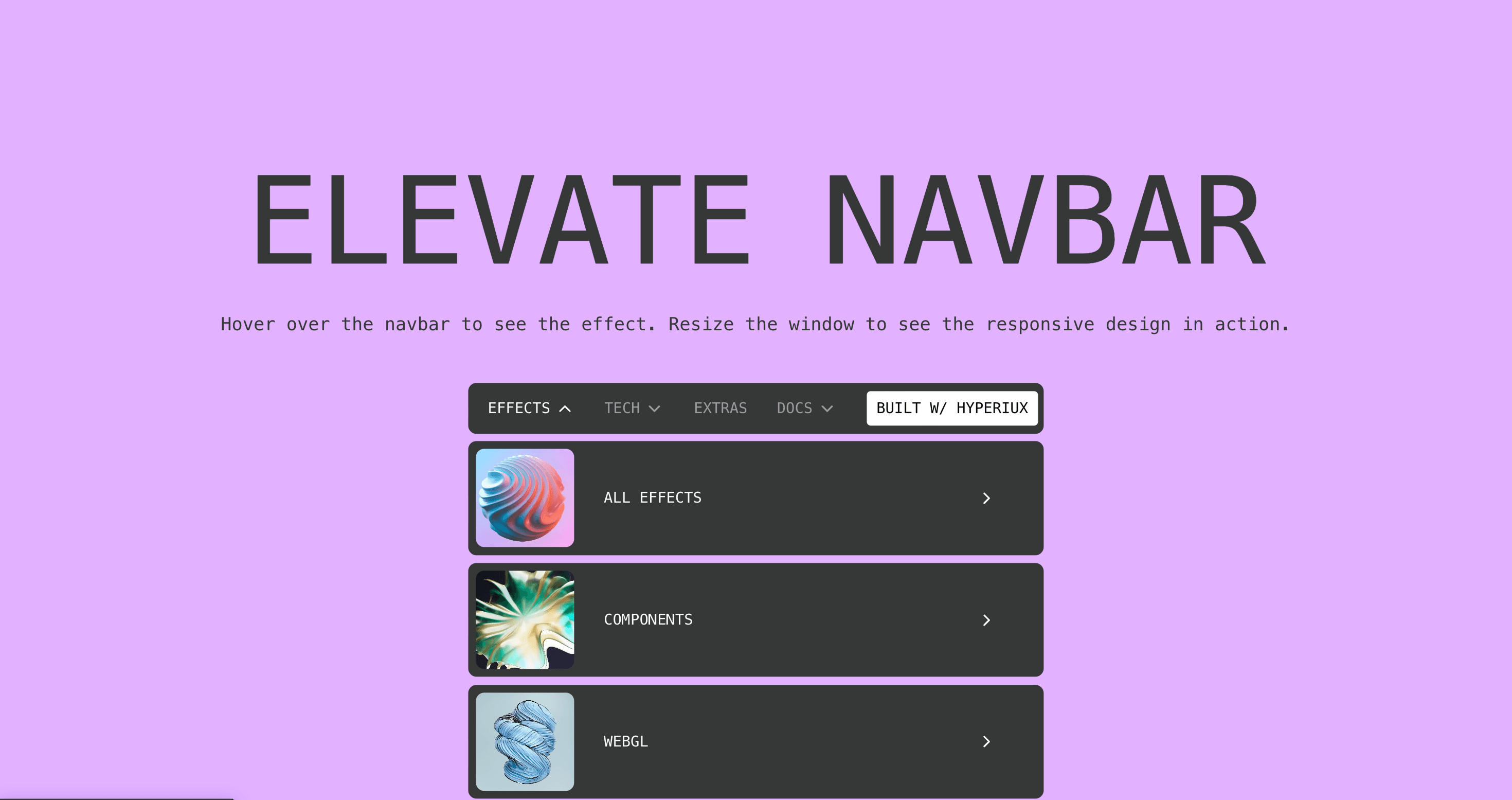
A responsive navbar with animated dropdowns, text-swap hover effects, and a collapsible mobile menu.
Published On: June 4, 2026
Last Updated: August 17, 2026
GSAPLucide-react
Overview
Elevate Navbar gives navigation spatial presence: the header gains visual weight while scrolling.
Use it when the site has enough structure to justify a designed menu moment: services, products, resources, docs, use cases, or portfolios. For three links, keep it boring and fast.
The risk in production is cleverness in the one place every visitor needs reliability. Build keyboard, click, tap, Escape, focus restore, and mobile behavior before adding directional or overlay motion.
Install Command
npx hyperiux add elevate-navbarUsage Code
page.jsx
import ElevateNavbar from '@/components/effects/elevate-navbar'

const page = () => {
  return (
    <>
    <ElevateNavbar/>
    </>
  )
}
Component Code
index.jsx
// Built using Hyperiux Vault: https://vault.hyperiux.com
"use client";
import React, { useEffect, useState } from "react";
import { ElevateNavbarMobile } from "./ElevateMobileNav";
import { ElevateNavbarDesktop } from "./ElevateDesktopNav";
const NAV_CONFIG = {
    backgroundColor: "#d8b4fe",
    duration: 0.35,
    navTextDuration: 0.35,
    ctaDuration: 0.4,
    dropdownItemOffsetY: -8,
    dropdownPointerDelay: 0.03,
    staggerItems: true,
    activeColor: "#ffffff",
    inactiveColor: "rgba(255,255,255,0.5)",
    ease: "power2.out",
    ctaBackground: "#ffffff",
    ctaHoverBackground: "#000000",
};
export default function ElevateNavbar({ navConfig = {}, ...props }) {
    const config = { ...NAV_CONFIG, ...navConfig, ...props };
    const durationValue = config.duration ?? config.navTextDuration;
    const [isMobile, setIsMobile] = useState(false);
    const [hasMounted, setHasMounted] = useState(false);
    useEffect(() => {
        const checkWidth = () => {
            setIsMobile(window.innerWidth < 1025);
        };
        queueMicrotask(() => {
            checkWidth();
            setHasMounted(true);
        });
        window.addEventListener("resize", checkWidth);
        return () => {
            window.removeEventListener("resize", checkWidth);
        };
    }, []);
    if (!hasMounted) {
        return null;
    }
    return (<div style={{ backgroundColor: config.backgroundColor }} className="relative h-screen w-full font-mono text-[0.75vw]">
      {isMobile ? (<ElevateNavbarMobile menuItems={menuItems} cta={cta} duration={durationValue} ease={config.ease} activeColor={config.activeColor} inactiveColor={config.inactiveColor}/>) : (<ElevateNavbarDesktop menuItems={menuItems} cta={cta} navTextDuration={durationValue} ctaDuration={durationValue} dropdownItemOffsetY={config.dropdownItemOffsetY} dropdownPointerDelay={config.dropdownPointerDelay} staggerItems={config.staggerItems} activeColor={config.activeColor} inactiveColor={config.inactiveColor} ease={config.ease} ctaBackground={config.ctaBackground} ctaHoverBackground={config.ctaHoverBackground}/>)}
    </div>);
}
const menuItems = [
    {
        name: "Effects",
        href: "#",
        isDropdown: true,
        dropdown: [
            { title: "All Effects", img: "https://pub-8abee449136941f5b0a1cd2c014534e9.r2.dev/vault-listing-images/assets-images/h-09.jpg", href: "#" },
            { title: "Components", img: "https://pub-8abee449136941f5b0a1cd2c014534e9.r2.dev/vault-listing-images/assets-images/h-10.jpg", href: "#" },
            { title: "WebGL", img: "https://pub-8abee449136941f5b0a1cd2c014534e9.r2.dev/vault-listing-images/assets-images/h-11.jpg", href: "#" },
        ],
    },
    {
        name: "Tech",
        href: "/tech",
        isDropdown: true,
        dropdown: [
            { title: "React Effects", img: "https://pub-8abee449136941f5b0a1cd2c014534e9.r2.dev/vault-listing-images/assets-images/h-01.jpg", href: "#" },
            { title: "GSAP Effects", img: "https://pub-8abee449136941f5b0a1cd2c014534e9.r2.dev/vault-listing-images/assets-images/h-02.jpg", href: "#" },
            { title: "Three.js Effects", img: "https://pub-8abee449136941f5b0a1cd2c014534e9.r2.dev/vault-listing-images/assets-images/h-03.jpg", href: "#" },
        ],
    },
    {
        name: "Extras",
        href: "#",
        isDropdown: false,
        dropdown: null,
    },
    {
        name: "Docs",
        href: "#",
        isDropdown: true,
        dropdown: [
            { title: "Introduction", img: "https://pub-8abee449136941f5b0a1cd2c014534e9.r2.dev/vault-listing-images/assets-images/h-05.jpg", href: "#" },
            { title: "Installation", img: "https://pub-8abee449136941f5b0a1cd2c014534e9.r2.dev/vault-listing-images/assets-images/h-06.jpg", href: "#" },
            { title: "CLI", img: "https://pub-8abee449136941f5b0a1cd2c014534e9.r2.dev/vault-listing-images/assets-images/h-07.jpg", href: "#" },
        ],
    },
];
const cta = {
    label: "BUILT W/ HYPERIUX",
    href: "#",
};
ElevateDesktopNav.jsx
"use client";
import { useCallback, useEffect, useLayoutEffect, useRef, useState } from "react";
import gsap from "gsap";
import { ChevronDown, ChevronRight } from "lucide-react";
const DEFAULT_MENU_ITEMS = [
{
name: "Effects",
href: "#",
isDropdown: true,
dropdown: [
{ title: "All Effects", img: "https://pub-8abee449136941f5b0a1cd2c014534e9.r2.dev/vault-listing-images/assets-images/h-09.jpg", href: "#" },
{ title: "Components", img: "https://pub-8abee449136941f5b0a1cd2c014534e9.r2.dev/vault-listing-images/assets-images/h-10.jpg", href: "#" },
{ title: "WebGL", img: "https://pub-8abee449136941f5b0a1cd2c014534e9.r2.dev/vault-listing-images/assets-images/h-11.jpg", href: "#" },
],
},
{
name: "Tech",
href: "/tech",
isDropdown: true,
dropdown: [
{ title: "React Effects", img: "https://pub-8abee449136941f5b0a1cd2c014534e9.r2.dev/vault-listing-images/assets-images/h-01.jpg", href: "#" },
{ title: "GSAP Effects", img: "https://pub-8abee449136941f5b0a1cd2c014534e9.r2.dev/vault-listing-images/assets-images/h-02.jpg", href: "#" },
{ title: "Three.js Effects", img: "https://pub-8abee449136941f5b0a1cd2c014534e9.r2.dev/vault-listing-images/assets-images/h-03.jpg", href: "#" },
],
},
{
name: "Extras",
href: "#",
isDropdown: false,
dropdown: null,
},
{
name: "Docs",
href: "#",
isDropdown: true,
dropdown: [
{ title: "Introduction", img: "https://pub-8abee449136941f5b0a1cd2c014534e9.r2.dev/vault-listing-images/assets-images/h-05.jpg", href: "#" },
{ title: "Installation", img: "https://pub-8abee449136941f5b0a1cd2c014534e9.r2.dev/vault-listing-images/assets-images/h-06.jpg", href: "#" },
{ title: "CLI", img: "https://pub-8abee449136941f5b0a1cd2c014534e9.r2.dev/vault-listing-images/assets-images/h-07.jpg", href: "#" },
],
},
];
const DROPDOWN_ITEM_OFFSET_Y = -8;
const NAV_TEXT_DURATION = 0.35;
const CTA_DURATION = 0.4;
const DROPDOWN_POINTER_DELAY = 0.03;
const DIMMED_TEXT_COLOR = "rgba(255,255,255,0.5)";
const ACTIVE_TEXT_COLOR = "rgba(255,255,255,1)";
const DEFAULT_CTA_BACKGROUND = "#fff";
const HOVER_CTA_BACKGROUND = "#000";
const DEFAULT_CTA = {
label: "BUILT W/ HYPERIUX",
href: "#",
};
export function ElevateNavbarDesktop({ menuItems = DEFAULT_MENU_ITEMS, cta = DEFAULT_CTA, navTextDuration = NAV_TEXT_DURATION, ctaDuration = CTA_DURATION, activeColor = ACTIVE_TEXT_COLOR, inactiveColor = DIMMED_TEXT_COLOR, ease = "power2.out", dropdownItemOffsetY = DROPDOWN_ITEM_OFFSET_Y, dropdownPointerDelay = DROPDOWN_POINTER_DELAY, staggerItems = true, ctaBackground = DEFAULT_CTA_BACKGROUND, ctaHoverBackground = HOVER_CTA_BACKGROUND, }) {
const navWrapRef = useRef(null);
const navLinksRef = useRef([]);
const ctaRef = useRef(null);
const dropdownRef = useRef(null);
const dropdownItemsRef = useRef([]);
const dropdownTextDataRef = useRef([]);
const linkDataRef = useRef([]);
const activeDropdownIndexRef = useRef(null);
const isPointerInsideDropdownRef = useRef(false);
const hideCallRef = useRef(null);
const switchTweenRef = useRef(null);
const itemTweenRef = useRef(null);
const [renderedDropdownIndex, setRenderedDropdownIndexState] = useState(null);
const [activeChevronIndex, setActiveChevronIndex] = useState(null);
const reduceMotion = useCallback(() => typeof window !== "undefined" &&
window.matchMedia?.("(prefers-reduced-motion: reduce)")?.matches === true, []);
const killHideCall = useCallback(() => {
if (!hideCallRef.current)
return;
hideCallRef.current.kill();
hideCallRef.current = null;
}, []);
const killSwitchTween = useCallback(() => {
if (!switchTweenRef.current)
return;
switchTweenRef.current.kill();
switchTweenRef.current = null;
}, []);
const killItemTween = useCallback(() => {
if (!itemTweenRef.current)
return;
itemTweenRef.current.kill();
itemTweenRef.current = null;
}, []);
const getCurrentDropdownItems = useCallback(() => {
return dropdownItemsRef.current.filter(Boolean);
}, []);
const setRenderedDropdownIndex = useCallback((index) => {
dropdownItemsRef.current = [];
dropdownTextDataRef.current = [];
setRenderedDropdownIndexState(index);
}, []);
const showWrapper = useCallback(() => {
if (!dropdownRef.current)
return;
gsap.set(dropdownRef.current, {
autoAlpha: 1,
pointerEvents: "auto",
});
}, []);
const hideWrapper = useCallback(() => {
if (!dropdownRef.current)
return;
gsap.set(dropdownRef.current, {
autoAlpha: 0,
pointerEvents: "none",
});
}, []);
const setNavVisualState = useCallback((activeIndex) => {
navLinksRef.current.forEach((linkElement, index) => {
if (!linkElement)
return;
const color = activeIndex !== null && index !== activeIndex
? inactiveColor
: activeColor;
if (reduceMotion()) {
gsap.set(linkElement, { color });
return;
}
gsap.to(linkElement, {
color,
duration: navTextDuration,
ease,
overwrite: true,
});
});
}, [activeColor, ease, inactiveColor, navTextDuration, reduceMotion]);
const animateTextSwap = useCallback((item, isEntering) => {
if (!item)
return;
if (reduceMotion()) {
gsap.set(item.defaultText, { yPercent: 0 });
gsap.set(item.hoverText, { yPercent: 100 });
return;
}
gsap
.timeline({
defaults: {
duration: navTextDuration,
ease,
overwrite: true,
},
})
.to(item.defaultText, { yPercent: isEntering ? -100 : 0 }, 0)
.to(item.hoverText, { yPercent: isEntering ? 0 : 100 }, 0);
}, [ease, navTextDuration, reduceMotion]);
const initDropdownItemText = useCallback(() => {
dropdownTextDataRef.current = dropdownItemsRef.current.map((itemElement) => {
if (!itemElement)
return null;
return {
defaultText: itemElement.querySelector("[data-default]"),
hoverText: itemElement.querySelector("[data-hover]"),
};
});
dropdownTextDataRef.current.forEach((item) => {
if (!item)
return;
gsap.set(item.defaultText, { yPercent: 0 });
gsap.set(item.hoverText, { yPercent: 100 });
});
}, []);
const animateDropdownItemsIn = useCallback(() => {
const dropdownItems = getCurrentDropdownItems();
if (!dropdownItems.length)
return;
killItemTween();
gsap.killTweensOf(dropdownItems);
if (reduceMotion()) {
gsap.set(dropdownItems, {
opacity: 1,
y: 0,
pointerEvents: "auto",
});
return;
}
gsap.set(dropdownItems, {
opacity: 0,
y: dropdownItemOffsetY,
pointerEvents: "auto",
});
itemTweenRef.current = gsap.timeline({
overwrite: true,
});
itemTweenRef.current.to(dropdownItems, {
y: 0,
opacity: 1,
duration: navTextDuration,
stagger: staggerItems ? 0.025 : 0,
ease,
});
}, [dropdownItemOffsetY, ease, getCurrentDropdownItems, killItemTween, navTextDuration, reduceMotion, staggerItems]);
const animateDropdownItemsOut = useCallback((onComplete) => {
const dropdownItems = getCurrentDropdownItems();
if (!dropdownItems.length) {
onComplete?.();
return;
}
killItemTween();
gsap.killTweensOf(dropdownItems);
if (reduceMotion()) {
gsap.set(dropdownItems, {
y: dropdownItemOffsetY,
opacity: 0,
pointerEvents: "none",
});
onComplete?.();
return;
}
itemTweenRef.current = gsap.timeline({
overwrite: true,
onStart: () => {
gsap.set(dropdownItems, {
pointerEvents: "none",
});
},
onComplete,
});
itemTweenRef.current.to(dropdownItems, {
y: dropdownItemOffsetY,
opacity: 0,
duration: navTextDuration,
stagger: staggerItems ? 0.015 : 0,
ease,
});
}, [dropdownItemOffsetY, ease, getCurrentDropdownItems, killItemTween, navTextDuration, reduceMotion, staggerItems]);
const closeDropdown = useCallback(() => {
killHideCall();
killSwitchTween();
activeDropdownIndexRef.current = null;
setActiveChevronIndex(null);
animateDropdownItemsOut(() => {
if (activeDropdownIndexRef.current !== null ||
isPointerInsideDropdownRef.current) {
return;
}
setRenderedDropdownIndex(null);
hideWrapper();
});
}, [
animateDropdownItemsOut,
hideWrapper,
killHideCall,
killSwitchTween,
setRenderedDropdownIndex,
]);
const openDropdownForIndex = useCallback((index) => {
const menuItem = menuItems[index];
killHideCall();
killSwitchTween();
if (!menuItem?.isDropdown)
return;
activeDropdownIndexRef.current = index;
isPointerInsideDropdownRef.current = false;
showWrapper();
if (renderedDropdownIndex === null) {
setRenderedDropdownIndex(index);
return;
}
if (renderedDropdownIndex === index) {
const dropdownItems = getCurrentDropdownItems();
if (!dropdownItems.length)
return;
killItemTween();
gsap.killTweensOf(dropdownItems);
if (reduceMotion()) {
gsap.set(dropdownItems, {
y: 0,
opacity: 1,
pointerEvents: "auto",
});
return;
}
gsap.set(dropdownItems, {
pointerEvents: "auto",
});
itemTweenRef.current = gsap.to(dropdownItems, {
y: 0,
opacity: 1,
duration: navTextDuration,
stagger: 0.02,
ease,
overwrite: true,
});
return;
}
switchTweenRef.current = gsap.delayedCall(0, () => {
animateDropdownItemsOut(() => {
if (activeDropdownIndexRef.current === null)
return;
setRenderedDropdownIndex(activeDropdownIndexRef.current);
});
});
}, [
animateDropdownItemsOut,
ease,
getCurrentDropdownItems,
killHideCall,
killItemTween,
killSwitchTween,
menuItems,
navTextDuration,
reduceMotion,
renderedDropdownIndex,
setRenderedDropdownIndex,
showWrapper,
]);
const scheduleCloseDropdown = useCallback(() => {
killHideCall();
if (reduceMotion()) {
if (isPointerInsideDropdownRef.current)
return;
closeDropdown();
return;
}
hideCallRef.current = gsap.delayedCall(dropdownPointerDelay, () => {
if (isPointerInsideDropdownRef.current)
return;
closeDropdown();
});
}, [closeDropdown, dropdownPointerDelay, killHideCall, reduceMotion]);
const onHeaderMouseEnter = useCallback(() => {
killHideCall();
}, [killHideCall]);
const onHeaderMouseLeave = useCallback(() => {
killHideCall();
killSwitchTween();
activeDropdownIndexRef.current = null;
isPointerInsideDropdownRef.current = false;
setActiveChevronIndex(null);
setNavVisualState(null);
animateDropdownItemsOut(() => {
setRenderedDropdownIndex(null);
hideWrapper();
});
}, [
animateDropdownItemsOut,
hideWrapper,
killHideCall,
killSwitchTween,
setNavVisualState,
setRenderedDropdownIndex,
]);
const onNavItemEnter = useCallback((index) => {
const item = linkDataRef.current[index];
if (!item)
return;
killHideCall();
animateTextSwap(item, true);
setNavVisualState(index);
if (menuItems[index]?.isDropdown) {
setActiveChevronIndex(index);
activeDropdownIndexRef.current = index;
openDropdownForIndex(index);
return;
}
setActiveChevronIndex(null);
activeDropdownIndexRef.current = null;
closeDropdown();
}, [
animateTextSwap,
closeDropdown,
killHideCall,
menuItems,
openDropdownForIndex,
setNavVisualState,
]);
const onNavItemLeave = useCallback((index) => {
const item = linkDataRef.current[index];
if (!item)
return;
animateTextSwap(item, false);
if (menuItems[index]?.isDropdown) {
return;
}
setNavVisualState(null);
}, [animateTextSwap, menuItems, setNavVisualState]);
const onCtaHover = useCallback((isEntering = true) => {
const ctaElement = ctaRef.current;
if (!ctaElement)
return;
const defaultText = ctaElement.querySelector("[data-default]");
const hoverText = ctaElement.querySelector("[data-hover]");
if (reduceMotion()) {
gsap.set(ctaElement, {
backgroundColor: isEntering
? ctaHoverBackground
: ctaBackground,
color: isEntering ? "#fff" : "#000",
});
gsap.set(defaultText, { yPercent: 0 });
gsap.set(hoverText, { yPercent: 100 });
return;
}
gsap
.timeline({
defaults: {
duration: ctaDuration,
ease,
overwrite: true,
},
})
.to(ctaElement, {
backgroundColor: isEntering
? ctaHoverBackground
: ctaBackground,
}, 0)
.to(defaultText, { yPercent: isEntering ? -100 : 0 }, 0)
.to(hoverText, { yPercent: isEntering ? 0 : 100 }, 0);
}, [ctaBackground, ctaDuration, ctaHoverBackground, ease, reduceMotion]);
const onDropdownMouseEnter = useCallback(() => {
isPointerInsideDropdownRef.current = true;
killHideCall();
showWrapper();
}, [killHideCall, showWrapper]);
const onDropdownMouseLeave = useCallback(() => {
isPointerInsideDropdownRef.current = false;
scheduleCloseDropdown();
}, [scheduleCloseDropdown]);
const onDropdownItemEnter = useCallback((index) => {
animateTextSwap(dropdownTextDataRef.current[index], true);
}, [animateTextSwap]);
const onDropdownItemLeave = useCallback((index) => {
animateTextSwap(dropdownTextDataRef.current[index], false);
}, [animateTextSwap]);
useLayoutEffect(() => {
const context = gsap.context(() => {
linkDataRef.current = navLinksRef.current.map((linkElement) => {
if (!linkElement)
return null;
return {
defaultText: linkElement.querySelector("[data-default]"),
hoverText: linkElement.querySelector("[data-hover]"),
};
});
linkDataRef.current.forEach((item) => {
if (!item)
return;
gsap.set(item.defaultText, { yPercent: 0 });
gsap.set(item.hoverText, { yPercent: 100 });
});
if (ctaRef.current) {
const defaultText = ctaRef.current.querySelector("[data-default]");
const hoverText = ctaRef.current.querySelector("[data-hover]");
gsap.set(defaultText, { yPercent: 0 });
gsap.set(hoverText, { yPercent: 100 });
}
hideWrapper();
}, navWrapRef);
return () => context.revert();
}, [hideWrapper]);
useLayoutEffect(() => {
if (renderedDropdownIndex === null)
return;
initDropdownItemText();
animateDropdownItemsIn();
}, [animateDropdownItemsIn, initDropdownItemText, renderedDropdownIndex]);
useEffect(() => {
return () => {
killHideCall();
killSwitchTween();
killItemTween();
};
}, [killHideCall, killItemTween, killSwitchTween]);
const dropdownItems = renderedDropdownIndex !== null
? menuItems[renderedDropdownIndex]?.dropdown || []
: [];
return (<div ref={navWrapRef} onMouseEnter={onHeaderMouseEnter} onMouseLeave={onHeaderMouseLeave} className="absolute left-1/2 top-1/2 -translate-x-1/2 -translate-y-1/2 rounded-[0.55vw] bg-[#363737] text-[0.98vw]">
<div className="relative flex h-full w-full items-center gap-[1.95vw] p-[0.39vw] pl-[1.3vw]">
<div className="flex h-full items-center gap-[1.95vw]">
{menuItems.map((item, index) => {
const isDropdownActive = activeChevronIndex === index;
return (<a key={item.name} ref={(element) => {
navLinksRef.current[index] = element;
}} href={item.href} className="relative flex items-center gap-[0.32vw] py-[0.65vw] text-[0.98vw] uppercase leading-none" style={{ color: inactiveColor }} onMouseEnter={() => onNavItemEnter(index)} onMouseLeave={() => onNavItemLeave(index)}>
<div className="relative overflow-hidden">
<span data-default className="block">
{item.name}
</span>
<span data-hover className="absolute inset-0 flex items-center">
{item.name}
</span>
</div>
{item.isDropdown && (<ChevronDown className={`h-[1.3vw] w-[1.3vw] shrink-0 transition-transform duration-100 ease-out motion-reduce:rotate-0 motion-reduce:transition-none ${isDropdownActive ? "-rotate-180" : "rotate-0"}`}/>)}
</a>);
})}
</div>
<a ref={ctaRef} href={cta.href} className="relative overflow-hidden rounded-[0.26vw] bg-white px-[0.65vw] py-[0.65vw] text-[0.98vw] leading-none text-black" onMouseEnter={() => onCtaHover(true)} onMouseLeave={() => onCtaHover(false)}>
<span data-default className="block">
{cta.label}
</span>
<span data-hover className="absolute inset-0 flex items-center justify-center text-white">
{cta.label}
</span>
</a>
<div ref={dropdownRef} onMouseEnter={onDropdownMouseEnter} onMouseLeave={onDropdownMouseLeave} className="absolute left-0 top-full h-fit w-full pt-[0.46vw]">
<div className="space-y-[0.52vw]">
{dropdownItems.map((item, index) => (<div key={`${renderedDropdownIndex}-${item.title}`} ref={(element) => {
dropdownItemsRef.current[index] = element;
}} className="link-btns">
<a href={item.href} onMouseEnter={() => onDropdownItemEnter(index)} onMouseLeave={() => onDropdownItemLeave(index)} className="flex items-center justify-between rounded-[0.55vw] bg-[#363737] p-[0.52vw] text-[0.98vw] text-white transition-all duration-300 hover:scale-[1.02] hover:bg-white hover:text-black! motion-reduce:scale-100 motion-reduce:bg-[#363737] motion-reduce:text-white! motion-reduce:transition-none">
<div className="flex items-center gap-[1.95vw]">
<div className="size-[6.5vw] overflow-hidden rounded-[0.55vw]">
<img src={item.img} alt={item.title} width={500} height={500} className="h-full w-full object-cover"/>
</div>
<div className="relative overflow-hidden uppercase leading-none">
<span data-default className="block">
{item.title}
</span>
<span data-hover className="absolute inset-0 flex items-center">
{item.title}
</span>
</div>
</div>
<ChevronRight className="mr-[2.6vw] h-[1.3vw] w-[1.3vw]"/>
</a>
</div>))}
</div>
</div>
</div>
</div>);
}
ElevateMobileNav.jsx
"use client";
import { useEffect, useRef, useState } from "react";
import gsap from "gsap";
import { ChevronDown, Menu, X } from "lucide-react";
import { useFocusTrap } from "./useFocusTrap";
const DEFAULT_MENU_ITEMS = [
    {
        name: "Effects",
        href: "#",
        isDropdown: true,
        dropdown: [
            { title: "All Effects", img: "https://pub-8abee449136941f5b0a1cd2c014534e9.r2.dev/vault-listing-images/assets-images/h-09.jpg", href: "#" },
            { title: "Components", img: "https://pub-8abee449136941f5b0a1cd2c014534e9.r2.dev/vault-listing-images/assets-images/h-10.jpg", href: "#" },
            { title: "WebGL", img: "https://pub-8abee449136941f5b0a1cd2c014534e9.r2.dev/vault-listing-images/assets-images/h-11.jpg", href: "#" },
        ],
    },
    {
        name: "Tech",
        href: "/tech",
        isDropdown: true,
        dropdown: [
            { title: "React Effects", img: "https://pub-8abee449136941f5b0a1cd2c014534e9.r2.dev/vault-listing-images/assets-images/h-01.jpg", href: "#" },
            { title: "GSAP Effects", img: "https://pub-8abee449136941f5b0a1cd2c014534e9.r2.dev/vault-listing-images/assets-images/h-02.jpg", href: "#" },
            { title: "Three.js Effects", img: "https://pub-8abee449136941f5b0a1cd2c014534e9.r2.dev/vault-listing-images/assets-images/h-03.jpg", href: "#" },
        ],
    },
    {
        name: "Extras",
        href: "#",
        isDropdown: false,
        dropdown: null,
    },
    {
        name: "Docs",
        href: "#",
        isDropdown: true,
        dropdown: [
            { title: "Introduction", img: "https://pub-8abee449136941f5b0a1cd2c014534e9.r2.dev/vault-listing-images/assets-images/h-05.jpg", href: "#" },
            { title: "Installation", img: "https://pub-8abee449136941f5b0a1cd2c014534e9.r2.dev/vault-listing-images/assets-images/h-06.jpg", href: "#" },
            { title: "CLI", img: "https://pub-8abee449136941f5b0a1cd2c014534e9.r2.dev/vault-listing-images/assets-images/h-07.jpg", href: "#" },
        ],
    },
];
const DEFAULT_CTA = {
    label: "BUILT W/ HYPERIUX",
    href: "#",
};
const BACKDROP_DURATION = 0.2;
const PANEL_OFFSET_Y = -20;
const PANEL_OPEN_DURATION = 0.3;
const PANEL_CLOSE_DURATION = 0.2;
const ACCORDION_DURATION = 0.25;
export function ElevateNavbarMobile({ menuItems = DEFAULT_MENU_ITEMS, cta = DEFAULT_CTA, duration = 0.35, ease = "power3.out", activeColor = "#ffffff", inactiveColor = "rgba(255,255,255,0.85)", }) {
    const [isMenuOpen, setIsMenuOpen] = useState(false);
    const [activeDropdownIndex, setActiveDropdownIndex] = useState(null);
    const panelRef = useRef(null);
    const backdropRef = useRef(null);
    const sectionsRef = useRef([]);
    const containerRef = useRef(null);
    const toggleButtonRef = useRef(null);
    const reduceMotion = () => typeof window !== "undefined" &&
        window.matchMedia?.("(prefers-reduced-motion: reduce)")?.matches === true;
    const motionDuration = Math.max(0.05, Number(duration) || 0.35);
    // Trap focus across the toggle + panel while open, restore it on close.
    useFocusTrap({
        active: isMenuOpen,
        containerRef,
        initialFocusRef: toggleButtonRef,
        onEscape: () => setIsMenuOpen(false),
    });
    useEffect(() => {
        const panelElement = panelRef.current;
        const backdropElement = backdropRef.current;
        if (!panelElement || !backdropElement)
            return;
        if (isMenuOpen) {
            gsap.set(panelElement, {
                pointerEvents: "auto",
            });
            if (reduceMotion()) {
                gsap.set(backdropElement, { autoAlpha: 1 });
                gsap.set(panelElement, {
                    autoAlpha: 1,
                    y: 0,
                });
                return;
            }
            gsap.to(backdropElement, {
                autoAlpha: 1,
                duration: motionDuration * 0.6,
            });
            gsap.fromTo(panelElement, {
                autoAlpha: 0,
                y: PANEL_OFFSET_Y,
            }, {
                autoAlpha: 1,
                y: 0,
                duration: motionDuration,
                ease,
            });
            return;
        }
        if (reduceMotion()) {
            gsap.set(panelElement, {
                autoAlpha: 0,
                y: PANEL_OFFSET_Y,
                pointerEvents: "none",
            });
            gsap.set(backdropElement, {
                autoAlpha: 0,
            });
            return;
        }
        gsap.to(panelElement, {
            autoAlpha: 0,
            y: PANEL_OFFSET_Y,
            duration: motionDuration * 0.7,
            onComplete: () => {
                gsap.set(panelElement, {
                    pointerEvents: "none",
                });
            },
        });
        gsap.to(backdropElement, {
            autoAlpha: 0,
            duration: motionDuration * 0.6,
        });
    }, [ease, isMenuOpen, motionDuration]);
    useEffect(() => {
        sectionsRef.current.forEach((sectionElement, index) => {
            if (!sectionElement)
                return;
            const isSectionOpen = activeDropdownIndex === index;
            if (reduceMotion()) {
                gsap.set(sectionElement, {
                    height: isSectionOpen ? sectionElement.scrollHeight : 0,
                    autoAlpha: isSectionOpen ? 1 : 0,
                });
                return;
            }
            gsap.to(sectionElement, {
                height: isSectionOpen ? sectionElement.scrollHeight : 0,
                autoAlpha: isSectionOpen ? 1 : 0,
                duration: motionDuration,
                ease,
            });
        });
    }, [activeDropdownIndex, ease, motionDuration]);
    return (<div ref={containerRef} className="fixed h-fit left-1/2 max-[1025px]:top-[10%] max-md:top-[31%] -translate-x-1/2 z-999">
      <div ref={backdropRef} onClick={() => setIsMenuOpen(false)} className="fixed inset-0 "/>

      <div className="flex items-center justify-between gap-[2vw] rounded-[4vw] border border-white/10 bg-[#2f2f2f]/90 px-[3vw] max-[1025px]:py-[1vw] max-md:py-[2vw] backdrop-blur-xl">
        <span className="px-[2vw] text-[3vw] uppercase tracking-wide text-white/80">
          Hyperiux
        </span>

        <button ref={toggleButtonRef} type="button" onClick={() => setIsMenuOpen((currentValue) => !currentValue)} className="flex h-[8vw] w-[8vw] items-center justify-center rounded-[2vw] text-white transition hover:bg-white/10 motion-reduce:bg-transparent motion-reduce:transition-none" style={{ backgroundColor: isMenuOpen ? activeColor : undefined }} aria-label={isMenuOpen ? "Close menu" : "Open menu"}>
          {isMenuOpen ? (<X className="max-md:h-[4.5vw] max-md:w-[4.5vw] max-[1025px]:w-[3.5vw] max-[1025px]:h-[3.5vw]"/>) : (<Menu className="max-md:h-[4.5vw] max-md:w-[4.5vw] max-[1025px]:w-[3.5vw] max-[1025px]:h-[3.5vw]"/>)}
        </button>
      </div>

      <div ref={panelRef} className="mt-[2vw] w-[92vw] rounded-[4vw] border border-white/10 bg-[#2f2f2f]/95 p-[2vw] backdrop-blur-xl" style={{
            pointerEvents: "none",
            opacity: 0,
        }}>
        <div className="space-y-[1vw]">
          {menuItems.map((item, index) => {
            const hasDropdown = Boolean(item.dropdown);
            const isDropdownOpen = activeDropdownIndex === index;
            if (!hasDropdown) {
                return (<a key={item.name} href={item.href} onClick={() => setIsMenuOpen(false)} className="flex items-center justify-between rounded-[2.5vw] px-[3vw] py-[2.5vw] max-[1025px]:text-[2.5vw] max-md:text-[3vw] uppercase text-white/85 transition hover:bg-white/10 motion-reduce:bg-transparent motion-reduce:transition-none" style={{ color: inactiveColor }}>
                  {item.name}
                </a>);
            }
            return (<div key={item.name}>
                <button type="button" onClick={() => setActiveDropdownIndex((currentIndex) => currentIndex === index ? null : index)} className="flex w-full items-center justify-between rounded-[2.5vw] px-[3vw] py-[2.5vw] max-[1025px]:text-[2.5vw]! max-md:text-[3vw]! uppercase text-white/85 transition hover:bg-white/10 motion-reduce:bg-transparent motion-reduce:transition-none" style={{ color: inactiveColor }}>
                  {item.name}

                  <ChevronDown className={`h-[3.5vw] w-[3.5vw] transition-transform motion-reduce:rotate-0 motion-reduce:transition-none ${isDropdownOpen ? "rotate-180" : ""}`}/>
                </button>

                <div ref={(element) => {
                    sectionsRef.current[index] = element;
                }} className="overflow-hidden pl-[2vw]" style={{
                    height: 0,
                    opacity: 0,
                }}>
                  <div className="space-y-[2vw] pt-[1vw]">
                    {item.dropdown.map((dropdownItem) => (<a key={dropdownItem.title} href={dropdownItem.href} onClick={() => setIsMenuOpen(false)} className="flex items-center gap-[3vw] rounded-[2vw] bg-white/5 p-[2vw] max-md:text-[2.8vw] max-[1025px]:text-[2vw]  uppercase text-white/80 transition hover:bg-white/10 motion-reduce:bg-white/5 motion-reduce:transition-none" style={{ color: inactiveColor }}>
                        <div className="relative h-[10vw] w-[10vw] overflow-hidden rounded-[2vw] bg-white/25">
                          <img src={dropdownItem.img} alt={dropdownItem.title} width={80} height={80} className="h-full w-full object-cover"/>
                        </div>

                        <span className="flex-1">{dropdownItem.title}</span>
                      </a>))}
                  </div>
                </div>
              </div>);
        })}

          <div className="pt-[3vw]">
            <a href={cta.href} onClick={() => setIsMenuOpen(false)} className="block w-full max-md:py-[3vw] rounded-[3vw] bg-white py-[1.5vw] text-center max-md:text-[3vw] max-[1025px]:text-[2.5vw] font-semibold text-black">
              {cta.label}
            </a>
          </div>
        </div>
      </div>
    </div>);
}
useFocusTrap.jsx
"use client";
import { useEffect, useRef } from "react";
const FOCUSABLE_SELECTOR = [
    "a[href]",
    "button:not([disabled])",
    "input:not([disabled])",
    "select:not([disabled])",
    "textarea:not([disabled])",
    '[tabindex]:not([tabindex="-1"])',
].join(",");
const isVisible = (element) => {
    if (!element || element.hidden) {
        return false;
    }
    const style = window.getComputedStyle(element);
    if (style.visibility === "hidden" || style.visibility === "collapse") {
        return false;
    }
    return element.getClientRects().length > 0;
};
const getFocusableElements = (container) => {
    if (!container) {
        return [];
    }
    return Array.from(container.querySelectorAll(FOCUSABLE_SELECTOR)).filter(isVisible);
};
/**
 * Keeps keyboard focus inside `containerRef` while `active` is true.
 *
 * - Captures the element focused before opening and restores focus to it on
 *   close (so the trigger button gets focus back).
 * - Moves focus into the menu on open (to `initialFocusRef` when provided,
 *   otherwise the first focusable element).
 * - Wraps Tab / Shift+Tab around the menu's focusable elements.
 * - Calls `onEscape` when the Escape key is pressed.
 */
export function useFocusTrap({ active, containerRef, initialFocusRef, onEscape, }) {
    const onEscapeRef = useRef(onEscape);
    onEscapeRef.current = onEscape;
    useEffect(() => {
        if (!active) {
            return;
        }
        const container = containerRef.current;
        if (!container) {
            return;
        }
        const previouslyFocused = document.activeElement instanceof HTMLElement
            ? document.activeElement
            : null;
        const focusInitial = () => {
            const target = initialFocusRef?.current ??
                getFocusableElements(container)[0] ??
                container;
            if (!(target instanceof HTMLElement)) {
                return;
            }
            if (target === container && !container.hasAttribute("tabindex")) {
                container.setAttribute("tabindex", "-1");
            }
            target.focus();
        };
        // Defer focus so it lands after the menu has mounted / started animating in.
        const focusFrame = requestAnimationFrame(focusInitial);
        const onKeyDown = (event) => {
            if (event.key === "Escape") {
                event.preventDefault();
                onEscapeRef.current?.();
                return;
            }
            if (event.key !== "Tab") {
                return;
            }
            const focusable = getFocusableElements(container);
            if (!focusable.length) {
                event.preventDefault();
                return;
            }
            const first = focusable[0];
            const last = focusable[focusable.length - 1];
            const activeElement = document.activeElement;
            if (event.shiftKey) {
                if (activeElement === first || !container.contains(activeElement)) {
                    event.preventDefault();
                    last.focus();
                }
                return;
            }
            if (activeElement === last || !container.contains(activeElement)) {
                event.preventDefault();
                first.focus();
            }
        };
        document.addEventListener("keydown", onKeyDown);
        return () => {
            cancelAnimationFrame(focusFrame);
            document.removeEventListener("keydown", onKeyDown);
            if (previouslyFocused && document.contains(previouslyFocused)) {
                previouslyFocused.focus();
            }
        };
    }, [active, containerRef, initialFocusRef]);
}
Example Production Use Case
Use this as navigation-system implementation guidance. Verify the shipped menu API, trigger state, keyboard path, Escape close, focus trap/restore behavior, mobile drawer logic, and reduced-motion fallback before relying on exact props, defaults, imports, or installation steps.
Best Used For
- SaaS and product pages where the header needs more presence after scroll begins.
- Sticky navigation that should improve orientation without adding layout shift.
- Elevate Navbar makes wayfinding feel designed while keeping keyboard and mobile paths clear.
Not For
Not for tiny sites, hover-only menus, checkout, forms, or navigation where speed and reliability are the whole job.
Performance Budget
Keep panel animations short, avoid layout shift, and do not block route transitions or scroll restoration.
Accessibility and Mobile
Use real links, aria-expanded triggers, Escape close, and focus restore. Mobile should use a drawer, accordion, or full-screen menu that does not depend on hover.
Common Mistakes
- Relying on hover only for Elevate Navbar.
- Forgetting Escape close and focus restore.
- Making a simple three-link site feel overbuilt.
Changelog
v1.1.0
Jul 21, 2026Added prefers-reduced-motion support: dropdown and hover color transitions are set instantly instead of tweened when the user has reduced motion enabled
v1.0.0
Jun 4, 2026Initial release
Props
| Prop | Type | Default | Description |
|---|---|---|---|
backgroundColor | string | #d8b4fe | Page background behind the navbar. |
ctaBackground | string | #ffffff | CTA button background color. |
ctaHoverBackground | string | #000000 | CTA button hover background color. |
activeColor | string | #ffffff | Active and focused nav link color. |
inactiveColor | string | rgba(255,255,255,0.5) | Dimmed nav link color while another item is active. |
duration | number | 0.35 | Nav, dropdown, and mobile accordion animation duration. |
ease | string | power2.out | GSAP easing used for nav and dropdown transitions. |
staggerItems | boolean | true | Reveals dropdown items one by one. |
Frequently Asked Questions
When should I use Elevate Navbar?
Use it when a SaaS or product page needs the header to gain visual weight while scrolling.
Can Elevate Navbar work without hover?
Yes. It needs click, tap, keyboard, and mobile paths that do not rely on hover.
How should Escape and focus restore work for Elevate Navbar?
Escape should close the menu and restore focus to the trigger. Trap focus only while overlay menus are open.
How should Elevate Navbar behave on mobile?
Use a drawer, accordion, or simple full-screen menu that respects touch expectations.
What should reduced motion do for Elevate Navbar?
Remove direction travel and large shifts; keep simple visible open/closed states.
Request a Custom Navigation Animation
Need a custom effect? Tell us what to create.


