Loading
Directional Menu
A direction-aware navigation menu where panels enter from pointer movement while preserving click, keyboard, tap, and focus behavior.
Published On: June 4, 2026
Last Updated: August 17, 2026
GSAPLucide-react
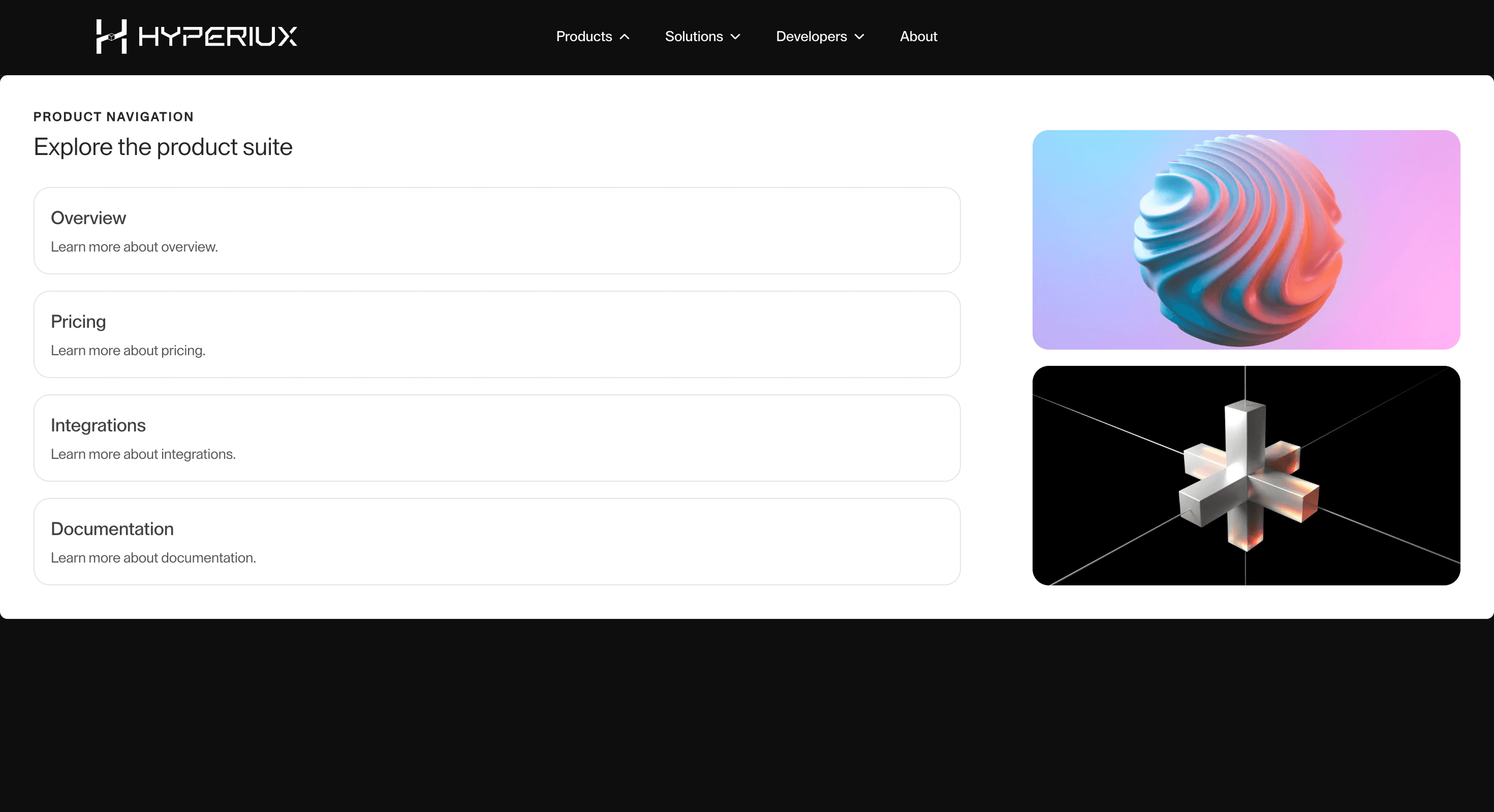
Overview
Directional Menu gives navigation spatial presence: menu panels enter from the pointer direction.
Use it when the site has enough structure to justify a designed menu moment: services, products, resources, docs, use cases, or portfolios. For three links, keep it boring and fast.
The main risk is cleverness in the one place every visitor needs reliability. Build keyboard, click, tap, Escape, focus restore, and mobile behavior before adding directional or overlay motion.
Install Command
npx hyperiux add directional-menuUsage Code
page.jsx
import DirectionalMenu from '@/components/effects/directional-menu'

const page = () => {
  return (
   <DirectionalMenu/>
  )
}
Component Code
index.jsx
// Built using Hyperiux Vault: https://vault.hyperiux.com
"use client";
import { DirectionalMegaMenu } from "./DirectionalMegaMenu";
import { Menu1 } from "./Menu1";
import { Menu2 } from "./Menu2";
import { Menu3 } from "./Menu3";
import { MobileDirectionalMenu } from "./MobileDirectionalMenu";
const menuItems = [
    {
        label: "Products",
        customContent: <Menu1 />,
    },
    {
        label: "Solutions",
        customContent: <Menu2 />,
    },
    {
        label: "Developers",
        customContent: <Menu3 />,
    },
    {
        label: "About",
        href: "#",
    },
];
const MENU_EASE = "power2.inOut";
export default function DirectionalMenu({ activeColor = "#ffffff", inactiveColor = "#ffffff", panelGap = 20, closeDelay = 80, duration = 0.35, }) {
    return (<div className="relative h-screen overflow-hidden bg-black text-white max-md:h-full max-md:overflow-visible max-md:pb-10">
      {/* Navbar */}
      <header className="relative z-50 border-b border-white/10">
        <div className="max-w-7xl mx-auto max-[1025px]:hidden h-19 flex items-center justify-between">
          {/* Logo */}
          <div className="flex items-center gap-3">
            <a href="/" className="flex items-center gap-3 cursor-pointer">
              <svg width="30" height="30" viewBox="0 0 58 65" fill="none" xmlns="http://www.w3.org/2000/svg">
                <path d="M0 0H9.02977V28.5943H0V0Z" fill="#ffffff"/>
                <path d="M57.1895 64.7134H48.1597V36.1192H57.1895V64.7134Z" fill="#ffffff"/>
                <path d="M0.0195312 36.1192V64.7135H9.0493V42.139L21.5405 37.4737V28.7449L0.0195312 36.1192Z" fill="#ffffff"/>
                <path d="M48.1777 22.5746V0.00012207H57.3579V28.5944L34.332 37.8697V28.5944L48.1777 22.5746Z" fill="#ffffff"/>
                <path d="M21.9912 29.0459L28.4868 26.8346C28.8573 26.7085 29.2624 26.7316 29.6161 26.8992L34.7834 29.3469M21.9912 29.0459L28.1616 32.2063M21.9912 29.0459V37.1727L28.1616 40.0321M34.7834 29.3469L28.1616 32.2063M34.7834 29.3469C34.7834 32.3443 34.7834 34.1753 34.7834 37.1727L28.1616 40.0321M28.1616 32.2063V40.0321" stroke="#ffffff" strokeWidth="0.902977"/>
              </svg>

              <div className="flex items-center gap-2 text-white">
                <svg width="156" height="45" viewBox="0 0 351 43" fill="none" xmlns="http://www.w3.org/2000/svg">
                  <path d="M315.441 6.10352e-05H306.862L320.055 15.9603L324.019 21.0695L306.862 42.139H315.591L332.597 21.0695L328.555 15.9603L315.441 6.10352e-05Z" fill="white"/>
                  <path d="M350.055 6.10352e-05H341.326L332.598 10.6853L336.962 15.9527L350.055 6.10352e-05Z" fill="white"/>
                  <path d="M349.905 42.139L341.176 42.139L332.598 31.7548L336.962 26.3369L349.905 42.139Z" fill="white"/>
                  <path d="M264.874 6.10352e-05H258.252V34.0122L269.088 42.139H289.555L300.391 34.0122V6.10352e-05H293.769V29.9349C293.769 30.4164 293.539 30.8688 293.149 31.152L287.543 35.2293C287.286 35.4164 286.976 35.5172 286.658 35.5172H271.985C271.667 35.5172 271.357 35.4164 271.1 35.2293L265.494 31.152C265.104 30.8688 264.874 30.4164 264.874 29.9349V6.10352e-05Z" fill="white"/>
                  <rect x="244.406" y="6.10352e-05" width="6.62183" height="42.1389" fill="white"/>
                  <path d="M195.043 0.000183105H228.002V6.62202H201.665V42.2896H195.043V0.000183105Z" fill="white"/>
                  <path d="M233.269 24.0796L237.182 18.1404V6.62202V0.000183105H195.043V6.62202H230.56V15.8023L225.594 24.0796H233.269Z" fill="white"/>
                  <path d="M221.078 17.7586H201.664V24.3804H217.466L229.205 42.139H237.163L221.078 17.7586Z" fill="white"/>
                  <path d="M182.401 24.3804V17.7585H162.235L153.205 27.9923H162.084L165.245 24.3804H182.401Z" fill="white"/>
                  <path d="M158.322 0H188.421V6.62183H161.031L152.904 15.9526V35.5171H188.421V42.1389H146.282V12.0397L158.322 0Z" fill="white"/>
                  <rect x="97.5234" y="17.7585" width="6.62183" height="24.3804" fill="white"/>
                  <path d="M139.662 0H97.5234V6.62183H133.041V17.7586H111.15L104.534 24.3804H133.643L139.662 18.0595V0Z" fill="white"/>
                  <path d="M55.3826 10.8357L55.3826 0H48.7607L48.7607 14.8991L66.5754 24.2299L66.5193 42.1389H73.1411V24.2299L90.8997 14.7486V0H84.2779V10.8357L69.8302 18.4786L55.3826 10.8357Z" fill="white"/>
                  <rect width="6.62183" height="42.1389" fill="white"/>
                  <rect x="35.5166" width="6.62183" height="42.1389" fill="white"/>
                  <rect x="6.62305" y="17.7585" width="28.8953" height="6.62183" fill="white"/>
                </svg>
              </div>
            </a>
          </div>

          {/* Menu */}
          <DirectionalMegaMenu items={menuItems} closeDelay={closeDelay} panelGap={panelGap} activeClassName="" inactiveClassName="" navItemStyle={{ color: inactiveColor }} activeNavItemStyle={{ color: activeColor }} navClassName="mx-auto w-full  max-w-7xl justify-center px-6 md:px-10 max-[1025px]:translate-x-10 max-md:translate-x-0 " contentWrapperClassName="p-8 bg-white border border-white/10 rounded-3xl max-md:h-[92vh] max-[1025px]:h-[75vh]" animation={{
            duration,
            ease: MENU_EASE,
            distance: 100,
            closeOpacityDuration: duration,
            openOpacityDuration: duration,
            fade: true,
            heightDuration: duration,
            heightEase: MENU_EASE,
        }}/>
        </div>
        <MobileDirectionalMenu items={menuItems}/>
      </header>

    </div>);
}
DirectionalMegaMenu.jsx
"use client";
import { useEffect, useLayoutEffect, useMemo, useRef, useState } from "react";
import gsap from "gsap";
import { ChevronDown } from "lucide-react";
const DEFAULT_ANIMATION = {
    contentFadeDelay: 0.06,
    contentFadeDuration: 0.18,
    distance: 56,
    duration: 0.26,
    ease: "power2.out",
    fade: true,
    heightDuration: 0.22,
    heightEase: "power2.out",
};
const DEFAULT_TRANSITION_DIRECTION = 1;
const NO_INDEX = null;
const useIsomorphicLayoutEffect = typeof window !== "undefined" ? useLayoutEffect : useEffect;
const hasDropdownContent = (item) => Boolean(item?.customContent);
const getPaneHeight = (element) => {
    if (!element) {
        return 0;
    }
    return element.offsetHeight || element.scrollHeight || 0;
};
const prefersReducedMotion = () => typeof window !== "undefined" &&
    window.matchMedia?.("(prefers-reduced-motion: reduce)")?.matches === true;
const REDUCED_MOTION_FADE_DURATION = 0.16;
export function DirectionalMegaMenu({ items = [], className = "", navClassName = "", navItemClassName = "", navItemStyle, activeNavItemStyle, activeClassName = "text-white", inactiveClassName = "text-white", panelClassName = "", contentWrapperClassName = "", initialIndex = NO_INDEX, closeDelay = 180, animation = {}, panelGap = 0, menuTop = "", }) {
    // Animation config
    const config = useMemo(() => ({
        contentFadeDelay: animation.contentFadeDelay ?? DEFAULT_ANIMATION.contentFadeDelay,
        contentFadeDuration: animation.contentFadeDuration ??
            DEFAULT_ANIMATION.contentFadeDuration,
        distance: animation.distance ?? DEFAULT_ANIMATION.distance,
        duration: animation.duration ?? DEFAULT_ANIMATION.duration,
        ease: animation.ease ?? DEFAULT_ANIMATION.ease,
        fade: animation.fade ?? DEFAULT_ANIMATION.fade,
        heightDuration: animation.heightDuration ?? DEFAULT_ANIMATION.heightDuration,
        heightEase: animation.heightEase ?? DEFAULT_ANIMATION.heightEase,
    }), [animation]);
    // State and refs
    const [isOpen, setIsOpen] = useState(initialIndex !== NO_INDEX);
    const [currentIndex, setCurrentIndex] = useState(initialIndex);
    const [nextIndex, setNextIndex] = useState(NO_INDEX);
    const [highlightedIndex, setHighlightedIndex] = useState(initialIndex);
    const panelRef = useRef(null);
    const viewportRef = useRef(null);
    const currentPaneRef = useRef(null);
    const nextPaneRef = useRef(null);
    const menuPanelRef = useRef(null);
    const closeTimerRef = useRef(null);
    const isAnimatingRef = useRef(false);
    const queuedIndexRef = useRef(NO_INDEX);
    const hasOpenedOnceRef = useRef(initialIndex !== NO_INDEX);
    const visualIndexRef = useRef(initialIndex);
    const transitionDirectionRef = useRef(DEFAULT_TRANSITION_DIRECTION);
    const clearCloseTimer = () => {
        if (!closeTimerRef.current) {
            return;
        }
        clearTimeout(closeTimerRef.current);
        closeTimerRef.current = null;
    };
    const resetMenuState = () => {
        setIsOpen(false);
        setCurrentIndex(NO_INDEX);
        setNextIndex(NO_INDEX);
        setHighlightedIndex(NO_INDEX);
        isAnimatingRef.current = false;
        queuedIndexRef.current = NO_INDEX;
        hasOpenedOnceRef.current = false;
        visualIndexRef.current = NO_INDEX;
        transitionDirectionRef.current = DEFAULT_TRANSITION_DIRECTION;
    };
    const killPanelTweens = () => {
        gsap.killTweensOf([
            menuPanelRef.current,
            panelRef.current,
            viewportRef.current,
            currentPaneRef.current,
            nextPaneRef.current,
        ]);
    };
    const restoreMenuPanel = () => {
        if (!menuPanelRef.current) {
            return;
        }
        gsap.killTweensOf(menuPanelRef.current);
        gsap.set(menuPanelRef.current, {
            opacity: 1,
            height: "auto",
        });
    };
    const closeMenu = () => {
        clearCloseTimer();
        if (!menuPanelRef.current) {
            resetMenuState();
            return;
        }
        killPanelTweens();
        if (prefersReducedMotion()) {
            gsap.to(menuPanelRef.current, {
                opacity: 0,
                duration: REDUCED_MOTION_FADE_DURATION,
                ease: "power2.out",
                onComplete: () => {
                    gsap.set(menuPanelRef.current, {
                        height: 0,
                    });
                    resetMenuState();
                },
            });
            return;
        }
        gsap.to(menuPanelRef.current, {
            opacity: 0,
            height: 0,
            duration: config.heightDuration,
            ease: config.heightEase,
            onComplete: resetMenuState,
        });
    };
    const scheduleClose = () => {
        clearCloseTimer();
        closeTimerRef.current = setTimeout(() => {
            closeMenu();
        }, closeDelay);
    };
    const openMenuAt = (index) => {
        const item = items[index];
        if (!item || !hasDropdownContent(item)) {
            return;
        }
        restoreMenuPanel();
        setIsOpen(true);
        setCurrentIndex(index);
        setNextIndex(NO_INDEX);
        setHighlightedIndex(index);
        queuedIndexRef.current = NO_INDEX;
        isAnimatingRef.current = false;
        hasOpenedOnceRef.current = false;
        visualIndexRef.current = index;
        transitionDirectionRef.current = DEFAULT_TRANSITION_DIRECTION;
    };
    const requestSwitch = (index) => {
        const item = items[index];
        if (!item) {
            return;
        }
        clearCloseTimer();
        restoreMenuPanel();
        setHighlightedIndex(index);
        if (!hasDropdownContent(item)) {
            setHighlightedIndex(NO_INDEX);
            if (isOpen) {
                closeMenu();
            }
            return;
        }
        if (!isOpen || currentIndex === NO_INDEX) {
            openMenuAt(index);
            return;
        }
        if (index === currentIndex && nextIndex === NO_INDEX) {
            visualIndexRef.current = index;
            return;
        }
        if (index === nextIndex) {
            visualIndexRef.current = index;
            return;
        }
        const baseIndex = queuedIndexRef.current !== NO_INDEX
            ? queuedIndexRef.current
            : nextIndex !== NO_INDEX
                ? nextIndex
                : visualIndexRef.current !== NO_INDEX
                    ? visualIndexRef.current
                    : currentIndex;
        const direction = index > baseIndex ? 1 : -1;
        if (isAnimatingRef.current) {
            queuedIndexRef.current = index;
            visualIndexRef.current = index;
            transitionDirectionRef.current = direction;
            return;
        }
        visualIndexRef.current = index;
        transitionDirectionRef.current = direction;
        setNextIndex(index);
    };
    const onWrapperMouseLeave = () => {
        scheduleClose();
    };
    const onItemEnter = (index) => {
        const item = items[index];
        if (!hasDropdownContent(item)) {
            clearCloseTimer();
            setHighlightedIndex(NO_INDEX);
            if (isOpen) {
                closeMenu();
            }
            return;
        }
        requestSwitch(index);
    };
    // Initial panel open
    useIsomorphicLayoutEffect(() => {
        if (!isOpen || currentIndex === NO_INDEX || !panelRef.current || !viewportRef.current) {
            return;
        }
        if (!currentPaneRef.current) {
            return;
        }
        gsap.killTweensOf([menuPanelRef.current, panelRef.current, viewportRef.current]);
        const contentHeight = getPaneHeight(currentPaneRef.current);
        if (!hasOpenedOnceRef.current) {
            if (prefersReducedMotion()) {
                gsap.set(menuPanelRef.current, {
                    height: "auto",
                    opacity: 0,
                });
                gsap.set(viewportRef.current, {
                    height: contentHeight,
                    opacity: 1,
                });
                gsap.to(menuPanelRef.current, {
                    opacity: 1,
                    duration: REDUCED_MOTION_FADE_DURATION,
                    ease: "power2.out",
                    onComplete: () => {
                        hasOpenedOnceRef.current = true;
                    },
                });
                return;
            }
            gsap.set(menuPanelRef.current, {
                height: 0,
                opacity: 1,
            });
            gsap.set(viewportRef.current, {
                height: contentHeight,
                opacity: 0,
            });
            const timeline = gsap.timeline({
                onComplete: () => {
                    hasOpenedOnceRef.current = true;
                    gsap.set(viewportRef.current, { height: contentHeight, opacity: 1 });
                },
            });
            timeline
                .to(menuPanelRef.current, {
                height: "auto",
                duration: config.heightDuration,
                ease: config.heightEase,
            }, 0)
                .to(viewportRef.current, {
                opacity: 1,
                duration: config.contentFadeDuration,
                ease: "power2.out",
            }, config.contentFadeDelay);
            return;
        }
        gsap.set(viewportRef.current, {
            height: contentHeight,
        });
    }, [
        config.contentFadeDelay,
        config.contentFadeDuration,
        config.heightDuration,
        config.heightEase,
        currentIndex,
        isOpen,
    ]);
    // Sync static panel height
    useIsomorphicLayoutEffect(() => {
        if (currentIndex === NO_INDEX || nextIndex !== NO_INDEX) {
            return;
        }
        if (!currentPaneRef.current || !viewportRef.current) {
            return;
        }
        const height = getPaneHeight(currentPaneRef.current);
        gsap.set(viewportRef.current, { height });
    }, [currentIndex, nextIndex]);
    // Animate panel switch
    useIsomorphicLayoutEffect(() => {
        if (nextIndex === NO_INDEX) {
            return;
        }
        if (!currentPaneRef.current || !nextPaneRef.current || !viewportRef.current) {
            return;
        }
        const currentElement = currentPaneRef.current;
        const nextElement = nextPaneRef.current;
        const currentHeight = getPaneHeight(currentElement);
        const nextHeight = getPaneHeight(nextElement);
        const targetIndex = nextIndex;
        const direction = transitionDirectionRef.current;
        const distance = config.distance;
        isAnimatingRef.current = true;
        gsap.killTweensOf([currentElement, nextElement, viewportRef.current]);
        if (prefersReducedMotion()) {
            gsap.set(currentElement, {
                position: "absolute",
                inset: 0,
                x: 0,
                opacity: 0,
                zIndex: 1,
                pointerEvents: "none",
            });
            gsap.set(nextElement, {
                position: "absolute",
                inset: 0,
                x: 0,
                opacity: 1,
                zIndex: 2,
                pointerEvents: "none",
            });
            gsap.set(viewportRef.current, {
                height: nextHeight,
            });
            setCurrentIndex(targetIndex);
            setNextIndex(NO_INDEX);
            isAnimatingRef.current = false;
            visualIndexRef.current = targetIndex;
            const queuedIndex = queuedIndexRef.current;
            queuedIndexRef.current = NO_INDEX;
            if (queuedIndex !== NO_INDEX &&
                queuedIndex !== targetIndex &&
                items[queuedIndex] &&
                hasDropdownContent(items[queuedIndex])) {
                requestSwitch(queuedIndex);
            }
            return;
        }
        gsap.set(currentElement, {
            position: "absolute",
            inset: 0,
            x: 0,
            opacity: 1,
            zIndex: 1,
            pointerEvents: "none",
        });
        gsap.set(nextElement, {
            position: "absolute",
            inset: 0,
            x: direction > 0 ? distance : -distance,
            opacity: config.fade ? 0 : 1,
            zIndex: 2,
            pointerEvents: "none",
        });
        gsap.set(viewportRef.current, {
            height: currentHeight,
        });
        const timeline = gsap.timeline({
            onComplete: () => {
                setCurrentIndex(targetIndex);
                setNextIndex(NO_INDEX);
                isAnimatingRef.current = false;
                visualIndexRef.current = targetIndex;
                const queuedIndex = queuedIndexRef.current;
                queuedIndexRef.current = NO_INDEX;
                if (queuedIndex !== NO_INDEX &&
                    queuedIndex !== targetIndex &&
                    items[queuedIndex] &&
                    hasDropdownContent(items[queuedIndex])) {
                    requestSwitch(queuedIndex);
                }
            },
        });
        timeline
            .to(viewportRef.current, {
            height: nextHeight,
            duration: config.heightDuration,
            ease: config.heightEase,
        }, 0)
            .to(currentElement, {
            x: direction > 0 ? -distance : distance,
            opacity: config.fade ? 0 : 1,
            duration: config.duration,
            ease: config.ease,
        }, 0)
            .to(nextElement, {
            x: 0,
            opacity: 1,
            duration: config.duration,
            ease: config.ease,
        }, 0);
    }, [config.distance, config.duration, config.ease, config.fade, config.heightDuration, config.heightEase, items, nextIndex]);
    // Cleanup
    useEffect(() => {
        const panel = panelRef.current;
        const viewport = viewportRef.current;
        const currentPane = currentPaneRef.current;
        const nextPane = nextPaneRef.current;
        return () => {
            clearCloseTimer();
            gsap.killTweensOf(panel);
            gsap.killTweensOf(viewport);
            gsap.killTweensOf([currentPane, nextPane]);
        };
    }, []);
    return (<div className={`pointer-events-none absolute inset-0 z-50 ${className}`} onMouseEnter={clearCloseTimer} onMouseLeave={onWrapperMouseLeave}>
      <div className={`flex h-full items-center justify-center ${navClassName}`}>
        <div className="pointer-events-auto flex items-center justify-center gap-8">
          {items.map((item, index) => {
            const isActive = highlightedIndex === index;
            return (<button key={item.label || index} type="button" onMouseEnter={() => onItemEnter(index)} style={isActive ? activeNavItemStyle : navItemStyle} className={`relative flex cursor-pointer items-center gap-1 text-sm font-medium text-white transition-colors duration-300 hover:text-white motion-reduce:text-white motion-reduce:transition-none max-[1025px]:text-lg max-md:text-sm ${navItemClassName} ${isActive ? activeClassName : inactiveClassName}`}>
                {item.label}

                {hasDropdownContent(item) && (<ChevronDown className={`h-4 w-4 transition-transform duration-300 motion-reduce:rotate-0 motion-reduce:transition-none ${isActive ? "-rotate-180" : "rotate-0"}`}/>)}
              </button>);
        })}
        </div>
      </div>

      {isOpen && currentIndex !== NO_INDEX && hasDropdownContent(items[currentIndex]) && (<div className="absolute left-0 w-full" style={{ top: `calc(100% + ${panelGap}px)` }}>
          <div ref={menuPanelRef} className={`menu-container pointer-events-auto w-full overflow-hidden ${menuTop}`}>
            <div ref={panelRef} className={`w-full overflow-hidden rounded-[0.5vw] border border-neutral-200 bg-white shadow-[0_20px_60px_rgba(0,0,0,0.08)] transform-gpu ${panelClassName} ${contentWrapperClassName}`}>
              <div ref={viewportRef} className="relative" onMouseEnter={clearCloseTimer}>
                <div key={`current-${currentIndex}`} ref={currentPaneRef} className="relative w-full">
                  {items[currentIndex]?.customContent || null}
                </div>

                {nextIndex !== NO_INDEX && hasDropdownContent(items[nextIndex]) && (<div key={`next-${nextIndex}`} ref={nextPaneRef} className="absolute left-0 top-0 w-full">
                    {items[nextIndex]?.customContent || null}
                  </div>)}
              </div>
            </div>
          </div>
        </div>)}
    </div>);
}
Menu1.jsx
"use client";
const PRODUCT_LINKS = [
    { label: "Overview", href: "#" },
    { label: "Pricing", href: "#" },
    { label: "Integrations", href: "#" },
    { label: "Documentation", href: "#" },
];
const PREVIEW_IMAGES = [
    {
        alt: "Dashboard preview",
        heightClassName: "h-54 max-[1025px]:h-60 max-md:h-40",
        src: "https://pub-8abee449136941f5b0a1cd2c014534e9.r2.dev/vault-listing-images/assets-images/h-09.jpg",
    },
    {
        alt: "Product showcase",
        heightClassName: "h-54 max-[1025px]:h-60 max-md:h-40",
        src: "https://pub-8abee449136941f5b0a1cd2c014534e9.r2.dev/vault-listing-images/assets-images/h-07.jpg",
    },
];
export function Menu1() {
    return (<div className="flex justify-between gap-8 max-[1025px]:flex-wrap max-md:flex-col">
      <div className="flex w-[65%] flex-col gap-6 max-[1025px]:w-[70%] max-md:w-full">
        <div className="flex flex-col gap-2 max-[1025px]:gap-3 max-md:gap-2">
          <p className="text-xs font-semibold uppercase tracking-[0.14em] text-neutral-800 max-[1025px]:text-base max-md:text-xs">
            Product Navigation
          </p>
          <h3 className="text-2xl text-neutral-800 font-semibold max-[1025px]:text-4xl max-md:text-2xl">
            Explore the product suite
          </h3>
        </div>

        <div className="flex flex-col max-md:flex-wrap gap-4">
          {PRODUCT_LINKS.map((item) => (<a key={item.label} href={item.href} className="flex flex-col gap-1 rounded-lg border border-neutral-200 p-4 transition-colors duration-200 hover:bg-neutral-100 motion-reduce:bg-transparent motion-reduce:transition-none">
              <div className="text-lg font-medium text-neutral-700 max-[1025px]:text-2xl max-md:text-xl">{item.label}</div>
              <div className="text-sm text-neutral-600 max-[1025px]:text-lg max-md:text-base">
                Learn more about {item.label.toLowerCase()}.
              </div>
            </a>))}
        </div>
      </div>

      <div className="flex w-[30%] max-[1025px]:hidden flex-col justify-end gap-4  max-[1025px]:w-full max-[1025px]:grid-cols-2 max-[1025px]:gap-4  ">
        {PREVIEW_IMAGES.map((image) => (<div key={image.src} className={`${image.heightClassName} overflow-hidden rounded-lg `}>
            <img src={image.src} alt={image.alt} width={600} height={400} className="h-full w-full object-cover"/>
          </div>))}
      </div>
    </div>);
}
Menu2.jsx
"use client";
const SOLUTION_BLOCKS = [
    {
        title: "Startups",
        description: "Launch faster with flexible infrastructure, simple onboarding, and scalable workflows.",
        href: "#",
    },
    {
        title: "Enterprise",
        description: "Bring governance, performance, and operational control to complex digital systems.",
        href: "#",
    },
    {
        title: "Agencies",
        description: "Build repeatable client delivery with modular systems, collaboration, and speed.",
        href: "#",
    },
];
export function Menu2() {
    return (<div className="flex flex-col gap-6 max-[1025px]:gap-10">
      <div className="flex flex-col gap-2 max-[1025px]:gap-3">
        <p className="text-xs font-semibold uppercase tracking-[0.14em] text-neutral-800 max-[1025px]:text-base max-md:text-xs">
          Solutions
        </p>
        <h3 className="text-2xl text-neutral-800 font-semibold max-[1025px]:text-4xl max-md:text-2xl">
          Built for different teams
        </h3>
      </div>

      <div className="grid grid-cols-3 gap-6 max-[1025px]:grid-cols-2">
        {SOLUTION_BLOCKS.map((block) => (<a key={block.title} href={block.href} className="flex flex-col gap-3 rounded-lg border border-neutral-200 p-6 transition-all duration-200 hover:bg-neutral-100 max-md:p-4 motion-reduce:bg-transparent motion-reduce:transition-none">
            <h4 className="text-lg font-semibold text-neutral-800 max-[1025px]:text-3xl max-md:text-xl">{block.title}</h4>
            <p className="text-sm leading-6 text-neutral-600 max-[1025px]:text-xl max-md:text-base max-md:leading-[1.2]">
              {block.description}
            </p>
          </a>))}
      </div>
    </div>);
}
Menu3.jsx
"use client";
const LINK_GROUPS = [
    {
        heading: "Documentation",
        links: [
            { label: "API Reference", href: "#" },
            { label: "Guides", href: "#" },
            { label: "Examples", href: "#" },
        ],
    },
    {
        heading: "Resources",
        links: [
            { label: "Changelog", href: "#" },
            { label: "Community", href: "#" },
            { label: "Support", href: "#" },
        ],
    },
    {
        heading: "Company",
        links: [
            { label: "About", href: "#" },
            { label: "Careers", href: "#" },
            { label: "Contact", href: "#" },
        ],
    },
];
export function Menu3() {
    return (<div className="grid grid-cols-3 gap-10 max-[1025px]:grid-cols-2">
      {LINK_GROUPS.map((group) => (<div key={group.heading} className="flex flex-col gap-4">
          <h4 className="text-sm font-semibold uppercase tracking-[0.08em] text-neutral-800 max-[1025px]:text-2xl max-md:text-sm">
            {group.heading}
          </h4>

          <div className="flex flex-col gap-3">
            {group.links.map((link) => (<a key={link.label} href={link.href} className="block text-sm font-medium text-neutral-600 transition-opacity duration-200 hover:text-black max-[1025px]:text-xl max-md:text-base motion-reduce:text-neutral-600 motion-reduce:transition-none">
                {link.label}
              </a>))}
          </div>
        </div>))}
    </div>);
}
MobileDirectionalMenu.jsx
"use client";
import { useRef, useState } from "react";
import { ChevronDown, Menu, X } from "lucide-react";
import { useFocusTrap } from "./useFocusTrap";
const hasDropdownContent = (item) => Boolean(item?.customContent);
export function MobileDirectionalMenu({ items = [] }) {
    const [isMenuOpen, setIsMenuOpen] = useState(false);
    const [activeIndex, setActiveIndex] = useState(null);
    const containerRef = useRef(null);
    const toggleButtonRef = useRef(null);
    const closeMenu = () => {
        setIsMenuOpen(false);
        setActiveIndex(null);
    };
    // Trap focus across the toggle + panel while open, restore it on close.
    useFocusTrap({
        active: isMenuOpen,
        containerRef,
        initialFocusRef: toggleButtonRef,
        onEscape: closeMenu,
    });
    const onToggleMenu = () => {
        setIsMenuOpen((currentValue) => {
            const nextValue = !currentValue;
            if (!nextValue) {
                setActiveIndex(null);
            }
            return nextValue;
        });
    };
    const onToggleSection = (index) => {
        setActiveIndex((currentValue) => (currentValue === index ? null : index));
    };
    return (<div ref={containerRef} className="relative hidden max-[1025px]:block px-6 py-4">
      <div className="flex items-center justify-between gap-4">
        <a href="/" className="flex items-center  gap-3 cursor-pointer">
          <svg width="35" height="35" viewBox="0 0 58 65" fill="none" xmlns="http://www.w3.org/2000/svg">
            <path d="M0 0H9.02977V28.5943H0V0Z" fill="#ffffff"/>
            <path d="M57.1895 64.7134H48.1597V36.1192H57.1895V64.7134Z" fill="#ffffff"/>
            <path d="M0.0195312 36.1192V64.7135H9.0493V42.139L21.5405 37.4737V28.7449L0.0195312 36.1192Z" fill="#ffffff"/>
            <path d="M48.1777 22.5746V0.00012207H57.3579V28.5944L34.332 37.8697V28.5944L48.1777 22.5746Z" fill="#ffffff"/>
            <path d="M21.9912 29.0459L28.4868 26.8346C28.8573 26.7085 29.2624 26.7316 29.6161 26.8992L34.7834 29.3469M21.9912 29.0459L28.1616 32.2063M21.9912 29.0459V37.1727L28.1616 40.0321M34.7834 29.3469L28.1616 32.2063M34.7834 29.3469C34.7834 32.3443 34.7834 34.1753 34.7834 37.1727L28.1616 40.0321M28.1616 32.2063V40.0321" stroke="#ffffff" strokeWidth="0.902977"/>
          </svg>
          <svg width="166" height="55" viewBox="0 0 351 43" fill="none" xmlns="http://www.w3.org/2000/svg">
            <path d="M315.441 6.10352e-05H306.862L320.055 15.9603L324.019 21.0695L306.862 42.139H315.591L332.597 21.0695L328.555 15.9603L315.441 6.10352e-05Z" fill="white"/>
            <path d="M350.055 6.10352e-05H341.326L332.598 10.6853L336.962 15.9527L350.055 6.10352e-05Z" fill="white"/>
            <path d="M349.905 42.139L341.176 42.139L332.598 31.7548L336.962 26.3369L349.905 42.139Z" fill="white"/>
            <path d="M264.874 6.10352e-05H258.252V34.0122L269.088 42.139H289.555L300.391 34.0122V6.10352e-05H293.769V29.9349C293.769 30.4164 293.539 30.8688 293.149 31.152L287.543 35.2293C287.286 35.4164 286.976 35.5172 286.658 35.5172H271.985C271.667 35.5172 271.357 35.4164 271.1 35.2293L265.494 31.152C265.104 30.8688 264.874 30.4164 264.874 29.9349V6.10352e-05Z" fill="white"/>
            <rect x="244.406" y="6.10352e-05" width="6.62183" height="42.1389" fill="white"/>
            <path d="M195.043 0.000183105H228.002V6.62202H201.665V42.2896H195.043V0.000183105Z" fill="white"/>
            <path d="M233.269 24.0796L237.182 18.1404V6.62202V0.000183105H195.043V6.62202H230.56V15.8023L225.594 24.0796H233.269Z" fill="white"/>
            <path d="M221.078 17.7586H201.664V24.3804H217.466L229.205 42.139H237.163L221.078 17.7586Z" fill="white"/>
            <path d="M182.401 24.3804V17.7585H162.235L153.205 27.9923H162.084L165.245 24.3804H182.401Z" fill="white"/>
            <path d="M158.322 0H188.421V6.62183H161.031L152.904 15.9526V35.5171H188.421V42.1389H146.282V12.0397L158.322 0Z" fill="white"/>
            <rect x="97.5234" y="17.7585" width="6.62183" height="24.3804" fill="white"/>
            <path d="M139.662 0H97.5234V6.62183H133.041V17.7586H111.15L104.534 24.3804H133.643L139.662 18.0595V0Z" fill="white"/>
            <path d="M55.3826 10.8357L55.3826 0H48.7607L48.7607 14.8991L66.5754 24.2299L66.5193 42.1389H73.1411V24.2299L90.8997 14.7486V0H84.2779V10.8357L69.8302 18.4786L55.3826 10.8357Z" fill="white"/>
            <rect width="6.62183" height="42.1389" fill="white"/>
            <rect x="35.5166" width="6.62183" height="42.1389" fill="white"/>
            <rect x="6.62305" y="17.7585" width="28.8953" height="6.62183" fill="white"/>
          </svg>
        </a>

        <button ref={toggleButtonRef} type="button" onClick={onToggleMenu} className="flex h-11 w-11 items-center justify-center rounded-full  text-white transition-colors duration-200 hover:bg-white/10 motion-reduce:bg-transparent motion-reduce:transition-none" aria-expanded={isMenuOpen} aria-label={isMenuOpen ? "Close menu" : "Open menu"}>
          {isMenuOpen ? <X className="max-md:h-5 max-md:w-5 h-10 w-10"/> : <Menu className=" max-md:h-7 max-md:w-7 h-10 w-10"/>}
        </button>
      </div>

      <div className={`absolute left-6 right-6 top-18 z-50 overflow-hidden rounded-lg bg-white text-black transition-all duration-300 ease-in-out motion-reduce:transition-none ${isMenuOpen
            ? "max-h-[80vh] overflow-y-scroll p-8 opacity-100 max-md:max-h-[90vh] max-md:p-3"
            : "max-h-0 p-0 opacity-0 pointer-events-none"}`} aria-hidden={!isMenuOpen}>
          <div className="flex flex-col max-md:gap-2 gap-5">
            {items.map((item, index) => {
            const isOpen = activeIndex === index;
            const isDropdown = hasDropdownContent(item);
            if (!isDropdown) {
                return (<a key={item.label} href={item.href || "#"} className="rounded-lg border border-neutral-200 bg-neutral-50/60 px-4 py-4 max-md:text-sm max-[1025px]:text-lg font-semibold uppercase tracking-[0.14em] text-neutral-500 transition-all duration-300 ease-in-out hover:bg-neutral-100 motion-reduce:bg-neutral-50/60 motion-reduce:transition-none max-[1025px]:rounded-none max-[1025px]:border-x-0 max-[1025px]:border-t-0" onClick={() => setIsMenuOpen(false)}>
                    {item.label}
                  </a>);
            }
            return (<section key={item.label} className="rounded-lg border border-neutral-200 bg-neutral-50/60 transition-all duration-300 ease-in-out motion-reduce:transition-none max-[1025px]:rounded-none max-[1025px]:border-x-0 max-[1025px]:border-t-0">
                  <button type="button" onClick={() => onToggleSection(index)} className="flex w-full items-center justify-between gap-4 px-4 py-4 text-left transition-all duration-300 ease-in-out motion-reduce:transition-none" aria-expanded={isOpen}>
                    <span className="max-md:text-sm max-[1025px]:text-lg font-semibold uppercase tracking-[0.14em] text-neutral-500">
                      {item.label}
                    </span>

                    <ChevronDown className={`h-4 w-4 text-neutral-500 transition-transform duration-300 ease-in-out motion-reduce:rotate-0 motion-reduce:transition-none ${isOpen ? "rotate-180" : ""}`}/>
                  </button>

                  <div className={`overflow-hidden transition-all duration-300 ease-in-out motion-reduce:transition-none ${isOpen
                    ? "max-h-[60rem]  px-4 py-4 opacity-100"
                    : "max-h-0 border-t-0 px-4 py-0 opacity-0"}`}>
                      <div className="max-[1025px]:[&_.grid]:grid-cols-2 max-md:[&_.grid]:grid-cols-1 ">
                        {item.customContent}
                      </div>
                    </div>
                </section>);
        })}
          </div>
      </div>
    </div>);
}
useFocusTrap.jsx
"use client";
import { useEffect, useRef } from "react";
const FOCUSABLE_SELECTOR = [
    "a[href]",
    "button:not([disabled])",
    "input:not([disabled])",
    "select:not([disabled])",
    "textarea:not([disabled])",
    '[tabindex]:not([tabindex="-1"])',
].join(",");
const isVisible = (element) => {
    if (!element || element.hidden) {
        return false;
    }
    const style = window.getComputedStyle(element);
    if (style.visibility === "hidden" || style.visibility === "collapse") {
        return false;
    }
    return element.getClientRects().length > 0;
};
const getFocusableElements = (container) => {
    if (!container) {
        return [];
    }
    return Array.from(container.querySelectorAll(FOCUSABLE_SELECTOR)).filter(isVisible);
};
/**
 * Keeps keyboard focus inside `containerRef` while `active` is true.
 *
 * - Captures the element focused before opening and restores focus to it on
 *   close (so the trigger button gets focus back).
 * - Moves focus into the menu on open (to `initialFocusRef` when provided,
 *   otherwise the first focusable element).
 * - Wraps Tab / Shift+Tab around the menu's focusable elements.
 * - Calls `onEscape` when the Escape key is pressed.
 */
export function useFocusTrap({ active, containerRef, initialFocusRef, onEscape, }) {
    const onEscapeRef = useRef(onEscape);
    onEscapeRef.current = onEscape;
    useEffect(() => {
        if (!active) {
            return;
        }
        const container = containerRef.current;
        if (!container) {
            return;
        }
        const previouslyFocused = document.activeElement instanceof HTMLElement
            ? document.activeElement
            : null;
        const focusInitial = () => {
            const target = initialFocusRef?.current ??
                getFocusableElements(container)[0] ??
                container;
            if (!(target instanceof HTMLElement)) {
                return;
            }
            if (target === container && !container.hasAttribute("tabindex")) {
                container.setAttribute("tabindex", "-1");
            }
            target.focus();
        };
        // Defer focus so it lands after the menu has mounted / started animating in.
        const focusFrame = requestAnimationFrame(focusInitial);
        const onKeyDown = (event) => {
            if (event.key === "Escape") {
                event.preventDefault();
                onEscapeRef.current?.();
                return;
            }
            if (event.key !== "Tab") {
                return;
            }
            const focusable = getFocusableElements(container);
            if (!focusable.length) {
                event.preventDefault();
                return;
            }
            const first = focusable[0];
            const last = focusable[focusable.length - 1];
            const activeElement = document.activeElement;
            if (event.shiftKey) {
                if (activeElement === first || !container.contains(activeElement)) {
                    event.preventDefault();
                    last.focus();
                }
                return;
            }
            if (activeElement === last || !container.contains(activeElement)) {
                event.preventDefault();
                first.focus();
            }
        };
        document.addEventListener("keydown", onKeyDown);
        return () => {
            cancelAnimationFrame(focusFrame);
            document.removeEventListener("keydown", onKeyDown);
            if (previouslyFocused && document.contains(previouslyFocused)) {
                previouslyFocused.focus();
            }
        };
    }, [active, containerRef, initialFocusRef]);
}
Example Production Use Case
Use this as navigation-system implementation guidance. Verify the shipped menu API, trigger state, keyboard path, Escape close, focus trap/restore behavior, mobile drawer logic, and reduced-motion fallback before relying on exact props, defaults, imports, or installation steps.
Best Used For
- Multi-section marketing sites with services, products, resources, docs, or use cases.
- Navigation systems where direction-aware panels enhance grouping but never replace click or keyboard paths.
- Directional Menu makes wayfinding feel designed while keeping keyboard and mobile paths clear.
Not For
Not for tiny sites, hover-only menus, checkout, forms, or navigation where speed and reliability are the whole job.
Performance Budget
Keep panel animations short, avoid layout shift, and do not block route transitions or scroll restoration.
Accessibility and Mobile
Use real links, aria-expanded triggers, Escape close, and focus restore. Mobile should use a drawer, accordion, or full-screen menu that does not depend on hover.
Common Mistakes
- Relying on hover only for Directional Menu.
- Forgetting Escape close and focus restore.
- Making a simple three-link site feel overbuilt.
Changelog
v1.1.0
Jul 21, 2026Added prefers-reduced-motion support: mega menu open/close panel animations use a reduced-motion-safe fade instead of the full height/slide tween
v1.0.0
Jun 4, 2026Initial release
Props
| Prop | Type | Default | Description |
|---|---|---|---|
closeDelay | number | 80 | Delay before closing the menu. |
panelGap | number | 20 | Gap between trigger and submenu panel. |
activeColor | string | #ffffff | Color for active menu state. |
inactiveColor | string | #ffffff | Color for inactive menu state. |
duration | number | 0.35 | Menu transition duration. |
Frequently Asked Questions
When should I use Directional Menu?
Use it when a multi-section marketing site needs menu panels entering from the pointer direction.
Can Directional Menu work without hover?
Yes. It needs click, tap, keyboard, and mobile paths that do not rely on hover.
How should Escape and focus restore work for Directional Menu?
Escape should close the menu and restore focus to the trigger. Trap focus only while overlay menus are open.
How should Directional Menu behave on mobile?
Use a drawer, accordion, or simple full-screen menu that respects touch expectations.
What should reduced motion do for Directional Menu?
Remove direction travel and large shifts; keep simple visible open/closed states.
Can Hyperiux adapt Directional Menu for a real brand system?
Yes. A custom version should define motion rules, visual treatment, performance budget, fallback behavior, source handoff, and implementation notes for the specific page or launch context.
Request a Custom Navigation Animation
Need a custom effect? Tell us what to create.


