Loading
Zoom Slider
A visual carousel where the active slide moves forward with depth for product imagery, case studies, and image-led sections.
Published On: June 4, 2026
Last Updated: August 17, 2026
GSAP
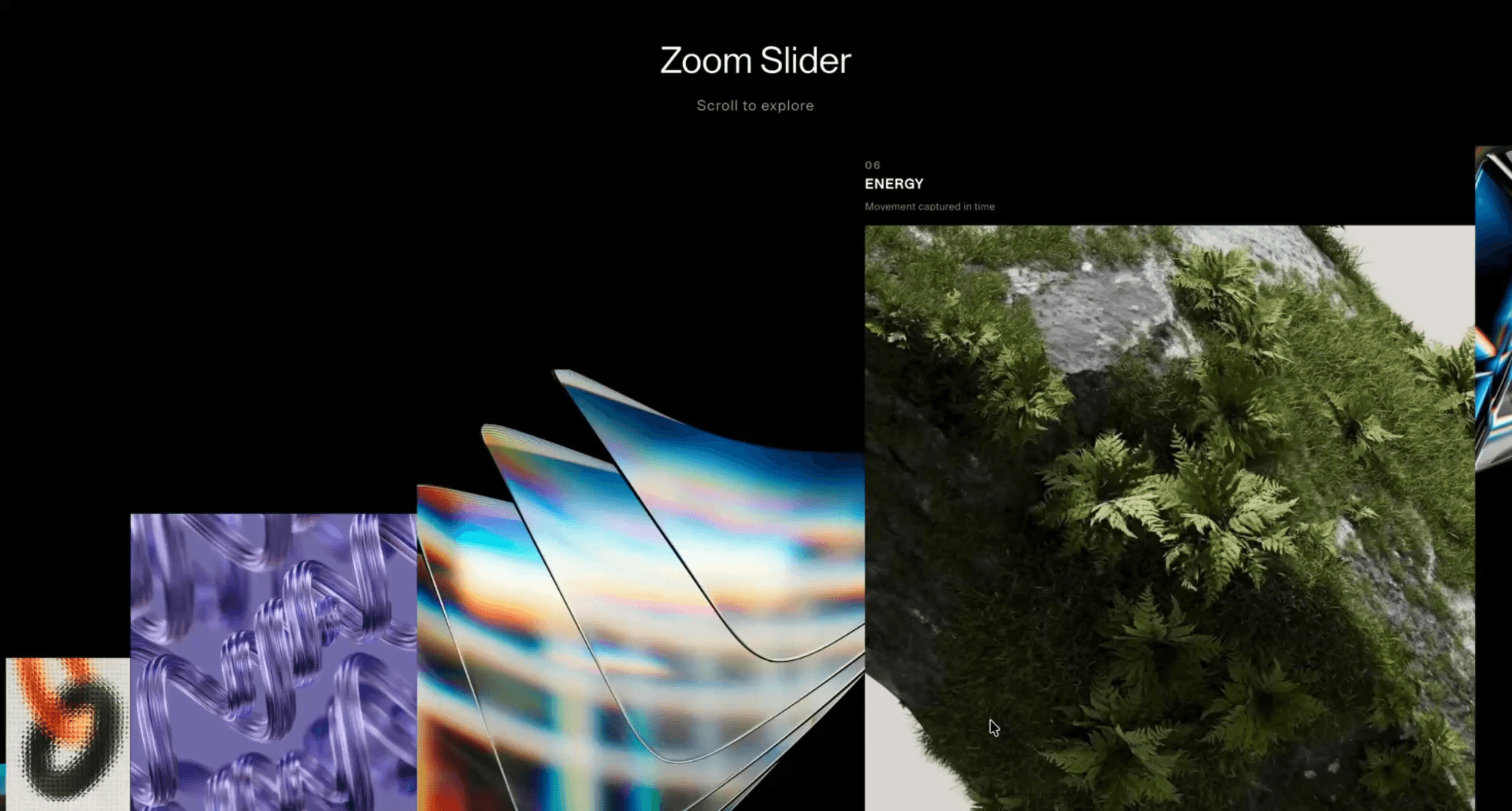
Overview
Zoom Slider creates a controlled visual sequence: the active slide moves forward with depth.
Use it for equal-weight images, portfolio work, campaign visuals, or product shots where browsing is the point. If users must compare everything, read everything, or convert from every item, use a grid instead.
The risk in production is hiding important content. Keep controls visible, support keyboard and swipe, announce meaningful slide changes politely, and pause autoplay when the visitor interacts.
Install Command
npx hyperiux add zoom-sliderUsage Code
page.jsx
import ZoomSlider from '@/components/effects/zoom-slider'

const page = () => {
  return (
    <>
    <ZoomSlider/>
    </>
  )
}
Component Code
index.jsx
// Built using Hyperiux Vault: https://vault.hyperiux.com
import React from 'react';
import ZoomSliderComp from './ZoomSliderComp';
const ZoomSlider = ({ scaleOnHover = true, textOnHover = true, size = 1, easeScrollPercentage = 100, }) => {
    return (<ZoomSliderComp title="Zoom Slider" subheading="Scroll to explore " sliderData={DEFAULT_SLIDER_DATA} scaleOnHover={scaleOnHover} textOnHover={textOnHover} size={size} easeScrollPercentage={easeScrollPercentage}/>);
};
export default ZoomSlider;
const DEFAULT_SLIDER_DATA = [
    {
        number: '01',
        src: 'https://pub-8abee449136941f5b0a1cd2c014534e9.r2.dev/vault-listing-images/assets-images/h-09.jpg',
        title: 'AURA',
        desc: 'Soft light and atmospheric tones',
    },
    {
        number: '02',
        src: 'https://pub-8abee449136941f5b0a1cd2c014534e9.r2.dev/vault-listing-images/assets-images/h-07.jpg',
        title: 'DRIFT',
        desc: 'Floating through silence',
    },
    {
        number: '03',
        src: 'https://pub-8abee449136941f5b0a1cd2c014534e9.r2.dev/vault-listing-images/assets-images/h-03.jpg',
        title: 'FORM',
        desc: 'Shapes carved by light',
    },
    {
        number: '04',
        src: 'https://pub-8abee449136941f5b0a1cd2c014534e9.r2.dev/vault-listing-images/assets-images/h-08.jpg',
        title: 'FLOW',
        desc: 'Smooth transitions in motion',
    },
    {
        number: '05',
        src: 'https://pub-8abee449136941f5b0a1cd2c014534e9.r2.dev/vault-listing-images/assets-images/h-05.jpg',
        title: 'DEPTH',
        desc: 'Layers and visual weight',
    },
    {
        number: '06',
        src: 'https://pub-8abee449136941f5b0a1cd2c014534e9.r2.dev/vault-listing-images/assets-images/h-06.jpg',
        title: 'ENERGY',
        desc: 'Movement captured in time',
    },
    {
        number: '07',
        src: 'https://pub-8abee449136941f5b0a1cd2c014534e9.r2.dev/vault-listing-images/assets-images/h-02.jpg',
        title: 'GLITCH',
        desc: 'Breaking visual boundaries',
    },
    {
        number: '08',
        src: 'https://pub-8abee449136941f5b0a1cd2c014534e9.r2.dev/vault-listing-images/assets-images/h-08.jpg',
        title: 'FRAME-X',
        desc: 'Cinematic still frame',
    },
    {
        number: '09',
        src: 'https://pub-8abee449136941f5b0a1cd2c014534e9.r2.dev/vault-listing-images/assets-images/h-01.jpg',
        title: 'LIGHTPLAY',
        desc: 'Contrast and highlights',
    },
    {
        number: '10',
        src: 'https://pub-8abee449136941f5b0a1cd2c014534e9.r2.dev/vault-listing-images/assets-images/h-05.jpg',
        title: 'MINIMAL',
        desc: 'Less but stronger',
    },
];
ZoomSliderComp.jsx
'use client';
import { useCallback, useEffect, useRef, useState } from 'react';
import gsap from 'gsap';
import { SplitText } from 'gsap/SplitText';
gsap.registerPlugin(SplitText);
const SCROLL_PER_PX = 1.0;
const LERP_FACTOR = 0.08;
const DRAG_LERP_FACTOR = 0.22;
const MOMENTUM_FRICTION = 0.92;
const MIN_MOMENTUM = 0.1;
const MOBILE_BREAKPOINT = 640;
const TABLET_BREAKPOINT = 1025;
const SLIDER_BOTTOM_OFFSET = 0;
const REDUCED_MOTION_LERP_FACTOR = 1;
const REDUCED_MOTION_FADE_DURATION = 0.18;
const prefersReducedMotion = () => typeof window !== 'undefined' &&
    window.matchMedia?.('(prefers-reduced-motion: reduce)')?.matches === true;
const lerp = (a, b, n) => a + (b - a) * n;
export function ZoomSliderComp({ sliderData, title, subheading, scaleOnHover = true, textOnHover = true, size = 1, easeScrollPercentage = 100, }) {
    const images = sliderData;
    const stripRef = useRef(null);
    const cardRefs = useRef([]);
    const imageWrapRefs = useRef([]);
    const textRefs = useRef([]);
    const [viewportWidth, setViewportWidth] = useState(1440);
    const [viewportHeight, setViewportHeight] = useState(900);
    const [reduceMotion, setReduceMotion] = useState(false);
    const isMobile = viewportWidth < MOBILE_BREAKPOINT;
    const isTablet = viewportWidth >= MOBILE_BREAKPOINT && viewportWidth < TABLET_BREAKPOINT;
    const resolvedSize = Math.max(0.5, Number(size) || 1);
    const resolvedEaseScrollPercentage = Math.max(20, Number(easeScrollPercentage) || 100);
    const cardWidthMin = (isMobile ? 75 : 190) * resolvedSize;
    const cardWidthMax = (isMobile ? 260 : isTablet ? 500 : 680) * resolvedSize;
    const cardHeightMax = isMobile
        ? Math.round(viewportHeight * 0.6 * resolvedSize)
        : Math.round(viewportHeight * 0.82 * resolvedSize);
    const cardHeightMin = (isMobile ? 80 : 50) * resolvedSize;
    const cardStep = cardWidthMax;
    const stateRef = useRef({
        current: 0,
        target: 0,
        raf: null,
        isDragging: false,
        lastX: 0,
        lastY: 0,
        velocity: 0,
    });
    const [activeIndex, setActiveIndex] = useState(0);
    const announcedIndexRef = useRef(0);
    useEffect(() => {
        const onResize = () => {
            setViewportWidth(window.innerWidth);
            setViewportHeight(window.innerHeight);
        };
        onResize();
        window.addEventListener('resize', onResize);
        return () => window.removeEventListener('resize', onResize);
    }, []);
    useEffect(() => {
        const mediaQuery = window.matchMedia?.('(prefers-reduced-motion: reduce)');
        const syncReducedMotion = (event) => {
            setReduceMotion('matches' in event ? event.matches : prefersReducedMotion());
        };
        if (!mediaQuery)
            return;
        syncReducedMotion(mediaQuery);
        mediaQuery.addEventListener('change', syncReducedMotion);
        return () => mediaQuery.removeEventListener('change', syncReducedMotion);
    }, []);
    const positionCards = useCallback((offset) => {
        if (!stripRef.current)
            return;
        const cards = Array.from(stripRef.current.children);
        const count = images.length;
        if (!count)
            return;
        const loopWidth = count * cardStep;
        const viewportWidthValue = window.innerWidth;
        const viewportHeightValue = window.innerHeight;
        const bottom = viewportHeightValue - SLIDER_BOTTOM_OFFSET;
        const easingDistance = 2 * viewportWidthValue * (resolvedEaseScrollPercentage / 100);
        const mapVtoX = (value) => {
            if (value <= 0)
                return 0;
            if (value >= easingDistance)
                return value - easingDistance / 2;
            return (value * value) / (2 * easingDistance);
        };
        const normalizedOffset = ((offset % loopWidth) + loopWidth) % loopWidth;
        const startIndex = Math.floor(normalizedOffset / cardStep);
        const fractionalOffset = (normalizedOffset % cardStep) / cardStep;
        for (let index = 0; index < count; index += 1) {
            const cardIndex = (startIndex + index) % count;
            const visualOffset = (index - fractionalOffset) * cardStep;
            const currentX = mapVtoX(visualOffset);
            const nextX = mapVtoX(visualOffset + cardStep);
            const visualWidth = nextX - currentX;
            const scale = visualWidth / cardWidthMax;
            const cardHeight = cardHeightMin + scale * (cardHeightMax - cardHeightMin);
            const y = bottom - cardHeight;
            if (!cards[cardIndex])
                continue;
            cards[cardIndex].style.transform = `translate(${currentX}px, ${y}px)`;
            const imageWrap = imageWrapRefs.current[cardIndex];
            if (!imageWrap)
                continue;
            imageWrap.style.width = `${visualWidth}px`;
            imageWrap.style.height = `${cardHeight}px`;
        }
    }, [cardHeightMax, cardHeightMin, cardStep, cardWidthMax, images.length, resolvedEaseScrollPercentage]);
    useEffect(() => {
        if (!images.length)
            return;
        const state = stateRef.current;
        const loopWidth = images.length * cardStep;
        const tick = () => {
            // Momentum glide after the finger/pointer is released. Reduced motion
            // skips the coast entirely so the slider stops as soon as input does.
            if (!reduceMotion &&
                !state.isDragging &&
                Math.abs(state.velocity) > MIN_MOMENTUM) {
                state.target += state.velocity;
                state.velocity *= MOMENTUM_FRICTION;
            }
            else if (!state.isDragging) {
                state.velocity = 0;
            }
            // Track tightly while actively dragging, glide smoothly otherwise.
            // Reduced motion collapses this to a direct 1:1 follow (no glide).
            const lerpFactor = reduceMotion
                ? REDUCED_MOTION_LERP_FACTOR
                : state.isDragging
                    ? DRAG_LERP_FACTOR
                    : LERP_FACTOR;
            state.current = lerp(state.current, state.target, lerpFactor);
            if (Math.abs(state.current - state.target) < 0.01) {
                const shift = Math.round(state.current / loopWidth) * loopWidth;
                state.current -= shift;
                state.target -= shift;
            }
            positionCards(state.current);
            if (images.length) {
                const normalizedOffset = ((state.current % loopWidth) + loopWidth) % loopWidth;
                const nextIndex = Math.floor(normalizedOffset / cardStep) % images.length;
                if (nextIndex !== announcedIndexRef.current) {
                    announcedIndexRef.current = nextIndex;
                    setActiveIndex(nextIndex);
                }
            }
            state.raf = requestAnimationFrame(tick);
        };
        const onWheel = (event) => {
            state.target -= event.deltaY * SCROLL_PER_PX;
        };
        const beginDrag = (clientX, clientY) => {
            state.isDragging = true;
            state.lastX = clientX;
            state.lastY = clientY;
            state.velocity = 0;
        };
        const moveDrag = (clientX, clientY, direction = 1) => {
            if (!state.isDragging)
                return;
            // Drive by whichever axis the gesture moved most, so a horizontal drag
            // OR a vertical (scroll-like) swipe advances the slider - in both
            // directions. `direction` flips the sign so touch matches the natural
            // mobile scroll feel.
            const deltaX = clientX - state.lastX;
            const deltaY = clientY - state.lastY;
            const rawDelta = Math.abs(deltaX) >= Math.abs(deltaY) ? -deltaX : -deltaY;
            const delta = rawDelta * direction;
            state.target += delta;
            // Smooth the recorded velocity so momentum isn't driven by one jumpy frame.
            state.velocity = lerp(state.velocity, delta, 0.5);
            state.lastX = clientX;
            state.lastY = clientY;
        };
        const endDrag = () => {
            state.isDragging = false;
        };
        const onMouseDown = (event) => beginDrag(event.clientX, event.clientY);
        const onMouseMove = (event) => moveDrag(event.clientX, event.clientY);
        const onMouseUp = endDrag;
        const onTouchStart = (event) => beginDrag(event.touches[0].clientX, event.touches[0].clientY);
        const onTouchMove = (event) => moveDrag(event.touches[0].clientX, event.touches[0].clientY, -1);
        const onTouchEnd = endDrag;
        window.addEventListener('wheel', onWheel, { passive: true });
        window.addEventListener('mousedown', onMouseDown);
        window.addEventListener('mousemove', onMouseMove);
        window.addEventListener('mouseup', onMouseUp);
        window.addEventListener('touchstart', onTouchStart, { passive: true });
        window.addEventListener('touchmove', onTouchMove, { passive: true });
        window.addEventListener('touchend', onTouchEnd);
        window.addEventListener('touchcancel', onTouchEnd);
        state.raf = requestAnimationFrame(tick);
        return () => {
            cancelAnimationFrame(state.raf);
            window.removeEventListener('wheel', onWheel);
            window.removeEventListener('mousedown', onMouseDown);
            window.removeEventListener('mousemove', onMouseMove);
            window.removeEventListener('mouseup', onMouseUp);
            window.removeEventListener('touchstart', onTouchStart);
            window.removeEventListener('touchmove', onTouchMove);
            window.removeEventListener('touchend', onTouchEnd);
            window.removeEventListener('touchcancel', onTouchEnd);
        };
    }, [cardStep, images, positionCards, reduceMotion]);
    useEffect(() => {
        if (!images.length)
            return;
        const cleanups = [];
        cardRefs.current.forEach((card, index) => {
            const textElement = textRefs.current[index];
            const imageWrap = imageWrapRefs.current[index];
            if (!card || !textElement || !imageWrap)
                return;
            const numberElement = textElement.querySelector('[data-number]');
            const titleElement = textElement.querySelector('[data-title]');
            const descElement = textElement.querySelector('[data-desc]');
            if (!numberElement || !titleElement || !descElement)
                return;
            const split = SplitText.create([numberElement, titleElement, descElement], {
                type: 'lines',
                mask: 'lines',
            });
            gsap.set(split.lines, { yPercent: 100 });
            gsap.set(textElement, { autoAlpha: 0 });
            const imageElement = imageWrap.querySelector('img');
            if (imageElement) {
                gsap.set(imageElement, { opacity: 1 });
            }
            const onEnter = () => {
                if (textOnHover) {
                    if (reduceMotion) {
                        gsap.killTweensOf([textElement, split.lines]);
                        gsap.set(split.lines, { yPercent: 0 });
                        gsap.to(textElement, {
                            autoAlpha: 1,
                            duration: REDUCED_MOTION_FADE_DURATION,
                            ease: 'power2.out',
                        });
                    }
                    else {
                        gsap
                            .timeline()
                            .set(textElement, { autoAlpha: 1 })
                            .to(split.lines, {
                            yPercent: 0,
                            duration: 0.55,
                            stagger: 0.05,
                            ease: 'power3.out',
                        });
                    }
                }
                if (!imageElement || !scaleOnHover || reduceMotion)
                    return;
                gsap.to(imageElement, {
                    scale: 1.05,
                    duration: 0.6,
                    ease: 'power2.out',
                });
            };
            const onLeave = () => {
                if (textOnHover) {
                    if (reduceMotion) {
                        gsap.killTweensOf([textElement, split.lines]);
                        gsap.to(textElement, {
                            autoAlpha: 0,
                            duration: REDUCED_MOTION_FADE_DURATION,
                            ease: 'power2.out',
                            onComplete: () => gsap.set(split.lines, { yPercent: 100 }),
                        });
                    }
                    else {
                        gsap.to(split.lines, {
                            yPercent: 100,
                            duration: 0.28,
                            stagger: 0.03,
                            ease: 'power2.in',
                            onComplete: () => gsap.set(textElement, { autoAlpha: 0 }),
                        });
                    }
                }
                else {
                    gsap.killTweensOf([textElement, split.lines]);
                    gsap.set(textElement, { autoAlpha: 0 });
                    gsap.set(split.lines, { yPercent: 100 });
                }
                if (!imageElement || !scaleOnHover)
                    return;
                gsap.to(imageElement, {
                    scale: 1,
                    duration: 0.6,
                    ease: 'power2.out',
                });
            };
            imageWrap.addEventListener('mouseenter', onEnter);
            imageWrap.addEventListener('mouseleave', onLeave);
            cleanups.push(() => {
                imageWrap.removeEventListener('mouseenter', onEnter);
                imageWrap.removeEventListener('mouseleave', onLeave);
                split.revert();
            });
        });
        return () => cleanups.forEach((cleanup) => cleanup());
    }, [images, reduceMotion, scaleOnHover, textOnHover]);
    const activeItem = images[activeIndex];
    const slideAnnouncement = images.length
        ? activeItem?.title
            ? `${activeItem.title}, slide ${activeIndex + 1} of ${images.length}`
            : `Slide ${activeIndex + 1} of ${images.length}`
        : '';
    return (<div className="relative w-screen overflow-hidden bg-black" style={{ height: '100svh', touchAction: 'none' }}>
      <div className="sr-only" aria-live="polite" aria-atomic="true">
        {slideAnnouncement}
      </div>
      {title ? (<div className="pointer-events-none absolute left-1/2 top-10 z-20 -translate-x-1/2 px-4 text-center">
          <h2 className="text-4xl text-white max-md:text-2xl">
            {title}
          </h2>
          {subheading ? (<p className="mt-3 text-sm tracking-[0.08em] text-white/65 max-md:text-xs">
              {subheading}
            </p>) : null}
        </div>) : null}

      <div ref={stripRef} className="absolute inset-0">
        {images.map((item, index) => (<div key={index} ref={(element) => {
                cardRefs.current[index] = element;
            }} className="absolute left-0 top-0" style={{ willChange: 'transform' }}>
            <div ref={(element) => {
                textRefs.current[index] = element;
            }} className="absolute z-10 flex w-full flex-col gap-1.25" style={{
                bottom: 'calc(100% + 10px)',
                left: 0,
                padding: '0 0 4px',
                visibility: 'hidden',
            }}>
              <p data-number className="overflow-hidden select-none text-[10px] font-bold uppercase leading-none tracking-[0.18em] text-white/50">
                {item.number}
              </p>

              <p data-title className="overflow-hidden select-none text-[13px] font-extrabold uppercase leading-[1.15] tracking-[0.08em] text-white">
                {item.title}
              </p>

              <p data-desc className="overflow-hidden text-[10px] select-none font-normal leading-normal tracking-[0.04em] text-white/60">
                {item.desc}
              </p>
            </div>

            <div ref={(element) => {
                imageWrapRefs.current[index] = element;
            }} className="relative overflow-hidden" style={{
                width: cardWidthMin,
                height: cardHeightMax,
                willChange: 'width, height',
            }}>
              <img src={item.src} alt={item.title} draggable={false} className="pointer-events-none absolute inset-0 select-none object-cover opacity-0 w-full h-full" style={{
                transform: 'none',
                objectPosition: 'center bottom',
                transition: 'none',
                willChange: 'auto',
            }}/>
            </div>
          </div>))}
      </div>
    </div>);
}
export default ZoomSliderComp;
Example Production Use Case
Use this as carousel-pattern implementation guidance. Verify the shipped controls, swipe behavior, keyboard model, autoplay/pause behavior, focus management, aria-live announcements, and fallback layout before relying on exact props, defaults, imports, or installation steps.
Best Used For
- Product and project showcases where the active image should step forward with controlled depth.
- Visual browsing sections where comparison is optional and controls stay obvious.
- Zoom Slider supports visual browsing when a grid would feel flat and comparison is not the priority.
Not For
Not for critical proof, pricing, feature comparisons, or content users must see to convert.
Performance Budget
Optimize images, lazy-load offscreen slides carefully, and pause autoplay when inactive or offscreen.
Accessibility and Mobile
Use visible controls, keyboard navigation, swipe, and aria-live="polite" for meaningful slide changes. Mobile controls must remain reachable.
Common Mistakes
- Using Zoom Slider to hide critical conversion content.
- Autoplaying without pause controls.
- Skipping keyboard and swipe support.
Changelog
v1.0.1
Jul 28, 2026Added reduced-motion support and customizable slider content.
v1.0.0
Jun 4, 2026Initial release
Props
| Prop | Type | Default | Description |
|---|---|---|---|
scaleOnHover | boolean | true | Enables the image scale-up effect on hover. |
textOnHover | boolean | true | Enables the hover text reveal above each slide. |
size | number | 1 | Multiplier applied to zoom slider card width and height. |
easeScrollPercentage | number | 100 | Percentage of viewport distance used by the horizontal easing curve. |
Frequently Asked Questions
When should I use Zoom Slider?
Use it when a product showcase needs the active slide moving forward with depth so one image holds focus.
Should Zoom Slider autoplay?
Only with pause controls and only if autoplay stops on hover, focus, touch, and reduced motion.
How should Zoom Slider announce slides?
Use a labelled region and aria-live="polite" for meaningful user-initiated changes.
When is a grid better than Zoom Slider?
Use a grid when users need to compare, scan, read, or see all items to convert.
How should Zoom Slider behave on mobile?
Support swipe, keep controls reachable, and reduce depth or masking where it hurts clarity.
Request a Custom Carousel Animation
Need a custom effect? Tell us what to create.


