Three.js@react-three/fiber@react-three/postprocessing
Moss Grid
Backgrounds
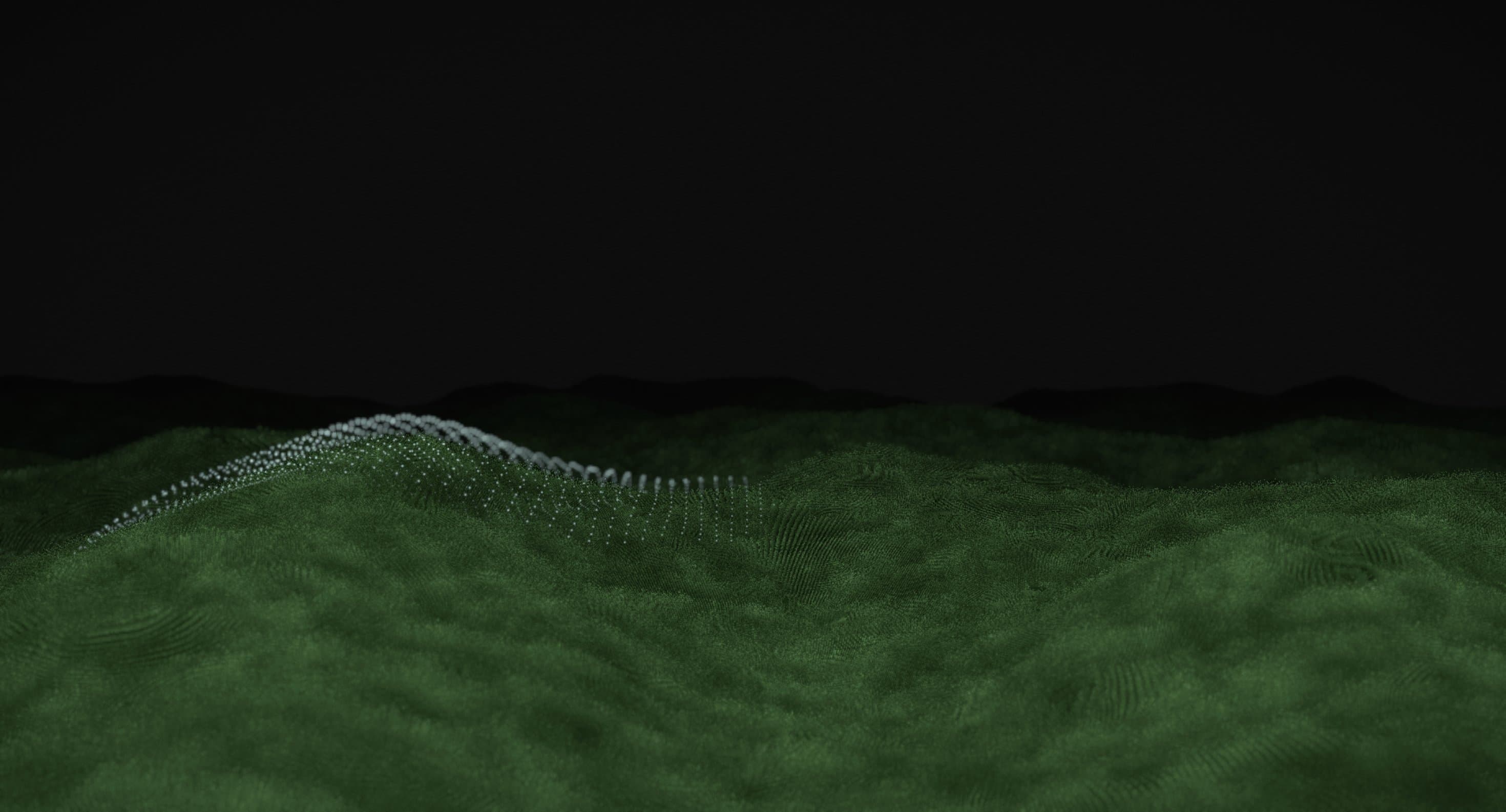
A flowing 3D grass landscape where thousands of fine green blades sway in wind-like waves, creating a natural sense of depth and movement.
Grassy Background transforms the screen into a rolling landscape of dense, animated grass. Fine green blades move in flowing waves, creating the appearance of wind travelling across an open field. Subtle changes in height and direction give the landscape a natural, continuously shifting texture.
The effect combines detailed vegetation with smooth, coordinated movement. Grass-covered hills extend towards a dark horizon, while variations in lighting and density reveal the contours of the terrain. The contrast creates an atmospheric environment that feels both minimal and immersive.
Built with Three.js WebGPU and TSL, Grassy Background brings nature-inspired motion into modern web interfaces. It works particularly well for creative portfolios, environmental brands, experimental websites, and visual experiences where organic movement plays a central role.
import GrassyBackground from '@/components/effects/grassy-background' const page = () => { return ( <div className="h-screen w-full"> <GrassyBackground /> </div> )} export default pageConsider a sustainability-focused technology company introducing its vision through a nature-inspired website. The homepage opens with a bold headline against a dark sky, while a field of animated grass moves gently beneath it.
The rolling landscape creates a visual connection to natural systems without relying on static photographs or conventional illustrations. Its restrained movement adds atmosphere while leaving the headline and primary call to action clearly visible.
The result is an immersive landing page that communicates the brand's relationship with nature through motion and texture.
Grassy Background is less suitable for dense dashboards, financial applications, checkout flows, and content-heavy interfaces where a detailed 3D landscape adds little functional value. Continuous animation can also compete with foreground information if the scene occupies too much visual attention.
Avoid combining it with several demanding WebGL effects on the same page. The landscape works best as a primary atmospheric element, supported by restrained typography and minimal competing movement.
Detailed grass rendering can place significant demands on the GPU, particularly when many blades are visible simultaneously. Keep geometry and shader calculations efficient, control rendering resolution, and avoid unnecessary per-frame CPU work. Instancing is worth considering for repeated vegetation geometry where supported by the implementation.
On mobile and lower-powered devices, reduce grass density, simplify shading, or lower the rendering resolution when necessary. Pause offscreen animation and provide a static fallback when continuous rendering is unsupported or unnecessary.
Keep headings, navigation, and interactive controls in accessible HTML above the 3D scene. Maintain sufficient contrast between foreground content and the changing green landscape, and ensure the decorative canvas does not interfere with keyboard navigation.
On mobile, adjust camera framing to preserve the rolling terrain without obscuring important content. Respect prefers-reduced-motion by pausing the wind animation or displaying a static landscape.
| Prop | Type | Default | Description |
|---|---|---|---|
speed | number | 1 | How fast the wind moves through the grass and the hills slowly shift. |
wind | number | 0.6 | How far the blades lean when gusts roll across the field. |
hills | number | 1 | Height of the rolling hills. 0 gives a flat field. |
terrainScale | number | 1 | How many hills fit on screen. Lower values give wider, softer hills. |
horizon | number | 0.5 | Where the field sits on screen. Higher values tilt the view down so the grass fills more of it. |
density | number | 1 | How many grass blades are drawn. Lower it for slower devices. |
bladeHeight | number | 1 | How tall each grass blade stands above the ground. |
bladeWidth | number | 1 | How thick each grass blade is at the root. |
mouseInteractive | boolean | true | Grass parts around the cursor and gets swept along as it moves. |
mouseStrength | number | 1 | How far the grass bends away from the cursor. Needs Mouse on. |
mouseSize | number | 1 | Size of the patch of grass around the cursor that bends away. Needs Mouse on. |
backgroundColor | color | #000000 | Colour of the sky and the gaps between blades. |
shadowColor | color | #16260f | Colour of the grass on slopes facing away from the light. |
grassColor | color | #446f22 | Main colour of the grass. |
highlightColor | color | #b4ec5a | Colour of the brightest grass on slopes facing the light. |
Grassy Background is a Three.js animated background featuring a dense field of green grass moving in wind-like waves across a rolling landscape.
The visual effect combines detailed grass geometry with coordinated wave-like motion. The supplied TSL imports include noise, trigonometric functions, geometry-position access, and instance indexing, which can support procedural vegetation animation.
The supplied implementation uses React, Three.js through three/webgpu, and Three.js Shading Language through three/tsl. Its imports include Fn, instanceIndex, positionGeometry, varying, uniform, and noise functions.
No. It is written with Three.js's WebGPU build and TSL, but the renderer is created with forceWebGL, so it always renders through WebGL2 and runs in any browser that supports WebGL2.
Yes. Props cover the colours (backgroundColor, shadowColor, grassColor, highlightColor), the blades (density, bladeHeight, bladeWidth), the wind and speed, the landscape (hills, terrainScale, horizon), and how the pointer parts the grass (mouseInteractive, mouseStrength, mouseSize).
Yes. It is a client component, so it works in the Next.js App Router. It pauses while offscreen or in a hidden tab, renders at a lower pixel ratio on touch devices, and stills the wind when reduced motion is preferred. Lower density on smaller devices if needed.
Need a custom effect? Tell us what to create.
Backgrounds

Backgrounds
Backgrounds
Backgrounds