Three.js@react-three/fiber@react-three/postprocessing
Moss Grid
Backgrounds
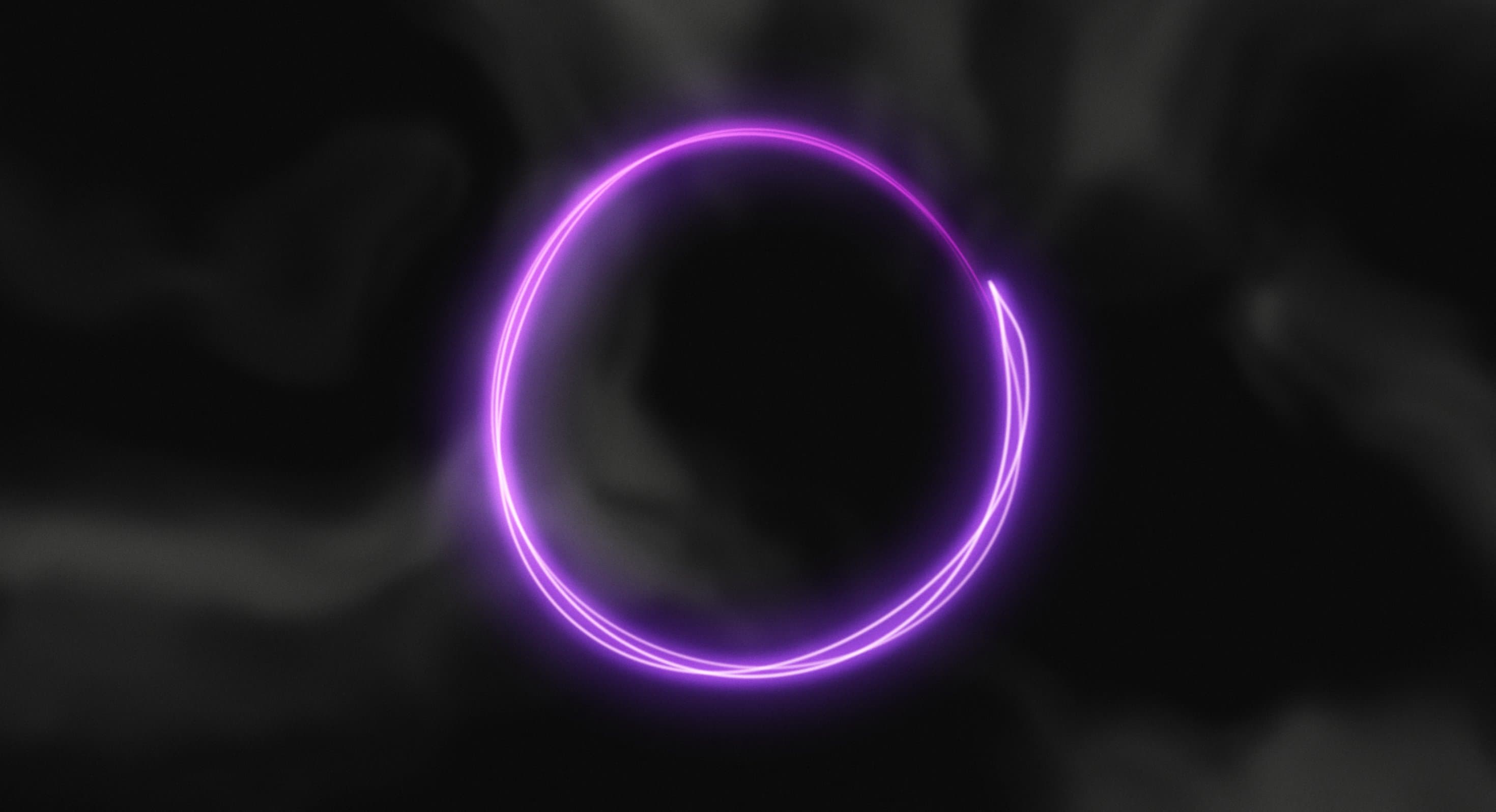
A dark, fluid background where glowing purple and molten-orange patterns twist, spread, and dissolve into an ever-changing abstract landscape.
Creepy Background transforms a dark canvas into a constantly evolving field of liquid-like patterns. Vibrant purple and fiery orange formations spread across the screen, folding into irregular waves, swirling shapes, and deep black pockets.
The animation resembles a shifting mixture of smoke, molten material, and psychedelic fluid. Its unpredictable movement creates an unsettling yet visually captivating atmosphere, while the contrast between luminous colours and dark negative space adds depth.
Built using Three.js WebGPU and TSL, the effect uses shader-oriented mathematical and noise functions to create its abstract appearance. It works particularly well for creative portfolios, experimental brands, entertainment websites, and immersive hero sections.
import CreepyBackground from '@/components/effects/creepy-background' const page = () => { return ( <div className="h-screen w-full"> <CreepyBackground /> </div> )} export default pageConsider a creative studio launching a website for an experimental digital art exhibition. The homepage opens with a bold exhibition title surrounded by slowly shifting purple and orange fluid patterns.
As visitors explore the page, the background continues transforming, creating an atmosphere that feels mysterious and alive. The dark central space provides contrast for the heading and primary call to action.
The result is a distinctive visual introduction that establishes the exhibition's identity without requiring conventional photography or illustrations.
Creepy Background is less suitable for corporate dashboards, financial applications, checkout flows, and content-heavy interfaces where clarity and restrained visuals are essential. Its high-contrast movement can compete with text and interactive controls.
Avoid combining it with several other intensive animated backgrounds or complex WebGL scenes. The effect works best as a primary atmospheric element with minimal competing motion.
Keep shader calculations efficient and control the rendering resolution to reduce GPU load. Procedural noise and screen-space effects can become expensive at high resolutions, so test performance across different hardware capabilities.
On mobile and lower-powered devices, reduce rendering quality or animation complexity where necessary. Pause offscreen rendering and provide a static fallback when continuous animation is unnecessary or unsupported.
Keep headings, navigation, and interactive elements in accessible HTML above the animated canvas. Maintain sufficient contrast as bright fluid patterns move behind the content.
On mobile, preserve the overall composition without letting high-contrast movement overwhelm smaller screens. Respect prefers-reduced-motion by pausing the shader animation or displaying a static frame.
| Prop | Type | Default | Description |
|---|---|---|---|
speed | number | 0.15 | How fast the clouds crawl and fold into new shapes. |
warp | number | 2.5 | How much the clouds twist into each other. Higher is stranger. Not used when Cursor only is on. |
scale | number | 1.1 | Size of the pattern. Lower values give bigger clouds. Not used when Cursor only is on. |
voidSize | number | 0.65 | Size of the dark, empty area that drifts around the middle. 0 fills the screen. Not used when Cursor only is on. |
cursorOnly | boolean | false | Hides the background clouds so only the colour from the cursor shows on the background colour. |
mouseInteractive | boolean | true | The cursor leaves coloured smoke that spreads out and fades over the clouds. |
mouseStrength | number | 1 | How much colour the cursor releases as it moves. Needs Mouse on. |
mouseSize | number | 1 | Width of the smoke trail the cursor leaves. Needs Mouse on. |
trailLength | number | 2 | How long the smoke lingers and spreads before it fades, in seconds. Needs Mouse on. |
heat | number | 2.2 | How far the clouds burn from blue into orange and red cores. Not used when Cursor only is on. |
grain | number | 0.5 | Strength of the speckled film grain inside the clouds. |
backgroundColor | color | #000000 | Colour of the empty space behind the clouds. |
coolColor | color | #2a1aff | Colour of the thin outer edges of the clouds. |
midColor | color | #e04cff | Colour of the denser middle of the clouds. |
warmColor | color | #ffa01e | Colour of the hot areas near the cores. |
hotColor | color | #d0101a | Colour of the hottest cores. |
Creepy Background is an animated React effect featuring flowing purple and orange fluid patterns against a dark canvas, creating an eerie, psychedelic atmosphere.
The effect uses Three.js Shading Language functions, including noise, screen-space coordinates, and mathematical operations, to warp layered clouds that burn from a cool blue through magenta and orange to red. Moving the pointer leaves a trail of coloured smoke through the clouds.
The supplied implementation imports React, Three.js through three/webgpu, and shader functions from three/tsl, including Fn, mx_noise_float, screenUV, and uniform.
No. It is written with Three.js's WebGPU build and TSL, but the renderer is created with forceWebGL, so it always renders through WebGL2 and runs in any browser that supports WebGL2.
Yes. Props cover the palette (backgroundColor, coolColor, midColor, warmColor, hotColor, heat), the shape of the clouds (warp, scale, voidSize), speed and grain, and the pointer trail (mouseInteractive, mouseStrength, mouseSize, trailLength). Turn on cursorOnly to show colour only where the pointer has been.
Yes. It is a client component, so it works in the Next.js App Router. It pauses while offscreen or in a hidden tab, renders at a lower pixel ratio on touch devices, and stops animating when reduced motion is preferred.
Need a custom effect? Tell us what to create.
Backgrounds
Backgrounds
Backgrounds
Backgrounds